
Search Results (Searched for: )
- Todd Zuercher
03 Jun 2026 16:38
Keyboard Jogging Problems!!!. was created by Todd Zuercher
I am currently seeing a very serious problem with keyboard jogging on a fresh install of the current version of Linuxcnc 2.9, installed using the current ISO. Occasionally when jogging using the keyboard it appears as if the jog key you press sticks and the machine will continue to jog long after you release the key. Sometimes it won't stop jogging until you press a different keyboard key (what key doesn't matter.) I have only observed this behavior when using keyboard jogging. Jogging using the mouse to click on screen jog buttons behaves normally. This is a very serious and unsafe problem. I just updated the control on this machine from Linuxcnc 2.7 to the current version, and I had never observed this kind of behavior before. I've already totally smashed one limit switch jogging before homed, so no soft limits.)
The machine is using the Axis UI, running on an industrial (fanless) i5 mini computer. Latency seems OK and the UI is very responsive not laggy at all.
Is this some kind of bug? Could it be a Debian setting?
The machine is using the Axis UI, running on an industrial (fanless) i5 mini computer. Latency seems OK and the UI is very responsive not laggy at all.
Is this some kind of bug? Could it be a Debian setting?
- Aciera
03 Jun 2026 15:03 - 04 Jun 2026 06:35
Replied by Aciera on topic potential bug in version 2.9.8
If you feel like testing there is an alternative:
Keep line 330 (ie initcode = "") and add these lines after it:
This should initialize the interpreter with the currently active modal gcodes.
Keep line 330 (ie initcode = "") and add these lines after it:
Code:
active_gcodes = s.gcodes
for i in (3,6,14,7,5,4,9,12,10,16,8,11,13,15):
if active_gcodes[i] > -1:
initcode = initcode + 'G' + str(active_gcodes[i]/10) + ' '
This should initialize the interpreter with the currently active modal gcodes.
- spumco
03 Jun 2026 14:24
I don't know about homing yet, but I don't think it's possible to get around the requirement to rotate the carousel until the index pin is triggered.
Replied by spumco on topic Carousel component with CIA402 controlled Ethercat closed loop stepper
I threw the problem at ChatGPT and got a promising response. I've not had time to really work on it and test, but the AI Overlord suggests that carousel should be in counts mode, and connecting carousel.N.counts-target to the lcec.N.something-something-position-command is the basic connection.Please let me know if you make any progress , I am planning on using two cia 402 motors for the tool changer but don't know where to begin.
I don't know about homing yet, but I don't think it's possible to get around the requirement to rotate the carousel until the index pin is triggered.
- spumco
03 Jun 2026 14:13
Replied by spumco on topic Rotary Axis
I've attached an A-axis probing routine - it's from PathPilot. I think it's suitable for cylindrical stock along A, not really for prismatic stock.
I've not tested it, but it'd probably be a good starting point for someone to test/tweak and then submit to the ProbeBasic devs for inclusion in PB mainline.
2. Run the macro — it probes at A=0° and A=180° in Y, calculates the midpoint, and sets G52 Y to the center of rotation
For this to work the following must be true:
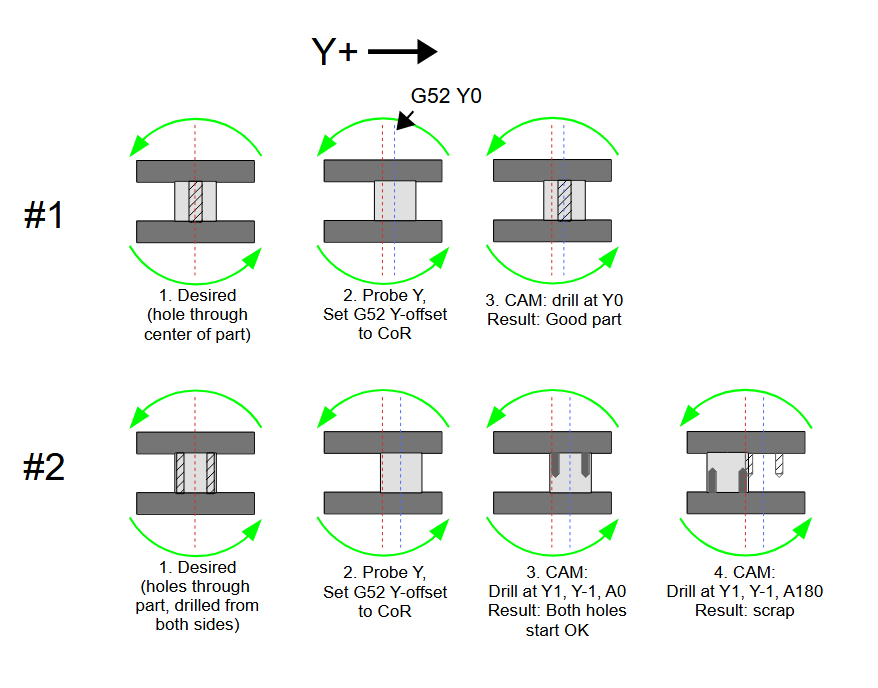
If you have TCP that takes care of everything.
If you adjust CAM after probing, that also takes care of everything.
But just probing and shifting Y will result in bad parts unless you're only machining at one A-position.
I didn't draw the other problem... but not only will features not line up, the part will orbit the actual CoR, which means at A90/A-90 the Z-position will be higher/lower than CAM expects it to be. Maybe crashy-crashy.
The only reason to probe is if you're doing 2nd op parts and have to line up features with existing surfaces. Even then you'll probe, adjust CAM (or TCP), and pray.
No skim cuts, no calipers, no manual offset math — roughly 30 seconds per part.
Or use a work stop that gets the stock centered enough to take care of a little excess material - roughly 1 second per part.
I've not tested it, but it'd probably be a good starting point for someone to test/tweak and then submit to the ProbeBasic devs for inclusion in PB mainline.
2. Run the macro — it probes at A=0° and A=180° in Y, calculates the midpoint, and sets G52 Y to the center of rotation
For this to work the following must be true:
- You have some sort of TCP enabled, or
- You adjust rotational point to stock offset in CAM after probing, or
- You have very simple parts, with very simple programs, and
- an internal macro/subroutine 'adjusts' the Z/Y positions for every single point in the program based on the probed offset.
If you have TCP that takes care of everything.
If you adjust CAM after probing, that also takes care of everything.
But just probing and shifting Y will result in bad parts unless you're only machining at one A-position.
I didn't draw the other problem... but not only will features not line up, the part will orbit the actual CoR, which means at A90/A-90 the Z-position will be higher/lower than CAM expects it to be. Maybe crashy-crashy.
The only reason to probe is if you're doing 2nd op parts and have to line up features with existing surfaces. Even then you'll probe, adjust CAM (or TCP), and pray.
No skim cuts, no calipers, no manual offset math — roughly 30 seconds per part.
Or use a work stop that gets the stock centered enough to take care of a little excess material - roughly 1 second per part.
- Aciera
03 Jun 2026 11:20 - 03 Jun 2026 13:58
Replied by Aciera on topic potential bug in version 2.9.8
The cause has been identified to be a side effect of the bug fix mentioned above. You can revert this by finding 'gremlin.py' on your system (I sorry but I do not know where that is on a package installation) and change this

to this:

This will revert the bug fix.
I'll have a look at getting this fixed without regression.
to this:
This will revert the bug fix.
I'll have a look at getting this fixed without regression.
- SwitchWitch
03 Jun 2026 10:26
Replied by SwitchWitch on topic Rotary Axis
Thanks for the detailed writeup — very helpful, especially the encoder index homing tip (I use A6 Servos with absolute encoders myself)!
For the daily workflow with changing stock I would like to find an easier way to avoid the manual indicating and skim cuts: a small probing macro that finds the rotary center automatically and sets G52.
The idea:
1. Clamp the stock (no need to center it carefully)
2. Run the macro — it probes at A=0° and A=180° in Y, calculates the midpoint, and sets G52 Y to the center of rotation
3. Swap to the cutting tool and run the program
With the WCS origin set to the rotary axis in CAM (Y0 = center of rotation), one single setup covers all rotation angles. No skim cuts, no calipers, no manual offset math — roughly 30 seconds per part.
G52 persists across resets in LinuxCNC by default, so the machine-level calibration (the fixed offset between G54 and the rotary axis) only needs to be done once after homing. The macro then corrects only for the actual clamping offset of each individual part.
What do you think?
Might be worth adding something like this to the ProbeBasic probing tab — the Rotary Axis tab seems like the natural home for it.
For the daily workflow with changing stock I would like to find an easier way to avoid the manual indicating and skim cuts: a small probing macro that finds the rotary center automatically and sets G52.
The idea:
1. Clamp the stock (no need to center it carefully)
2. Run the macro — it probes at A=0° and A=180° in Y, calculates the midpoint, and sets G52 Y to the center of rotation
3. Swap to the cutting tool and run the program
With the WCS origin set to the rotary axis in CAM (Y0 = center of rotation), one single setup covers all rotation angles. No skim cuts, no calipers, no manual offset math — roughly 30 seconds per part.
G52 persists across resets in LinuxCNC by default, so the machine-level calibration (the fixed offset between G54 and the rotary axis) only needs to be done once after homing. The macro then corrects only for the actual clamping offset of each individual part.
What do you think?
Might be worth adding something like this to the ProbeBasic probing tab — the Rotary Axis tab seems like the natural home for it.
- Will_cnc
03 Jun 2026 09:29
Replied by Will_cnc on topic Carousel component with CIA402 controlled Ethercat closed loop stepper
Please let me know if you make any progress , I am planning on using two cia 402 motors for the tool changer but don't know where to begin.
- andrax
03 Jun 2026 08:37
Replied by andrax on topic Setting up the Stepperonline A6 battery encoder cable
Hi,
Yes, the internal homing routine needs to be triggered one more time; after that, the axes will remain permanently referenced.
I am using internal homing method 4.
Once that is complete, you can comment out or delete everything related to homing.
My home and limit switches run via EtherCAT. This allows me to save a significant amount of cabling.
My XML file is nothing special.
Yes, the internal homing routine needs to be triggered one more time; after that, the axes will remain permanently referenced.
I am using internal homing method 4.
Once that is complete, you can comment out or delete everything related to homing.
My home and limit switches run via EtherCAT. This allows me to save a significant amount of cabling.
My XML file is nothing special.
- NWE
-

03 Jun 2026 04:01
Replied by NWE on topic What PC or Hardware Works Best for LinuxCNC?
It seems LinuxCNC runs great on the majority of PCs. I've had a lot of network and USB problems with several min-pc's I bought new, cheap, for around $100 USD. With desktop, gaming, or workstation type PCs you will find occasional models that refuse to cooperate but most work.
I've test run LinuxCNC on my GMKTek mini-pc with a Ryzen 7 5825U cpu, with good results, but I recall someone recently complaining about a similar model.
If you use 1-10 year old hardware I'd expect a good chance of success. But that number range is no strict rule in any way. I'm typing this on a ~11 year old pc that tested fine on LinuxCNC, currently running straight Debian 13. With a ~9 year old graphics card and 16GB RAM it is still very usable.
Even brand new less than 1 year old often works great, you just run a greater chance of not-yet-fully supported hardware.
A couple days ago I installed LinuxCNC on A Dell Precision T5820 for a customer, an 8 year old server grade workstation with massive overkill computing power. Everything works so far except the new 8-port non-branded network card bought separate from Amazon was junk.
I've test run LinuxCNC on my GMKTek mini-pc with a Ryzen 7 5825U cpu, with good results, but I recall someone recently complaining about a similar model.
If you use 1-10 year old hardware I'd expect a good chance of success. But that number range is no strict rule in any way. I'm typing this on a ~11 year old pc that tested fine on LinuxCNC, currently running straight Debian 13. With a ~9 year old graphics card and 16GB RAM it is still very usable.
Even brand new less than 1 year old often works great, you just run a greater chance of not-yet-fully supported hardware.
A couple days ago I installed LinuxCNC on A Dell Precision T5820 for a customer, an 8 year old server grade workstation with massive overkill computing power. Everything works so far except the new 8-port non-branded network card bought separate from Amazon was junk.
- tommylight
-

03 Jun 2026 01:31
Replied by tommylight on topic What PC or Hardware Works Best for LinuxCNC?
forum.linuxcnc.org/18-computer/39371-res...or-use-with-linuxcnc
forum.linuxcnc.org/18-computer/54979-new-pc-build-asrock-n100dc
forum.linuxcnc.org/18-computer/57073-hp-...or-use-with-linuxcnc
forum.linuxcnc.org/18-computer/38838-har...ency-tests-used-pc-s
forum.linuxcnc.org/18-computer/54369-use...mesa-ethernet-boards
The thing with laptops is, despite getting the same exact model, still might not work. Happened to me only once, so it can happen.
forum.linuxcnc.org/18-computer/54979-new-pc-build-asrock-n100dc
forum.linuxcnc.org/18-computer/57073-hp-...or-use-with-linuxcnc
forum.linuxcnc.org/18-computer/38838-har...ency-tests-used-pc-s
forum.linuxcnc.org/18-computer/54369-use...mesa-ethernet-boards
The thing with laptops is, despite getting the same exact model, still might not work. Happened to me only once, so it can happen.
- emmaleo
03 Jun 2026 00:32
Rendering Error in layout Search/Results/Row: Kunena\Forum\Libraries\BBCode\KunenaBBCodeLibrary::renderEbayLayout(): Argument #1 ($ItemID) must be of type int, string given, called in /var/www/html/libraries/kunena/src/BBCode/KunenaBBCode.php on line 320. Please enable debug mode for more information.
Displaying 3466 - 3480 out of 11908 results.
What PC or Hardware Works Best for LinuxCNC? was created by emmaleo
Rendering Error in layout Search/Results/Row: Kunena\Forum\Libraries\BBCode\KunenaBBCodeLibrary::renderEbayLayout(): Argument #1 ($ItemID) must be of type int, string given, called in /var/www/html/libraries/kunena/src/BBCode/KunenaBBCode.php on line 320. Please enable debug mode for more information.
- djdelorie
02 Jun 2026 21:58
Replied by djdelorie on topic Rotary Axis
It sounds like you either need to (1) make your stock a little bigger and *mill* it true after mounting, or (2) probe the part and update your origin in CAM. It would be cool if there were a kinematics layer that could do the G52 equivalent in a rotating frame.
If you're doing a production run, could you put in the equivalent of a vice stop on your chuck, so that every part is at least in the *same* place?
If you're doing a production run, could you put in the equivalent of a vice stop on your chuck, so that every part is at least in the *same* place?
- depronman
02 Jun 2026 21:36
Replied by depronman on topic potential bug in version 2.9.8
Thanks for the quick replyfind attached my ini file and the Gcode, you will see in the Gcode in the first few lines that I have added G07, with this in the Gcode everything works as expected (and how it worked in linuxcnc 2.8.4)
revoce the G07 from the Gcode and the 'bug' will be self evident when saving the modified Gcode file
revoce the G07 from the Gcode and the 'bug' will be self evident when saving the modified Gcode file
- spumco
02 Jun 2026 20:32
Replied by spumco on topic Rotary Axis
I program (F360) using the center of rotation as Y0Z0.
Your example shows a self-centering vise, and I assume it'll be connected to the axis with a zero-point system. If your adapter plate is adjustable you can indicate the adapter & zero-point chuck in very close. From that point on the vise should self-center close enough.
For round parts (3-jaw chuck) treat it like a 'set-true' lathe chuck. Chuck up the part and indicate it concentric with the axis of rotation (dial test indicator). Loosen the chuck on the backplate and tap it around.
Once it's turning concentric the Probe Basic 'Ridge & Valley' probing routine (in Y) will find Y-axis center. Once you have Y-center, probe in Z and then adjust Z-offset based on stock diameter.
As far as probing the center of rotation for a prismatic part - assuming you've adjusted your vise & zero-point to be on center...
The above headache of indicating is why I switched to encoder index homing on my A-axis, and am in the process of doing the same thing on my XYZ axes.
Your example shows a self-centering vise, and I assume it'll be connected to the axis with a zero-point system. If your adapter plate is adjustable you can indicate the adapter & zero-point chuck in very close. From that point on the vise should self-center close enough.
For round parts (3-jaw chuck) treat it like a 'set-true' lathe chuck. Chuck up the part and indicate it concentric with the axis of rotation (dial test indicator). Loosen the chuck on the backplate and tap it around.
Once it's turning concentric the Probe Basic 'Ridge & Valley' probing routine (in Y) will find Y-axis center. Once you have Y-center, probe in Z and then adjust Z-offset based on stock diameter.
As far as probing the center of rotation for a prismatic part - assuming you've adjusted your vise & zero-point to be on center...
- Z-axis
- clamp a piece of stock in the self-centering vise
- Skim cut one side using Y-axis to establish a flat plane - doesn't need to be a huge area
- Rotate 180
- Skim cut opposite side at the same Z-position - preferably without changing Z-position between cuts
- Measure part thickness (and checking for taper to ensure 180 degrees is actually 180!)
- Probe part in Z, setting Z0 to top of part (probably automatic in probing routine)
- Adjust Z-offset by half the measured thickness. Z0 should now be center of rotation
- Y-axis
- Probe your vise on one side (jaws horizontal)
- Rotate vise 180
- Probe same vise surface again, approach from the opposite Y-direction
- Difference between these two is the Y-axis center.
- From that point use a scale, calipers or a jig to center the stock in the vise along the jaws.
- Bonus
- Write down the machine coordinates once you've found center of rotation in Y and Z
- Next time you home the machine, repeat the above indicating and compare the numbers. Any difference is the error window for your machine's homing position.
- Double-bonus
- Avoid removing your 4th axis at all costs so you don't have to re-indicateimage missing /media/kunena/emoticons/wink.png
The above headache of indicating is why I switched to encoder index homing on my A-axis, and am in the process of doing the same thing on my XYZ axes.
- SwitchWitch
02 Jun 2026 19:11
Replied by SwitchWitch on topic please help five Axis with Vismach simulation and Mesa 7i96S
Most important: You have to modify the postprocessor to enable tcp.
With 5 Axis you really want to use tcp.
With 5 Axis you really want to use tcp.
Time to create page: 0.292 seconds