
- Posts: 37
- Thank you received: 10
New Trajectory Planner - Testers/programs wanted
- rellenberg
- Offline
- Junior Member
-

Less
More
12 years 9 months ago - 12 years 9 months ago #42593
by rellenberg
I am still seeing it here with the latest pull. The first corner doesn't seem to have any blending. This in on a sim install - not realtime. Make sure you start fresh - I had goofed around with loading programs and it seems to start blending the first move. (don't remember the steps) but on the inital loading of linuxcnc and run of the program shows this.
Does this mean that it's working for you now after doing a rebuild, or do you still see the blend missing sometimes?
Replied by rellenberg on topic New Trajectory Planner - Testers/programs wanted
I am still seeing it here with the latest pull. The first corner doesn't seem to have any blending. This in on a sim install - not realtime. Make sure you start fresh - I had goofed around with loading programs and it seems to start blending the first move. (don't remember the steps) but on the inital loading of linuxcnc and run of the program shows this.
Does this mean that it's working for you now after doing a rebuild, or do you still see the blend missing sometimes?
Last edit: 12 years 9 months ago by rellenberg.
Please Log in or Create an account to join the conversation.
- skunkworks
- Offline
- Moderator
-

Less
More
- Posts: 351
- Thank you received: 153
12 years 9 months ago #42595
by skunkworks
Replied by skunkworks on topic New Trajectory Planner - Testers/programs wanted
if you look at the screenshot - you can see that it still isn't blending on the first corner (left side)
rellenberg wrote:
I am still seeing it here with the latest pull. The first corner doesn't seem to have any blending. This in on a sim install - not realtime. Make sure you start fresh - I had goofed around with loading programs and it seems to start blending the first move. (don't remember the steps) but on the inital loading of linuxcnc and run of the program shows this.
Does this mean that it's working for you now after doing a rebuild, or do you still see the blend missing sometimes?
Please Log in or Create an account to join the conversation.
- rellenberg
- Offline
- Junior Member
-
Less
More
- Posts: 37
- Thank you received: 10
12 years 9 months ago #42597
by rellenberg
Replied by rellenberg on topic New Trajectory Planner - Testers/programs wanted
Ok, after further research, I think it's because I forgot to apply the same change to the tangent line check. This was an (un)lucky case because [1,0,0] is the default unit vector for XYZ when there is motion on ABC/UVW. It must be flagging the X move as tangent to the previous move. My lastest push should fix that, and extends the acceleration constraint check to the W axis.
Please Log in or Create an account to join the conversation.
- skunkworks
- Offline
- Moderator
-
Less
More
- Posts: 351
- Thank you received: 153
12 years 9 months ago #42601
by skunkworks
Replied by skunkworks on topic New Trajectory Planner - Testers/programs wanted
Cool - that seeemed to fix my test program..
sam
sam
rellenberg wrote: Ok, after further research, I think it's because I forgot to apply the same change to the tangent line check. This was an (un)lucky case because [1,0,0] is the default unit vector for XYZ when there is motion on ABC/UVW. It must be flagging the X move as tangent to the previous move. My lastest push should fix that, and extends the acceleration constraint check to the W axis.
Please Log in or Create an account to join the conversation.
- Rick G
- Offline
- Junior Member
-
Less
More
- Posts: 27
- Thank you received: 114
12 years 9 months ago - 12 years 9 months ago #42637
by Rick G
Replied by Rick G on topic New Trajectory Planner - Testers/programs wanted
Sam,
Just a couple thoughts,
It seems to me that this could be a big improvement for certain jobs. Jobs with many short segments and jobs such as plasma cutting where keeping a constant speed effects cut quality. So great to hear it is being worked on.
Well yes that is clear but would it not be better to be consistent with the current TP for existing code and compatibility?
On a different note with the current TP it seems that if there is any command between the current Gn move and the next Gn move blending is broken.
G1 x1 y1
G1 x1.025 y1
might be combined to one move but,
G1 x1 y1
M5
G1 x1.025 y1
will not be.
M62/M63 do not break blending, but do not work with tool radius compensation.
Is this still true in the new TP?
Rick G
Just a couple thoughts,
It seems to me that this could be a big improvement for certain jobs. Jobs with many short segments and jobs such as plasma cutting where keeping a constant speed effects cut quality. So great to hear it is being worked on.
One thing to note. There has been a slight change to G64 with the new TP
Currently if you specify G64P0.005 this means the same as G64P0.005Q0.005
P is how far from path the planner can go Q uses a naive cam detector to combine lines within the given tolerance.
In the new TP if you specify G64P0.005 it is now the same as G64P0.005Q0
so as an example - if you had a program that specified G65P0.005 to compare apples to apples you would want in the new TP to specify G65P0.005Q.005
Clear as mud?
Well yes that is clear but would it not be better to be consistent with the current TP for existing code and compatibility?
On a different note with the current TP it seems that if there is any command between the current Gn move and the next Gn move blending is broken.
G1 x1 y1
G1 x1.025 y1
might be combined to one move but,
G1 x1 y1
M5
G1 x1.025 y1
will not be.
M62/M63 do not break blending, but do not work with tool radius compensation.
Is this still true in the new TP?
Rick G
Last edit: 12 years 9 months ago by Rick G.
Please Log in or Create an account to join the conversation.
- rellenberg
- Offline
- Junior Member
-
Less
More
- Posts: 37
- Thank you received: 10
12 years 9 months ago - 12 years 9 months ago #42662
by rellenberg
Replied by rellenberg on topic New Trajectory Planner - Testers/programs wanted
Thanks for your feedback, Rick!
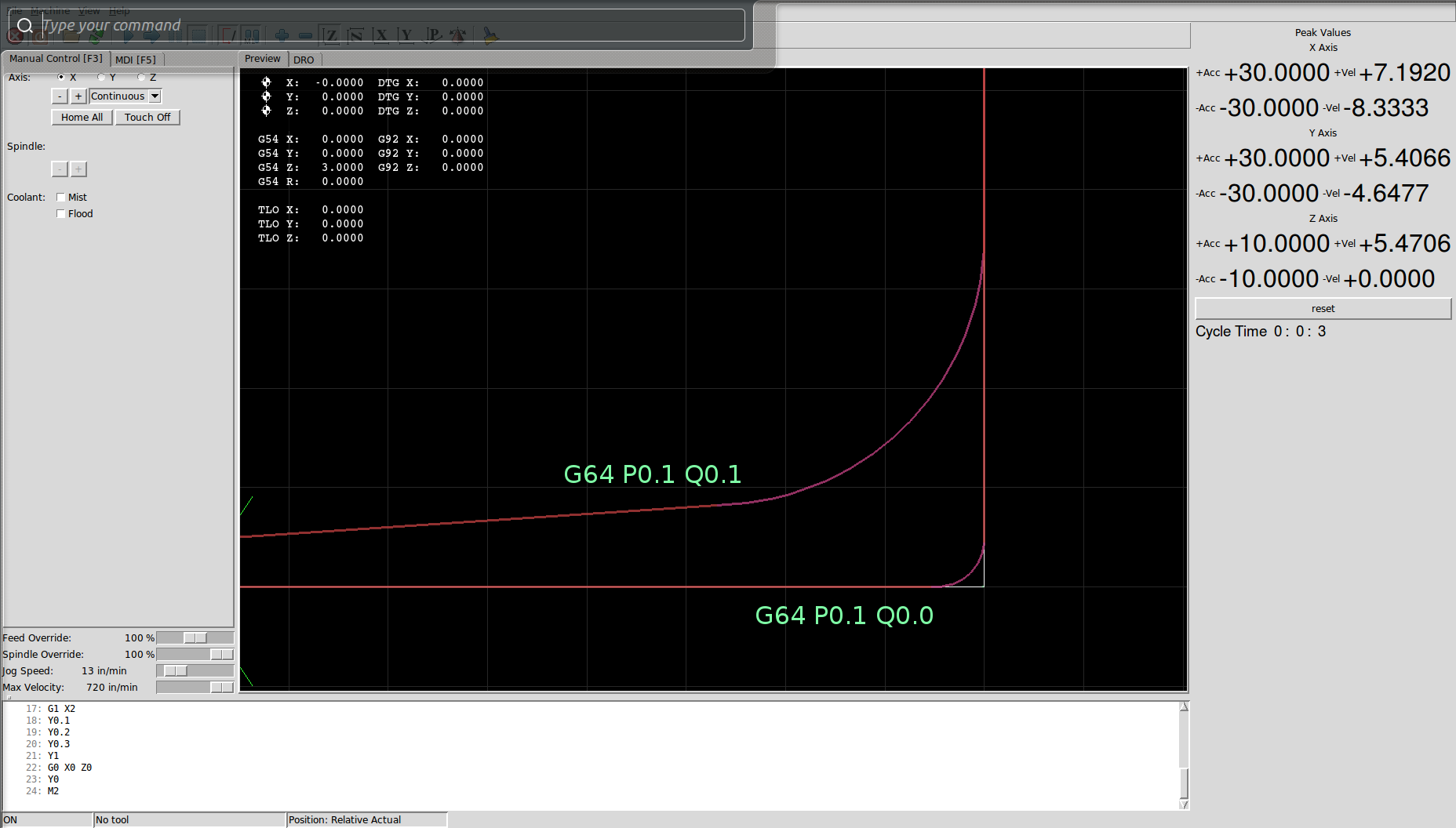
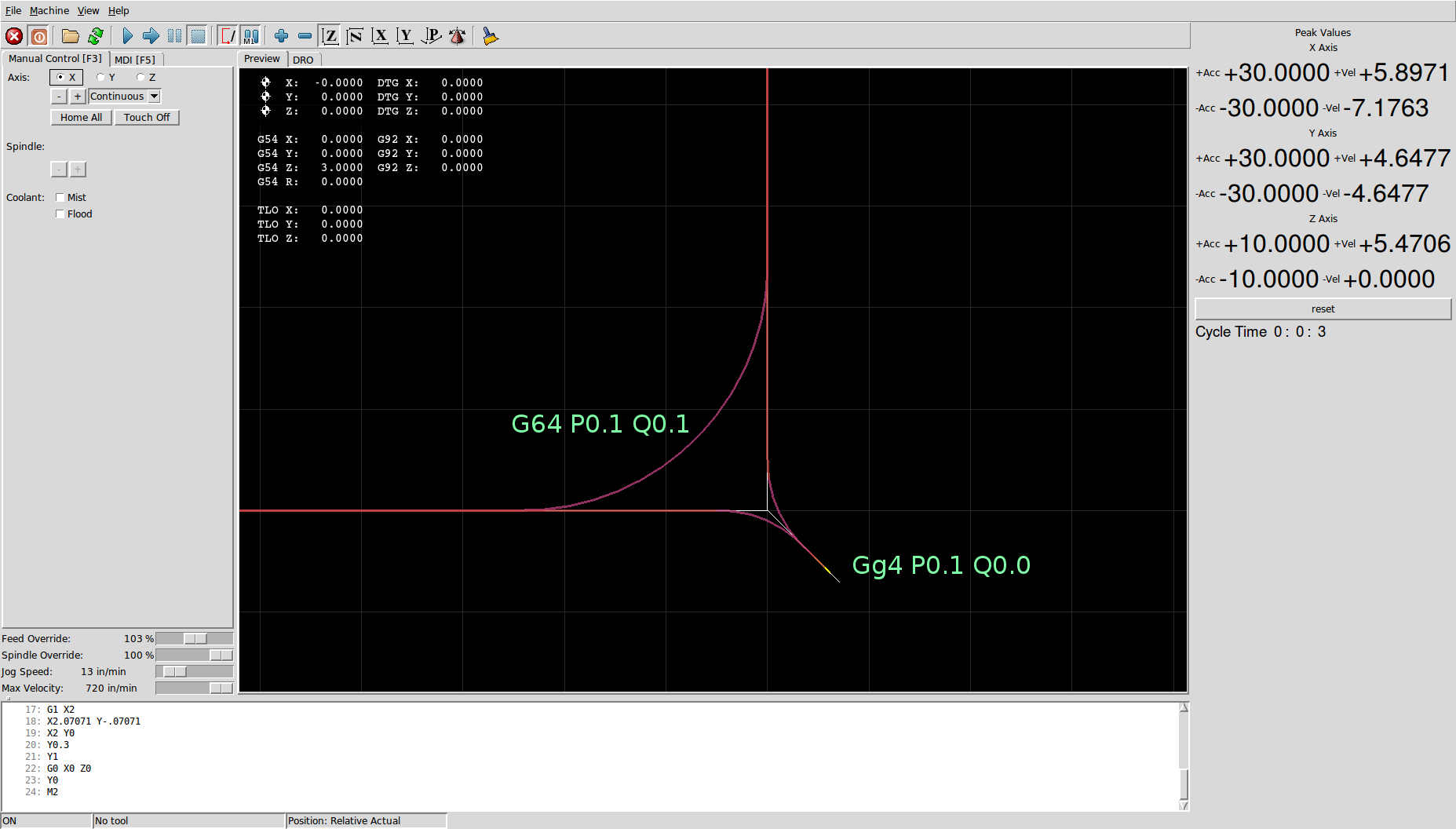
I changed the behavior of G64 P & Q mostly because I found the default behavior counter-intuitive. In the original TP (as you said) G64 P0.01 implies Q0.01 as well. The attached image / G code shows what happens if you have a few segments that are less than or equal to the blend tolerance (run using circular-blend-arc-beta). With Naive CAM enabled, the worst-case tolerance is almost double what "P" specified. The actual path tolerance is (in the worst case) the sum of P and Q, it makes more sense to me to have to explicitly specify the Naive CAM tolerance. Having Q default to the P value "hides" this extra tolerance from the user.
That's correct, the new TP will not blend when calling commands like M3, M5, etc. Those commands imply that the program needs to wait for the spindle to be at speed, which in the worst case could be way longer than the duration of the segment. The safe response is to do an exact stop and wait for the spindle. As for M62/M63, I haven't specifically changed anything, so it should work the same as before.
Rick G wrote: Well yes that is clear but would it not be better to be consistent with the current TP for existing code and compatibility?
I changed the behavior of G64 P & Q mostly because I found the default behavior counter-intuitive. In the original TP (as you said) G64 P0.01 implies Q0.01 as well. The attached image / G code shows what happens if you have a few segments that are less than or equal to the blend tolerance (run using circular-blend-arc-beta). With Naive CAM enabled, the worst-case tolerance is almost double what "P" specified. The actual path tolerance is (in the worst case) the sum of P and Q, it makes more sense to me to have to explicitly specify the Naive CAM tolerance. Having Q default to the P value "hides" this extra tolerance from the user.
Rick G wrote: On a different note with the current TP it seems that if there is any command between the current Gn move and the next Gn move blending is broken.
G1 x1 y1
G1 x1.025 y1
might be combined to one move but,
G1 x1 y1
M5
G1 x1.025 y1
will not be.
M62/M63 do not break blending, but do not work with tool radius compensation.
Is this still true in the new TP?
Rick G
That's correct, the new TP will not blend when calling commands like M3, M5, etc. Those commands imply that the program needs to wait for the spindle to be at speed, which in the worst case could be way longer than the duration of the segment. The safe response is to do an exact stop and wait for the spindle. As for M62/M63, I haven't specifically changed anything, so it should work the same as before.
Last edit: 12 years 9 months ago by rellenberg.
The following user(s) said Thank You: Rick G
Please Log in or Create an account to join the conversation.
Time to create page: 0.646 seconds