
- Posts: 27
- Thank you received: 114
New Trajectory Planner - Testers/programs wanted
- Rick G
- Offline
- Junior Member
-

Less
More
12 years 9 months ago #43073
by Rick G
Should installation instructions be changed?
Rick G
Replied by Rick G on topic New Trajectory Planner - Testers/programs wanted
I think the problem was that the original was the master with Robs stuff added, whereas this is all in his fork of the master
I just cloned Robs fork, checked out the experimantal branch and built it
Should installation instructions be changed?
Rick G
Please Log in or Create an account to join the conversation.
- ArcEye
- Offline
- Junior Member
-
Less
More
- Posts: 22
- Thank you received: 240
12 years 9 months ago - 12 years 9 months ago #43074
by ArcEye
No I think they are fine as they are Rick.
This was in his experimental, Alpha branch, which he wanted confirmation on before pushing over to the Beta that everyone is being asked to test.
I just assumed that they were different branches of the same repo originally, which is where the (my) confusion came from
regards
Replied by ArcEye on topic New Trajectory Planner - Testers/programs wanted
Rick G wrote:
I think the problem was that the original was the master with Robs stuff added, whereas this is all in his fork of the master
I just cloned Robs fork, checked out the experimantal branch and built it
Should installation instructions be changed?
Rick G
No I think they are fine as they are Rick.
This was in his experimental, Alpha branch, which he wanted confirmation on before pushing over to the Beta that everyone is being asked to test.
I just assumed that they were different branches of the same repo originally, which is where the (my) confusion came from
regards
Last edit: 12 years 9 months ago by ArcEye.
Please Log in or Create an account to join the conversation.
- Rick G
- Offline
- Junior Member
-
Less
More
- Posts: 27
- Thank you received: 114
12 years 9 months ago #43077
by Rick G
Replied by Rick G on topic New Trajectory Planner - Testers/programs wanted
ArcEye,
Thanks, I will give it a try this week.
Rick G
Thanks, I will give it a try this week.
Rick G
Please Log in or Create an account to join the conversation.
- Rick G
- Offline
- Junior Member
-
Less
More
- Posts: 27
- Thank you received: 114
12 years 9 months ago - 12 years 9 months ago #43122
by Rick G
Replied by Rick G on topic New Trajectory Planner - Testers/programs wanted
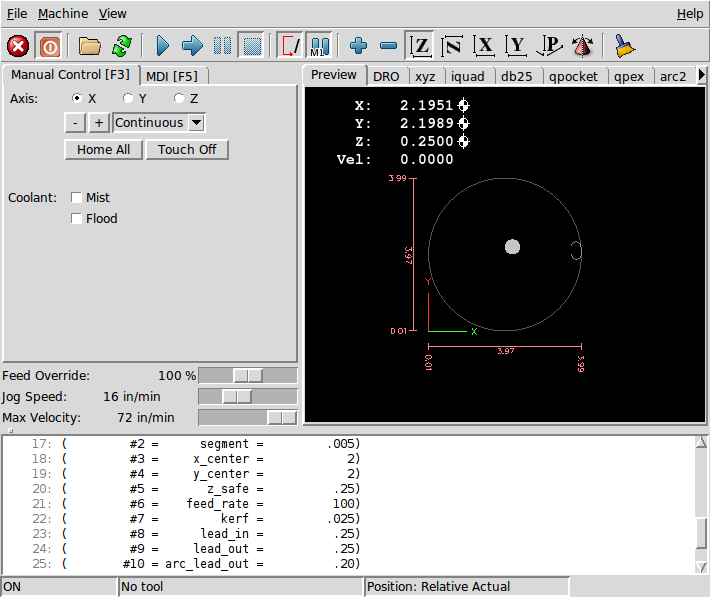
Here a NGCGUI sub was used to compare the original and the new TP.
It is useless code but might show some differences and offers an easy way to try different variables.
The NGCGUI sample configuration was used.
To exaggerate the differences the acceleration of the X and Y axis was set to an extremely low rate of .05
Set for inches.
Use MDI to set G64 Pn Qn before running.
This test was done with G64 P.001 Q.001
There is a move to the start location, a lead in Arc then a circular path made of segments and finally a lead out arc.
The velocities
Original TP...
Lead in arc max 4.74 slows at end to enter circular path.
Circular path max 3.82 - 3.32
Lead slows to 1.5
New TP...
Lead in arc max 3.32 slows at end .04 to enter circular path.
Circular path max 5.24 - 5.02
Lead out slows to .05
Highest circular path speeds at 45/135/225/315 deg when X and Y are both moving closest to the same rate.
There appears to be a dramatic increase in the circular path speed 3.82 vs 5.24.
The transition from arc to segment and back again appears to cause more of a slow down.
To try some text samples NGCGUI and true type tracer might be used.
As a side note auto homing seems to ignore the acceleration settings on some moves in both cases.
Rick G
It is useless code but might show some differences and offers an easy way to try different variables.
The NGCGUI sample configuration was used.
To exaggerate the differences the acceleration of the X and Y axis was set to an extremely low rate of .05
Set for inches.
Use MDI to set G64 Pn Qn before running.
This test was done with G64 P.001 Q.001
There is a move to the start location, a lead in Arc then a circular path made of segments and finally a lead out arc.
The velocities
Original TP...
Lead in arc max 4.74 slows at end to enter circular path.
Circular path max 3.82 - 3.32
Lead slows to 1.5
New TP...
Lead in arc max 3.32 slows at end .04 to enter circular path.
Circular path max 5.24 - 5.02
Lead out slows to .05
Highest circular path speeds at 45/135/225/315 deg when X and Y are both moving closest to the same rate.
There appears to be a dramatic increase in the circular path speed 3.82 vs 5.24.
The transition from arc to segment and back again appears to cause more of a slow down.
To try some text samples NGCGUI and true type tracer might be used.
As a side note auto homing seems to ignore the acceleration settings on some moves in both cases.
Code:
o<circle_arc_test_b> sub
;simulator test only, not useful for anything
;arc lead in, segmented circular path, arc lead out TP test
;segment is the length of each straight move to make up circular path
;set path tolerance with G64 Pn Qn in MDI before running
#<diameter> = #1 (= 4 diameter)
#<segment> = #2 (=.005 segment size)
#<x_center> = #3 (= 2 X center)
#<y_center> = #4 (= 2 Y center)
#<z_safe> = #5 (= .25 Z safe)
#<Feed_rate> = #6 (= 100 Feed rate)
#<Kerf> = #7 (= .025 Kerf)
#<Lead_in> = #8 (= .25 Lead in)
#<Lead_out> = #9 (= .25 Lead out)
#<Arc_Lead_out> = #10 (= .20 Arc Lead out)
#<Main_cord> = 54
#<Temp_cord> = 55
#<Main_cord_n> = 1
#<Temp_cord_n> = 2
G17 (xy plane)
G20 (inches)
G40 (cancel cutter radius compensation)
G49 (cancel tool length offset)
G90 (absolute distance mode)
G94 (units/min feed rate)
G#<Main_cord>
#<radius> = [[#<diameter> / 2] - [#<Kerf> / 2]]
#<circumference> = [[22/7] * [#<radius> *2]]
#<number> = [#<circumference> / #<segment>]
#<number> =FUP[#<number>] ;number of segments in full circle
(debug, number #<number>)
#<deg> = [360 / #<number>] ; degs each segment
(debug, deg #<deg>)
#<segment_final> = [#<circumference> / #<number>]
(debug, segment final #<segment_final>)
#<Arc_deg_out> = FUP [[#<Arc_Lead_out> / #<segment_final>]]
(debug, arc deg out #<Arc_deg_out>)
G90
G0 Z #<z_safe>
G0 X #<x_center> Y #<y_center>
G10 L20 P#<Temp_cord_n> X0 Y0 Z#<z_safe> (set Temp cord)
G#<Temp_cord>
G0 x[#<radius> - #<Lead_in>] y0
G91 (relative distance mode)
F#<Feed_rate>
G3 x#<Lead_in> R [#<Lead_in>/2]
#<circle_number> = [#<number> + #<Arc_deg_out>]
o100 repeat [#<circle_number>]
G1 ^#<deg>
o100 endrepeat
M63 P0 (turn off digital motion)
G3 x-#<Lead_out> R [#<Lead_out>/2]
G90 (absolute distance mode)
G#<Main_cord>
o<circle_arc_test_b> endsub
Rick G
Last edit: 12 years 9 months ago by Rick G.
Please Log in or Create an account to join the conversation.
- skunkworks
- Offline
- Moderator
-

Less
More
- Posts: 351
- Thank you received: 153
12 years 9 months ago #43124
by skunkworks
Replied by skunkworks on topic New Trajectory Planner - Testers/programs wanted
I think there, and rob will have to weigh in here, that the first and last segment do not get blended well yet. (so your lead-in and lead-out arc probably slow more than previously..)
You can see it if you would run a program like
if you run this the second time (to be sure the tool is starting at the begining of the line segment) - you can see it slow down at the start of the first line-arc transistion and then again at the last line-arc transistion.
I know Rob has talked about this on the list and is looking at rectifying it. ah - found it
As far as homing - can you give more info? I have not seen constraint violations in quite a while. (homing and otherwise)
sam
You can see it if you would run a program like
Code:
%
(1" square with rounded corners)
G90 G54 G20
g64
G0 X0 Y.25 Z0
G1 Y.75 F999
G2 X.25 Y1 I.25
G1 X.75
G2 X1 Y.75 J-.25
G1 Y.25
G2 X.75 Y0 I-.25
G1 X.25
G2 X0 Y.25 J.25
M30
if you run this the second time (to be sure the tool is starting at the begining of the line segment) - you can see it slow down at the start of the first line-arc transistion and then again at the last line-arc transistion.
I know Rob has talked about this on the list and is looking at rectifying it. ah - found it
That's by design, though it's not optimal. I abort optimization if a
segment is already in progress , to prevent stepping on tp 's toes. Also,
the optimization doesn't run on the last segment in the queue, because that
segment has the potential to be shortened by a future blend arc.
Both of these problems are fixable. I was looking into how to detect "end
if file" in the code, and it seems that the interp_waiting state
corresponds to the interpreter running out of valid moves (rather than just
having a full queue). If this is the case, then a simple check should be
enough to flag the last move. Similarly, I could make blend arc creation
work on the unchanged portion of a segment in progress.
As far as homing - can you give more info? I have not seen constraint violations in quite a while. (homing and otherwise)
sam
Please Log in or Create an account to join the conversation.
- Rick G
- Offline
- Junior Member
-
Less
More
- Posts: 27
- Thank you received: 114
12 years 9 months ago #43125
by Rick G
I just took the sim NGCGUI ini and reduced the acceleration to the extremely low rate for X and Y. Left Z alone.
When you hit home all there is a combination of slow and fast moves.
O.K. I will add a extra move at the start and an extra move at the end to see what happens.
However the main path shows a substantial improvement in speed, and thus the possibility of maintaining a more constant cut speed during a program. A big deal.
Rick G
Replied by Rick G on topic New Trajectory Planner - Testers/programs wanted
As far as homing - can you give more info? I have not seen constraint violations in quite a while. (homing and otherwise)
I just took the sim NGCGUI ini and reduced the acceleration to the extremely low rate for X and Y. Left Z alone.
When you hit home all there is a combination of slow and fast moves.
O.K. I will add a extra move at the start and an extra move at the end to see what happens.
However the main path shows a substantial improvement in speed, and thus the possibility of maintaining a more constant cut speed during a program. A big deal.
Rick G
Please Log in or Create an account to join the conversation.
Time to create page: 0.212 seconds