TCP 5-axis kinematics

More
6 years 10 months ago - 6 years 10 months ago #153544 by jsskangas
Replied by jsskangas on topic TCP 5-axis kinematics
Hello

I got my core2 duo dumpster find working and linuxcnc installed.

I took look into vismach sim xyzbc kinematics and there are some problems.
B and C axis rotations are incorrect.

CAM software's output toolpath as tool tip location + IJK vectors.
This is called CLD (cutter location data).
Post-processor take this data in and translates it to NC-code and calculates rotary axis position from tool orientation.

In general all CAM outputted nc-code is tooltip data and tool orientation.
It is a machine position where tool is located and oriented as it is in CAM.

All machines I have seen until now has followed this same rule.
To layman's therms, you don't move machine axis you move tool, this applies to rotary axes as well.


If you have machine like xyzbc vismach sim example, X axis is table and moves part.
To move tool X+ direction , part and table needs to move X- direction.
Like it does, and it is correct.

But same rule applies to rotary axes.
When you look trough axis to its positive direction, CW rotation is positive rotation.
When you rotate tool positive direction it would be CW.
But in this case positive rotation of B and C axis would be CCW, cause we are rotating part.
Then tool moves CW relative to part.

Current vismach xyzbc sim example kinematics does not behave this way.
Both B and C axis rotation is incorrect.
I assume that xyzac kinematics have same issue.

Do we change these?
Last edit: 6 years 10 months ago by jsskangas.

Please Log in or Create an account to join the conversation.

More
6 years 10 months ago #153567 by plopes9000
Replied by plopes9000 on topic TCP 5-axis kinematics

andypugh wrote:

plopes9000 wrote: Finally, see attached test gcode file and video.


I thought that your video was very instructive about what TCP is, and the Linuxcnc home page needed a new Showcase.

So your video is now on the front page of LinuxCNC :-)


Andy, could you please update the TCP feature video on the home page with this new video link?


Had to create a new version - thank you !

Please Log in or Create an account to join the conversation.

More
6 years 9 months ago #154129 by MDM3D
Replied by MDM3D on topic TCP 5-axis kinematics
Hello All, This is a really neat feature!
I am still reading through this thread and I read a lot on AC and BC configurations is it possible to use this "switchkins branch" on an AB configured machine. I have a rotary table for the A axis and the spindle rotates in the B axis. I have attached a picture for clarity.
I guess I am confused as to how I would go about handling the changing offsets between A and B. I hope I am over thinking it.

Please Log in or Create an account to join the conversation.

More
6 years 9 months ago #155341 by bbsr_5a
Replied by bbsr_5a on topic TCP 5-axis kinematics
How do i compile this switchkinetics.c file to get this action

is the Joint numbering open from 0 to max joints e.g 0=x 1=Y 2=z 3=A 4=C ?
or is it fixed as in AXIS_0=X 1=Y 2=Z 3=A 4=B 5=C

Please Log in or Create an account to join the conversation.

More
6 years 7 months ago #160798 by LIMONEVERDE
Replied by LIMONEVERDE on topic TCP 5-axis kinematics
Hi there
thanks for this great forum and for your support to newbies like me, I come from Mach3 experience and
I have installed the linuxcnc mint 19.2 RT 2.8 pre, I want to test the xyzac-trt-kins on my 5 axis mill table/table, I have read the topic but I have not understood where I have to put the the trt values of x.rot.point, y.rot.point, z.rot.point (vs the machine0 home), maybe in the machine.ini file together with the Y and Z offset of the A/C axis?

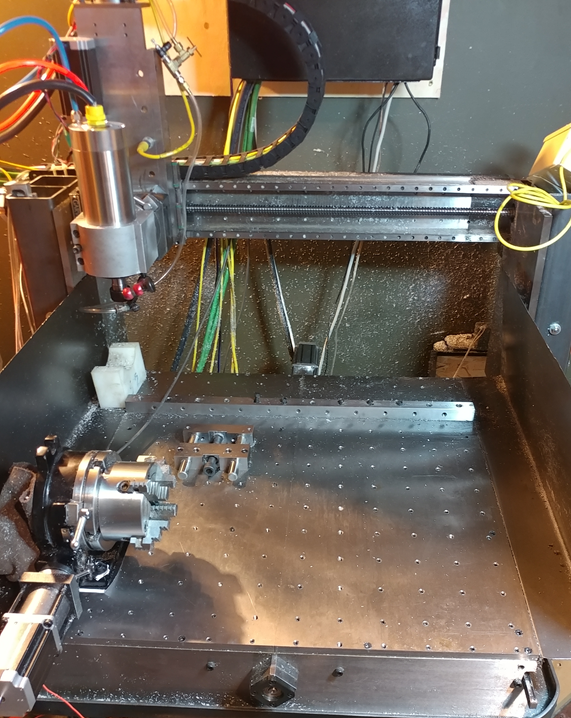
next I will test your great project regarding the kinematics switch in order to activate RTCP function during gcode execution , but I need to adapt the xyzac kinematics to a xyzab one cause my mill is an horizontal machine, I can simulate an A/C configuration homing the tilt table at 90°, but normally my turning table is along Y axis (in my case the vertical axis) as a normal trunnion table,
someone has done a kinematics mod for an horizontal 5 axis mill?

thanks in advance
hello from Italy!

Please Log in or Create an account to join the conversation.
More
6 years 7 months ago - 6 years 7 months ago #160822 by dgarrett
Replied by dgarrett on topic TCP 5-axis kinematics

where I have to put the the trt values of
x.rot.point, y.rot.point, z.rot.point (vs the machine0
home), maybe in the machine.ini file together with the
Y and Z offset of the A/C axis?


Setting hal pins ('setp' commands) can be included in a
file specified as [HAL]HALFILE=filename or within the
ini file using the [HAL]HALCMD=command

Ref: linuxcnc.org/docs/master/html/config/ini...ig.html#_hal_section

The latter method is used in some of the s_kins branch sim
configs:

github.com/LinuxCNC/linuxcnc/blob/dgarr/...ng/xyzbc-trt.ini#L44

Notes:

1) In the s_kins branch, both the xyzac-trt-kins and
xyzbc-trt-kins kins modules include
xyz[ab]c-trt-kins.[xyz]-rot-point hal pins but are not
implemented within the vismach guis and are lightly
tested.

2) The s_kins branch is usually force-pushed, notes
are updated at:
www.panix.com/~dgarrett/stuff/s_kins_guide.txt

3) If someone writes *and* tests kinematics functions
for an xyzab configuration (following the design
pattern implemented in trtfuncs.c), they could likely
be added to the branch

Ref: github.com/LinuxCNC/linuxcnc/blob/dgarr/...inematics/trtfuncs.c
Last edit: 6 years 7 months ago by dgarrett.
The following user(s) said Thank You: LIMONEVERDE

Please Log in or Create an account to join the conversation.

Time to create page: 0.138 seconds
Powered by Kunena Forum
