
- Posts: 2180
- Thank you received: 905
caxis.comp status
2 years 9 months ago #291308
by spumco
And because it outputs to two different pid's, it'll control two different amps as it's written now.
I think it just needs some additional features and/or pins to cover various hardware configs and situations.
OUT - caxis.N.mode-is-axis
OUT - caxis.N.mode-is-spindle
IN - caxis.N.spindle-ready
IN - caxis.N.axis-amp-enabled
IN - caxis.N.spindle-amp-enabled
The out pins could be used to turn off/on other components (so you can't jog the axis and change the FB position while in spindle mode). The in pins could be used to adjust the component state, or delay the spindle output if a separate axis motor needed to be engaged (clutch, air driven swing gears, etc.).
Replied by spumco on topic caxis.comp - problems
The more I think about it, the more I realize Andy's caxis.comp works really, really well. There's no 'swapping back and forth'. It's like having a c-axis that you can run like a spindle with no m-codes or other input fiddling.I think the answer is to figure out how to use the C axis as a spindle all the time, not the swapping back and forth, or maybe put a way for the c axis to be in charge of the spindle and to choose which amplifier to use base on the setting call from the traj planner.
And because it outputs to two different pid's, it'll control two different amps as it's written now.
I think it just needs some additional features and/or pins to cover various hardware configs and situations.
OUT - caxis.N.mode-is-axis
OUT - caxis.N.mode-is-spindle
IN - caxis.N.spindle-ready
IN - caxis.N.axis-amp-enabled
IN - caxis.N.spindle-amp-enabled
The out pins could be used to turn off/on other components (so you can't jog the axis and change the FB position while in spindle mode). The in pins could be used to adjust the component state, or delay the spindle output if a separate axis motor needed to be engaged (clutch, air driven swing gears, etc.).
Please Log in or Create an account to join the conversation.

2 years 9 months ago #291311
by Aciera
Replied by Aciera on topic caxis.comp - problems
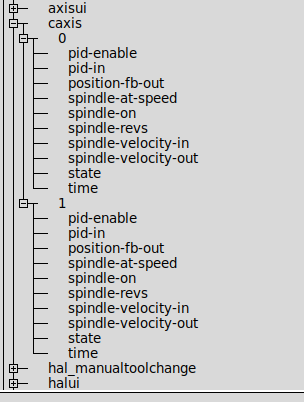
Not sure but I just tried it:
and it seems to work fine:
Code:
loadrt caxis count=2
addf caxis.0 servo-thread
addf caxis.1 servo-thread
and it seems to work fine:
The following user(s) said Thank You: spumco
Please Log in or Create an account to join the conversation.
2 years 9 months ago #291336
by spumco
Replied by spumco on topic caxis.comp - problems
Aciera - which comp did you install? The one I attached a while ago in this thread, or from some other source?
Please Log in or Create an account to join the conversation.
2 years 9 months ago #291338
by Aciera
Replied by Aciera on topic caxis.comp - problems
This one you posted here:
forum.linuxcnc.org/10-advanced-configura...lems?start=20#291280
forum.linuxcnc.org/10-advanced-configura...lems?start=20#291280
The following user(s) said Thank You: spumco
Please Log in or Create an account to join the conversation.
- smc.collins
- Offline
- Platinum Member
-

Less
More
- Posts: 723
- Thank you received: 139
2 years 9 months ago #291344
by smc.collins
Replied by smc.collins on topic caxis.comp - problems
Just because we can brute force something to work, doesn't mean it's a good idea. Also a lot of machines have rotary axis that can behave as a spindle. This needs to be addressed at a axis level.
Please Log in or Create an account to join the conversation.
2 years 9 months ago #291370
by spumco
Well hot dang. I recompiled/installed caxis.comp, and it worked.
I have no idea what the difference was, but I've now got two instances of caxis.comp.
Time to set up the subspindle...
Replied by spumco on topic caxis.comp - problems
This one you posted here:
forum.linuxcnc.org/10-advanced-configura...lems?start=20#291280
Well hot dang. I recompiled/installed caxis.comp, and it worked.
I have no idea what the difference was, but I've now got two instances of caxis.comp.
Time to set up the subspindle...
Please Log in or Create an account to join the conversation.
Time to create page: 0.289 seconds