
PUMA 200 Robotarm and some Hal/INI issues
- Aciera
-

- Offline
- Administrator
-

Less
More
- Posts: 4809
- Thank you received: 2163
03 Aug 2026 07:59 #348405
by Aciera
Replied by Aciera on topic PUMA 200 Robotarm and some Hal/INI issues
It's going to very difficult to troubleshoot the basic setup by running random gcode files. You need to take a step back and simplify things so you can actually wrap your head around what is going on.
First you need to verify that your home position is really putting the arm in the pose it should be. Which means the pose shown on the drawing you posted earlier. If your flange is not correctly oriented to the base plane (ie parallel or perpendicular to your table) then you need to adjust your HOME, HOME_OFFSET values in the INI.
Once you have verified that the home position is actually correct, you can check your DH parameters by positioning the arm in different simple poses in joint mode, then switch to world mode and check if the cartesian coordinates in the DRO make sense. Simple poses would be those with joint angles like 0°,90°,180°. Make a diagram on paper, calculate the theoretical XYZ position using your robots link lengths and compare that to the XYZ values in the DRO.
Small inaccuracies are to be expected but if you have a rotation direction or a link direction wrong then your values would be way off.
First you need to verify that your home position is really putting the arm in the pose it should be. Which means the pose shown on the drawing you posted earlier. If your flange is not correctly oriented to the base plane (ie parallel or perpendicular to your table) then you need to adjust your HOME, HOME_OFFSET values in the INI.
Once you have verified that the home position is actually correct, you can check your DH parameters by positioning the arm in different simple poses in joint mode, then switch to world mode and check if the cartesian coordinates in the DRO make sense. Simple poses would be those with joint angles like 0°,90°,180°. Make a diagram on paper, calculate the theoretical XYZ position using your robots link lengths and compare that to the XYZ values in the DRO.
Small inaccuracies are to be expected but if you have a rotation direction or a link direction wrong then your values would be way off.
The following user(s) said Thank You: NWE
Please Log in or Create an account to join the conversation.
- hitchhiker
- Offline
- Elite Member
-

Less
More
- Posts: 247
- Thank you received: 21
03 Aug 2026 14:43 #348413
by hitchhiker
Replied by hitchhiker on topic PUMA 200 Robotarm and some Hal/INI issues
You mean this position?
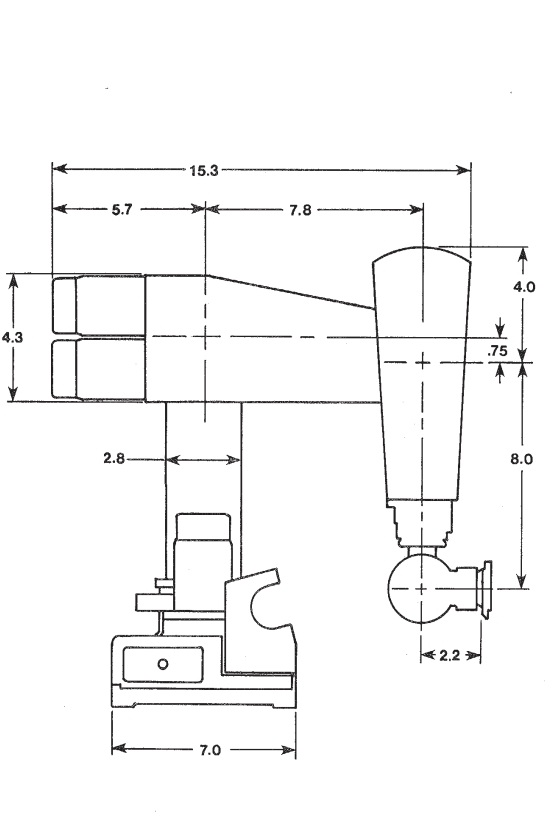
I was thinking it was only to show dimension?!
I was thinking it was only to show dimension?!
Attachments:
Please Log in or Create an account to join the conversation.
- Aciera
-
- Offline
- Administrator
-
Less
More
- Posts: 4809
- Thank you received: 2163
03 Aug 2026 15:33 #348416
by Aciera
Replied by Aciera on topic PUMA 200 Robotarm and some Hal/INI issues
Yes, although I think that your DH parameters have the wrist pointing straight down. Having it point straight down instead of 90° to the right as in the image is not wrong but it is a singular pose and hence you need [JOINT_4] 'HOME = 0.1' in your ini file to avoid an inverse kinematic failure right after homing.
In any case, the important thing is that the home pose MUST be the same pose as what you used to derive your DH parameter values. If an angle in the model is 1.570796 then the angle between the corresponding links of your physical arm needs to be as exactly 90° as possible when all joints are at 0°.
In other words:
With all joints at 0° your upper arm needs to be horizontal and your lower arm needs to be vertical like in the drawing. If you have setup your DH parameters for the pose with the hand pointing straight down then the center of the flange needs to be exactly vertical below the wirst.
That is really why you need to understand what those DH-parameters mean in your particular robot.
In any case, the important thing is that the home pose MUST be the same pose as what you used to derive your DH parameter values. If an angle in the model is 1.570796 then the angle between the corresponding links of your physical arm needs to be as exactly 90° as possible when all joints are at 0°.
In other words:
With all joints at 0° your upper arm needs to be horizontal and your lower arm needs to be vertical like in the drawing. If you have setup your DH parameters for the pose with the hand pointing straight down then the center of the flange needs to be exactly vertical below the wirst.
That is really why you need to understand what those DH-parameters mean in your particular robot.
The following user(s) said Thank You: tommylight, hitchhiker, NWE
Please Log in or Create an account to join the conversation.
- hitchhiker
- Offline
- Elite Member
-
Less
More
- Posts: 247
- Thank you received: 21
03 Aug 2026 16:57 #348419
by hitchhiker
Replied by hitchhiker on topic PUMA 200 Robotarm and some Hal/INI issues
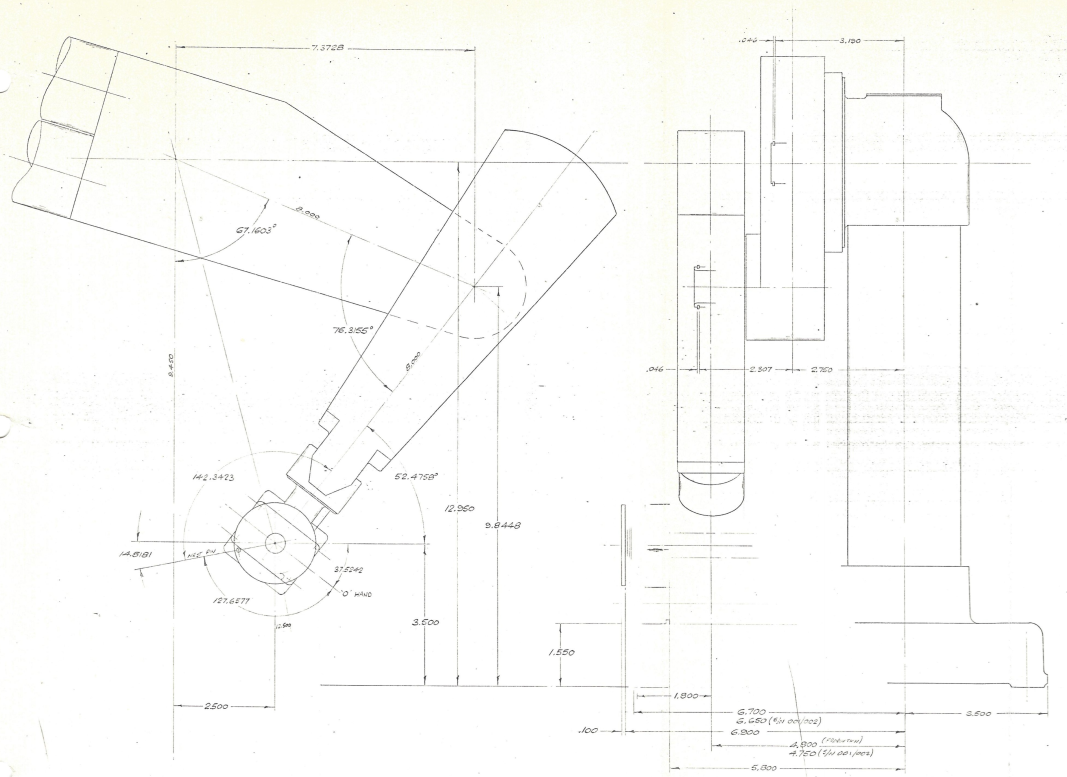
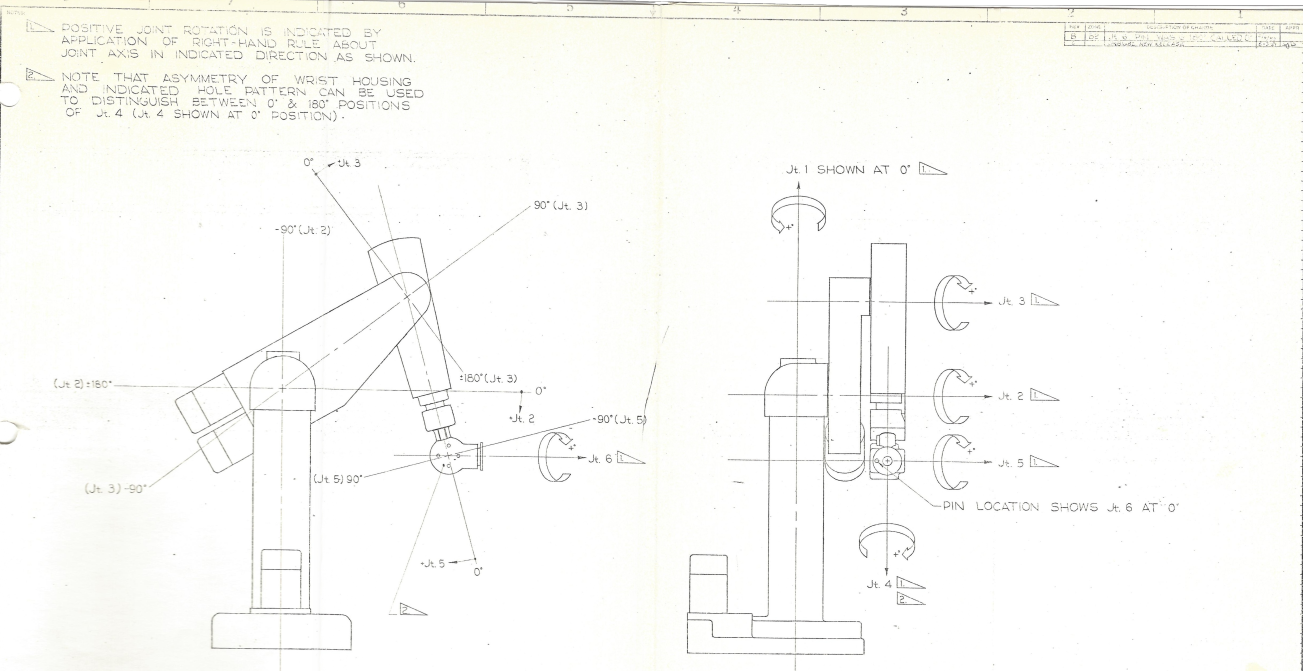
i got some datasheets... interesting part:
i the joint angle view.... the arm is upside down?!
the arrows and signs show the alpha for each joint?! or i am wrong.. then is my DH parameter list complete wrong...
in the drawing with the measurements... the arm is in the NEST position... dont care.. but all measurements are present... now.. i wonder because:
joint 1 is the base which rotate left and right alpha 0
joint 2 is the upper arm on the shoulder alpha+
joint 3 is the lower arm on the elbow alpha+
joint 4 wrist rotate alpha 0
joint 5 wrist roll alpha +
joint 6 toolplate rotate alpha 0
we have a side offset from shoulder rotation point to base rotation point..
we have a side offset from upper arm to lower arm...
but i was thinking that the side offset ist from base turn point to middle upper arm..... complete wrong?!
thanks guys!
i the joint angle view.... the arm is upside down?!
the arrows and signs show the alpha for each joint?! or i am wrong.. then is my DH parameter list complete wrong...
in the drawing with the measurements... the arm is in the NEST position... dont care.. but all measurements are present... now.. i wonder because:
joint 1 is the base which rotate left and right alpha 0
joint 2 is the upper arm on the shoulder alpha+
joint 3 is the lower arm on the elbow alpha+
joint 4 wrist rotate alpha 0
joint 5 wrist roll alpha +
joint 6 toolplate rotate alpha 0
we have a side offset from shoulder rotation point to base rotation point..
we have a side offset from upper arm to lower arm...
but i was thinking that the side offset ist from base turn point to middle upper arm..... complete wrong?!
thanks guys!
Please Log in or Create an account to join the conversation.
- Aciera
-
- Offline
- Administrator
-
Less
More
- Posts: 4809
- Thank you received: 2163
03 Aug 2026 18:00 - 03 Aug 2026 18:20 #348421
by Aciera
Replied by Aciera on topic PUMA 200 Robotarm and some Hal/INI issues
Regarding the joint rotation direction: It does not really matter if you follow the drawing or not the important thing is that the actual joint rotation directions on your arm match those in your DH-parameter model. Again, the DH parameter values describe the sequence of translations and rotations used to transform the world coordinate system in the center of the base to the hand of your robot.
The positive rotation sense of each individual joint motor on your arm is determined by how you choose to manipulate the coordinate system on its path to the hand when you derive the DH parameter values. That is why you need to understand what the DH parameter model actually is. But I repeat myself.
The side offset (ie the one in the y direction) is the distance between the rotational axis of joint0 (likely the center of the vertical column) and the center of the wrist.
The positive rotation sense of each individual joint motor on your arm is determined by how you choose to manipulate the coordinate system on its path to the hand when you derive the DH parameter values. That is why you need to understand what the DH parameter model actually is. But I repeat myself.
The side offset (ie the one in the y direction) is the distance between the rotational axis of joint0 (likely the center of the vertical column) and the center of the wrist.
Last edit: 03 Aug 2026 18:20 by Aciera.
Please Log in or Create an account to join the conversation.
- hitchhiker
- Offline
- Elite Member
-
Less
More
- Posts: 247
- Thank you received: 21
03 Aug 2026 18:38 #348423
by hitchhiker
Replied by hitchhiker on topic PUMA 200 Robotarm and some Hal/INI issues
ah i get it...i think..
this means... its important that if i jog in +.. the + the direction is of the joint i move... and this is the direction of the arrows +.
this means for the alphas from the drawing: 0,90,90,0,-90,0 would be tool to the table?!
my setup is alpha 0,90,0,90,-90,90
i throwed again my hand with the right hand rule.. thumb up is Z..
i get 0,90,0,90,-90,90 BUT the toolplate is parallel to the base/table. different is that the toolplate is in another angle?!
its so complex...
thank you for your help....
this means... its important that if i jog in +.. the + the direction is of the joint i move... and this is the direction of the arrows +.
this means for the alphas from the drawing: 0,90,90,0,-90,0 would be tool to the table?!
my setup is alpha 0,90,0,90,-90,90
i throwed again my hand with the right hand rule.. thumb up is Z..
i get 0,90,0,90,-90,90 BUT the toolplate is parallel to the base/table. different is that the toolplate is in another angle?!
its so complex...
thank you for your help....
Please Log in or Create an account to join the conversation.
- Aciera
-
- Offline
- Administrator
-
Less
More
- Posts: 4809
- Thank you received: 2163
03 Aug 2026 20:02 - 03 Aug 2026 20:15 #348426
by Aciera
Replied by Aciera on topic PUMA 200 Robotarm and some Hal/INI issues
Lets verify your home pose:
1. Home the arm
2. Activate 'Identity' mode
3. Remove all offsets (MDI: g10 l2 p0 x0 y0 z0 a0 b0 c0)
4. Move all joints except joint_4 to zero (MDI: g0 x0 y0 z0 a0 b0 c0)
5. Take a screenshot of the axis gui window
6. Take a picture from the side (ie the Y direction) of your robot
7. Post the two images
1. Home the arm
2. Activate 'Identity' mode
3. Remove all offsets (MDI: g10 l2 p0 x0 y0 z0 a0 b0 c0)
4. Move all joints except joint_4 to zero (MDI: g0 x0 y0 z0 a0 b0 c0)
5. Take a screenshot of the axis gui window
6. Take a picture from the side (ie the Y direction) of your robot
7. Post the two images
Last edit: 03 Aug 2026 20:15 by Aciera.
The following user(s) said Thank You: NWE
Please Log in or Create an account to join the conversation.
- hitchhiker
- Offline
- Elite Member
-
Less
More
- Posts: 247
- Thank you received: 21
03 Aug 2026 21:31 #348427
by hitchhiker
Replied by hitchhiker on topic PUMA 200 Robotarm and some Hal/INI issues
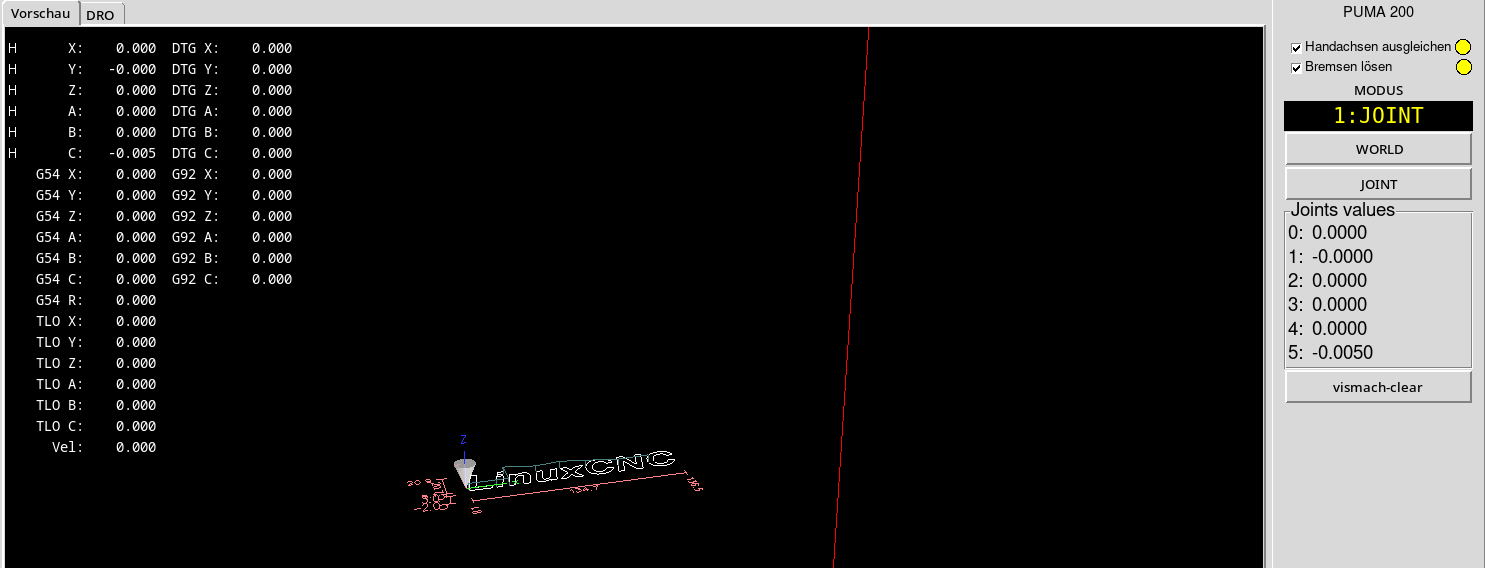
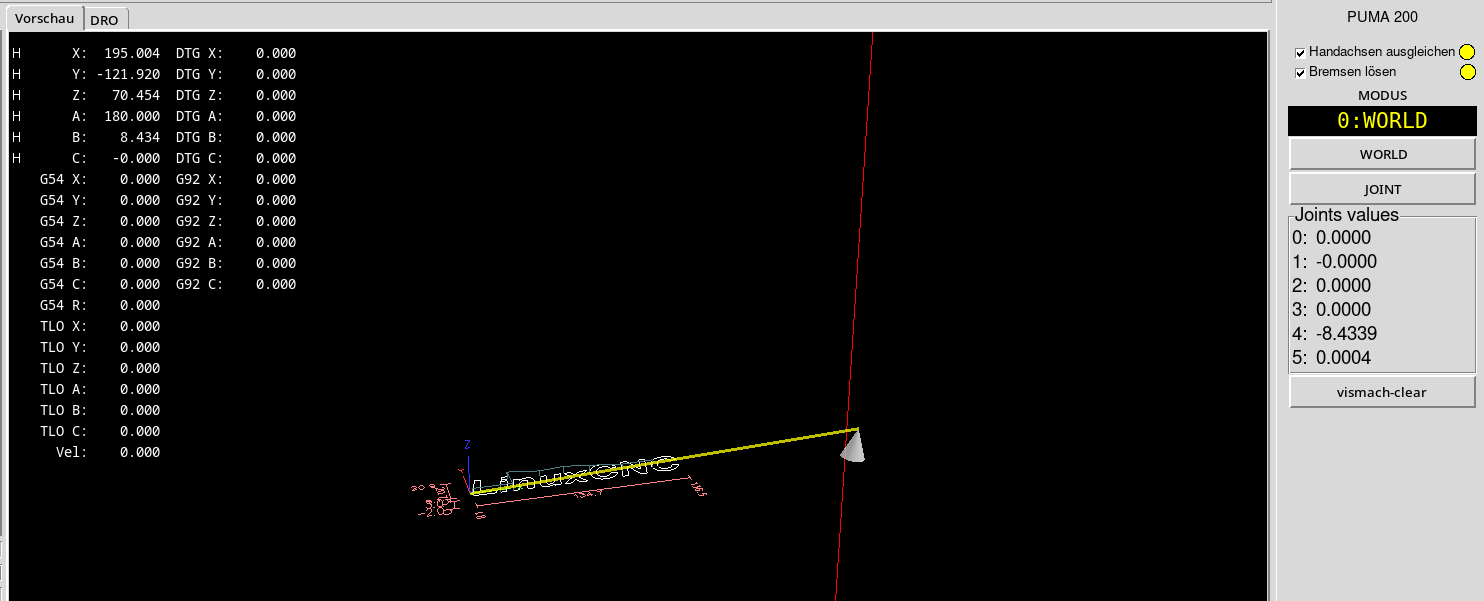
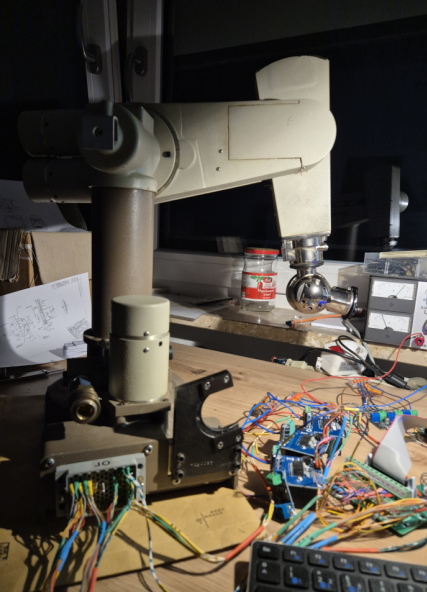
After homing in joint mode (idintity) i add second screenshot from world! but i moved B a little bit to go away from 0.0
in my ini:
RS274NGC_STARTUP_CODE = G21 G90 G94
#RS274NGC_STARTUP_CODE = G21 G10L2P0 x19.2 y5.5 z9.4 a0 b90 c0 (debug, ini: startup offsets set)
ALPHA-0 = 0
A-0 = 0
#D-0 = 330.2
D-0 = 328.93
ALPHA-1 = 1.570796
A-1 = 0
#D-1 = 121.92
D-1 = 0
ALPHA-2 = 0
A-2 = 203.2
#A-2 = 198.12
D-2 = 121.92
#D-2 = 0
ALPHA-3 = 1.570796
A-3 = 0
D-3 = 203.2
ALPHA-4 = -1.570796
A-4 = 0
D-4 = 0
ALPHA-5 = 1.570796
A-5 = 0
D-5 = 55.88
thanks for your help!
in my ini:
RS274NGC_STARTUP_CODE = G21 G90 G94
#RS274NGC_STARTUP_CODE = G21 G10L2P0 x19.2 y5.5 z9.4 a0 b90 c0 (debug, ini: startup offsets set)
ALPHA-0 = 0
A-0 = 0
#D-0 = 330.2
D-0 = 328.93
ALPHA-1 = 1.570796
A-1 = 0
#D-1 = 121.92
D-1 = 0
ALPHA-2 = 0
A-2 = 203.2
#A-2 = 198.12
D-2 = 121.92
#D-2 = 0
ALPHA-3 = 1.570796
A-3 = 0
D-3 = 203.2
ALPHA-4 = -1.570796
A-4 = 0
D-4 = 0
ALPHA-5 = 1.570796
A-5 = 0
D-5 = 55.88
thanks for your help!
Please Log in or Create an account to join the conversation.
- Aciera
-
- Offline
- Administrator
-
Less
More
- Posts: 4809
- Thank you received: 2163
04 Aug 2026 07:19 - 04 Aug 2026 07:27 #348434
by Aciera
Replied by Aciera on topic PUMA 200 Robotarm and some Hal/INI issues
Certainly looks like your home pose is way off.
1. The lower arm is not vertical so your homing parameters for joint2 must be off.
2. Joint 4 is off as well it has to be either straight down or horizontal (with the lower arm being vertical)
3. Also joint0 is not oriented correctly, the upper arm is not aligned with the base (Although this is less problematic than the misalignment of joint2 and joint4 )
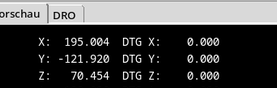
4. As you noticed the pose in the first drawing and the most recent ones are different. You can choose either one but you will need to adjust your 'side offset' accordingly. In your picture the wrist is obviously offset in the positive y-direction but the coordinate values show a _negative_ Y value, that needs to be fixed in the DH parameters:
So, in order to go forward you need to:
1. choose which home pose you want to use and derive the DH parameters accordingly
2. set up your homing parameters so the arm joints are actually in the chosen home pose when all joints are at 0°
1. The lower arm is not vertical so your homing parameters for joint2 must be off.
2. Joint 4 is off as well it has to be either straight down or horizontal (with the lower arm being vertical)
3. Also joint0 is not oriented correctly, the upper arm is not aligned with the base (Although this is less problematic than the misalignment of joint2 and joint4 )
4. As you noticed the pose in the first drawing and the most recent ones are different. You can choose either one but you will need to adjust your 'side offset' accordingly. In your picture the wrist is obviously offset in the positive y-direction but the coordinate values show a _negative_ Y value, that needs to be fixed in the DH parameters:
So, in order to go forward you need to:
1. choose which home pose you want to use and derive the DH parameters accordingly
2. set up your homing parameters so the arm joints are actually in the chosen home pose when all joints are at 0°
Attachments:
Last edit: 04 Aug 2026 07:27 by Aciera.
The following user(s) said Thank You: NWE
Please Log in or Create an account to join the conversation.
- hitchhiker
- Offline
- Elite Member
-
Less
More
- Posts: 247
- Thank you received: 21
04 Aug 2026 19:46 #348448
by hitchhiker
Replied by hitchhiker on topic PUMA 200 Robotarm and some Hal/INI issues
ok the first pose is what i wish... arm is on the right side from the " tower" this means there is a -Y correct.
i played a little bit arround...
what i found: some failures are "softlimit positiv reached 500" i open the min max limits to 750 - 750... still for play more arround. after this message i get position error... but ich can manual jog in jooint mode many more deg. and all speeds are slow!
you wrote :
Lets verify your home pose:
1. Home the arm
2. Activate 'Identity' mode
3. Remove all offsets (MDI: g10 l2 p0 x0 y0 z0 a0 b0 c0)
4. Move all joints except joint_4 to zero (MDI: g0 x0 y0 z0 a0 b0 c0)
5. Take a screenshot of the axis gui window
6. Take a picture from the side (ie the Y direction) of your robot
7. Post the two images
i do the g00 x0y0z0 a0b0c0.. but correct would be without a0?
i have really issues with the right hand rule and rotate and flip the coordinatesystem.. i must build something with toothpicks and a cheese cube.. ...
...
homeing : i need on joint 4 or 5 ( joints here not linuxcnc.. i men robot) a 1deg. offset..if i dont have it.. kinematic errors came after homing... like in the example.. but with the puma560 genser simulator.. i can rebuild the existing failures....
if i throw in the ini the line in:
RS274NGC_STARTUP_CODE = G21 G10L2P0 x19.2 y5.5 z9.4 a90 b0 c90 (debug, ini: startup offsets1 set)
this line is from the gesner kins puma 560 example
it works better on my real puma
i played a little bit arround...
what i found: some failures are "softlimit positiv reached 500" i open the min max limits to 750 - 750... still for play more arround. after this message i get position error... but ich can manual jog in jooint mode many more deg. and all speeds are slow!
you wrote :
Lets verify your home pose:
1. Home the arm
2. Activate 'Identity' mode
3. Remove all offsets (MDI: g10 l2 p0 x0 y0 z0 a0 b0 c0)
4. Move all joints except joint_4 to zero (MDI: g0 x0 y0 z0 a0 b0 c0)
5. Take a screenshot of the axis gui window
6. Take a picture from the side (ie the Y direction) of your robot
7. Post the two images
i do the g00 x0y0z0 a0b0c0.. but correct would be without a0?
i have really issues with the right hand rule and rotate and flip the coordinatesystem.. i must build something with toothpicks and a cheese cube..
...homeing : i need on joint 4 or 5 ( joints here not linuxcnc.. i men robot) a 1deg. offset..if i dont have it.. kinematic errors came after homing... like in the example.. but with the puma560 genser simulator.. i can rebuild the existing failures....
if i throw in the ini the line in:
RS274NGC_STARTUP_CODE = G21 G10L2P0 x19.2 y5.5 z9.4 a90 b0 c90 (debug, ini: startup offsets1 set)
this line is from the gesner kins puma 560 example
it works better on my real puma
Please Log in or Create an account to join the conversation.
Time to create page: 0.459 seconds