
PUMA 200 Robotarm and some Hal/INI issues
- Aciera
-

- Away
- Administrator
-

Less
More
- Posts: 4811
- Thank you received: 2164
08 Aug 2026 12:55 - 09 Aug 2026 09:47 #348556
by Aciera
Yes.
But the real problem is that you are getting ahead of yourself. There is ZERO point in hooking up your robot to linuxcnc before you have a clear understanding of what those modified DH parameters actually mean.
Step 1: Take the drawings of your puma, draw a kinematic model and derive a set of DH parameters.
Step 2: Take a six-axis SIM config (without hooking up ANY hardware) that uses genserkins and verify that the World coordinates calculated for simple poses are what you expect.
There is absolutely no point in either hooking up your robot or building a vismach model before Step 2 has been completed successfully.
Replied by Aciera on topic PUMA 200 Robotarm and some Hal/INI issues
Dh parameters= real positon/ angles
Vismach model = not build by dh paramters.
Or what do you mean?
Yes.
But the real problem is that you are getting ahead of yourself. There is ZERO point in hooking up your robot to linuxcnc before you have a clear understanding of what those modified DH parameters actually mean.
Step 1: Take the drawings of your puma, draw a kinematic model and derive a set of DH parameters.
Step 2: Take a six-axis SIM config (without hooking up ANY hardware) that uses genserkins and verify that the World coordinates calculated for simple poses are what you expect.
There is absolutely no point in either hooking up your robot or building a vismach model before Step 2 has been completed successfully.
Attachments:
Last edit: 09 Aug 2026 09:47 by Aciera. Reason: Remove wrong parameter model
The following user(s) said Thank You: NWE
Please Log in or Create an account to join the conversation.
- Aciera
-
- Away
- Administrator
-
Less
More
- Posts: 4811
- Thank you received: 2164
09 Aug 2026 10:26 - 09 Aug 2026 10:33 #348586
by Aciera
Replied by Aciera on topic PUMA 200 Robotarm and some Hal/INI issues
Here is the corrected suggestion on how to build the modified DH parameter model. The vertical offset (0.75") between J1 and J2 make things a bit more complex then in the 'puma560' sim config.
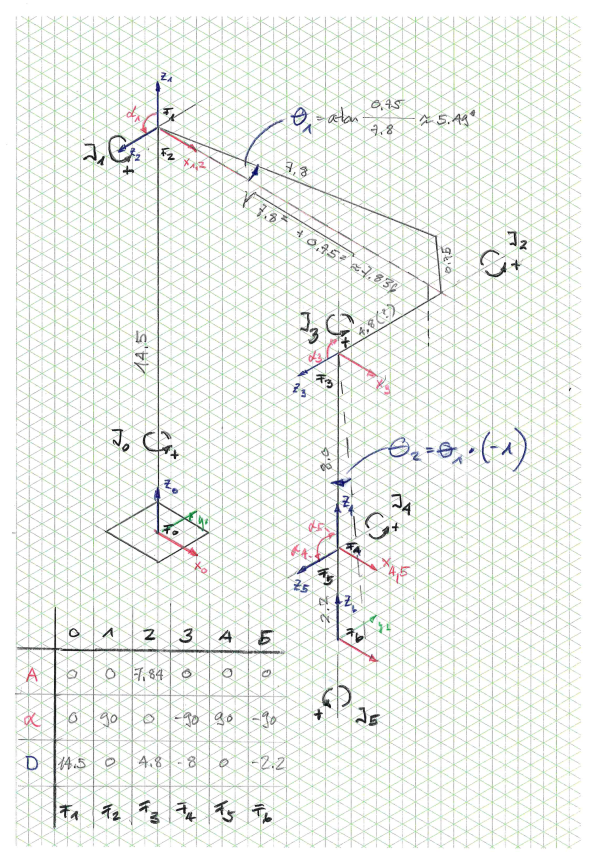
Some explanation on how modified DH parameters work:
- Each parameter set describes the coordinate transformation from one coordinate frame (F0..F6) to the next.
- Each transformation consists of the same sequence (X,Z directions here follow the current coordinate frame!)
1. Translation along Xn so that the origin of the coordinate frame lies on the rotational axis of the next joint (Jn+1)
2. Rotation around Xn so that Zn is collinear with the rotational axis of the current joint Jn . Note that the direction of Zn and the rotational direction of the physical joint MUST be identical!
3. Translation along Zn so that the Xn direction intersects with the rotational axis of the next joint (Jn).
- At the end of each transformation sequence we have created a new coordinate frame Fn+1.
Note that with these rules it is not possible to build a transformation from F2 to F3 without rotating J1 by angle theta1 so that the rotational axis of the next joint (J2) intersects with the X vector of F2. This then requires rotating J2 the same amount but in the opposite direction so the lower arm is vertical again. This needs to be corrected in the configuration by either setting a corresponding HOME_OFFSET value for JOINT_1 and JOINT_2 in the INI file or setting the work_offsets accordingly when in JOINT mode (these must then be deactivated when switching to WORLD mode)
Some explanation on how modified DH parameters work:
- Each parameter set describes the coordinate transformation from one coordinate frame (F0..F6) to the next.
- Each transformation consists of the same sequence (X,Z directions here follow the current coordinate frame!)
1. Translation along Xn so that the origin of the coordinate frame lies on the rotational axis of the next joint (Jn+1)
2. Rotation around Xn so that Zn is collinear with the rotational axis of the current joint Jn . Note that the direction of Zn and the rotational direction of the physical joint MUST be identical!
3. Translation along Zn so that the Xn direction intersects with the rotational axis of the next joint (Jn).
- At the end of each transformation sequence we have created a new coordinate frame Fn+1.
Note that with these rules it is not possible to build a transformation from F2 to F3 without rotating J1 by angle theta1 so that the rotational axis of the next joint (J2) intersects with the X vector of F2. This then requires rotating J2 the same amount but in the opposite direction so the lower arm is vertical again. This needs to be corrected in the configuration by either setting a corresponding HOME_OFFSET value for JOINT_1 and JOINT_2 in the INI file or setting the work_offsets accordingly when in JOINT mode (these must then be deactivated when switching to WORLD mode)
Attachments:
Last edit: 09 Aug 2026 10:33 by Aciera.
Please Log in or Create an account to join the conversation.
- Aciera
-
- Away
- Administrator
-
Less
More
- Posts: 4811
- Thank you received: 2164
09 Aug 2026 11:19 #348590
by Aciera
Replied by Aciera on topic PUMA 200 Robotarm and some Hal/INI issues
As for Step2:
Draw some simple poses and calculate the expected x,y,z coordinates:
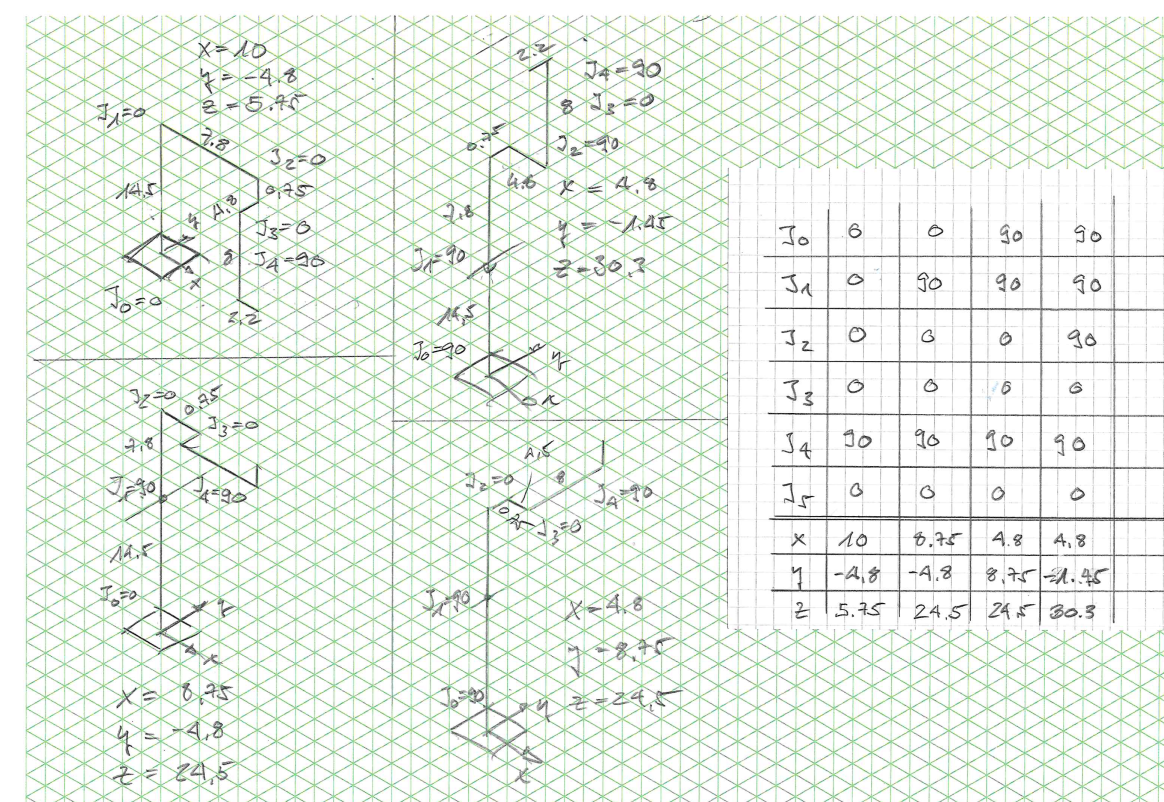
Then create a sim config for genserkins and feed in the derived DH parameters. then test the results by setting up the joint positions as in the chosen poses while keepin the angular offset for J1 and J2 in mind (+- 5.49°) :
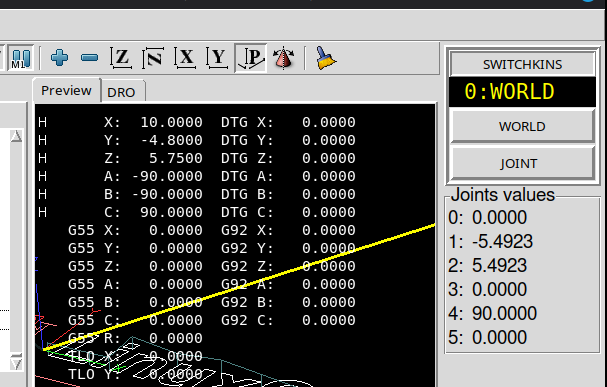
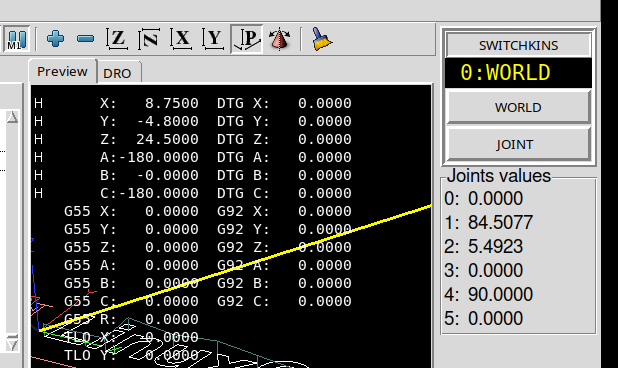
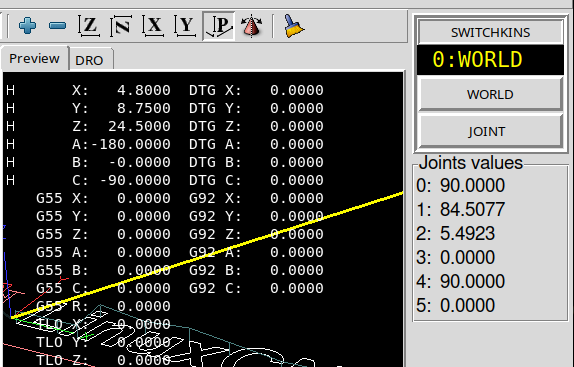
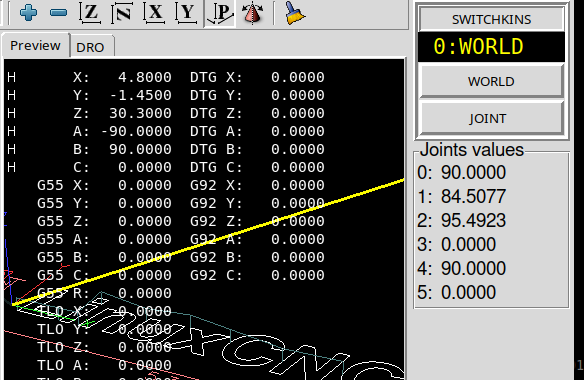
Draw some simple poses and calculate the expected x,y,z coordinates:
Then create a sim config for genserkins and feed in the derived DH parameters. then test the results by setting up the joint positions as in the chosen poses while keepin the angular offset for J1 and J2 in mind (+- 5.49°) :
The following user(s) said Thank You: tommylight
Please Log in or Create an account to join the conversation.
- hitchhiker
- Offline
- Elite Member
-

Less
More
- Posts: 247
- Thank you received: 21
09 Aug 2026 11:43 #348593
by hitchhiker
Replied by hitchhiker on topic PUMA 200 Robotarm and some Hal/INI issues
wow... ok.... i thank you.. i understand now more...
but here are some news.....
today i start making a excel... because i wondering why the gear ratios not fit which i get from unimation.... and then.... i get it... i open the gear from joint 2.. count the teeths... suprise... they changed the gears...
i get gear ratio from a puma 250.. i have a puma 200... .. now i open every gear... and count...
when i start with the robot i done this:
open all covers... check encoders.. wiring.. lables.. all what i can get.
then i start in linux counting form index to index pulse and see what was the counting of a/b. ok i get 250 cpr encoder on joint 1 2 3 and 200 cpr on 4 5 6.
then i start with the motors and angles... i measured with inclinometer. parallel i wrote a mail to stäubli and unimation... stäubli give me contact to rp automation. rp automation share some details with me.. they only have what they have.. so all what i get was stuff for different puma 2xx versions.
i calculated then the scales for each axis... it never fit.. i was thinking ok.. lets stay at the values i measured... but today i start opening the gears and i was suprised.... the teeth counting i get doesnt fit my robot.
if i am done with counting every gear.. i come back and try what you wrote.. but i see my failures and i am happy that you teach it to me because now i understand it better..
thank you!
but here are some news.....
today i start making a excel... because i wondering why the gear ratios not fit which i get from unimation.... and then.... i get it... i open the gear from joint 2.. count the teeths... suprise... they changed the gears...
i get gear ratio from a puma 250.. i have a puma 200... .. now i open every gear... and count...
when i start with the robot i done this:
open all covers... check encoders.. wiring.. lables.. all what i can get.
then i start in linux counting form index to index pulse and see what was the counting of a/b. ok i get 250 cpr encoder on joint 1 2 3 and 200 cpr on 4 5 6.
then i start with the motors and angles... i measured with inclinometer. parallel i wrote a mail to stäubli and unimation... stäubli give me contact to rp automation. rp automation share some details with me.. they only have what they have.. so all what i get was stuff for different puma 2xx versions.
i calculated then the scales for each axis... it never fit.. i was thinking ok.. lets stay at the values i measured... but today i start opening the gears and i was suprised.... the teeth counting i get doesnt fit my robot.
if i am done with counting every gear.. i come back and try what you wrote.. but i see my failures and i am happy that you teach it to me because now i understand it better..
thank you!
Please Log in or Create an account to join the conversation.
- hitchhiker
- Offline
- Elite Member
-
Less
More
- Posts: 247
- Thank you received: 21
09 Aug 2026 21:26 - 09 Aug 2026 21:26 #348618
by hitchhiker
Replied by hitchhiker on topic PUMA 200 Robotarm and some Hal/INI issues
wow.. it works... now i understand my failure with the signs...
interesting part:
you calculate a different arm length for upper arm.. i got a drawing where the 0.75" are not realy present.
but yes its first time the moves are correct. thats so nice... i was fighting with the right hand rule and know i understand my failure... the rotations arround the X axis are not correct.. and thats why i have the TCP upside down.. and the signs for the d3 and d5....
now i am near to get the real ratios... issue are the encapsulated gearboxes.. my solution... add a second encoder to the outputshaft and work with the index signals of the encoder on the motor to get a start and end point for counting but the mesuring with the incinometer was a good starter.
aciara!!! thank you...!!!!!!!! nice lesson!

interesting part:
you calculate a different arm length for upper arm.. i got a drawing where the 0.75" are not realy present.
but yes its first time the moves are correct. thats so nice... i was fighting with the right hand rule and know i understand my failure... the rotations arround the X axis are not correct.. and thats why i have the TCP upside down.. and the signs for the d3 and d5....
now i am near to get the real ratios... issue are the encapsulated gearboxes.. my solution... add a second encoder to the outputshaft and work with the index signals of the encoder on the motor to get a start and end point for counting but the mesuring with the incinometer was a good starter.
aciara!!! thank you...!!!!!!!! nice lesson!
Attachments:
Last edit: 09 Aug 2026 21:26 by hitchhiker.
The following user(s) said Thank You: tommylight
Please Log in or Create an account to join the conversation.
- Aciera
-
- Away
- Administrator
-
Less
More
- Posts: 4811
- Thank you received: 2164
10 Aug 2026 06:50 #348626
by Aciera
Replied by Aciera on topic PUMA 200 Robotarm and some Hal/INI issues
You are very welcome!
Note though that the line from center to center is not parallel to the underside of the upper arm, so there is also a vertical offset when the arm is horizontal. But, yes, the center distance is given here as 8" so you might want to check that on the actual arm and adjust the A2 value accordingly.
you calculate a different arm length for upper arm.. i got a drawing where the 0.75" are not realy present.
Note though that the line from center to center is not parallel to the underside of the upper arm, so there is also a vertical offset when the arm is horizontal. But, yes, the center distance is given here as 8" so you might want to check that on the actual arm and adjust the A2 value accordingly.
The following user(s) said Thank You: NWE
Please Log in or Create an account to join the conversation.
- hitchhiker
- Offline
- Elite Member
-
Less
More
- Posts: 247
- Thank you received: 21
10 Aug 2026 07:01 #348627
by hitchhiker
Replied by hitchhiker on topic PUMA 200 Robotarm and some Hal/INI issues
Right, and up there is also the value of 7.3728 inches. But one thing does stand out to me... the distance to the tabletop remains virtually constant when I move along the X and Y axes.
This was without j2 and j3 +- 5.49
J2 upper arm J3 lower arm.
J5 5. Deg offset:
youtube.com/shorts/0iBH6llVtzk?is=Uy8PDOtG_uMjC4hk
This was without j2 and j3 +- 5.49
J2 upper arm J3 lower arm.
J5 5. Deg offset:
youtube.com/shorts/0iBH6llVtzk?is=Uy8PDOtG_uMjC4hk
Please Log in or Create an account to join the conversation.
- hitchhiker
- Offline
- Elite Member
-
Less
More
- Posts: 247
- Thank you received: 21
14 Aug 2026 21:16 #348752
by hitchhiker
Replied by hitchhiker on topic PUMA 200 Robotarm and some Hal/INI issues
Hey!
I am back on project.
I played a little bit with the arm.. adjust the backlash/teeth play and get now the correct scales for all joints.
In the next days i will machine a sharpie holder... then i will starting with first trails drawing on cardboard. I checked all movements in world mode.. x y z... and it looks good.. tomorrow i will test with a dial.
For my understanding:
The dh parameters doesnt changed... i must set the arm to different ready position over the homeoffset. Right?
Thanks
I am back on project.
I played a little bit with the arm.. adjust the backlash/teeth play and get now the correct scales for all joints.
In the next days i will machine a sharpie holder... then i will starting with first trails drawing on cardboard. I checked all movements in world mode.. x y z... and it looks good.. tomorrow i will test with a dial.
For my understanding:
The dh parameters doesnt changed... i must set the arm to different ready position over the homeoffset. Right?
Thanks
Please Log in or Create an account to join the conversation.
Time to create page: 0.245 seconds