
- Posts: 617
- Thank you received: 75
Replacing Advanced Motion Controls "brush type 12A8 with "Axcent" amplifier
- OT-CNC
- Offline
- Platinum Member
-

Less
More
5 years 10 months ago #190975
by OT-CNC
Replied by OT-CNC on topic Replacing Advanced Motion Controls "brush type 12A8 with "Axcent" amplifier
I have been off the forum for a while and lost track of this.
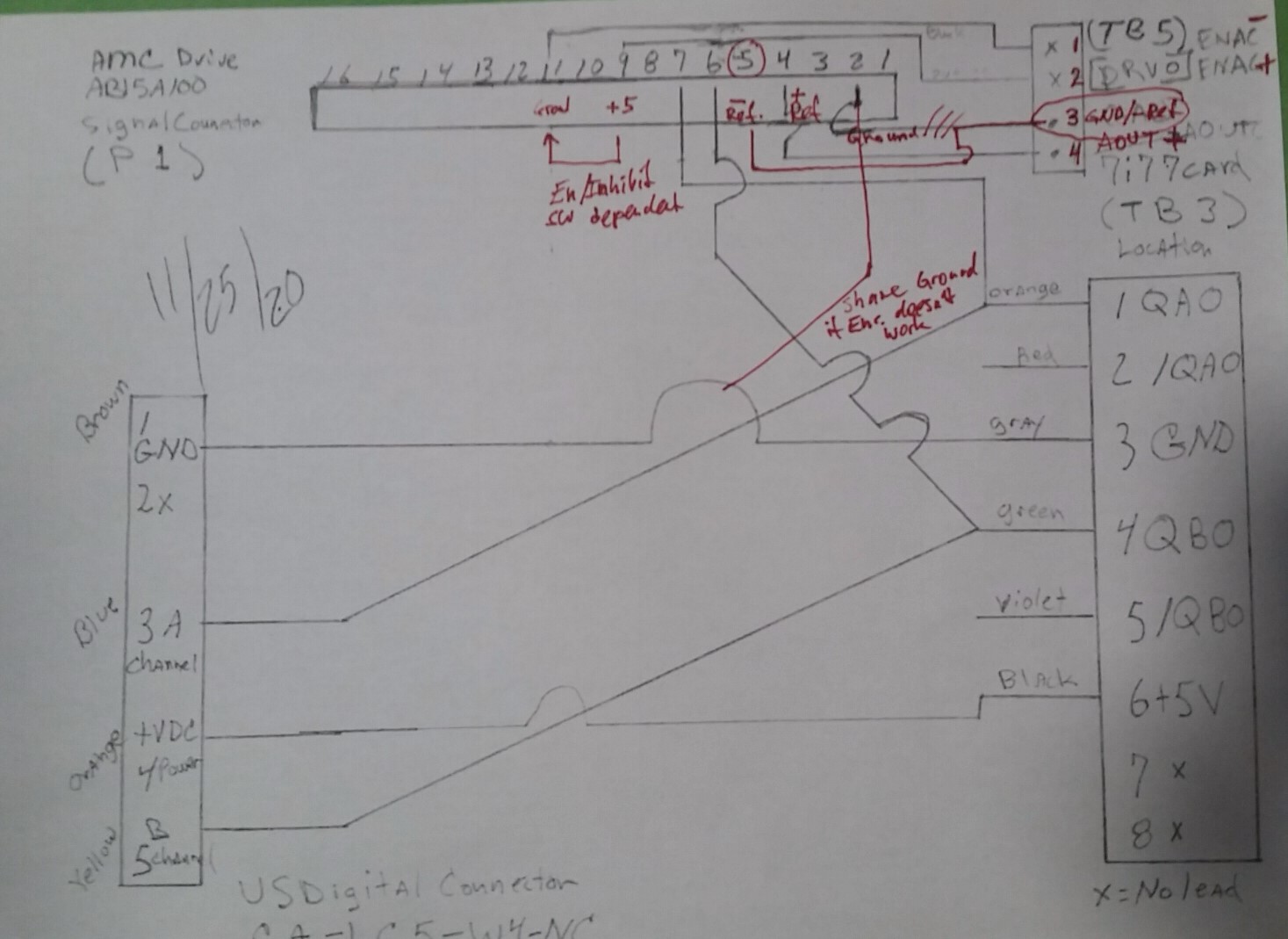
Looking over your pdf, you have the analog drive connection wrong.
You need to connect the 7i77 TB5 pin3 ground (neg ref) to the AMC signal connector pin 5 -ref input. (circled in red on my attachment)
If the encoder isn't reading try connecting encoder ground with pin 2 on the AMC.
Last, I'm not entirely sure on the enable in case that is not working for you. Double check with PCW as reversing can damage your 7i77.
I marked in red what you could do with a switch pin9 to ground to enable or disable the drive (logic is dip switch dependant).
I'm going off your earlier posted AMC manual not sure if anything changed since.
Hope this helps
Looking over your pdf, you have the analog drive connection wrong.
You need to connect the 7i77 TB5 pin3 ground (neg ref) to the AMC signal connector pin 5 -ref input. (circled in red on my attachment)
If the encoder isn't reading try connecting encoder ground with pin 2 on the AMC.
Last, I'm not entirely sure on the enable in case that is not working for you. Double check with PCW as reversing can damage your 7i77.
I marked in red what you could do with a switch pin9 to ground to enable or disable the drive (logic is dip switch dependant).
I'm going off your earlier posted AMC manual not sure if anything changed since.
Hope this helps
The following user(s) said Thank You: new2linux
Please Log in or Create an account to join the conversation.
- new2linux
- Offline
- Platinum Member
-
Less
More
- Posts: 711
- Thank you received: 9
5 years 10 months ago - 5 years 10 months ago #191354
by new2linux
Replied by new2linux on topic Replacing Advanced Motion Controls "brush type 12A8 with "Axcent" amplifier
OT-CNC, Many, many thanks!! I am ever so grateful for your help, but I have sent back and asked for return of the new AB15A100s. I have a set of AB15A100 (these were from ebay, have no history, so I thought it was me when could not tune, so that is when I ordered the new AB15A100s from A-M-C that I just returned) that I would consider (the ebay ones) if you feel up for it. As if that was all that is going on, I have on the way a set of 25A8Ds with A-M-C power supply from ebay (should be here 12/13) for backup.
I am very grateful for all the wonderful people on the forum and the expertise that is so spot on. I do not want to wear out my welcome and one reason I went back to proven solution, the 12a8s, for my application.
Many thanks!
Edit: This is new 7i77 card, I have been ever so careful not to do anything w/o advise in reference to this new card; it was not so obvious but AMCs engineer was advising or a member of this forum. I am tiring to be careful, because; "PCW says reversing can damage your 7i77" .
Edit01: Attached is diagram as I understand it, option 02 in dotted or option 01 (OT-CNC, if possible please read, what I think you have written, to see if I have it correct) pin 9 to pin 11. It will be option 1 or 2; not both. I am willing to try this just want to verify the diagram. 1st I will try this with ebay drives, to test as per earlier (AMC suggested a way to test drive w/o controller, that will turn motors both direction by POT 4) described in earlier post. If any success here and I will report back, if this fails, the 25A8Ds are on the way. Thanks!!
Many thanks!!
I am very grateful for all the wonderful people on the forum and the expertise that is so spot on. I do not want to wear out my welcome and one reason I went back to proven solution, the 12a8s, for my application.
Many thanks!
Edit: This is new 7i77 card, I have been ever so careful not to do anything w/o advise in reference to this new card; it was not so obvious but AMCs engineer was advising or a member of this forum. I am tiring to be careful, because; "PCW says reversing can damage your 7i77" .
Edit01: Attached is diagram as I understand it, option 02 in dotted or option 01 (OT-CNC, if possible please read, what I think you have written, to see if I have it correct) pin 9 to pin 11. It will be option 1 or 2; not both. I am willing to try this just want to verify the diagram. 1st I will try this with ebay drives, to test as per earlier (AMC suggested a way to test drive w/o controller, that will turn motors both direction by POT 4) described in earlier post. If any success here and I will report back, if this fails, the 25A8Ds are on the way. Thanks!!
Many thanks!!
Last edit: 5 years 10 months ago by new2linux. Reason: Add pic
Please Log in or Create an account to join the conversation.
- new2linux
- Offline
- Platinum Member
-
Less
More
- Posts: 711
- Thank you received: 9
5 years 10 months ago #191439
by new2linux
Replied by new2linux on topic Replacing Advanced Motion Controls "brush type 12A8 with "Axcent" amplifier
This is the test that I have done on the x and y axis, one at a time.
1) Before powering on the drive, set the switches as follows: SW1-1 OFF, SW1-2 OFF, SW1-3 OFF, SW1-4 ON, SW1-5 ON, SW1-6 ON.
2) Connect the power and ground to the drive, but do not connect the motor. power on the drive and make sure you have a green LED. If you have a green LED, power down and continue. If you have a red LED, double check the switch settings in step 1.
3) With the drive powered down, set potentiometer 4 to the middle of its adjustment. This is done by turning it clockwise 14 turns, then turn it back counter-clockwise 7 turns.
4) Connect the motor and the encoder wires to the drive. The encoders will need power and ground to work properly.
5) Now you can power on the drive again, but be ready to shut off the power if the motor runs away at full speed. If the motor does not run away, proceed to step 6. If the motor does run away, power down the drive and set SW1-6 OFF. Make a note of which way you have SW1-6 set for the motor to not run away. Once you have this setting it should not need to change.
6) If the motor is not running away, make sure that you can turn the motor in both directions by adjusting potentiometer 4 in either direction.
7) Turn potentiometer 4 back to the middle so that the motor is not moving, and then power down the drive.
At this point you can set SW1-4 back to the OFF position to set the drive back to offset mode. Then reconnect the drive and motor to the machine.
Results: with option 2 Diagram
x axis with sw1-6 on; motor is not full speed, but is moving, POT4 will change direction, Green LED unless you adjust POT 4 as direction changes red LED (some flashing between green and red) will appear. Motor will not (w/o belt) stay still. No encoder or controller leads connected. Changing sw1-6 to off did not seen to change anything.
y axis with sw1-6 on; motor is not full speed, but is moving, POT4 will change direction, Green LED unless you adjust POT 4 as direction changes red LED (some flashing between green and red) will appear. Motor will not (w/o belt) stay still. No encoder or controller leads connected. Changing sw1-6 to off, adjust POT 4, 1 1/2 turns cw; and would almost stop motor. Motor stayed in motion.
I will try option 1 Diagram and post later.
1) Before powering on the drive, set the switches as follows: SW1-1 OFF, SW1-2 OFF, SW1-3 OFF, SW1-4 ON, SW1-5 ON, SW1-6 ON.
2) Connect the power and ground to the drive, but do not connect the motor. power on the drive and make sure you have a green LED. If you have a green LED, power down and continue. If you have a red LED, double check the switch settings in step 1.
3) With the drive powered down, set potentiometer 4 to the middle of its adjustment. This is done by turning it clockwise 14 turns, then turn it back counter-clockwise 7 turns.
4) Connect the motor and the encoder wires to the drive. The encoders will need power and ground to work properly.
5) Now you can power on the drive again, but be ready to shut off the power if the motor runs away at full speed. If the motor does not run away, proceed to step 6. If the motor does run away, power down the drive and set SW1-6 OFF. Make a note of which way you have SW1-6 set for the motor to not run away. Once you have this setting it should not need to change.
6) If the motor is not running away, make sure that you can turn the motor in both directions by adjusting potentiometer 4 in either direction.
7) Turn potentiometer 4 back to the middle so that the motor is not moving, and then power down the drive.
At this point you can set SW1-4 back to the OFF position to set the drive back to offset mode. Then reconnect the drive and motor to the machine.
Results: with option 2 Diagram
x axis with sw1-6 on; motor is not full speed, but is moving, POT4 will change direction, Green LED unless you adjust POT 4 as direction changes red LED (some flashing between green and red) will appear. Motor will not (w/o belt) stay still. No encoder or controller leads connected. Changing sw1-6 to off did not seen to change anything.
y axis with sw1-6 on; motor is not full speed, but is moving, POT4 will change direction, Green LED unless you adjust POT 4 as direction changes red LED (some flashing between green and red) will appear. Motor will not (w/o belt) stay still. No encoder or controller leads connected. Changing sw1-6 to off, adjust POT 4, 1 1/2 turns cw; and would almost stop motor. Motor stayed in motion.
I will try option 1 Diagram and post later.
Please Log in or Create an account to join the conversation.
- OT-CNC
- Offline
- Platinum Member
-
Less
More
- Posts: 617
- Thank you received: 75
5 years 10 months ago #191441
by OT-CNC
Yes. Not both. If I read the docs correctly, the logic is switch dependent meaning you can turn the drive off when connecting pin 9 to 11 or turn it on. You could mount an estop there for your initial testing before you connect to mesa in case you get a runaway. I assume you have the motor pulleys removed and you're not driving the table at initial setup.
Replied by OT-CNC on topic Replacing Advanced Motion Controls "brush type 12A8 with "Axcent" amplifier
Edit01: Attached is diagram as I understand it, option 02 in dotted or option 01 (OT-CNC, if possible please read, what I think you have written, to see if I have it correct) pin 9 to pin 11. It will be option 1 or 2; not both. I am willing to try this just want to verify the diagram. 1st I will try this with ebay drives, to test as per earlier (AMC suggested a way to test drive w/o controller, that will turn motors both direction by POT 4) described in earlier post. If any success here and I will report back, if this fails, the 25A8Ds are on the way. Thanks!!
Yes. Not both. If I read the docs correctly, the logic is switch dependent meaning you can turn the drive off when connecting pin 9 to 11 or turn it on. You could mount an estop there for your initial testing before you connect to mesa in case you get a runaway. I assume you have the motor pulleys removed and you're not driving the table at initial setup.
The following user(s) said Thank You: new2linux
Please Log in or Create an account to join the conversation.
- new2linux
- Offline
- Platinum Member
-
Less
More
- Posts: 711
- Thank you received: 9
5 years 10 months ago - 5 years 10 months ago #191442
by new2linux
Replied by new2linux on topic Replacing Advanced Motion Controls "brush type 12A8 with "Axcent" amplifier
Many thanks OT-CNC!! Yes the belts are off. There is an e-stop installed, I plan to try other option tomorrow. Many thanks
Edit: This is with option 1 (9 & 11 together) Release e-stop, solid Red LED on drives, no motion in motors; start Linuxcnc F1 up, still no motion in motors, turn motor shaft by hand, and x DRO does not work, but y DRO works; F1 no change; F2 down (still red LED) x axis DRO does not work, y DRO works; x or y axis arrow key does not move DRO, velocity shows the feed rate but no motor motion.
Option 2 (pin 9 to 2 & pin 11 to 1 on TB3) Release e-stop, Red/Green blinking LED on drives, motors in motion (y faster than x (the x axis speed is very show)) start Linuxcnc F1 down, motors in motion (y faster than x (the x axis speed is very show)), x axis motor was making full rotation but show no DRO just the "-" blinking, y axis show run away, DRO working, velocity does not show motion; F1 up no change; F2 down, solid Red LED in drives; x and y motors stopped; no resistance to turn motor by hand, x DRO does not work, y DRO does work, x axis arrow key does not move motor, but velocity shows feed rate, y axis the same; F2 up, y axis starts slow run away, x axis very slow motion.
The x axis settings were: sw1-1,-2, -3, -4 are off; -5 & -6 are on
The y axis settings were: sw1-1,-2, -3, -4 & 6 are off; -5 on (this seemed to be best from earlier test drive w/o encodes or controller hooked up)
Many thanks for help with this project. Please be aware the drives are from ebay w/o any prior history.
Edit: This is with option 1 (9 & 11 together) Release e-stop, solid Red LED on drives, no motion in motors; start Linuxcnc F1 up, still no motion in motors, turn motor shaft by hand, and x DRO does not work, but y DRO works; F1 no change; F2 down (still red LED) x axis DRO does not work, y DRO works; x or y axis arrow key does not move DRO, velocity shows the feed rate but no motor motion.
Option 2 (pin 9 to 2 & pin 11 to 1 on TB3) Release e-stop, Red/Green blinking LED on drives, motors in motion (y faster than x (the x axis speed is very show)) start Linuxcnc F1 down, motors in motion (y faster than x (the x axis speed is very show)), x axis motor was making full rotation but show no DRO just the "-" blinking, y axis show run away, DRO working, velocity does not show motion; F1 up no change; F2 down, solid Red LED in drives; x and y motors stopped; no resistance to turn motor by hand, x DRO does not work, y DRO does work, x axis arrow key does not move motor, but velocity shows feed rate, y axis the same; F2 up, y axis starts slow run away, x axis very slow motion.
The x axis settings were: sw1-1,-2, -3, -4 are off; -5 & -6 are on
The y axis settings were: sw1-1,-2, -3, -4 & 6 are off; -5 on (this seemed to be best from earlier test drive w/o encodes or controller hooked up)
Many thanks for help with this project. Please be aware the drives are from ebay w/o any prior history.
Last edit: 5 years 10 months ago by new2linux.
Please Log in or Create an account to join the conversation.
Time to create page: 5.215 seconds