
- Posts: 711
- Thank you received: 9
Replacing Advanced Motion Controls "brush type 12A8 with "Axcent" amplifier
- new2linux
- Offline
- Platinum Member
-

Less
More
5 years 11 months ago - 5 years 11 months ago #189140
by new2linux
Replied by new2linux on topic Replacing Advanced Motion Controls "brush type 12A8 with "Axcent" amplifier
To all the forum members & moderators, Many, many thanks for the opportunity to learn and all of the continued support. I have been in contact with A-M-C's Engineers (the best support ever) and was asked to test the drive with the following settings.
Here is a very simple test you can do to make sure the drives are working okay.
First of all, disconnect everything from the drive. For this test all you need is power and ground connected to P2 to start.
Start with the drive powered off, the LED should not be on, then follow these steps:
1) Set the switches as follows SW1-1 ON, SW1-2 OFF, SW1-3 OFF, SW1-4 ON, SW1-5 ON, SW1-6 ON.
2) Turn potentiometer #4 clockwise 14 turns. Then turn it back counter clockwise 7 turns to make sure it's in the middle of its adjustment range.
3) Power up the drive and verify that the LED is green. If the LED is green, continue. If the LED is red, double check that SW1-2 is OFF and if it's still red, let me know.
4) Power down the drive, once again the LED should be off.
5) Connect the motor leads to MA and MB.
6) Power on the drive and make sure the LED is still green.
7) Start to adjust potentiometer 4 in either direction. As you do this, the motor should start to move. Turn the potentiometer the other way to make sure it moves in both directions and that the LED stays green the entire time.
It was good news that all is good with the drives. I have tested each lead from the TB3 to each encoder plug at the encoder to insure the lead is going where its suppose to be going. Now if the linux mint is running and e-stop is released and linuxcnc is started to run F1 is down, both DRO works correctly, including direction; F1 up now, worked just as before, both DRO works correctly, including direction; click F2 (is down) x axis motor oscillates until "joint 1 following error" appears, the DRO work. If you click F2 again. immediately motor oscillates again.
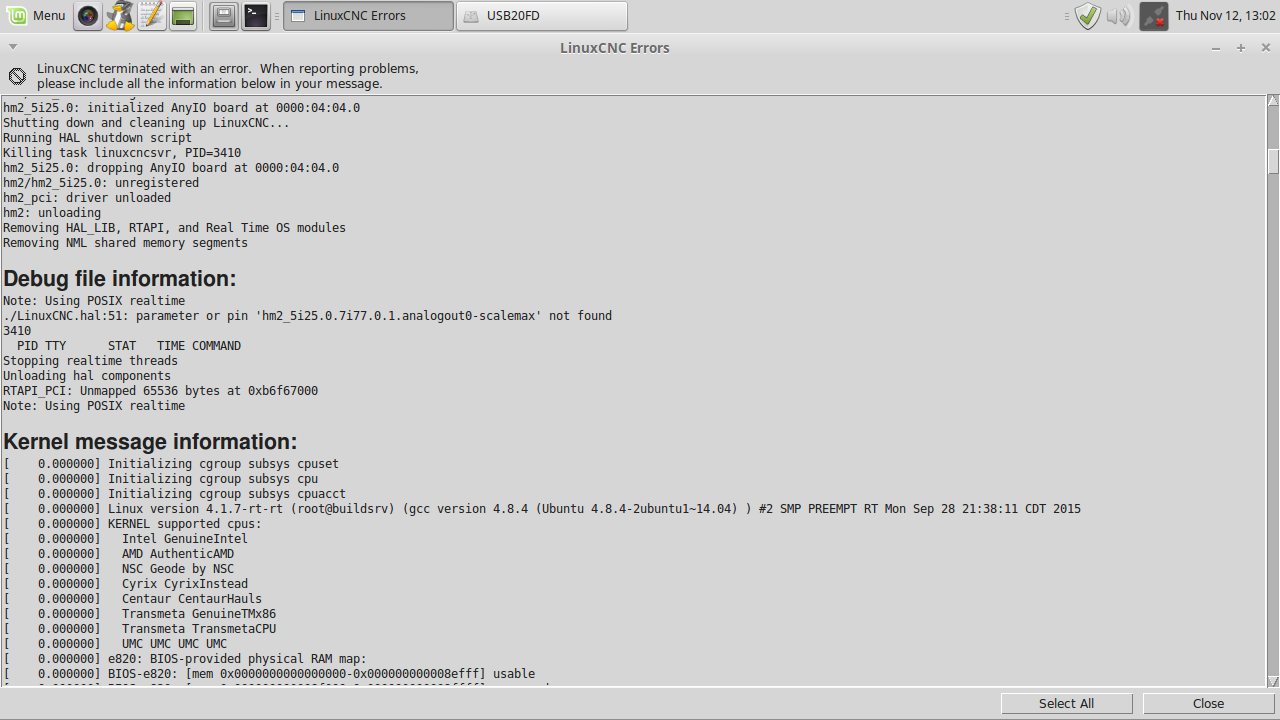
I will attach the current debug file pic, the .ini & .hal that I am working with.
Many thanks!
Edit: Current settings per A-M-C are as follows:
Just to be clear, to reset the drives for encoder velocity mode and to work with the inhibit/enable signal, set the switches as follows:
SW1-1 OFF
SW1-2 OFF
SW1-3 OFF
SW1-4 OFF
SW1-5 OFF
SW1-6 ON**
Also, set Potentiometer 4 back to the middle of the adjustment range. This means going 14 turns in one direction and then going back 7 turns in the opposite direction
**SW1-6 sets the velocity feedback polarity. Once you have the motors running you might need to switch this to the OFF position if you have a runaway condition.
Many thanks
Here is a very simple test you can do to make sure the drives are working okay.
First of all, disconnect everything from the drive. For this test all you need is power and ground connected to P2 to start.
Start with the drive powered off, the LED should not be on, then follow these steps:
1) Set the switches as follows SW1-1 ON, SW1-2 OFF, SW1-3 OFF, SW1-4 ON, SW1-5 ON, SW1-6 ON.
2) Turn potentiometer #4 clockwise 14 turns. Then turn it back counter clockwise 7 turns to make sure it's in the middle of its adjustment range.
3) Power up the drive and verify that the LED is green. If the LED is green, continue. If the LED is red, double check that SW1-2 is OFF and if it's still red, let me know.
4) Power down the drive, once again the LED should be off.
5) Connect the motor leads to MA and MB.
6) Power on the drive and make sure the LED is still green.
7) Start to adjust potentiometer 4 in either direction. As you do this, the motor should start to move. Turn the potentiometer the other way to make sure it moves in both directions and that the LED stays green the entire time.
It was good news that all is good with the drives. I have tested each lead from the TB3 to each encoder plug at the encoder to insure the lead is going where its suppose to be going. Now if the linux mint is running and e-stop is released and linuxcnc is started to run F1 is down, both DRO works correctly, including direction; F1 up now, worked just as before, both DRO works correctly, including direction; click F2 (is down) x axis motor oscillates until "joint 1 following error" appears, the DRO work. If you click F2 again. immediately motor oscillates again.
I will attach the current debug file pic, the .ini & .hal that I am working with.
Many thanks!
Edit: Current settings per A-M-C are as follows:
Just to be clear, to reset the drives for encoder velocity mode and to work with the inhibit/enable signal, set the switches as follows:
SW1-1 OFF
SW1-2 OFF
SW1-3 OFF
SW1-4 OFF
SW1-5 OFF
SW1-6 ON**
Also, set Potentiometer 4 back to the middle of the adjustment range. This means going 14 turns in one direction and then going back 7 turns in the opposite direction
**SW1-6 sets the velocity feedback polarity. Once you have the motors running you might need to switch this to the OFF position if you have a runaway condition.
Many thanks
Last edit: 5 years 11 months ago by new2linux. Reason: spelling & current settings
Please Log in or Create an account to join the conversation.
- Todd Zuercher
- Offline
- Platinum Member
-
Less
More
- Posts: 4793
- Thank you received: 1481
5 years 11 months ago #189144
by Todd Zuercher
Replied by Todd Zuercher on topic Replacing Advanced Motion Controls "brush type 12A8 with "Axcent" amplifier
You now need to follow the steps for tuning the PID loop in Linuxcnc. The X-axis oscillates and shuts down because you have a un-tuned values for your PID for the x-axis. Sart with a very low value for P and gradually increase it until you begin to see instability, then reduce it by 10% or until the oscillation stops. Look up and follow one of the tuning tutorials out there. (This is a decent one
gnipsel.com/linuxcnc/tuning/servo.html
)
The following user(s) said Thank You: new2linux
Please Log in or Create an account to join the conversation.
- new2linux
- Offline
- Platinum Member
-
Less
More
- Posts: 711
- Thank you received: 9
5 years 11 months ago #189219
by new2linux
Replied by new2linux on topic Replacing Advanced Motion Controls "brush type 12A8 with "Axcent" amplifier
Todd, Many thanks! While tuning I see there are different pins as the source of the signals displayed on Hal oscilloscope. There are the ones shown in the link to JT's servo tuning guide, does not have "hm2_5i25.0.encoder.00.velocity" or "pid.x.output". While tuning the drives the red LED is on (steady, both drives), as soon as F2 is down the red led goes to green until F2 is clicked again or joint following error appears. The tuning requires the motor to have the actual load applied (the belt is on). So far (by no means complete) it appears that with the feed set at 7"/min the P=.849 & FF1=.0255 & FF2=.00425, has good resistance to turning even at the low value. If P start at 2000, will oscillate (I started at 2000, went higher, at first) then all the way down. Use the reference on JTs of the values of FF1 & ("FF2 about 0.005% of P") and "FF1about 0.03% of P". My concern is the red LED and what pins to monitor?
many thanks
many thanks
Please Log in or Create an account to join the conversation.
- Todd Zuercher
- Offline
- Platinum Member
-
Less
More
- Posts: 4793
- Thank you received: 1481
5 years 11 months ago #189225
by Todd Zuercher
Replied by Todd Zuercher on topic Replacing Advanced Motion Controls "brush type 12A8 with "Axcent" amplifier
To make his tutorial more generic JT didn't use hardware specific pins in his examples. (Not everyone uses a Mesa card for their machine connection.)
If you post some screen shots of Halscope for a short move, we might be able to make tuning suggestions.
While tuning it is often helpful to temporarily set the following error limits (both min and max) to larger values in the ini file. But not so large they won't stop a runaway. Something like an inch or a couple cm. Once you are finished tuning don't forget to reset the f-error limits to sane values.
If you post some screen shots of Halscope for a short move, we might be able to make tuning suggestions.
While tuning it is often helpful to temporarily set the following error limits (both min and max) to larger values in the ini file. But not so large they won't stop a runaway. Something like an inch or a couple cm. Once you are finished tuning don't forget to reset the f-error limits to sane values.
The following user(s) said Thank You: new2linux
Please Log in or Create an account to join the conversation.
- new2linux
- Offline
- Platinum Member
-
Less
More
- Posts: 711
- Thank you received: 9
5 years 11 months ago #189230
by new2linux
Replied by new2linux on topic Replacing Advanced Motion Controls "brush type 12A8 with "Axcent" amplifier
Todd, many thanks. From your comment " following error limits (both min and max) to larger values " this is actually looks as follows: FERROR & MIN_ERROR; correct? This is the 3nd & 4th lines under the (AXIS 0) heading. Just want to be clear.
many thanks!
many thanks!
Please Log in or Create an account to join the conversation.
- tommylight
- Offline
- Moderator
-

Less
More
- Posts: 22011
- Thank you received: 7491
5 years 11 months ago #189235
by tommylight
But i never do that, i use this:
forum.linuxcnc.org/10-advanced-configura...ning-detailed-how-to
Replied by tommylight on topic Replacing Advanced Motion Controls "brush type 12A8 with "Axcent" amplifier
Yes.new2linux wrote: Todd, many thanks. From your comment " following error limits (both min and max) to larger values " this is actually looks as follows: FERROR & MIN_ERROR; correct? This is the 3nd & 4th lines under the (AXIS 0) heading. Just want to be clear.
many thanks!
But i never do that, i use this:
forum.linuxcnc.org/10-advanced-configura...ning-detailed-how-to
The following user(s) said Thank You: new2linux
Please Log in or Create an account to join the conversation.
Time to create page: 2.583 seconds