
- Posts: 617
- Thank you received: 75
Replacing Advanced Motion Controls "brush type 12A8 with "Axcent" amplifier
- OT-CNC
- Offline
- Platinum Member
-

Less
More
5 years 11 months ago #188334
by OT-CNC
Replied by OT-CNC on topic Replacing Advanced Motion Controls "brush type 12A8 with "Axcent" amplifier
AdvancedMotionControl
Welcome to linuxcnc and thanks for offering to help!
Welcome to linuxcnc and thanks for offering to help!
The following user(s) said Thank You: new2linux
Please Log in or Create an account to join the conversation.
- Todd Zuercher
- Offline
- Platinum Member
-
Less
More
- Posts: 4793
- Thank you received: 1481
5 years 11 months ago #188335
by Todd Zuercher
Replied by Todd Zuercher on topic Replacing Advanced Motion Controls "brush type 12A8 with "Axcent" amplifier
I guess that is another assumption we've made, that you have properly configured and connected the drive for use with a brushed motor.
The following user(s) said Thank You: new2linux
Please Log in or Create an account to join the conversation.
- new2linux
- Offline
- Platinum Member
-
Less
More
- Posts: 711
- Thank you received: 9
5 years 11 months ago - 5 years 11 months ago #188337
by new2linux
Replied by new2linux on topic Replacing Advanced Motion Controls "brush type 12A8 with "Axcent" amplifier
Todd, many thanks for you help. I am working the 1st paragraph including pin 9 issue as per your suggestion. The encoder:
www.usdigital.com/products/encoders/incr.../modules/EM1-2-500-N
is new and the jumpers on 7i77 are moved to the left, because the new encoders are single ended encoder signal. The earlier diagram shows a pictorial representation of the original protrak round connector on back of cabinet with its colors. The newer diagram is w/o the round plug. The address are on the connectors to show from & to info.
Encode does not move DRO. I will be working pin 9 & 11 issues. many thanks!!
AdvancedMotionControls, Many thanks, for your thoughts. The project is 2 axis mill and DC brushed motor application. Please advise.
Many thanks
Edit:Attached is a pic of the debug info when 1st start up w/o power to motor, with the pin 9 & 11 connected to TB5 (positions 1 & 2). This also has 6 & 7 connected to TB5, as in earlier post. When I power up motors & restart linuxcnc, I get logo screen, the motors are in motion. As per suggestion SW1-5 is off (all SW1-1 to-6 is off). DRO does not move.
As per Todd's suggestion: . If you have accidentally already ruined the enable output for that drive on the 7i77 card, you can use one of the other unused enable outputs (they are all switched together anyway) or set up a relay and control it with one of the regular field outputs. This is TB2? Pick a different location use 1 through 4, like 2?
many thanks!
Encode does not move DRO. I will be working pin 9 & 11 issues. many thanks!!
AdvancedMotionControls, Many thanks, for your thoughts. The project is 2 axis mill and DC brushed motor application. Please advise.
Many thanks
Edit:Attached is a pic of the debug info when 1st start up w/o power to motor, with the pin 9 & 11 connected to TB5 (positions 1 & 2). This also has 6 & 7 connected to TB5, as in earlier post. When I power up motors & restart linuxcnc, I get logo screen, the motors are in motion. As per suggestion SW1-5 is off (all SW1-1 to-6 is off). DRO does not move.
As per Todd's suggestion: . If you have accidentally already ruined the enable output for that drive on the 7i77 card, you can use one of the other unused enable outputs (they are all switched together anyway) or set up a relay and control it with one of the regular field outputs. This is TB2? Pick a different location use 1 through 4, like 2?
many thanks!
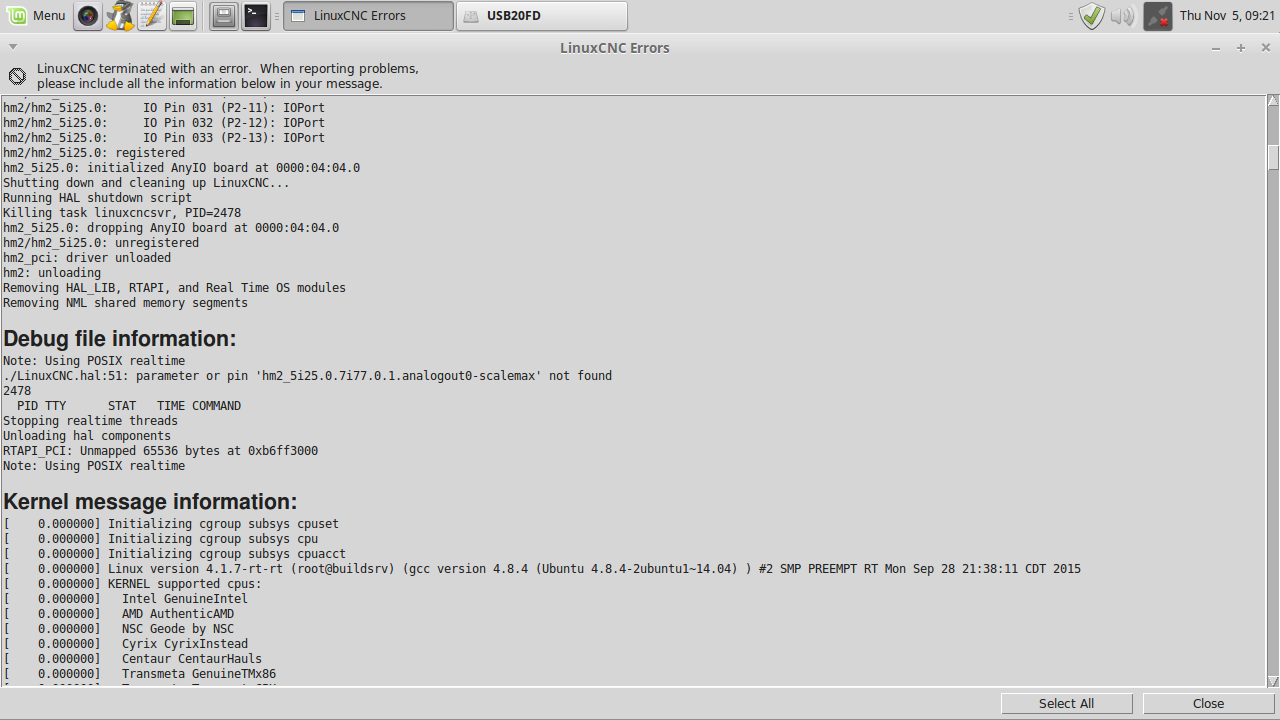
Last edit: 5 years 11 months ago by new2linux. Reason: Edit:Debug Pic
Please Log in or Create an account to join the conversation.
- new2linux
- Offline
- Platinum Member
-
Less
More
- Posts: 711
- Thank you received: 9
5 years 11 months ago #188413
by new2linux
Replied by new2linux on topic Replacing Advanced Motion Controls "brush type 12A8 with "Axcent" amplifier
Many thanks for all the help. I have used TB2 2 (the old one was 1) because I may have accidentally ruined the enable output for that drive on the 7i77 card (If this is not ruined, I will go back to use 1). This did not change the motor turning as soon as power up and linuxcnc is running. The DRO does not move, no motion on the screen, like the yellow path (use Ctrl K to clear). Pins 4,5,6,7,9,& 11 are to TB3 or TB5. I have reached out to AMC through email support.
Many thanks, all help warmly welcomed!
Many thanks, all help warmly welcomed!
Please Log in or Create an account to join the conversation.
- Todd Zuercher
- Offline
- Platinum Member
-
Less
More
- Posts: 4793
- Thank you received: 1481
5 years 11 months ago #188420
by Todd Zuercher
Replied by Todd Zuercher on topic Replacing Advanced Motion Controls "brush type 12A8 with "Axcent" amplifier
Ok, First address the enable signal. When you power the machine and start Linuxcnc, and the motor moves, what is the order of what is happening? Are the drives powered before Linuxcnc is started? (this is ok if it is what you want). Do the drives start moving now? Are the drives powered up after Linuxcnc is started? Do the motors move before Linuxcnc asserts the enable signal or after? If they are moving before the enable signal is asserted, do they stop when the enable signal is sent? It might be that the signal needs to be inverted either at the drive (dip switch SW1-5 on the drive) or in Linuxcnc.
Once you have that working we need to look at why you are not seeing encoder feedback in Linuxcnc. Can you post a copy of the hal and ini files you are currently using? In the wiring drawing you posted a few posts back, it stated you had the X encoder connected to TB3 pins 1-6 that would be for encoder.00. But in the last hal file you posted you had the X axis configured for encoder.04. That would explain the no encoder feed back, if it is how you still have it connected and configured.
Once you have that working we need to look at why you are not seeing encoder feedback in Linuxcnc. Can you post a copy of the hal and ini files you are currently using? In the wiring drawing you posted a few posts back, it stated you had the X encoder connected to TB3 pins 1-6 that would be for encoder.00. But in the last hal file you posted you had the X axis configured for encoder.04. That would explain the no encoder feed back, if it is how you still have it connected and configured.
The following user(s) said Thank You: new2linux
Please Log in or Create an account to join the conversation.
- new2linux
- Offline
- Platinum Member
-
Less
More
- Posts: 711
- Thank you received: 9
5 years 11 months ago #188425
by new2linux
Replied by new2linux on topic Replacing Advanced Motion Controls "brush type 12A8 with "Axcent" amplifier
Todd, Many thanks!! As I start the CPU is running linux mint. If I start linuxcnc w/o power supply on will get debug message attached. I apply power to power supply, no motor motion; when linuxcnc is running with logo up, motor no motion; when I click on the left (F1) button at the top, no motion; when I click the right button (F2) motors will run, click right (f2) and motor will stop, motor is not locked, will turn with your hand.
many thanks!!
many thanks!!

Please Log in or Create an account to join the conversation.
Time to create page: 5.904 seconds