
- Posts: 711
- Thank you received: 9
Replacing Advanced Motion Controls "brush type 12A8 with "Axcent" amplifier
- new2linux
- Offline
- Platinum Member
-

Less
More
6 years 4 days ago - 6 years 4 days ago #187574
by new2linux
Replied by new2linux on topic Replacing Advanced Motion Controls "brush type 12A8 with "Axcent" amplifier
Todd, I had a project that I was not confidant of some of the parts because they were proprietary or had no documentation. Nearly all of that has been replaced or the data is verified.
Quote from Todd
"We only suggested adding wires from the A and B terminals of the 7i77 to the encoder A and B terminals of the servo drive, to enable Velocity control of the drive and make tuning them easier."
This would be a set of leads going under the same screw (location 1 & 4, TB3; both 00 & 01 encoders) on the encoder plug on the 7i77 card (A and B terminals) to AMC (P1-Siginal Drive) pin 6 (ENCODER-B IN) and pin 7 (ENCODER-A IN) as per (sheet 4 of 9) of AB15A100 manual.
Quote from Todd
"We only suggested adding wires from the A and B terminals of the 7i77 to the encoder A and B terminals of the servo drive, to enable Velocity control of the drive and make tuning them easier."
This would be a set of leads going under the same screw (location 1 & 4, TB3; both 00 & 01 encoders) on the encoder plug on the 7i77 card (A and B terminals) to AMC (P1-Siginal Drive) pin 6 (ENCODER-B IN) and pin 7 (ENCODER-A IN) as per (sheet 4 of 9) of AB15A100 manual.
Last edit: 6 years 4 days ago by new2linux.
Please Log in or Create an account to join the conversation.
- OT-CNC
- Offline
- Platinum Member
-
Less
More
- Posts: 617
- Thank you received: 75
6 years 4 days ago - 6 years 4 days ago #187580
by OT-CNC
P1 (pin 1 on signal connector) based on your attached drive pdf is a 10v output! Why connect to that? Your encoders are getting power from the 7i77 5v. If anything you would share ground on pin 2 (signal ground) if that is the correct pdf.
Correction, I just read that wrong. coffee not kicked in yet LOL... you are just calling out the P1 connector and not actually connecting to pin 1, if I understand correcly?
You may still need to connect ground pin.
Replied by OT-CNC on topic Replacing Advanced Motion Controls "brush type 12A8 with "Axcent" amplifier
This would be a set of leads going under the same screw (location 1 & 4, TB3; both 00 & 01 encoders) on the encoder plug on the 7i77 card (A and B terminals) to AMC (P1-Siginal Drive) pin 6 (ENCODER-B IN) and pin 7 (ENCODER-A IN) as per (sheet 4 of 9) of AB15A100 manual.
P1 (pin 1 on signal connector) based on your attached drive pdf is a 10v output! Why connect to that? Your encoders are getting power from the 7i77 5v. If anything you would share ground on pin 2 (signal ground) if that is the correct pdf.
Correction, I just read that wrong. coffee not kicked in yet LOL... you are just calling out the P1 connector and not actually connecting to pin 1, if I understand correcly?
You may still need to connect ground pin.
Last edit: 6 years 4 days ago by OT-CNC. Reason: Correction
The following user(s) said Thank You: new2linux
Please Log in or Create an account to join the conversation.
- OT-CNC
- Offline
- Platinum Member
-
Less
More
- Posts: 617
- Thank you received: 75
6 years 4 days ago #187585
by OT-CNC
How are you moving the table? I suggest manually moving the table with the servo powered off to see if the dro counts.
I would connect your new encoder to the 7i77 1st to see if you can get it to read in then make the connection to the drive.
If you're switching to another encoder connection on the board make sure the hal and ini are configured correctly.
Replied by OT-CNC on topic Replacing Advanced Motion Controls "brush type 12A8 with "Axcent" amplifier
Todd, Many, many thanks for your help. I have used the pin selection you suggested, no motion or change of any kind. No DRO. Through process of elimination, the last component is the 7i77 card. To edit this to accept a different encoder at different location like TB4 (encoder 03 & 04). Is this how I should be thinking about this?
How are you moving the table? I suggest manually moving the table with the servo powered off to see if the dro counts.
I would connect your new encoder to the 7i77 1st to see if you can get it to read in then make the connection to the drive.
If you're switching to another encoder connection on the board make sure the hal and ini are configured correctly.
The following user(s) said Thank You: new2linux
Please Log in or Create an account to join the conversation.
- new2linux
- Offline
- Platinum Member
-
Less
More
- Posts: 711
- Thank you received: 9
6 years 4 days ago - 6 years 3 days ago #187587
by new2linux
Replied by new2linux on topic Replacing Advanced Motion Controls "brush type 12A8 with "Axcent" amplifier
OT-CNC, Many thanks for your help. I have tried to move table, no change to DRO. Currently new encoder is connected as per diagram. I am close to getting the x axis with wire under screw at encoder 00 (TB3) going to driver pin 6 and 7, plan to try x axis only, at this time.
Many thanks!!
I have plugged power supply in to the wall and released e-stop, the software was in process of boot up and as soon as releasing e-stop x axis started jerking and red LED on AMC driver was blinking, so I quickly reset e-stop. Open to ideas. Many thanks!
Edit: I will copy (save as starting point) and edit the .ini & .hal files with the "find and replace" (this is what I recall, maybe not correct) to use TB4 (ENCODER 4 & 5 and TB5; DRV 4 & 5 ). Use 04 and 05 in the edit process. What else should I be thinking about?
Many,many thanks to all for the your help!
Many thanks!!
I have plugged power supply in to the wall and released e-stop, the software was in process of boot up and as soon as releasing e-stop x axis started jerking and red LED on AMC driver was blinking, so I quickly reset e-stop. Open to ideas. Many thanks!
Edit: I will copy (save as starting point) and edit the .ini & .hal files with the "find and replace" (this is what I recall, maybe not correct) to use TB4 (ENCODER 4 & 5 and TB5; DRV 4 & 5 ). Use 04 and 05 in the edit process. What else should I be thinking about?
Many,many thanks to all for the your help!
Last edit: 6 years 3 days ago by new2linux. Reason: Applied power, edit 2; edit .ini & .hal
Please Log in or Create an account to join the conversation.
- new2linux
- Offline
- Platinum Member
-
Less
More
- Posts: 711
- Thank you received: 9
6 years 3 days ago - 6 years 2 days ago #187703
by new2linux
Replied by new2linux on topic Replacing Advanced Motion Controls "brush type 12A8 with "Axcent" amplifier
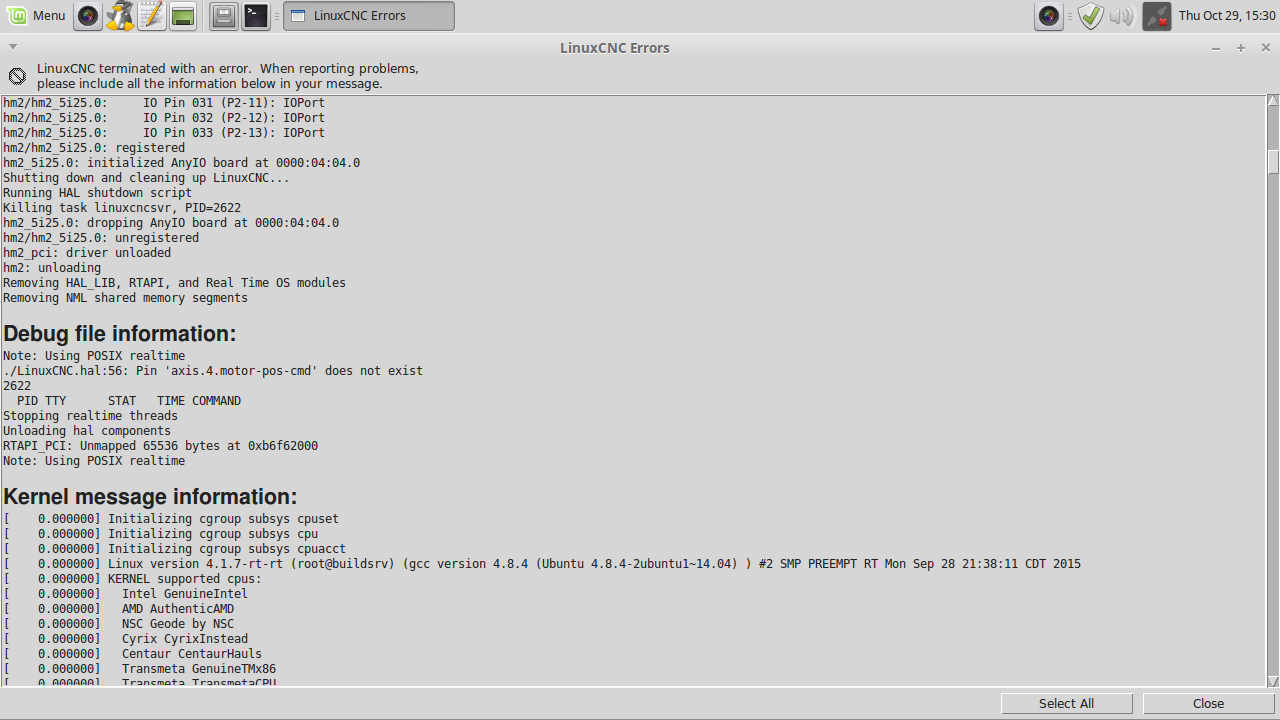
Many thanks, for all the help! I have edited the .ini & .hal files with the "find and replace" go from 00 to 04 & 01 to 05. The error is shown in the pic. This included the new locations TB4 & TB5 on the 7i77 card with the "jumpers" to the left. The wires under the screw on pins 1 & 4 (to provide additional input) are off for now. The LEDs on 7i77 are ok with exception of red LED that usually goes blinking (I think) after establishing connection.
Many thanks
Edit: similar error message.
Many thanks
Edit: similar error message.
Last edit: 6 years 2 days ago by new2linux. Reason: new .ini & .hal files
Please Log in or Create an account to join the conversation.
- Todd Zuercher
- Offline
- Platinum Member
-
Less
More
- Posts: 4793
- Thank you received: 1480
6 years 2 days ago #187718
by Todd Zuercher
Replied by Todd Zuercher on topic Replacing Advanced Motion Controls "brush type 12A8 with "Axcent" amplifier
In Linuxcnc versions 2.7 and older.
The axis numers can not be skipped and must be in order.
X axis = AXIS_0
Y axis = AXIS_1
Z axis = AXIS_2
Not sure how you ended up with the Axis numbering in your files.
The axis numers can not be skipped and must be in order.
X axis = AXIS_0
Y axis = AXIS_1
Z axis = AXIS_2
Not sure how you ended up with the Axis numbering in your files.
The following user(s) said Thank You: new2linux
Please Log in or Create an account to join the conversation.
Time to create page: 4.292 seconds