Can Asus Tinker Board run LINUXCNC

More
7 years 1 month ago #144399 by PCW
Loading information is in a hm2_rpspi manual page:

man hm2_rpspi

But note, the hm2_rpspi drives works only with the Raspberry PI,
I would try the generic spi driver first on the Tinkerboard:

man hm2_spi

Please Log in or Create an account to join the conversation.

More
7 years 1 month ago #144571 by JackyWu
I tried to load hm2_spi and hm2_rpspi today.
But both of them showed errors.

The error are as follows
Code:
halcmd: loadrt hm2_spi probe 24000000 hm2_spi: rtapi_app_main: No such file or directory (-2) <stdin>:6: waitpid failed /home/atech/linuxcnc-dev/bin/rtapi_app hm2_spi <stdin>:6: /home/atech/linuxcnc-dev/bin/rtapi_app exited without becoming ready <stdin>:6: insmod for hm2_spi failed, returned -1 halcmd: loadrt hm2_rpspi hm2_rpspi: Unsupported Platform, only Raspberry1/2/3 supported. hm2_rpspi: rtapi_app_main: Operation not permitted (-1) <stdin>:7: waitpid failed /home/atech/linuxcnc-dev/bin/rtapi_app hm2_rpspi <stdin>:7: /home/atech/linuxcnc-dev/bin/rtapi_app exited without becoming ready <stdin>:7: insmod for hm2_rpspi failed, returned -1

Is that means something is missing?
How can I fix it?

Please Log in or Create an account to join the conversation.

More
7 years 1 month ago #144608 by PCW
Did you read the hm2_spi manual page?

man hm2_spi

hm2_spi uses the unix spi driver so the path to the driver must be included in the command line that launches hm2_spi

Please Log in or Create an account to join the conversation.

More
7 years 1 month ago #144680 by JackyWu
1.
I had read the hm2_spi manual( linuxcnc.org/docs/2.7/html/man/man9/hm2_spi.9.html ).
And I checked the file in the default folder ( /dev/spidev1.0 ).
I found that I don't have the file named "spidev1.0", but there are "spidev0.0", "spidev0.1", "spidev2.0", "spidev2.1".
So I tried to change the default folder. The error shows as follows
Code:
atech@tinkerboard:~/linuxcnc-dev/src$ halrun halcmd: loadrt hostmot2 Note: Using POSIX realtime hm2: loading Mesa HostMot2 driver version 0.15 halcmd: loadrt hm2_spi spidev_path=/dev/spidev0.0 probe 24000000 hm2_spi: rtapi_app_main: Permission denied (-13) <stdin>:2: waitpid failed /home/atech/linuxcnc-dev/bin/rtapi_app hm2_spi <stdin>:2: /home/atech/linuxcnc-dev/bin/rtapi_app exited without becoming ready <stdin>:2: insmod for hm2_spi failed, returned -1 atech@tinkerboard:~/linuxcnc-dev/src$ halrun halcmd: loadrt hostmot2 Note: Using POSIX realtime hm2: loading Mesa HostMot2 driver version 0.15 halcmd: loadrt hm2_spi spidev_path=/dev/spidev0.1 probe 24000000 hm2_spi: rtapi_app_main: Permission denied (-13) <stdin>:2: waitpid failed /home/atech/linuxcnc-dev/bin/rtapi_app hm2_spi <stdin>:2: /home/atech/linuxcnc-dev/bin/rtapi_app exited without becoming ready <stdin>:2: insmod for hm2_spi failed, returned -1 atech@tinkerboard:~/linuxcnc-dev/src$ halrun halcmd: loadrt hostmot2 Note: Using POSIX realtime hm2: loading Mesa HostMot2 driver version 0.15 halcmd: loadrt hm2_spi spidev_path=/dev/spidev2.0 probe 24000000 hm2_spi: rtapi_app_main: Permission denied (-13) <stdin>:2: waitpid failed /home/atech/linuxcnc-dev/bin/rtapi_app hm2_spi <stdin>:2: /home/atech/linuxcnc-dev/bin/rtapi_app exited without becoming ready <stdin>:2: insmod for hm2_spi failed, returned -1 atech@tinkerboard:~/linuxcnc-dev/src$ halrun halcmd: loadrt hostmot2 Note: Using POSIX realtime hm2: loading Mesa HostMot2 driver version 0.15 halcmd: loadrt hm2_spi spidev_path=/dev/spidev2.1 probe 24000000 hm2_spi: rtapi_app_main: Permission denied (-13) <stdin>:2: waitpid failed /home/atech/linuxcnc-dev/bin/rtapi_app hm2_spi <stdin>:2: /home/atech/linuxcnc-dev/bin/rtapi_app exited without becoming ready <stdin>:2: insmod for hm2_spi failed, returned -1

Since the error shows permission denied, I also tried to do it at root.
However, I even can't use halrun at root.

2.
Since I found this ( forum.linuxcnc.org/27-driver-boards/30548-mesa-7i90-in-spi-mode ).
I also tried to install mesaflash, but it didn't work, either.
The error are as follows
Code:
atech@tinkerboard:~/mesaflash$ ./mesaflash --device 7I90 --spi --addr /dev/spidev0.0 --readhmid open: Permission denied No 7I90 board found

Does anyone know the reason of permission denied?
Is it because of I execute these commands without linking the mesa 7i90 card ?


Please Log in or Create an account to join the conversation.

More
7 years 1 month ago #144698 by PCW
Not sure, on the RPI you need to specifically enable SPI access to run mesaflash
It may be that you have to change the SPI device permissions, though normally
halcmd uses root permissions to access hardware drivers (like LinuxCNC does)

How did you install LinuxCNC? You might also have these issues if you built
LinuxCNC from source but forgot to run the "sudo make setuid" step so LinuxCNC
and halcmd can launch drivers with root permissions.

Please Log in or Create an account to join the conversation.

More
7 years 1 month ago - 7 years 1 month ago #144779 by JackyWu
I installed LinuxCNC following the guide of ( linuxcnc.org/docs/devel/html/code/building-linuxcnc.html )
I had run the "sudo make setuid" when I tried to run "loadrt hm2_spi" yesterday.
The message showed when I ran the "sudo make setuid" were
Code:
atech@tinkerboard:~/linuxcnc-dev/src$ sudo make setuid [sudo] password for atech: chown root ../bin/rtapi_app chmod 4750 ../bin/rtapi_app chown root ../bin/linuxcnc_module_helper chmod 4750 ../bin/linuxcnc_module_helper

And I ran "source ../scripts/rip-environment" and "halrun" after that.
Is there anything wrong?

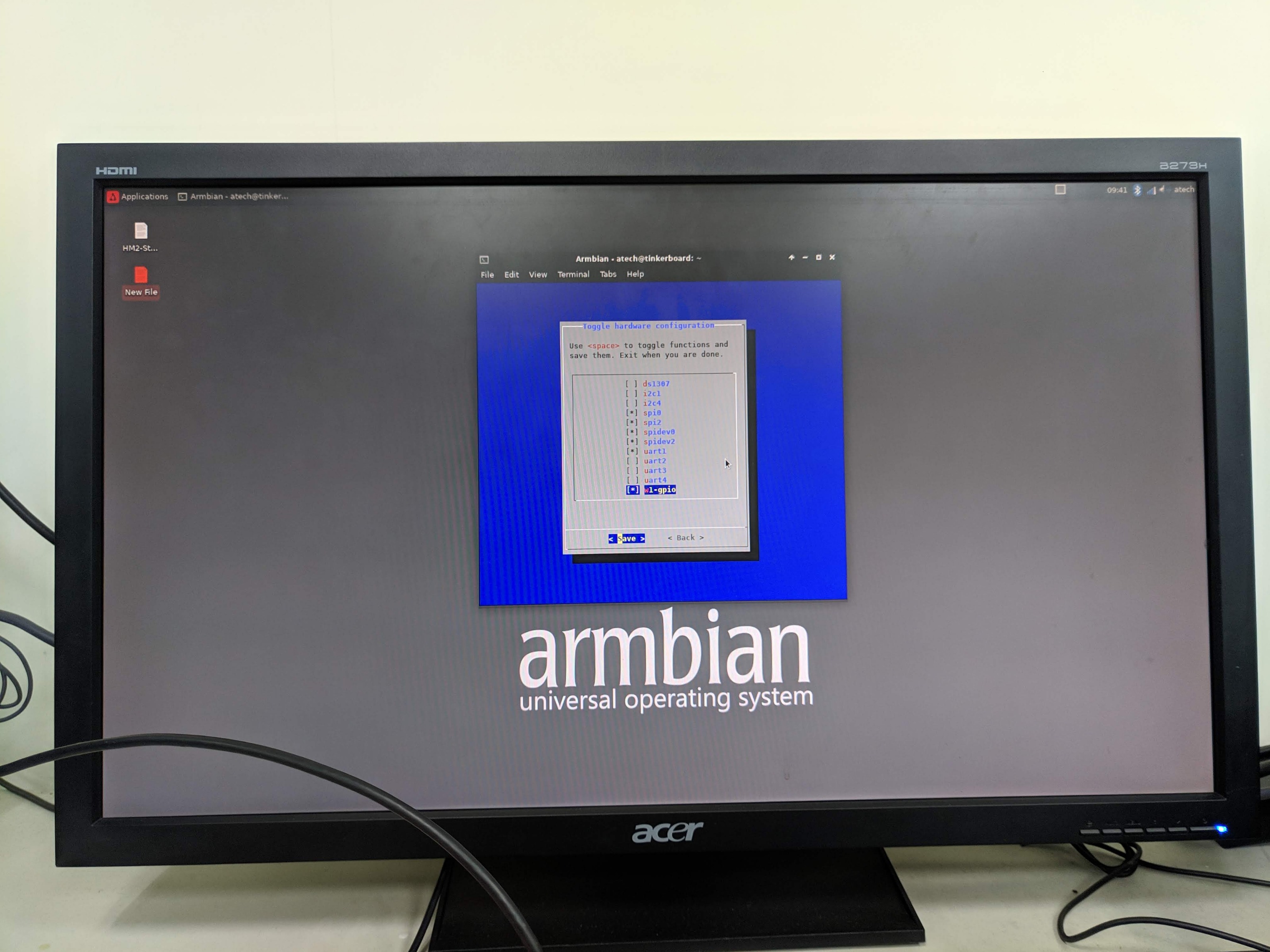
P.S. The SPI function is enabled as the attached image "spi_enable" shown,
Last edit: 7 years 1 month ago by JackyWu.

Please Log in or Create an account to join the conversation.

Time to create page: 0.172 seconds
Powered by Kunena Forum