
- Posts: 22011
- Thank you received: 7491
Hardware latency tests, used PC's
- tommylight
- Away
- Moderator
-

Less
More
6 years 1 month ago #183467
by tommylight
Replied by tommylight on topic Hardware latency tests, used PC's
You are welcomed, always.
Please Log in or Create an account to join the conversation.
- tommylight
- Away
- Moderator
-
Less
More
- Posts: 22011
- Thank you received: 7491
5 years 10 months ago #191790
by tommylight
Replied by tommylight on topic Hardware latency tests, used PC's
This is not a used PC, it is new, but might be useful for someone thinking of getting something similar,
New PC:
-MB Gigabyte Aorus Elite X570
-AMD Ryzen 5 3500X
-16GB (4X4GB)
-256GB NVME
-AMD RX480
-Noctua NH-D15
-Mesa 6i25
-Mint 20
-4.9.0-13-rt
And the result while doing things on the PC, doing a lot of things as can be seen on the bottom left side of the screen:
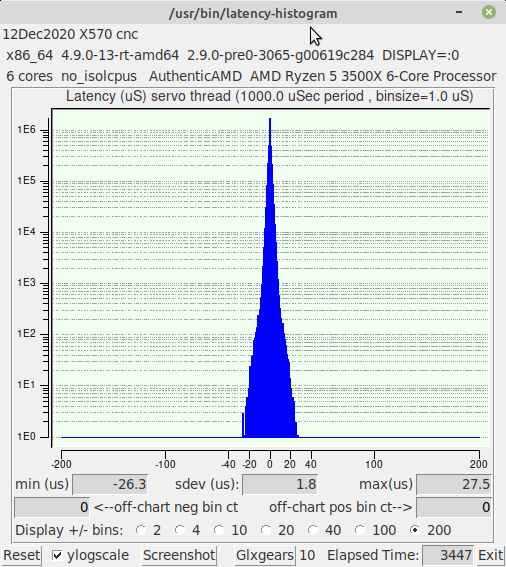
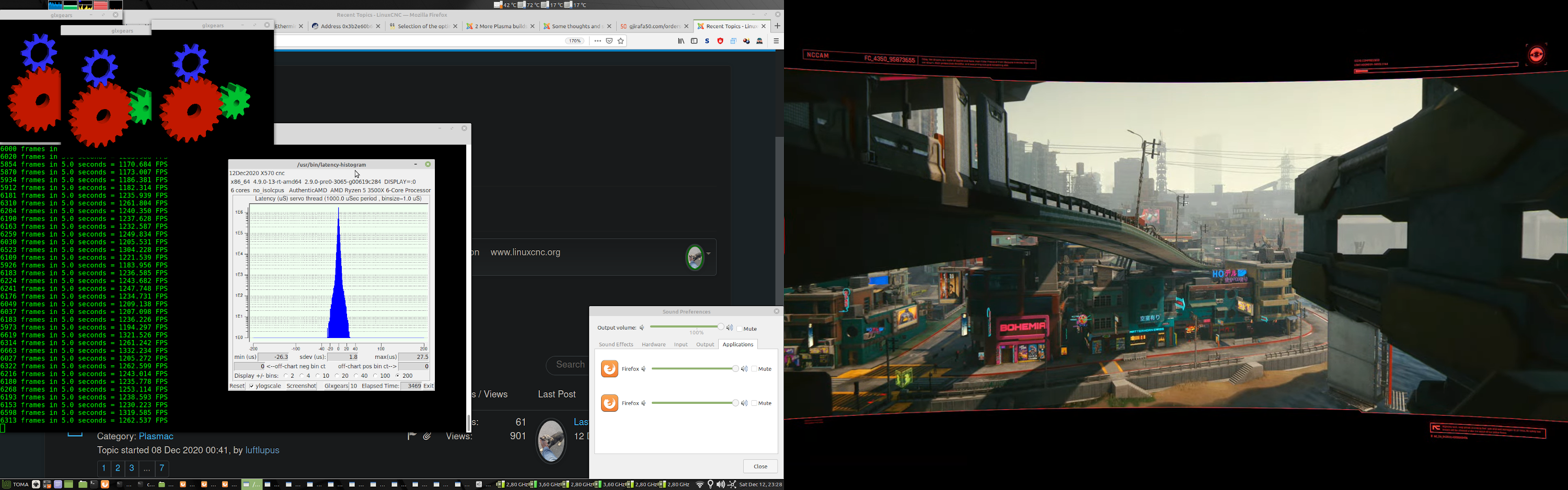
Had to scale down the image, to large to upload.
New PC:
-MB Gigabyte Aorus Elite X570
-AMD Ryzen 5 3500X
-16GB (4X4GB)
-256GB NVME
-AMD RX480
-Noctua NH-D15
-Mesa 6i25
-Mint 20
-4.9.0-13-rt
And the result while doing things on the PC, doing a lot of things as can be seen on the bottom left side of the screen:
Had to scale down the image, to large to upload.
Please Log in or Create an account to join the conversation.
- countersunkentreasure
- Offline
- New Member
-

Less
More
- Posts: 5
- Thank you received: 1
5 years 6 months ago #207331
by countersunkentreasure
Did either of you end up rerunning the Optiplex 780 with the extra memory? What kind of results did you end up with? I've got one with the E7500 2.93Ghz and 8GB. Just got it setup triple booting W7 x86; LinuxCNC 2.8.0 Debian 7 Wheezy RTAI; and LinuxCNC 2.8.0 Debian 10 Buster PREEMPT-RT ISO . Planning to run via parallel. I just ran across your testing script and I'll try to figure it out. Wanted something to compare it to if you had it. Thanks!
Replied by countersunkentreasure on topic Hardware latency tests, used PC's
tommylight wrote: forum.linuxcnc.org/18-computer/38838-har...-pc-s?start=0#163885
That was with 2GB of RAM, adding another 2GB made it much better and usable.
For software stepping it needs an older RTAI kernel to work, new ones do not work on them, it has a nice latency so parallel port can be used.
For Mesa boards it will need at least 4GB of RAM to have usable latency with new Preempt-RT kernels, use the 4.9 as it has the best latency on it.
wiremonkey wrote: Thanks for this senior tommylight. I'm going to take whack at setting up an Odroid and keep the Optiplex as a test (after adding to more GB RAM).
T-
Did either of you end up rerunning the Optiplex 780 with the extra memory? What kind of results did you end up with? I've got one with the E7500 2.93Ghz and 8GB. Just got it setup triple booting W7 x86; LinuxCNC 2.8.0 Debian 7 Wheezy RTAI; and LinuxCNC 2.8.0 Debian 10 Buster PREEMPT-RT ISO . Planning to run via parallel. I just ran across your testing script and I'll try to figure it out. Wanted something to compare it to if you had it. Thanks!
Please Log in or Create an account to join the conversation.
- tommylight
- Away
- Moderator
-
Less
More
- Posts: 22011
- Thank you received: 7491
5 years 6 months ago #207333
by tommylight
Replied by tommylight on topic Hardware latency tests, used PC's
Nope, can not find them anymore.
Got a Dell 7010 and a Fujitsu today, Dell is surprisingly good while Fujitsu is surprisingly bad !

No internet in the new shop (metal cladding does not help WiFi) so if at all possible i will try to run some more tests on them tomorrow or ...
In the mean time i am adding the below :
Got a Dell 7010 and a Fujitsu today, Dell is surprisingly good while Fujitsu is surprisingly bad !
No internet in the new shop (metal cladding does not help WiFi) so if at all possible i will try to run some more tests on them tomorrow or ...
In the mean time i am adding the below :
Please Log in or Create an account to join the conversation.
- tommylight
- Away
- Moderator
-
Less
More
- Posts: 22011
- Thank you received: 7491
5 years 6 months ago #207337
by tommylight
Replied by tommylight on topic Hardware latency tests, used PC's
New PC:
-MB Asus ROG Strix B550-i Gaming
-AMD Ryzen 5 3600
-32GB HyperX 3600 CL16 (2X16GB)
-32GB NVME (yes 32, main drive)
-1TB Intel NVME ( not mounted, backup only )
-Saphire Radeon RX580 /8GB
-Cooler Master MasterCool 240 Lite water cooling
-Corsair CX550F RGB power supply
-Cooler Master NR200P case
-4.9.0-13-rt on Linux Mint 19.3, LinuxCNC 2.9/Master
And the result while doing things on the PC, doing a lot of things as can be seen on the bottom left side of the screen:
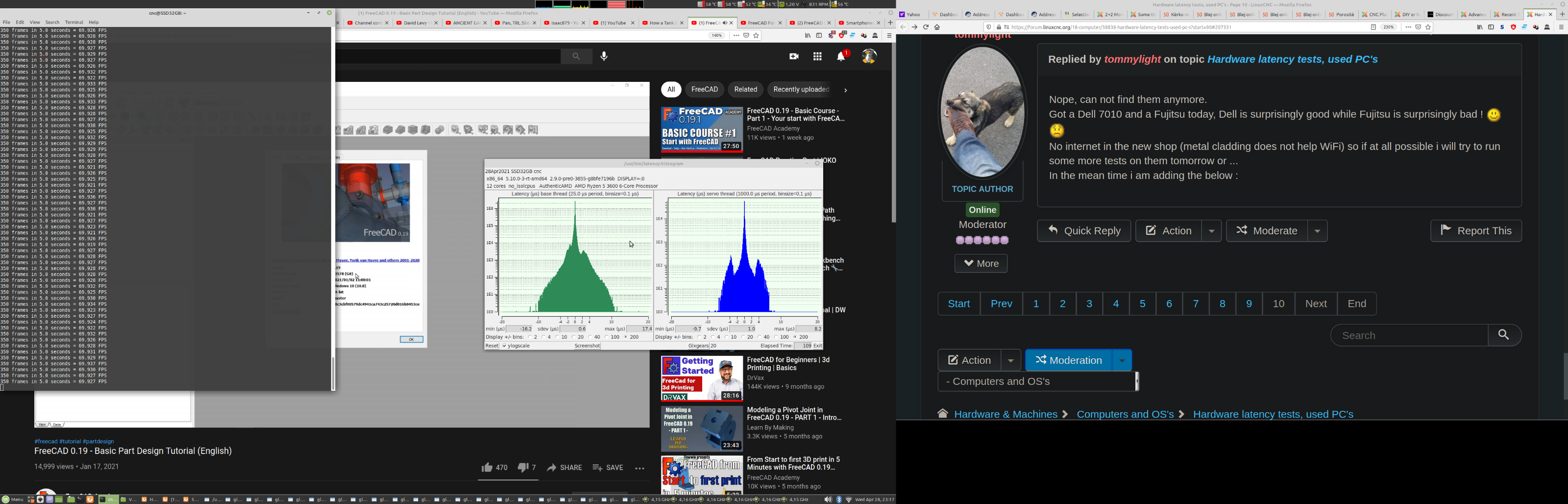
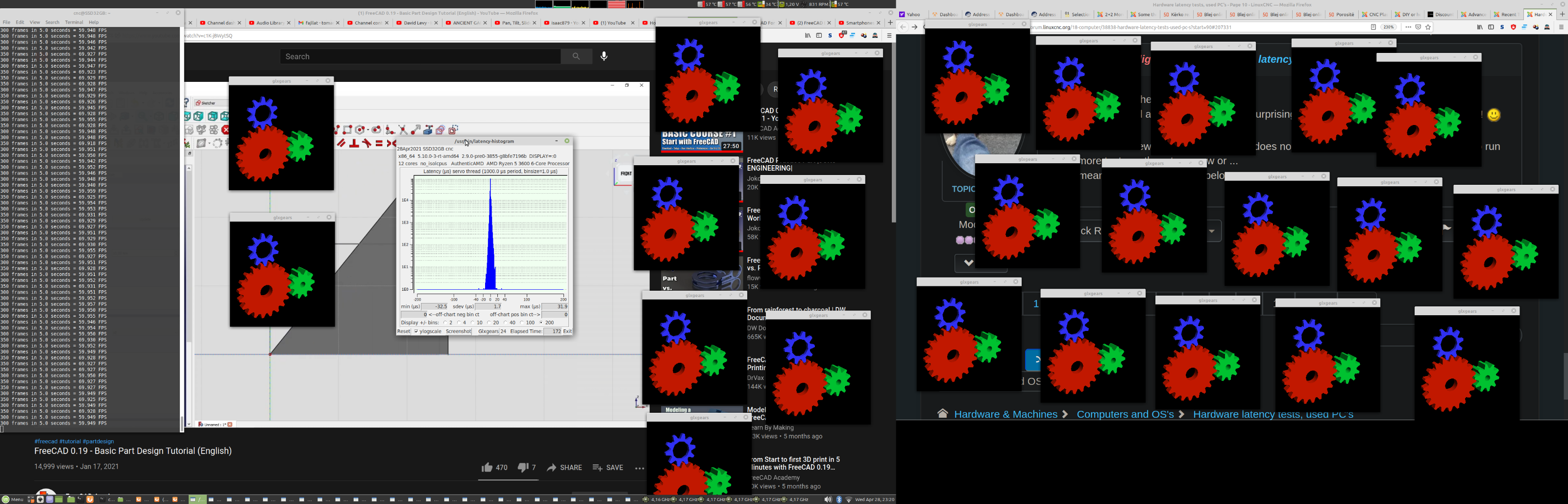
--NOT a recommendation, the above costs over 1000 Euro without the graphic card !!!
-MB Asus ROG Strix B550-i Gaming
-AMD Ryzen 5 3600
-32GB HyperX 3600 CL16 (2X16GB)
-32GB NVME (yes 32, main drive)
-1TB Intel NVME ( not mounted, backup only )
-Saphire Radeon RX580 /8GB
-Cooler Master MasterCool 240 Lite water cooling
-Corsair CX550F RGB power supply
-Cooler Master NR200P case
-4.9.0-13-rt on Linux Mint 19.3, LinuxCNC 2.9/Master
And the result while doing things on the PC, doing a lot of things as can be seen on the bottom left side of the screen:
--NOT a recommendation, the above costs over 1000 Euro without the graphic card !!!
Please Log in or Create an account to join the conversation.
- TheFarfar
- Offline
- New Member
-
Less
More
- Posts: 2
- Thank you received: 2
5 years 5 months ago - 5 years 5 months ago #209472
by TheFarfar
Replied by TheFarfar on topic Hardware latency tests, used PC's
I've been testing an old computer with Asus P5B-MX motherboard, 2x2GB RAM, Intel Core2 Q6600, 128 GB SSD and Nvidia GT210.
This is my result running 5 glxgears, 4k youtube video (auto quality) and stress -c 2 -i 1 -m 1 -d 1:
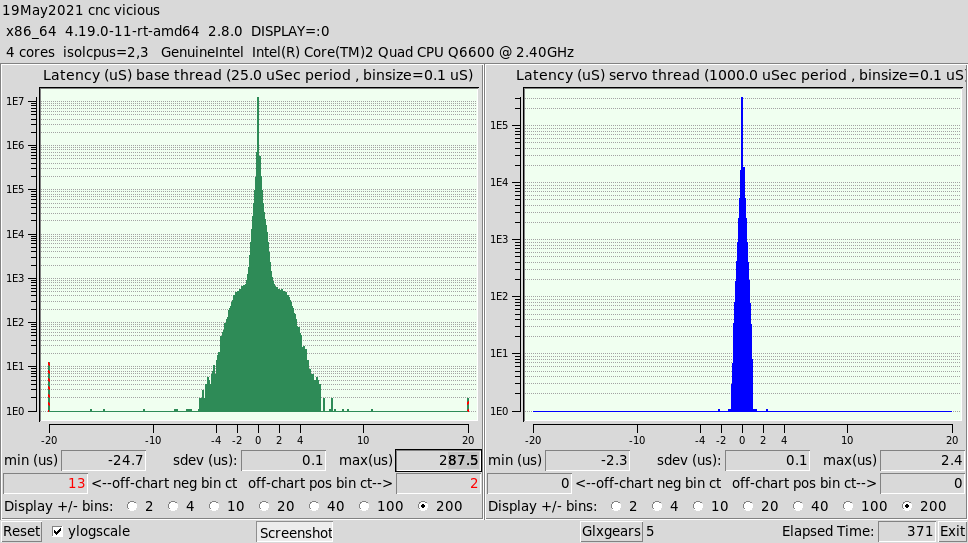
As you can see most of the time the latency is really solid but once in a while it spikes to really high values.
Not sure if this is something to be concerned about? As you can see it spiked 2 times in 5 minutes. Then there were 2 more spikes during the next 10 minutes.
Is there any way to trace what might cause the spike?
This is my result running 5 glxgears, 4k youtube video (auto quality) and stress -c 2 -i 1 -m 1 -d 1:
As you can see most of the time the latency is really solid but once in a while it spikes to really high values.
Not sure if this is something to be concerned about? As you can see it spiked 2 times in 5 minutes. Then there were 2 more spikes during the next 10 minutes.
Is there any way to trace what might cause the spike?
Last edit: 5 years 5 months ago by TheFarfar. Reason: Added SSD info
Please Log in or Create an account to join the conversation.
Time to create page: 0.172 seconds