
- Posts: 22011
- Thank you received: 7491
Hardware latency tests, used PC's
- tommylight
- Away
- Moderator
-

Less
More
5 years 5 months ago #209476
by tommylight
Replied by tommylight on topic Hardware latency tests, used PC's
For parallel port use it might cause issues, but either way you look at it RTAI kernel is much better for that.
For Mesa boards that is all fine as there is no need for a base period at all.
For Mesa boards that is all fine as there is no need for a base period at all.
Please Log in or Create an account to join the conversation.
- TheFarfar
- Offline
- New Member
-

Less
More
- Posts: 2
- Thank you received: 2
5 years 5 months ago #209530
by TheFarfar
Replied by TheFarfar on topic Hardware latency tests, used PC's
On Debian Wheezy with RTAI this computer performed slightly better with the Nvidia GT210 card but it seems it's much more solid with the built-in Intel GMA 3000 on Buster with preempt_rt. With the GT210 on Buster I get the latency posted earlier in thread.
Hardware is:
Asus P5B-MX, Intel Core2 Quad Q6600, 4 GB RAM (2x2 GB in dual channel), some 128 GB SSD i had laying around. Everything not needed disabled in BIOS.
Module pcspkr is not loaded, the script encounters an error when trying to detect if it's loaded.
Slight overclock for the CPU, running 290 MHz * 9 (266*9 stock). RAM running at 667 MHz.
Hardware is:
Asus P5B-MX, Intel Core2 Quad Q6600, 4 GB RAM (2x2 GB in dual channel), some 128 GB SSD i had laying around. Everything not needed disabled in BIOS.
Module pcspkr is not loaded, the script encounters an error when trying to detect if it's loaded.
Slight overclock for the CPU, running 290 MHz * 9 (266*9 stock). RAM running at 667 MHz.
Warning: Spoiler!
*****************************************
General info:
ASUSTeK Computer INC., System Product Name
Bios version 0605, dated 11/30/2007
Chipset: Harddisk is non-rotational, ie. SSD
The amount of swap currently used is 0
================================================================================
CPU related data:
model name : Intel(R) Core(TM)2 Quad CPU Q6600 @ 2.40GHz
cpu cores : 4
stepping : 11
cache size : 4096 KB
================================================================================
RAM related data:
Maximum Memory Module Size: 2048 MB
Maximum Total Memory Size: 4096 MB
Maximum Capacity: 4 GB
Maximum Memory Module Size: 2048 MB
Maximum Total Memory Size: 4096 MB
Size: 2048 MB
Size: 2048 MB
================================================================================
GPU related data:
product: 82946GZ/GL Integrated Graphics Controller
configuration: driver=i915 latency=0
================================================================================
Parallel port related data:
number of parallel ports is 1
parport0: PC-style at 0x378 (0x778), irq 7 [PCSPP,TRISTATE,EPP]
================================================================================
Os and desktop related data:
PRETTY_NAME="Debian GNU/Linux 10 (buster)"
Should the info below not match with your machine,
kindly post the output of pstree here, including a brief
desciption of your desktop environment, window manager and
display manager. Tia
forum.linuxcnc.org/18-computer/39370-scr...-of-computer-latency
Desktop environment :
Windowmanager : Openbox
Displaymanager : lightdm
================================================================================
Kernel related data:
Kernel 4.19.0-11-rt-amd64
GRUB_CMDLINE_LINUX_DEFAULT="quiet idle=poll acpi_irq_nobalance noirqbalance intel_idle.max_cstate=0 processor.max_cstate=0 isolcpus=2,3"
Cpu idle driver: none
================================================================================
Kernel modules data:
Check if pcspkr is loaded: Yes, may cause bigger latency.
can be eliminated using:
sudo echo "install pcspkr /bin/true" >/etc/modprobe.d/pcspkr.conf
Check if snd modules are loaded: No, which is good!
================================================================================
Keyboard & Mouse related data:
Number of mice: 1
Mouse 0 : Logitech USB-PS/2 Optical Mouse
Mice attached to USB:
Logitech, Inc. G3 (MX518) Optical Mouse
Keyboards attached to USB:
================================================================================
LinuxCNC related data:
LinuxCNC version is: 2.8.1
================================================================================
Preparing for latency test:
Started glxgears No. 1, 2, 3, 4, 5
..........
Started firefox with ' vimeo.com/150574260 ', WID 46137347
================================================================================
Command for latency test is:
su vicious -c "latency-histogram --bbinsize 1000 --base 100000 --sbinsize 1000 --nox 2>&1 | tee -a 1621436824.lat &"
Latency testing loop started ons 19 maj 2021 17:07:27 CEST,
should end after ons 19 maj 2021 19:07:27 CEST
================================================================================
Swap useage: prerun: 0, running: 0
================================================================================
CPU core temperatures:
Core 0: Tmin: 67.0°C, Tmax: 71.0°C, (high = +82.0°C, crit = +100.0°C)
Core 1: Tmin: 66.0°C, Tmax: 69.0°C, (high = +82.0°C, crit = +100.0°C)
Core 2: Tmin: 62.0°C, Tmax: 66.0°C, (high = +82.0°C, crit = +100.0°C)
Core 3: Tmin: 62.0°C, Tmax: 65.0°C, (high = +82.0°C, crit = +100.0°C)
================================================================================
last latency data is as follows:.
7199 secs servo min: -4.200 uS max: 4.300 uS sdev: 0.300 uS
7201 secs base min: -9.900 uS max: 9.800 uS sdev: 0.300 uS
General info:
ASUSTeK Computer INC., System Product Name
Bios version 0605, dated 11/30/2007
Chipset: Harddisk is non-rotational, ie. SSD
The amount of swap currently used is 0
================================================================================
CPU related data:
model name : Intel(R) Core(TM)2 Quad CPU Q6600 @ 2.40GHz
cpu cores : 4
stepping : 11
cache size : 4096 KB
================================================================================
RAM related data:
Maximum Memory Module Size: 2048 MB
Maximum Total Memory Size: 4096 MB
Maximum Capacity: 4 GB
Maximum Memory Module Size: 2048 MB
Maximum Total Memory Size: 4096 MB
Size: 2048 MB
Size: 2048 MB
================================================================================
GPU related data:
product: 82946GZ/GL Integrated Graphics Controller
configuration: driver=i915 latency=0
================================================================================
Parallel port related data:
number of parallel ports is 1
parport0: PC-style at 0x378 (0x778), irq 7 [PCSPP,TRISTATE,EPP]
================================================================================
Os and desktop related data:
PRETTY_NAME="Debian GNU/Linux 10 (buster)"
Should the info below not match with your machine,
kindly post the output of pstree here, including a brief
desciption of your desktop environment, window manager and
display manager. Tia
forum.linuxcnc.org/18-computer/39370-scr...-of-computer-latency
Desktop environment :
Windowmanager : Openbox
Displaymanager : lightdm
================================================================================
Kernel related data:
Kernel 4.19.0-11-rt-amd64
GRUB_CMDLINE_LINUX_DEFAULT="quiet idle=poll acpi_irq_nobalance noirqbalance intel_idle.max_cstate=0 processor.max_cstate=0 isolcpus=2,3"
Cpu idle driver: none
================================================================================
Kernel modules data:
Check if pcspkr is loaded: Yes, may cause bigger latency.
can be eliminated using:
sudo echo "install pcspkr /bin/true" >/etc/modprobe.d/pcspkr.conf
Check if snd modules are loaded: No, which is good!
================================================================================
Keyboard & Mouse related data:
Number of mice: 1
Mouse 0 : Logitech USB-PS/2 Optical Mouse
Mice attached to USB:
Logitech, Inc. G3 (MX518) Optical Mouse
Keyboards attached to USB:
================================================================================
LinuxCNC related data:
LinuxCNC version is: 2.8.1
================================================================================
Preparing for latency test:
Started glxgears No. 1, 2, 3, 4, 5
..........
Started firefox with ' vimeo.com/150574260 ', WID 46137347
================================================================================
Command for latency test is:
su vicious -c "latency-histogram --bbinsize 1000 --base 100000 --sbinsize 1000 --nox 2>&1 | tee -a 1621436824.lat &"
Latency testing loop started ons 19 maj 2021 17:07:27 CEST,
should end after ons 19 maj 2021 19:07:27 CEST
================================================================================
Swap useage: prerun: 0, running: 0
================================================================================
CPU core temperatures:
Core 0: Tmin: 67.0°C, Tmax: 71.0°C, (high = +82.0°C, crit = +100.0°C)
Core 1: Tmin: 66.0°C, Tmax: 69.0°C, (high = +82.0°C, crit = +100.0°C)
Core 2: Tmin: 62.0°C, Tmax: 66.0°C, (high = +82.0°C, crit = +100.0°C)
Core 3: Tmin: 62.0°C, Tmax: 65.0°C, (high = +82.0°C, crit = +100.0°C)
================================================================================
last latency data is as follows:.
7199 secs servo min: -4.200 uS max: 4.300 uS sdev: 0.300 uS
7201 secs base min: -9.900 uS max: 9.800 uS sdev: 0.300 uS
The following user(s) said Thank You: seuchato, Kosmas
Please Log in or Create an account to join the conversation.
- tommylight
- Away
- Moderator
-
Less
More
- Posts: 22011
- Thank you received: 7491
5 years 5 months ago #209541
by tommylight
Replied by tommylight on topic Hardware latency tests, used PC's
That looks very good even for software stepping.
Please Log in or Create an account to join the conversation.
- tommylight
- Away
- Moderator
-
Less
More
- Posts: 22011
- Thank you received: 7491
4 years 3 months ago #247327
by tommylight
Replied by tommylight on topic Hardware latency tests, used PC's
After reading several post on this forum about using old DELL Optiplex 980, i got hold of 2 of them, in Midi Tower or whatever they call the big box these days, they do come with parallel port on the board so i was pleasantly surprised by the very good latency with Preempt-RT kernel, so here are the settings to change in BIOS:
-disable
--hyperthreading
--C states
--Virtualisation
--Serial port
--Set parallel port to EPP
Left everything else at default, so turbo and speed step are still enabled.
Had LinuxCNC with a base period set at 50000 running for half a day on it while copying and browsing internet and watching youtube, messing with resizing, playing 4K video <<< this is a lie as it can not cope with it just does a frame every 2 to 5 seconds, and there are no latency warnings. 13 glxgears running.
Very good for machine control, so far.
-disable
--hyperthreading
--C states
--Virtualisation
--Serial port
--Set parallel port to EPP
Left everything else at default, so turbo and speed step are still enabled.
Had LinuxCNC with a base period set at 50000 running for half a day on it while copying and browsing internet and watching youtube, messing with resizing, playing 4K video <<< this is a lie as it can not cope with it just does a frame every 2 to 5 seconds, and there are no latency warnings. 13 glxgears running.
Very good for machine control, so far.
The following user(s) said Thank You: seuchato, Jensner
Please Log in or Create an account to join the conversation.
- tommylight
- Away
- Moderator
-
Less
More
- Posts: 22011
- Thank you received: 7491
4 years 3 months ago #247328
by tommylight

If you have a big cooler, give it a try.
Replied by tommylight on topic Hardware latency tests, used PC's
Oh i have that processor with an Asus P5B-Deluxe board, it would overclock to 2700-2800 and fail miserably above it, till i change a single setting in the BIOS that pushed it to 3.6GHz ... and it booted and worked perfectly, until the load would become high, i had only the smallest Intel cooler for it.Asus P5B-MX, Intel Core2 Quad Q6600, 4 GB RAM (2x2 GB in dual channel), some 128 GB SSD i had laying around. Everything not needed disabled in BIOS.
Module pcspkr is not loaded, the script encounters an error when trying to detect if it's loaded.
Slight overclock for the CPU, running 290 MHz * 9 (266*9 stock). RAM running at 667 MHz.
If you have a big cooler, give it a try.
Please Log in or Create an account to join the conversation.
- tommylight
- Away
- Moderator
-
Less
More
- Posts: 22011
- Thank you received: 7491
4 years 3 months ago #247390
by tommylight
Replied by tommylight on topic Hardware latency tests, used PC's
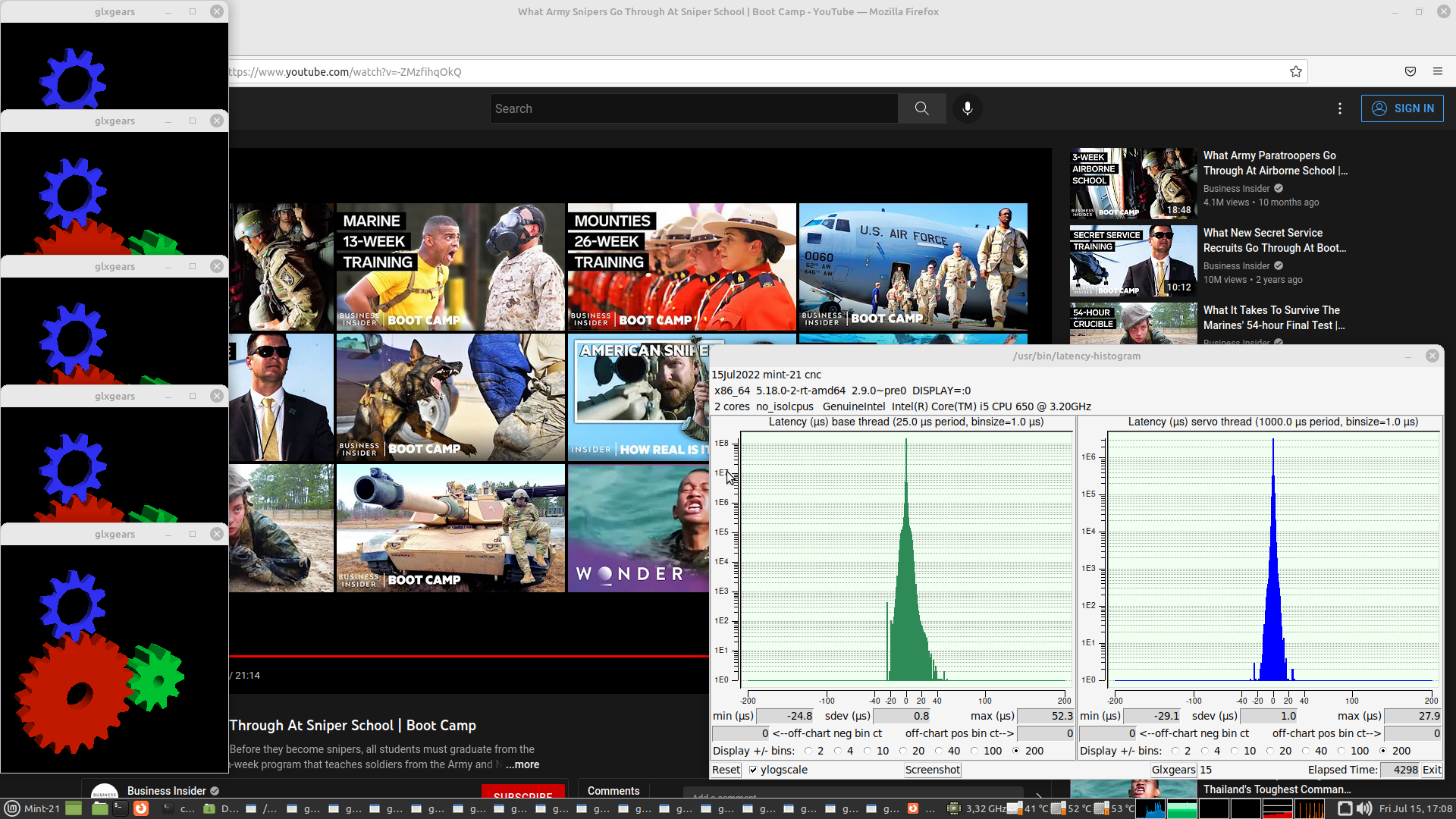
Here are the latency results for the Dell 980:
settings to change in BIOS:
-disable
--hyperthreading
--C states
--Virtualisation
--Serial port
--Set parallel port to EPP
settings to change in BIOS:
-disable
--hyperthreading
--C states
--Virtualisation
--Serial port
--Set parallel port to EPP
The following user(s) said Thank You: seuchato, JT
Please Log in or Create an account to join the conversation.
Time to create page: 0.202 seconds