
- Posts: 381
- Thank you received: 126
Hardware latency tests, used PC's
- seuchato
- Offline
- Platinum Member
-

Less
More
3 years 2 months ago #277866
by seuchato
Replied by seuchato on topic Hardware latency tests, used PC's
Jensner
Do not bother too much about a *very* "i7"! especially, if it eats a lot of power. I strongly believe (yet to be proved .. I am working on it) it is more the amount of caching memory.
Greez
chris
Do not bother too much about a *very* "i7"! especially, if it eats a lot of power. I strongly believe (yet to be proved .. I am working on it) it is more the amount of caching memory.
Greez
chris
Please Log in or Create an account to join the conversation.
- EricKeller
- Offline
- Junior Member
-

Less
More
- Posts: 24
- Thank you received: 3
3 years 2 months ago #277871
by EricKeller
Replied by EricKeller on topic Hardware latency tests, used PC's
I have never had problems with i5 processors. I have been buying Dell mini towers with i5 and the latency has been fine. The variability in latency seems to be bios related, and probably won't get much better with an i7.
Please Log in or Create an account to join the conversation.
- seuchato
- Offline
- Platinum Member
-
Less
More
- Posts: 381
- Thank you received: 126
3 years 2 months ago #277875
by seuchato
Replied by seuchato on topic Hardware latency tests, used PC's
Eric
Your emphasis on bios is imho well appreciated.
But there are also the grub default parameters like "isolcpus" etc. to consider.
I cannot prove it like bullet proof: the more cache and (possibly) single vs multichannel ram a machine had, so far it proofed to be better suites for LCNC.
Besides, your statement "been buying Dell mini towers with i5 and the latency has been fine" looks a bit broad. I Guess you could pin down what what models and latency times you got?
greez
chris
Your emphasis on bios is imho well appreciated.
But there are also the grub default parameters like "isolcpus" etc. to consider.
I cannot prove it like bullet proof: the more cache and (possibly) single vs multichannel ram a machine had, so far it proofed to be better suites for LCNC.
Besides, your statement "been buying Dell mini towers with i5 and the latency has been fine" looks a bit broad. I Guess you could pin down what what models and latency times you got?
greez
chris
Please Log in or Create an account to join the conversation.
- tommylight
- Offline
- Moderator
-

Less
More
- Posts: 22011
- Thank you received: 7491
3 years 1 month ago #280209
by tommylight
Replied by tommylight on topic Hardware latency tests, used PC's
I have never used those, tried it once several years back, it crippled the PC, everything got really sluggish.But there are also the grub default parameters like "isolcpus" etc. to consider.
Please Log in or Create an account to join the conversation.
- Hendrixx
- Offline
- Junior Member
-
Less
More
- Posts: 34
- Thank you received: 27
3 years 1 month ago #281128
by Hendrixx
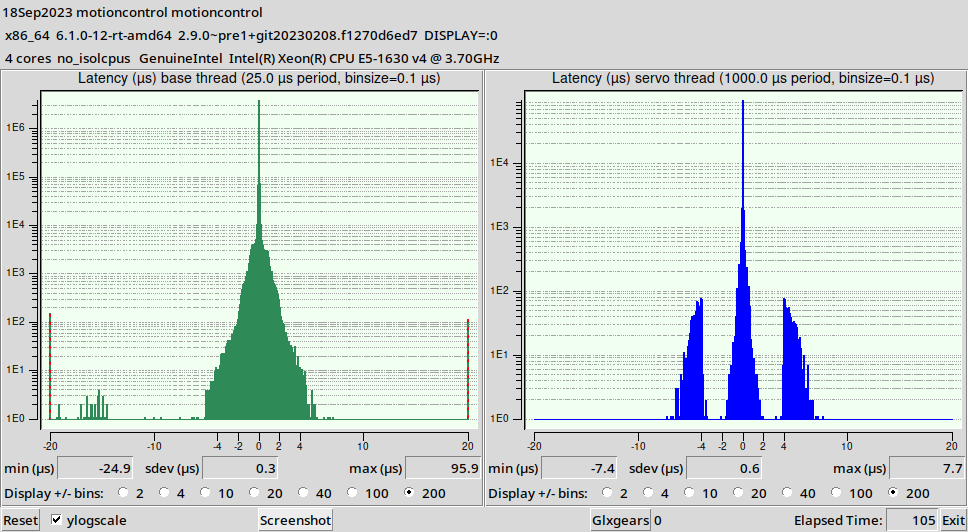 I picked up a budget mini pc at the beginning of this build. I think I paid $129 or close to it and it worked fine for getting the machine set up and in working order but as soon as I started trying to do any real work with multiple tool changes and set ups watchdog.has_bit triggered within 2 minutes and servo-thread warning as soon as the file started to load in. Isolcpus helped a little and I could do small files but not a viable option. I need this machine to be reliable and consistent so I chose to go with an older workstation and I got a HP Z440 for $185 and am very happy with it.
this is with no stress on the computer
This is with 50 glgears going
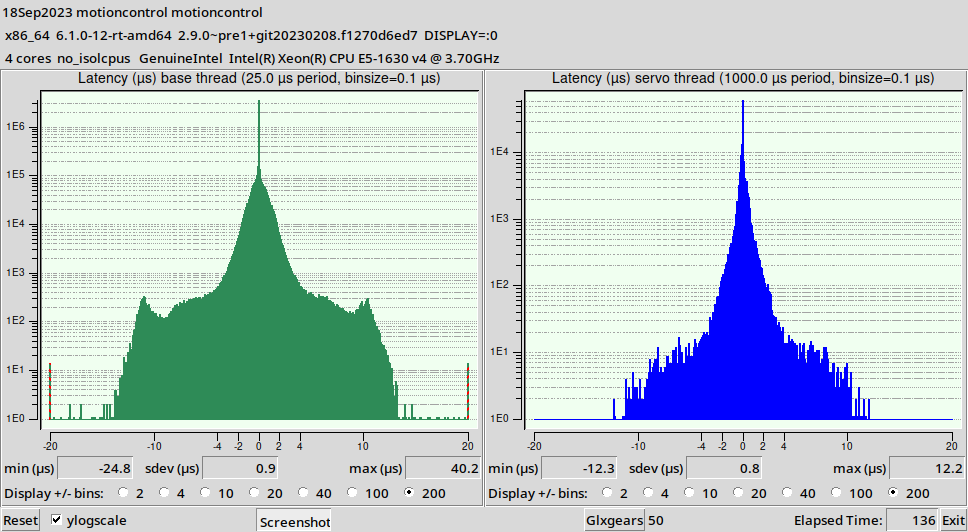
this servo thread
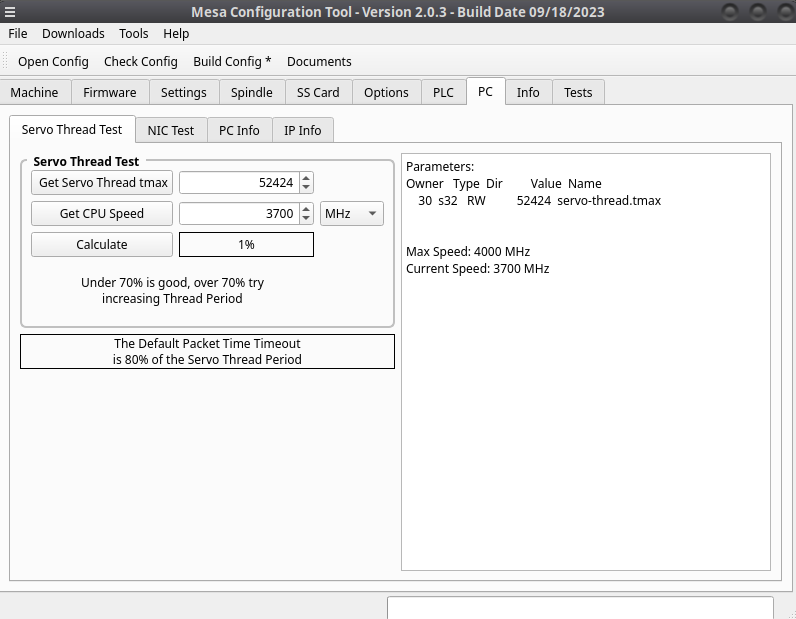
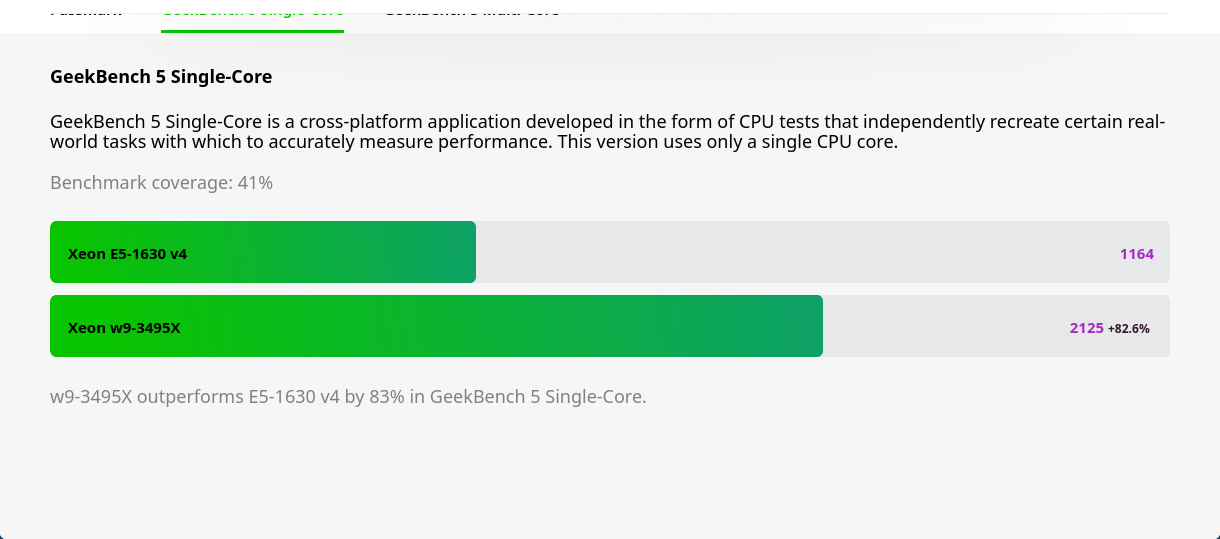
and this is how it compares to intels latest and greatest
System:
Kernel: 6.1.0-12-rt-amd64 arch: x86_64 bits: 64 compiler: gcc v: 12.2.0
Desktop: Cinnamon v: 5.6.8 Distro: Debian GNU/Linux 12 (bookworm)
Machine:
Type: Desktop System: Hewlett-Packard product: HP Z440 Workstation v: N/A
serial: <superuser required>
Mobo: Hewlett-Packard model: 212B v: 1.01 serial: <superuser required>
UEFI: Hewlett-Packard v: M60 v02.58 date: 12/07/2021
Battery:
Device-1: hidpp_battery_0 model: Logitech Wireless Touch Keyboard K400 Plus
charge: 100% (should be ignored) status: discharging
CPU:
Info: quad core model: Intel Xeon E5-1630 v4 bits: 64 type: MCP
smt: disabled arch: Broadwell rev: 1 cache: L1: 256 KiB L2: 1024 KiB
L3: 10 MiB
Speed (MHz): avg: 2417 high: 3700 min/max: 1200/3700 cores: 1: 1320
2: 1198 3: 3452 4: 3700 bogomips: 29530
Flags: avx avx2 ht lm nx pae sse sse2 sse3 sse4_1 sse4_2 ssse3
Graphics:
Device-1: AMD Oland [Radeon HD 8570 / R5 430 OEM R7 240/340 Radeon 520 OEM]
vendor: Dell driver: radeon v: kernel arch: GCN-1 bus-ID: 02:00.0
temp: 45.0 C
Display: x11 server: X.Org v: 1.21.1.7 with: Xwayland v: 22.1.9 driver: X:
loaded: radeon unloaded: fbdev,modesetting,vesa dri: radeonsi gpu: radeon
resolution: 1920x1080~60Hz
API: OpenGL v: 4.5 Mesa 22.3.6 renderer: OLAND ( LLVM 15.0.6 DRM 2.50
6.1.0-12-rt-amd64) direct-render: Yes
Audio:
Device-1: Intel C610/X99 series HD Audio vendor: Hewlett-Packard
driver: snd_hda_intel v: kernel bus-ID: 00:1b.0
Device-2: AMD Oland/Hainan/Cape Verde/Pitcairn HDMI Audio [Radeon HD 7000
Series] vendor: Dell driver: snd_hda_intel v: kernel bus-ID: 02:00.1
API: ALSA v: k6.1.0-12-rt-amd64 status: kernel-api
Server-1: PipeWire v: 0.3.65 status: active
Server-2: PulseAudio v: 16.1 status: off (using pipewire-pulse)
Network:
Device-1: Intel Ethernet I218-LM vendor: Hewlett-Packard driver: e1000e
v: kernel port: 3020 bus-ID: 00:19.0
IF: eno1 state: up speed: 1000 Mbps duplex: full mac: <filter>
Drives:
Local Storage: total: 1.94 TiB used: 15.5 GiB (0.8%)
ID-1: /dev/sda vendor: Toshiba model: MG04ACA200NY size: 1.82 TiB
ID-2: /dev/sdb vendor: Samsung model: SSD PM871 2.5 7mm 128GB
size: 119.24 GiB
Partition:
ID-1: / size: 115.38 GiB used: 15.49 GiB (13.4%) fs: ext4 dev: /dev/sdb2
ID-2: /boot/efi size: 511 MiB used: 5.8 MiB (1.1%) fs: vfat dev: /dev/sdb1
Swap:
ID-1: swap-1 type: partition size: 977 MiB used: 0 KiB (0.0%) dev: /dev/sdb3
Sensors:
System Temperatures: cpu: 38.0 C mobo: N/A gpu: radeon temp: 45.0 C
Fan Speeds (RPM): N/A
Info:
Processes: 239 Uptime: 18m Memory: 31.26 GiB used: 2.37 GiB (7.6%)
Init: systemd target: graphical (5) Compilers: gcc: 12.2.0 Packages: 3051
Shell: Bash v: 5.2.15 inxi: 3.3.26
Replied by Hendrixx on topic Hardware latency tests, used PC's
this is with no stress on the computer
This is with 50 glgears going
this servo thread
and this is how it compares to intels latest and greatest
System:
Kernel: 6.1.0-12-rt-amd64 arch: x86_64 bits: 64 compiler: gcc v: 12.2.0
Desktop: Cinnamon v: 5.6.8 Distro: Debian GNU/Linux 12 (bookworm)
Machine:
Type: Desktop System: Hewlett-Packard product: HP Z440 Workstation v: N/A
serial: <superuser required>
Mobo: Hewlett-Packard model: 212B v: 1.01 serial: <superuser required>
UEFI: Hewlett-Packard v: M60 v02.58 date: 12/07/2021
Battery:
Device-1: hidpp_battery_0 model: Logitech Wireless Touch Keyboard K400 Plus
charge: 100% (should be ignored) status: discharging
CPU:
Info: quad core model: Intel Xeon E5-1630 v4 bits: 64 type: MCP
smt: disabled arch: Broadwell rev: 1 cache: L1: 256 KiB L2: 1024 KiB
L3: 10 MiB
Speed (MHz): avg: 2417 high: 3700 min/max: 1200/3700 cores: 1: 1320
2: 1198 3: 3452 4: 3700 bogomips: 29530
Flags: avx avx2 ht lm nx pae sse sse2 sse3 sse4_1 sse4_2 ssse3
Graphics:
Device-1: AMD Oland [Radeon HD 8570 / R5 430 OEM R7 240/340 Radeon 520 OEM]
vendor: Dell driver: radeon v: kernel arch: GCN-1 bus-ID: 02:00.0
temp: 45.0 C
Display: x11 server: X.Org v: 1.21.1.7 with: Xwayland v: 22.1.9 driver: X:
loaded: radeon unloaded: fbdev,modesetting,vesa dri: radeonsi gpu: radeon
resolution: 1920x1080~60Hz
API: OpenGL v: 4.5 Mesa 22.3.6 renderer: OLAND ( LLVM 15.0.6 DRM 2.50
6.1.0-12-rt-amd64) direct-render: Yes
Audio:
Device-1: Intel C610/X99 series HD Audio vendor: Hewlett-Packard
driver: snd_hda_intel v: kernel bus-ID: 00:1b.0
Device-2: AMD Oland/Hainan/Cape Verde/Pitcairn HDMI Audio [Radeon HD 7000
Series] vendor: Dell driver: snd_hda_intel v: kernel bus-ID: 02:00.1
API: ALSA v: k6.1.0-12-rt-amd64 status: kernel-api
Server-1: PipeWire v: 0.3.65 status: active
Server-2: PulseAudio v: 16.1 status: off (using pipewire-pulse)
Network:
Device-1: Intel Ethernet I218-LM vendor: Hewlett-Packard driver: e1000e
v: kernel port: 3020 bus-ID: 00:19.0
IF: eno1 state: up speed: 1000 Mbps duplex: full mac: <filter>
Drives:
Local Storage: total: 1.94 TiB used: 15.5 GiB (0.8%)
ID-1: /dev/sda vendor: Toshiba model: MG04ACA200NY size: 1.82 TiB
ID-2: /dev/sdb vendor: Samsung model: SSD PM871 2.5 7mm 128GB
size: 119.24 GiB
Partition:
ID-1: / size: 115.38 GiB used: 15.49 GiB (13.4%) fs: ext4 dev: /dev/sdb2
ID-2: /boot/efi size: 511 MiB used: 5.8 MiB (1.1%) fs: vfat dev: /dev/sdb1
Swap:
ID-1: swap-1 type: partition size: 977 MiB used: 0 KiB (0.0%) dev: /dev/sdb3
Sensors:
System Temperatures: cpu: 38.0 C mobo: N/A gpu: radeon temp: 45.0 C
Fan Speeds (RPM): N/A
Info:
Processes: 239 Uptime: 18m Memory: 31.26 GiB used: 2.37 GiB (7.6%)
Init: systemd target: graphical (5) Compilers: gcc: 12.2.0 Packages: 3051
Shell: Bash v: 5.2.15 inxi: 3.3.26
The following user(s) said Thank You: tommylight
Please Log in or Create an account to join the conversation.
- EricKeller
- Offline
- Junior Member
-
Less
More
- Posts: 24
- Thank you received: 3
3 years 1 month ago - 3 years 1 month ago #281565
by EricKeller
Replied by EricKeller on topic Hardware latency tests, used PC's
The most recent computers I have worked with are Optiplex 7050 and 7010. The supply of used computers is such a moving target I'm not sure that will help anyone. Lots of relatively recent computers are being sold off because they won't run win 11. That's why I was able to buy the Opitplex, the university usually keeps them for more than 4 years. Although they do somethings just get rid of computers when they go off of maintenance.
I usually set an lcnc pc up with isolcpus. Unfortunately I couldn't find any interesting interrupts to change affinity for, that seems like it could lead to a big improvement in latency.
I think the best latency on a computer that set up recently was a dual Xeon workstation with RTAI. Can't use RTAI with ethernet mesa cards though. I might set up my pci mesa card in that one, but it's such a large computer I am not sure what machine I would control with it.
I usually set an lcnc pc up with isolcpus. Unfortunately I couldn't find any interesting interrupts to change affinity for, that seems like it could lead to a big improvement in latency.
I think the best latency on a computer that set up recently was a dual Xeon workstation with RTAI. Can't use RTAI with ethernet mesa cards though. I might set up my pci mesa card in that one, but it's such a large computer I am not sure what machine I would control with it.
Last edit: 3 years 1 month ago by EricKeller.
Please Log in or Create an account to join the conversation.
Time to create page: 0.158 seconds