
- Posts: 383
- Thank you received: 135
Remora - ethernet NVEM / EC300 / EC500 cnc board
- royka
- Offline
- Platinum Member
-

Less
More
4 years 6 months ago #240618
by royka
Replied by royka on topic Remora - ethernet NVEM / EC300 / EC500 cnc board
Sure! But that will be tomorrow, need a few hours of sleep, here it's 2.45am
Please Log in or Create an account to join the conversation.
- royka
- Offline
- Platinum Member
-
Less
More
- Posts: 383
- Thank you received: 135
4 years 6 months ago #240633
by royka
Replied by royka on topic Remora - ethernet NVEM / EC300 / EC500 cnc board
The moment it tries to write it restarts it seems.
In stm32cubeprogrammer you could save the memory from the device, maybe I could upload yours with the config included?
In stm32cubeprogrammer you could save the memory from the device, maybe I could upload yours with the config included?
Code:
tftp receive call back reached
tftp write process reached
Remora-NVEM starting
## Entering SETUP state
1. Loading JSON configuration file from Flash memory
Flash storage location is empty - no config file
2. Parsing JSON configuration file
Config deserialisation - Deserialization failed
Creating thread 40000
Creating thread 1000
4. Loading modules
Creating a std module
Creating an Ethernet communication monitoring module
## Entering START state
Starting the BASE thread
Registering interrupt for interrupt number = 25
power on Timer 1
timer started
Starting the SERVO thread
Registering interrupt for interrupt number = 28
power on Timer 2
timer started
## Entering IDLE state

Please Log in or Create an account to join the conversation.
- spdbmp927
- Offline
- New Member
-

Less
More
- Posts: 7
- Thank you received: 5
4 years 6 months ago - 4 years 6 months ago #240666
by spdbmp927
Replied by spdbmp927 on topic Remora - ethernet NVEM / EC300 / EC500 cnc board
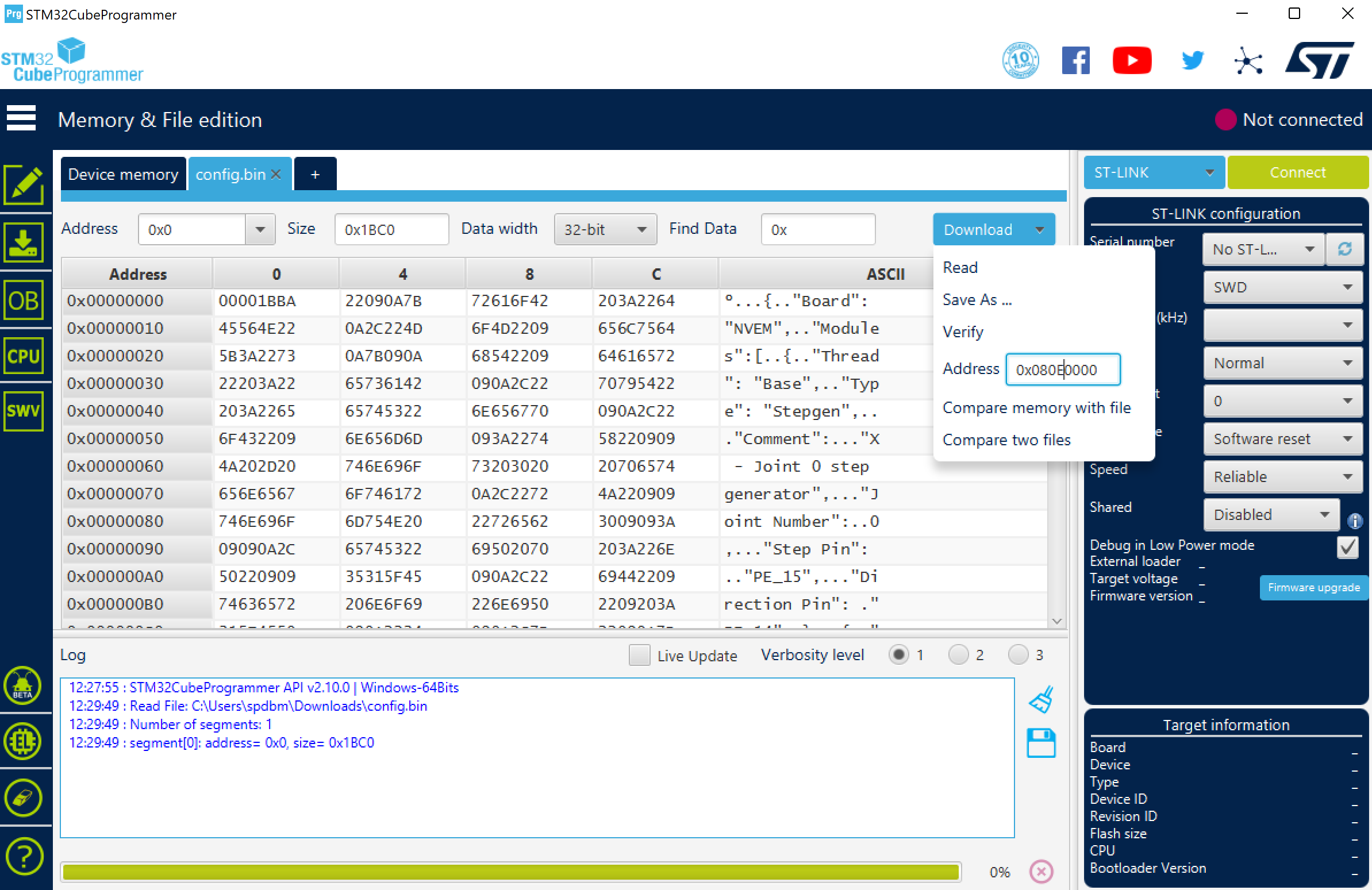
Roy and Scott, I modified Scotts python file to emulate what is happening when the config is copied from the D block to the E block. I loaded the resulting file into the NVEM using the STM32programmer at 0x080E0000 as Roy suggested. It seems to work, my NVEM is now functional with the JSON binary, and config. I guess I should note that like Roy my NVEM resets every time it gets a TFTP write request. Attached are my working config memory file (bin with txt appended) as well as the modified python script that generated it. just run the script and a new config.bin is created in /tmp. You can then use the programmer to upload it to 0x080E0000. The config.bin is just the original JSON file with the size of the original file appended as the first 4 bytes. Note the first 4 bytes are 1BBA (the JSON file length), and the whole config file is 1BC0 long (6 bytes longer, 4 for the length which was appended, and there are 2 bytes of zeros at the end to make a block of 8.
Last edit: 4 years 6 months ago by spdbmp927. Reason: clarification
The following user(s) said Thank You: royka
Please Log in or Create an account to join the conversation.
- royka
- Offline
- Platinum Member
-
Less
More
- Posts: 383
- Thank you received: 135
4 years 6 months ago #240669
by royka
Replied by royka on topic Remora - ethernet NVEM / EC300 / EC500 cnc board
Writing it as bin in the programmer did work
 First it gave an error
Then I looked if the Write protection was enabled, it was not, but I disabled it, wrote the config bit en then set it back. After that I erased the address after that it uploaded succesfully, not sure which one helped.
First it gave an error
Then I looked if the Write protection was enabled, it was not, but I disabled it, wrote the config bit en then set it back. After that I erased the address after that it uploaded succesfully, not sure which one helped.
Did try write the config.txt as bin before, but chose the wrong address I see, I chose the temporary address. And your file has some zeros added.
Uploading the edited config with your or the original python script does now work however. With your script it gives no error, but after a reboot it still loads your config. The original script still a time out. I did try try to enable and disable the other addresses, with no luck. I edited the config.bin and uploaded that one with the programmer, that works
Code:
19:03:53 : Error: failed to download Segment[0]
19:03:53 : Error: failed to download the File
19:03:53 : RUNNING Program ...
19:03:53 : Address: : 0x080E0000
19:03:53 : Application is running, Please Hold on...
19:03:53 : Start operation achieved successfully
Did try write the config.txt as bin before, but chose the wrong address I see, I chose the temporary address. And your file has some zeros added.
Uploading the edited config with your or the original python script does now work however. With your script it gives no error, but after a reboot it still loads your config. The original script still a time out. I did try try to enable and disable the other addresses, with no luck. I edited the config.bin and uploaded that one with the programmer, that works
Please Log in or Create an account to join the conversation.
- royka
- Offline
- Platinum Member
-
Less
More
- Posts: 383
- Thank you received: 135
4 years 6 months ago #240681
by royka
Replied by royka on topic Remora - ethernet NVEM / EC300 / EC500 cnc board
Oops I had to read carefully, now I see the script of spdbmp927 makes a valid bin file to write with the programmer. Scotta maybe it helps to choose another address for the tmp file? Unfortunately I'm getting errors when I try to compile.
Or maybe there is a difference in the option bytes? I don't know if it could make a difference but here are mine:
RDP: AA
BOR_LEV: 3
All the others are checked
Or maybe there is a difference in the option bytes? I don't know if it could make a difference but here are mine:
RDP: AA
BOR_LEV: 3
All the others are checked
Please Log in or Create an account to join the conversation.
- royka
- Offline
- Platinum Member
-
Less
More
- Posts: 383
- Thank you received: 135
4 years 6 months ago #240682
by royka
Replied by royka on topic Remora - ethernet NVEM / EC300 / EC500 cnc board
I'm still getting following errors btw at whatever settings I choose. Disabled the joints 3,4 and 5 and nvmpg in the config, should that make a difference? Could it be the buffer being too big or memory issues? Fortunately I could still use the lpt port, so no high prio for me
Please Log in or Create an account to join the conversation.
Time to create page: 0.511 seconds