
- Posts: 91
- Thank you received: 47
Axis 2 - touchscreen version of old friend
- zack
- Offline
- Premium Member
-

Less
More
4 years 5 months ago #244101
by zack
Replied by zack on topic Axis 2 - touchscreen version of old friend
Hi cakeslob
I will have a deep dive into this.
Did u put the axis2.py file etc in there respective folders with elevated privileges?
User command file as in a axis.src file will not allow a timer and certain highlighted areas when in pause and run etc
This was a request by a user
I chose to continue in tcl since it is pretty simple and axis is Rock solid I really want to maintain this simplicity and reliability.
I think the files including icons are less than 400kB
I will have a deep dive into this.
Did u put the axis2.py file etc in there respective folders with elevated privileges?
User command file as in a axis.src file will not allow a timer and certain highlighted areas when in pause and run etc
This was a request by a user
I chose to continue in tcl since it is pretty simple and axis is Rock solid I really want to maintain this simplicity and reliability.
I think the files including icons are less than 400kB
Please Log in or Create an account to join the conversation.
- cakeslob
- Offline
- Platinum Member
-

Less
More
- Posts: 927
- Thank you received: 280
4 years 5 months ago - 4 years 5 months ago #244145
by cakeslob
Replied by cakeslob on topic Axis 2 - touchscreen version of old friend
I dont think you need to do a deep dive, you can do a fairly shallow dive. On quick inspection your axis versions and glcanon versions are over a year old. They make reference to python2 and have python2/3 work arounds, as well as both files still calling on minigl, which was changed to opengl and glu last august , so before I can even try, glcanon breaks everything.
I use RIP, install so its pretty easy, but I also dont know if 2.9 is using the python2.7 lib anymore either
[/code]
[/code]
I do not believe that is the case, there appears to be no reason you cannot add a timer using usercommand.
I just made a quick dumb one using time.time() which works, so a more involved one using buttons or linked to program running or feedrate_blackout shouldnt be too much more effort, using these 2 examples as reference
github.com/LinuxCNC/linuxcnc/blob/17bb82...vcp_widgets.py#L1125
pythonguides.com/python-tkinter-stopwatch/
The highlighted sections could prove to be rudimentary also as axis already is doing something similar.
You appear to be proficient in tcl, but the simplicity involved with changing the tcl files is really only a short term gain, that requires more work long term with maintenance/upkeep which erodes the simplicity/reliability and makes it more difficult to deploy. Im not a computer hacking pro, but it became pretty clear for me early on that the usercommand file maybe be initially a little more difficult, long term it is easier to maintain, deploy and holds axis stability by not changing the source. The maintaining devs might be less reluctant to add this into master if it were in the form of a usercommand file. Nothing personal, I am just a lobbyist for the usercommand file and will always suggest its use when ever the chance arises. I think that was the whole reason it is there in the first place. I like your revisions and look forward to using them myself, but every time I try and install your screen, there is a version mismatch and I need to update the files for it to work. Phil and Chris have demonstrated to me many times that you can do pretty much anything using the usercommand file, like reassigning widgets to different locations and changing the preview screen. If you need help or examples feel free to ask, I dont know how to program but I know how to try. I know my long winded post probably make me come off like a know-it-all blowhard who doesnt know anything, but if we all get on the same page in regards to modifying axis by using phil's plasmac as an example/standard github.com/LinuxCNC/linuxcnc/blob/2.8/co...smac/plasmac_axis.py , I think we can accomplish more as a collective, with more long term stability.
If you need a good starting point, the file in this post has i think every widget brokenout in usercommand making it a good place to start from.
forum.linuxcnc.org/21-axis/45385-axis-dark-mode#237837
forum.linuxcnc.org/media/kunena/attachme...d_dark_2022-03-20.py
By comparison, the plasmac usercommand file is only 50kb, and from a maintenance perspective, ive only needed to update usercommand files twice, once for the mdi change from 2.8 to 2.9, and once to go from py2 to py3
But I do have 1 suggestion for improvement.
Instead of writing your setting to 5 different txt files, perhaps it could be done by reading the ini file for things like custom button, and writing things like colour to the .axis_preference file. Reading the ini file is pretty easy, I just copied it from plasmac,
the writing things to .axis_preference file is something I am still working on, as it could be useful for things like remembering new screen options ,like your colour chooser, or remembering things from last shutdown like rapid override rates.
edit, the compare files didnt format correctly in forum post so I will attatch them
I use RIP, install so its pretty easy, but I also dont know if 2.9 is using the python2.7 lib anymore either
Code:
original glcanon | axis2 glcanon
from OpenGL.GL import * | from minigl import *
from OpenGL.GLU import * |
import itertools |
| 'cone_xy_alpha': 1/4.,
| 'cone_uv_alpha': 1/4.,
| 'axis_z_alpha': 1/4.,
| 'overlay_foreground_alpha_xy': 1/3.,
| 'overlay_background_alpha_xy': 1/3.,
'overlay_alpha': 0.75, | 'overlay_alpha': 0.35,
'tool_alpha': 0.20, | 'tool_alpha': 0.50,
geometry_chars = "XYZABCUVW-!;" | geometry_chars = "XYZABCUVW-!"
buffer = glRenderMode(GL_RENDER) | buffer = list(glRenderMode(GL_RENDER))
min_depth, max_depth, names = (buffer[0].near, buffer[0].far, buffer[0].names) | min_depth, max_depth, names = min(buffer)
for x in buffer: |
if min_depth < x.near: |
min_depth, max_depth, names = (x.near, x.far, x.names) |
| glEnable(GL_BLEND);
| glBlendFunc(GL_SRC_ALPHA, GL_ONE_MINUS_SRC_ALPHA);
|
|
|
|
|
| glEnable(GL_BLEND);
| glBlendFunc(GL_SRC_ALPHA, GL_ONE_MINUS_SRC_ALPHA);
|
|
|
| glLoadIdentity ();
| glMatrixMode (GL_PROJECTION);
| glPushMatrix ();
| glLoadIdentity ();
|
| glDisable(GL_DEPTH_TEST);
|
| glBegin (GL_QUADS);
| glColor3f(0.1,0.1,0.125); # bottom left color
| glVertex3f (-1.0, -1.0, -1.0);
| glVertex3f (1.0, -1.0, -1.0);
|
| glColor3f(0.08,0.08,0.4); # top right color
| glVertex3f (1.0, 1.0, -1.0);
| glVertex3f (-1.0, 1.0, -1.0);
| glEnd ()
|
| glEnable(GL_BLEND);
| glEnable(GL_LIGHTING);
| glEnable(GL_DEPTH_TEST);
| glPopMatrix ();
| glMatrixMode (GL_MODELVIEW);
| glPopMatrix ();
| glMatrixMode (GL_PROJECTION);
|
glPopMatrix() # Restore the matrix |
|
|
|
| glEnable(GL_BLEND);
| glBlendFunc(GL_SRC_ALPHA, GL_ONE_MINUS_SRC_ALPHA);
|
|
| glBegin (GL_QUADS);
| glColor3f(0.1,0.1,0.125); # bottom left color
| glVertex3f (-w, -1.0, -1.0);
| glVertex3f (w, -w, -1.0);
|
| glColor3f(0.08,0.08,0.4); # top right color
| glVertex3f (h, 1.0, -1.0);
| glVertex3f (-h, h, -1.0);
| glEnd ()
|
|
|
|
|
| if sys.version_info[0] == 3:
| else:
| glBitmap(13, 16, 0, 3, 17, 0, icon.tostring())
spd = self.to_internal_linear_unit(s.current_vel) |
| spd = self.to_internal_linear_unit(s.current_vel)
return self.dro_format(self.stat,spd,dtg,limit,homed,positions, |
axisdtg,g5x_offset,g92_offset,tlo_offset) | # Note: hal_gremlin overrides dro_format() for different dro behavior
| limit, homed, posstrs, droposstrs = self.dro_format(self.stat,spd,dtg,limit,homed,positions,axisdtg,g5x_offset,g92_offset,tlo_offset)
return self.joint_dro_format(s,spd,self.get_num_joints(),limit, homed) |
|
# Note: this is overridden in other guis (then AXIS) for different dro behavior |
def joint_dro_format(self,s,spd,num_of_joints,limit, homed): |
# Note: this is overridden in other guis (then AXIS) for different dro behavior |
Code:
axis2 | axis original
|
from __future__ import print_function |
| from OpenGL.GL import *
| from OpenGL.GLU import *
| from OpenGL.GLUT import *
if sys.version_info[0] == 3: |
else: |
import Tkinter |
import thread as _thread |
gettext.install("linuxcnc", localedir=os.path.join(BASE, "share", "locale"), unicode=True) |
from minigl import * |
if sys.version_info[0] == 3: |
else: |
import ConfigParser as configparser |
| continuous_jog_in_progress = False
| cjogindices =
iconname = self.tk.call("load_image", "std_" + iconname) | iconname_image = self.tk.call("load_image", "std_" + iconname)
icon.configure(image=iconname) | icon.configure(image=iconname_image)
widgets = frame, icon, text, button, iconname | widgets = frame, icon, text, button, iconname_image
widgets = frame, icon, text, button, iconname | widgets = frame, icon, text, button, iconname_image
| if iconname == "error":
| comp["error"] = True
| if self._remaining_error_count() == 0:
| comp["error"] = False
| def _remaining_error_count(self):
| """ Returns the count of remaining error messages """
| count = 0
| for i, item in enumerate(self.widgets):
| frame, icon, text, button, iname = item
| if iname == "icon_std_error":
| count += 1
| return count
|
|
| global continuous_jog_in_progress,cjogindices
| if continuous_jog_in_progress and not manual_tab_visible():
| jjogmode = get_jog_mode()
| for idx in cjogindices:
| c.jog(linuxcnc.JOG_STOP, jjogmode,idx)
| continuous_jog_in_progress = 0
| cjogindices =
|
| stderr_line = line.decode()
# If it was "Continous" just before, then don't change last jog increment! | # If it was "Continuous" just before, then don't change last jog increment!
| comp["abort"] = True
| time.sleep(0.3)
| comp["abort"] = False
if sys.version_info[0] == 3: |
else: |
items = tuple(inifile.findall(section, item)) |
return root_window.tk.merge(*items) # str |
global continuous_jog_in_progress | global continuous_jog_in_progress,cjogindices
continuous_jog_in_progress = 1 | continuous_jog_in_progress = True
| if not a in cjogindices: cjogindices.append(a)
continuous_jog_in_progress = 0 | continuous_jog_in_progress = False
if joint_sequence[jnum] is '': | if joint_sequence[jnum] == '':
coordinate_font = "courier bold 20" | coordinate_font = "monospace 20"
coordinate_font = "courier bold 11" | coordinate_font = "monospace 11"
| comp.newpin("error", hal.HAL_BIT, hal.HAL_OUT)
| comp.newpin("abort", hal.HAL_BIT, hal.HAL_OUT)
cmd += ['-x', str(xid)] + gladecmd | cmd += ['-d', '-x', str(xid)] + gladecmd
| print(cmd)
# call an empty function that can be overidden | # call an empty function that can be overridden
[/code]
User command file as in a axis.src file will not allow a timer and certain highlighted areas when in pause and run etc
This was a request by a user
I do not believe that is the case, there appears to be no reason you cannot add a timer using usercommand.
I just made a quick dumb one using time.time() which works, so a more involved one using buttons or linked to program running or feedrate_blackout shouldnt be too much more effort, using these 2 examples as reference
github.com/LinuxCNC/linuxcnc/blob/17bb82...vcp_widgets.py#L1125
pythonguides.com/python-tkinter-stopwatch/
The highlighted sections could prove to be rudimentary also as axis already is doing something similar.
I chose to continue in tcl since it is pretty simple and axis is Rock solid I really want to maintain this simplicity and reliability.
I think the files including icons are less than 400kB
You appear to be proficient in tcl, but the simplicity involved with changing the tcl files is really only a short term gain, that requires more work long term with maintenance/upkeep which erodes the simplicity/reliability and makes it more difficult to deploy. Im not a computer hacking pro, but it became pretty clear for me early on that the usercommand file maybe be initially a little more difficult, long term it is easier to maintain, deploy and holds axis stability by not changing the source. The maintaining devs might be less reluctant to add this into master if it were in the form of a usercommand file. Nothing personal, I am just a lobbyist for the usercommand file and will always suggest its use when ever the chance arises. I think that was the whole reason it is there in the first place. I like your revisions and look forward to using them myself, but every time I try and install your screen, there is a version mismatch and I need to update the files for it to work. Phil and Chris have demonstrated to me many times that you can do pretty much anything using the usercommand file, like reassigning widgets to different locations and changing the preview screen. If you need help or examples feel free to ask, I dont know how to program but I know how to try. I know my long winded post probably make me come off like a know-it-all blowhard who doesnt know anything, but if we all get on the same page in regards to modifying axis by using phil's plasmac as an example/standard github.com/LinuxCNC/linuxcnc/blob/2.8/co...smac/plasmac_axis.py , I think we can accomplish more as a collective, with more long term stability.
If you need a good starting point, the file in this post has i think every widget brokenout in usercommand making it a good place to start from.
forum.linuxcnc.org/21-axis/45385-axis-dark-mode#237837
forum.linuxcnc.org/media/kunena/attachme...d_dark_2022-03-20.py
By comparison, the plasmac usercommand file is only 50kb, and from a maintenance perspective, ive only needed to update usercommand files twice, once for the mdi change from 2.8 to 2.9, and once to go from py2 to py3
But I do have 1 suggestion for improvement.
Instead of writing your setting to 5 different txt files, perhaps it could be done by reading the ini file for things like custom button, and writing things like colour to the .axis_preference file. Reading the ini file is pretty easy, I just copied it from plasmac,
the writing things to .axis_preference file is something I am still working on, as it could be useful for things like remembering new screen options ,like your colour chooser, or remembering things from last shutdown like rapid override rates.
edit, the compare files didnt format correctly in forum post so I will attatch them
Last edit: 4 years 5 months ago by cakeslob. Reason: holy fuck can we fix the forum editor already or what
The following user(s) said Thank You: phillc54
Please Log in or Create an account to join the conversation.
- cakeslob
- Offline
- Platinum Member
-
Less
More
- Posts: 927
- Thank you received: 280
4 years 5 months ago #244166
by cakeslob
Replied by cakeslob on topic Axis 2 - touchscreen version of old friend
zack, I think you will find the usercommand file easier to use than you think. I would like some clarification from some of the pros, but I think the usercommand file is, when we use "root_window.tk.call" we are sending tcl language in the form of strings to the axis.tcl file. I did a quick conversion of your timer part using user command. I took your portion from the axis2.tcl, and turned it into a usercommand file. Here is the portion at the end of the file ive attatched
I dont understand it very well, but I took some of your code from axis2.tcl, and I think I turned it into strings, which get sent to axis.py (?) and then sent to axis.tcl
with that in mind, you can probably use your same code from the axis2.tcl in a usercommand file and send it this way, or you could do it in python
In the file ive attatched, just about everything is broken out so you can easily do your size and color configurations
linuxcnc.org/docs/devel/html/gui/axis.ht..._customization_hints
have a look at the user_live_update and the creating hal pins and you are half way there.
I dont know how you could do the gradient preview background, someone else might need to help you.
Personally for me, the time spent working in the usercommand file has payed dividends because I found it so fucking annoying having to patch axis every time I installed a new linuxcnc or did an update. The extra time/hassle for usercommand file was much worth the time saved doing not doing updates, with the added bonus of working with future and past versions of axis
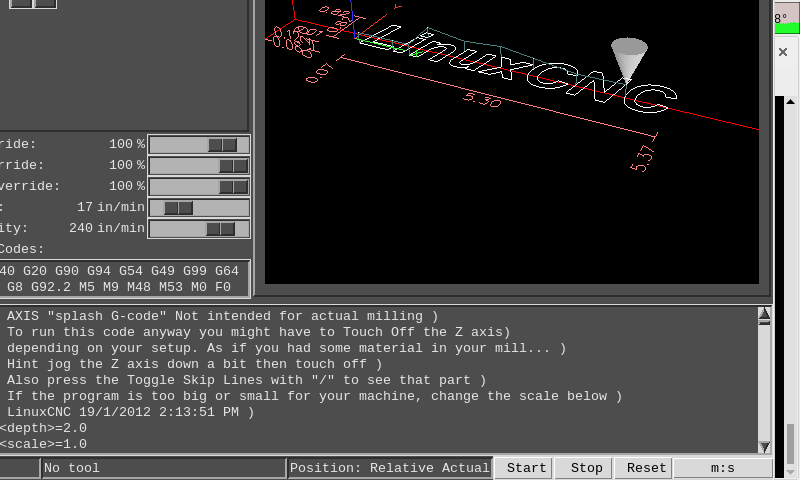
Code:
W = root_window.tk.call
######### PACKING THE TIMER INTO INFO ########
W('canvas','.info.timer')
W('pack','.info.timer','-side','right')
W('label','.info.timer.counter',
'-text' ,'m:s',
'-relief','raised', \
'-pady','1',
'-width','12')
W('button','.info.timer.start',\
'-text',' Start', \
'-borderwidth', '1', \
'-width',' 4', \
'-pady',' 1 ',\
'-command',' ')
W('button','.info.timer.restart', \
'-text',' Reset',
'-borderwidth', '1', \
'-width',' 4', \
'-pady',' 1 ',\
'-command',' ')
W('button','.info.timer.stop',
'-text',' Stop',
'-borderwidth','1',
'-width','4',
'-pady','1')
W('pack','.info.timer.start','-side','left')
W('pack','.info.timer.stop','-side','left')
W('pack','.info.timer.restart','-side','left')
W('pack','.info.timer.counter','-side','right')
I dont understand it very well, but I took some of your code from axis2.tcl, and I think I turned it into strings, which get sent to axis.py (?) and then sent to axis.tcl
with that in mind, you can probably use your same code from the axis2.tcl in a usercommand file and send it this way, or you could do it in python
In the file ive attatched, just about everything is broken out so you can easily do your size and color configurations
linuxcnc.org/docs/devel/html/gui/axis.ht..._customization_hints
have a look at the user_live_update and the creating hal pins and you are half way there.
I dont know how you could do the gradient preview background, someone else might need to help you.
Personally for me, the time spent working in the usercommand file has payed dividends because I found it so fucking annoying having to patch axis every time I installed a new linuxcnc or did an update. The extra time/hassle for usercommand file was much worth the time saved doing not doing updates, with the added bonus of working with future and past versions of axis
The following user(s) said Thank You: tommylight, zack
Please Log in or Create an account to join the conversation.
- phillc54
- Offline
- Platinum Member
-
Less
More
- Posts: 5711
- Thank you received: 2100
4 years 5 months ago - 4 years 5 months ago #244263
by phillc54
Replied by phillc54 on topic Axis 2 - touchscreen version of old friend
For reading and writing preferences you could use similar to the following which creates a new instance of configparser to create a file in the config directory called <MACHINE_NAME>.prefs
Use a sane DEFAULT when reading then it will use that if there is no entry in the file.
Use a sane DEFAULT when reading then it will use that if there is no entry in the file.
Warning: Spoiler!
Code:
prefP = configparser.ConfigParser
class plasmacPreferences(prefP):
types = {bool: prefP.getboolean,
float: prefP.getfloat,
int: prefP.getint,
str: prefP.get,
repr: lambda self,section,option: eval(prefP.get(self,section,option)),
}
def __init__(self):
prefP.__init__(self, strict=False, interpolation=None)
self.fn = os.path.join(PATH, '{}.prefs'.format(vars.machine.get()))
self.read(self.fn)
def getPrefs(prefs, section, option, default=False, type=bool):
m = prefs.types.get(type)
if prefs.has_section(section.upper()):
if prefs.has_option(section, option):
return m(prefs, section.upper(), option)
else:
prefs.set(section.upper(), option, str(default))
prefs.write(open(prefs.fn, "w"))
return default
else:# print("no getPrefs section", section.upper())
prefs.add_section(section.upper())
prefs.set(section.upper(), option, str(default))
prefs.write(open(prefs.fn, "w"))
def putPrefs(prefs, section, option, value, type=bool):
if prefs.has_section(section.upper()):
prefs.set(section.upper(), option, str(type(value)))
prefs.write(open(prefs.fn, "w"))
else:
prefs.add_section(section.upper())
prefs.set(section.upper(), option, str(type(value)))
prefs.write(open(prefs.fn, "w"))
def removePrefsSect(prefs, section):
prefs.remove_section(section.upper())
prefs.write(open(prefs.fn, "w"))
PREFS = plasmacPreferences()
# write a setting to prefs SECTION, SETTING, VALUE, TYPE
putPrefs(PREFS, 'GUI', 'foreground color', fgColor, str)
# get a setting from prefs SECTION, SETTING, DEFAULT, TYPE
fgColor = getPrefs(PREFS, 'GUI', 'foreground color', '#FFEE00', str)
Last edit: 4 years 5 months ago by phillc54.
The following user(s) said Thank You: zack, cakeslob
Please Log in or Create an account to join the conversation.
- cakeslob
- Offline
- Platinum Member
-
Less
More
- Posts: 927
- Thank you received: 280
4 years 5 months ago #244341
by cakeslob
Replied by cakeslob on topic Axis 2 - touchscreen version of old friend
Not to derail zacks thread, but since it might be mutually beneficial for us both I will continue.Posting python without the indentations, cheeky lol, I found it a good exercise in understanding python. Thank you Phil, this is the first time Im using fancy python, but I think I got it
Code:
PATH = ""
prefP = configparser.ConfigParser
class plasmacPreferences(prefP):
types = {
bool: prefP.getboolean,
float: prefP.getfloat,
int: prefP.getint,
str: prefP.get,
repr: lambda self,section,option: eval(prefP.get(self,section,option)),
}
def __init__(self):
prefP.__init__(self, strict=False, interpolation=None)
self.fn = os.path.join(PATH, '{}.prefs'.format(vars.machine.get()))
self.read(self.fn)
def getPrefs(prefs, section, option, default=False, type=bool):
m = prefs.types.get(type)
if prefs.has_section(section.upper()):
if prefs.has_option(section, option):
return m(prefs, section.upper(), option)
else:
prefs.set(section.upper(), option, str(default))
prefs.write(open(prefs.fn, "w"))
return default
else:
print("no getPrefs section", section.upper())
prefs.add_section(section.upper())
prefs.set(section.upper(), option, str(default))
prefs.write(open(prefs.fn, "w"))
def putPrefs(prefs, section, option, value, type=bool):
if prefs.has_section(section.upper()):
prefs.set(section.upper(), option, str(type(value)))
prefs.write(open(prefs.fn, "w"))
else:
prefs.add_section(section.upper())
prefs.set(section.upper(), option, str(type(value)))
prefs.write(open(prefs.fn, "w"))
def removePrefsSect(prefs, section):
prefs.remove_section(section.upper())
prefs.write(open(prefs.fn, "w"))
PREFS = plasmacPreferences()
# write a setting to prefs SECTION, SETTING, VALUE, TYPE
PREFS.putPrefs('GUI', 'foreground color', 'red', str)
# get a setting from prefs SECTION, SETTING, DEFAULT, TYPE
fgColor = PREFS.getPrefs('GUI', 'foreground color', '#FFEE00', str)
Code:
[GUI]
foreground color = red
Please Log in or Create an account to join the conversation.
- phillc54
- Offline
- Platinum Member
-
Less
More
- Posts: 5711
- Thank you received: 2100
4 years 5 months ago #244345
by phillc54

Replied by phillc54 on topic Axis 2 - touchscreen version of old friend
Shoot, I didn't notice that. I am getting lazier and lazier...Posting python without the indentations, cheeky lol
Please Log in or Create an account to join the conversation.
Time to create page: 0.451 seconds