
- Posts: 26
- Thank you received: 5
[ Vfdmod ] An easy VFD control over MODBUS RTU
- RobC
- Offline
- Junior Member
-

Less
More
3 years 8 months ago #264060
by RobC
Replied by RobC on topic [ Vfdmod ] An easy VFD control over MODBUS RTU
All of the files / settings I have posted in the previous posts are for an H100 VFD (also known as V70 from other vendors), so they should all work as a reference (file names may be different). The PDF version of the manual is too large to attach to the forum, but here is a link to the stepperonline V70 manual.
www.omc-stepperonline.com/download/VFD%20manual%20datasheet.pdf
The vfd settings that are related to control via rs-485 dongle are:
F001=2
F002=2
F163=1
F164=3
F165=3
F169=0
Then the settings needed for vfdmod ini are:
[RS485]
# VFD slave address.
SlaveAddress=1
# Serial device system path.
SerialDevice=/dev/ttyUSB0
# Communication speed.
BaudRate=38400
# Data bits: always 8.
DataBits=8
# Parity: 'N' for none (default), 'E' for even, 'O' for odd.
Parity=N
# Stop bits: 1 (default) or 2.
StopBits=1
# Loop delay in milliseconds, default value is 200 ms.
# Range: 0 ... 10000.
LoopDelay=200
# Delay in characters at front of every MODBUS request.
# MODBUS specification recommends at least 3.5 characters,
# so default value must be 4.
# Increase this value if communication errors happen.
# Range: 0 ... 100.
ProtocolDelay=4
# A minimum count of successfull requests to set HAL 'is-connected' output
# to TRUE. Default value is 10. Range: 1 ... 100.
IsConnectedDelay=10
# Comma separated critical errors that call reconnection event.
# For example: error code 5 occures when SerialDevice has been
# physically disconnected.
ConnectionErrorList=5
# Delay in milliseconds between reconnection attempts, this parameter
# is active when ConnectionErrorList is not empty. Default value is 1000 ms.
# Range: 0 ... 10000.
ConnectionDelay=1000
[Control]
# Function code:
# 0x06 - write single register (default).
# 0x10 - write multiple registers.
# 0x05 - write single coil.
# 0x0F - write multiple coils.
;FunctionCode=0x06
# **********************************************************
# Values below are active when FunctionCode is 0x06 or 0x10.
# **********************************************************
# An address of the control register.
Address=0x0200
# A value to run spindle forward.
RunForwardValue=0x0001
# A value to run spindle reverse.
RunReverseValue=0x0002
# A value to reset a fault state.
# If this parameter is commented then fault reset feature will be disabled.
;FaultResetValue=0x?????
# A value to stop spindle.
StopValue=0x0000
# **********************************************************
# Values below are active when FunctionCode is 0x05 or 0x0F.
# **********************************************************
# An address of the coil that turns spindle on.
;RunCoil=0x????
# An address of the coil that sets spindle direction.
;DirectionCoil=0x????
# An address of the coil that resets a fault state.
# If this parameter is commented then fault reset feature will be disabled.
;FaultResetCoil=0x????
[SpindleRpmIn]
# Function code:
# 0x06 - write single register (default).
# 0x10 - write multiple registers.
;FunctionCode=0x06
# An address of the command speed (or frequency) register.
Address=0x0201
# Multiplier and Divider are integer values to correct command speed value
# before it will be written to command speed register.
# Corrected command speed = (command speed) x Multiplier / Divider.
# Use both (Multiplier & Divider) to reach float coefficient.
Multiplier=1
Divider=6
[SpindleRpmOut]
# An address of the output speed (or frequency) register.
Address=0x0220
# Multiplier and Divider are integer values to correct output speed value
# after it has been read from output speed register.
# Corrected output speed = (output speed) x Multiplier / Divider.
# Use both (Multiplier & Divider) to reach float coefficient.
Multiplier=6
Divider=1
There are more settings that you can change / tweak, but this should be all you need to get your VFD working with linuxcnc.
The vfd settings that are related to control via rs-485 dongle are:
F001=2
F002=2
F163=1
F164=3
F165=3
F169=0
Then the settings needed for vfdmod ini are:
[RS485]
# VFD slave address.
SlaveAddress=1
# Serial device system path.
SerialDevice=/dev/ttyUSB0
# Communication speed.
BaudRate=38400
# Data bits: always 8.
DataBits=8
# Parity: 'N' for none (default), 'E' for even, 'O' for odd.
Parity=N
# Stop bits: 1 (default) or 2.
StopBits=1
# Loop delay in milliseconds, default value is 200 ms.
# Range: 0 ... 10000.
LoopDelay=200
# Delay in characters at front of every MODBUS request.
# MODBUS specification recommends at least 3.5 characters,
# so default value must be 4.
# Increase this value if communication errors happen.
# Range: 0 ... 100.
ProtocolDelay=4
# A minimum count of successfull requests to set HAL 'is-connected' output
# to TRUE. Default value is 10. Range: 1 ... 100.
IsConnectedDelay=10
# Comma separated critical errors that call reconnection event.
# For example: error code 5 occures when SerialDevice has been
# physically disconnected.
ConnectionErrorList=5
# Delay in milliseconds between reconnection attempts, this parameter
# is active when ConnectionErrorList is not empty. Default value is 1000 ms.
# Range: 0 ... 10000.
ConnectionDelay=1000
[Control]
# Function code:
# 0x06 - write single register (default).
# 0x10 - write multiple registers.
# 0x05 - write single coil.
# 0x0F - write multiple coils.
;FunctionCode=0x06
# **********************************************************
# Values below are active when FunctionCode is 0x06 or 0x10.
# **********************************************************
# An address of the control register.
Address=0x0200
# A value to run spindle forward.
RunForwardValue=0x0001
# A value to run spindle reverse.
RunReverseValue=0x0002
# A value to reset a fault state.
# If this parameter is commented then fault reset feature will be disabled.
;FaultResetValue=0x?????
# A value to stop spindle.
StopValue=0x0000
# **********************************************************
# Values below are active when FunctionCode is 0x05 or 0x0F.
# **********************************************************
# An address of the coil that turns spindle on.
;RunCoil=0x????
# An address of the coil that sets spindle direction.
;DirectionCoil=0x????
# An address of the coil that resets a fault state.
# If this parameter is commented then fault reset feature will be disabled.
;FaultResetCoil=0x????
[SpindleRpmIn]
# Function code:
# 0x06 - write single register (default).
# 0x10 - write multiple registers.
;FunctionCode=0x06
# An address of the command speed (or frequency) register.
Address=0x0201
# Multiplier and Divider are integer values to correct command speed value
# before it will be written to command speed register.
# Corrected command speed = (command speed) x Multiplier / Divider.
# Use both (Multiplier & Divider) to reach float coefficient.
Multiplier=1
Divider=6
[SpindleRpmOut]
# An address of the output speed (or frequency) register.
Address=0x0220
# Multiplier and Divider are integer values to correct output speed value
# after it has been read from output speed register.
# Corrected output speed = (output speed) x Multiplier / Divider.
# Use both (Multiplier & Divider) to reach float coefficient.
Multiplier=6
Divider=1
There are more settings that you can change / tweak, but this should be all you need to get your VFD working with linuxcnc.
Please Log in or Create an account to join the conversation.
- SkyMoCo
- Offline
- Junior Member
-
Less
More
- Posts: 33
- Thank you received: 4
3 years 8 months ago #264097
by SkyMoCo
Replied by SkyMoCo on topic [ Vfdmod ] An easy VFD control over MODBUS RTU
Perfect, thanks very very much. I tired searching for H100 and didn't find anything that matched on the forum. I think I get how you gleaned some of this from the manual. For example, the Address for the spindle rpm out (0x0220). From the manual, that appears to be mapped to the input registers 0000H (pg71) which is the Output frequency. Could you not use function 04 and read it from there as well? Excuse any newbie ignorance when it comes to modbus. I just know enough to be dangerous.
Kevin
Kevin
Please Log in or Create an account to join the conversation.
- RobC
- Offline
- Junior Member
-
Less
More
- Posts: 26
- Thank you received: 5
3 years 8 months ago - 3 years 8 months ago #264144
by RobC
Replied by RobC on topic [ Vfdmod ] An easy VFD control over MODBUS RTU
Vfdmod doesn't appear to support 04 functions. But yes, according to the manual you would be able to use 04 to read the registers.
Code:
# Function code:
# 0x01 - read coils.
# 0x03 - read holding registers (default).
# Function code:
# 0x06 - write single register (default).
# 0x10 - write multiple registers.
# 0x05 - write single coil.
# 0x0F - write multiple coils.
Last edit: 3 years 8 months ago by RobC.
Please Log in or Create an account to join the conversation.
- SrLange61
- Offline
- Junior Member
-
Less
More
- Posts: 39
- Thank you received: 5
3 years 8 months ago - 3 years 8 months ago #264404
by SrLange61
Replied by SrLange61 on topic [ Vfdmod ] An easy VFD control over MODBUS RTU
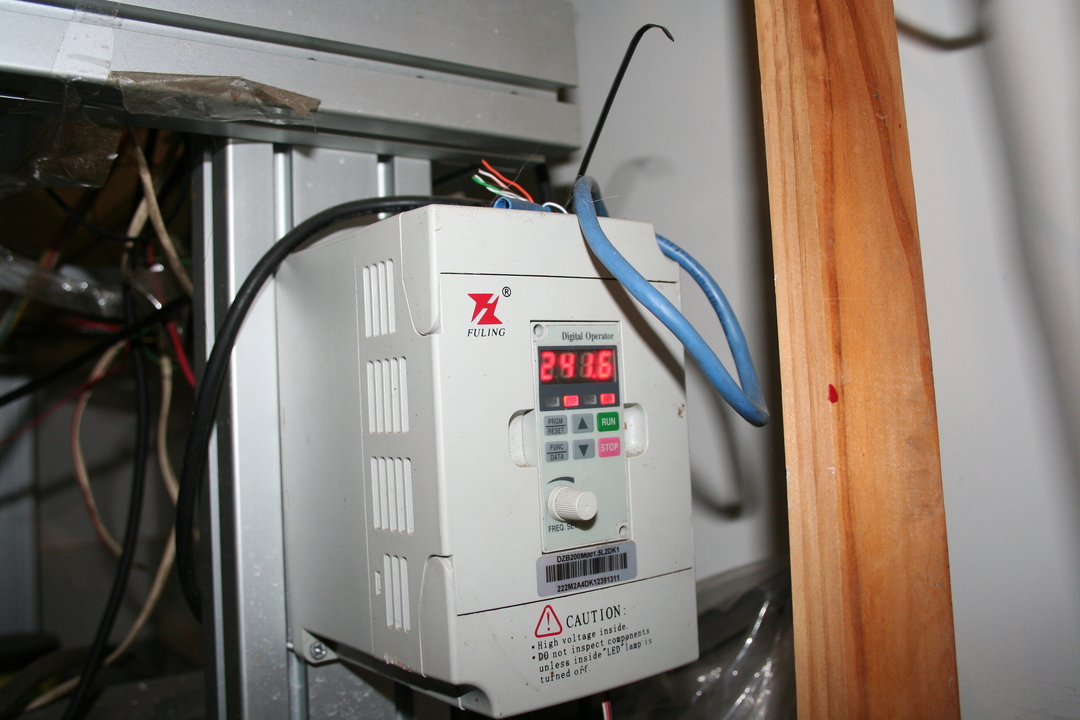
Had some time lately to play with the CNC. I cant get my DZB200 to go into rev. I tried the negative command value by compiling the program and it works but still in the forward direction. The rev light goes on then back to forward . Its been good to use my old C skills but I haven't solved anything. Well I don’t need rev but I would be nice the have it working for someone else.Debug txt below If any one wishes to look,Thankssrl
Last edit: 3 years 8 months ago by SrLange61.
Please Log in or Create an account to join the conversation.
- SkyMoCo
- Offline
- Junior Member
-
Less
More
- Posts: 33
- Thank you received: 4
3 years 8 months ago - 3 years 8 months ago #265196
by SkyMoCo
Replied by SkyMoCo on topic [ Vfdmod ] An easy VFD control over MODBUS RTU
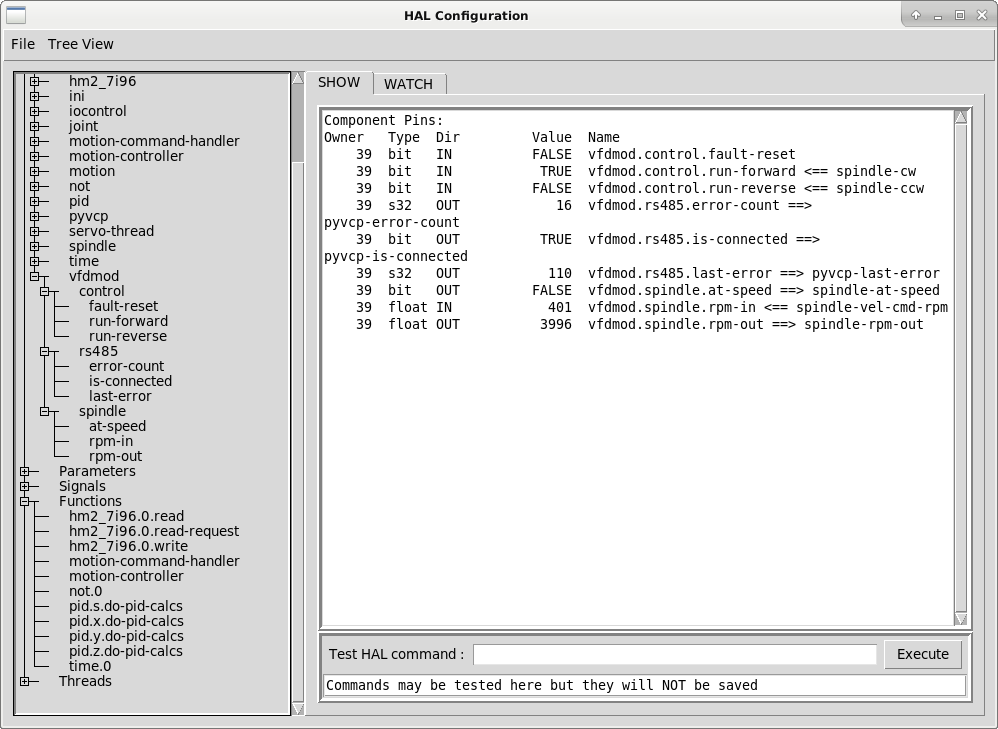
Thanks Rob. I am pretty close with my H100 VFD. I have everything set "correctly" as far as I am able to tell, but I have one issue. I cannot get the RPM above 4000. I don't have a tach, but the spindle seems to be turning at the 4000 rpm indicated. Spindle turns on and off, and I can slow it down, but I cannot go faster. (It works fine in manual mode).
Screen shot and config attached.
Screen shot and config attached.
Last edit: 3 years 8 months ago by SkyMoCo. Reason: Clarify that actual spindle speed appears to be what it reads.
Please Log in or Create an account to join the conversation.
- RobC
- Offline
- Junior Member
-
Less
More
- Posts: 26
- Thank you received: 5
3 years 8 months ago #265262
by RobC
Replied by RobC on topic [ Vfdmod ] An easy VFD control over MODBUS RTU
I would look at the vfd itself. Look at F014-F021 - mine are all set to 5.00. If these are too high it won't get to the target speed. I had this issue and I *think* it was the accel settings that straightened it out.
Please Log in or Create an account to join the conversation.
Time to create page: 0.148 seconds