
- Posts: 6
- Thank you received: 2
[ Vfdmod ] An easy VFD control over MODBUS RTU
- s_volenszki
- Offline
- New Member
-

Less
More
4 years 9 months ago #231875
by s_volenszki
Replied by s_volenszki on topic [ Vfdmod ] An easy VFD control over MODBUS RTU
I just guess, If I give a write command, the VFD echoes back the command what I sent, and do not bother with the CRC calculation (except if it has an error). But when I read data, It must calculate CRC, because the responded data is not related to the request command. I upload the whole SKI-780 RS485 communication protocol documentation, the CRC verification section starts at page 15. If you have time to take a look on it, maybe you can spot on the solution.
I do not know what's next. I try to change Modbus data format and Modbus protocol type, if it will fail too, I think I either start to learn the 0-10V analog solution or the PWM solution (if the VFD supports), or ask may local supplier to give me quotation for a supported VFD (like Omron or Siemens).
Thank you all for your help so far.
I do not know what's next. I try to change Modbus data format and Modbus protocol type, if it will fail too, I think I either start to learn the 0-10V analog solution or the PWM solution (if the VFD supports), or ask may local supplier to give me quotation for a supported VFD (like Omron or Siemens).
Thank you all for your help so far.
The following user(s) said Thank You: COFHAL
Please Log in or Create an account to join the conversation.
- s_volenszki
- Offline
- New Member
-
Less
More
- Posts: 6
- Thank you received: 2
4 years 9 months ago #231886
by s_volenszki
Replied by s_volenszki on topic [ Vfdmod ] An easy VFD control over MODBUS RTU
Finally I did it  I made a factory reset on the VFD and started over the settings.
What I did with Sako SKI-780:
Read baudrate
Request: 01 03 FD 00 00 01 B5 A6
Response: 01 03 02 17 75 76 53
Calculated response CRC: 0x5376
Write baudrate
Request: 01 06 FD 00 17 75 76 71
Response: 01 06 FD 00 17 75 76 71
Calculated response CRC: 0x7176
Set spindle speed to 100Hz
Request: 01 06 10 00 09 C4 8A C9
Response: 01 06 10 00 09 C4 8A C9
Calculated response CRC: 0xC98A
So I don't know what was the key parameter for the solution, but now it works, and I hope, next time if someone walks the same way, will end up in less dead ends like me did (I think because of my inattention)
I made a factory reset on the VFD and started over the settings.What I did with Sako SKI-780:
- Set the PP-01 to 01 manual on the VFD control panel (01 = reset factory settings except motor parameters)
- I used the default 9600 baudrate.
- Set the command source to RS485 with serial console app (01 06 F0 02 00 02 9A CB).
- Set the main frequency source to RS485 with serial console app (01 06 F0 03 00 09 8A CC).
- Changed the Modbus protocol to 31, standard Modbus communication, through RS485 with serial console app (01 06 FD 05 00 1F).
- Changed the Modbus data format to 8,N,1 (value 3) through RS485 with serial console app (01 06 FD 01 00 03).
Read baudrate
Request: 01 03 FD 00 00 01 B5 A6
Response: 01 03 02 17 75 76 53
Calculated response CRC: 0x5376
Write baudrate
Request: 01 06 FD 00 17 75 76 71
Response: 01 06 FD 00 17 75 76 71
Calculated response CRC: 0x7176
Set spindle speed to 100Hz
Request: 01 06 10 00 09 C4 8A C9
Response: 01 06 10 00 09 C4 8A C9
Calculated response CRC: 0xC98A
So I don't know what was the key parameter for the solution, but now it works, and I hope, next time if someone walks the same way, will end up in less dead ends like me did (I think because of my inattention)
The following user(s) said Thank You: tommylight
Please Log in or Create an account to join the conversation.
- hitchhiker
- Offline
- Elite Member
-

Less
More
- Posts: 247
- Thank you received: 21
4 years 9 months ago - 4 years 9 months ago #231927
by hitchhiker
Replied by hitchhiker on topic [ Vfdmod ] An easy VFD control over MODBUS RTU
hi!
I want to work with your component but i think i am to stupid to do the correct changes to the ini......
i add the ini to this reply and a picture from the registers.
please please please help.... thanks...
I want to work with your component but i think i am to stupid to do the correct changes to the ini......
i add the ini to this reply and a picture from the registers.
please please please help.... thanks...
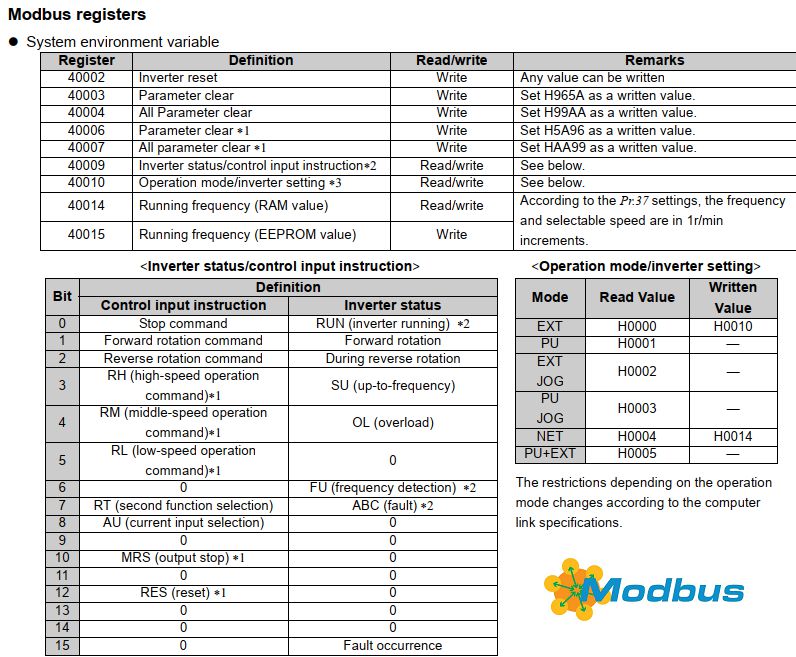
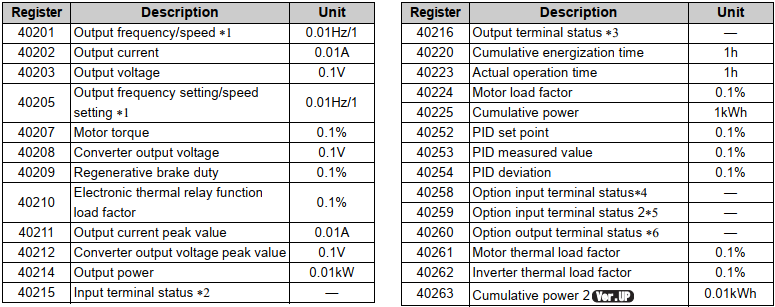
Last edit: 4 years 9 months ago by hitchhiker.
Please Log in or Create an account to join the conversation.
- hitchhiker
- Offline
- Elite Member
-
Less
More
- Posts: 247
- Thank you received: 21
4 years 9 months ago #232149
by hitchhiker
Replied by hitchhiker on topic [ Vfdmod ] An easy VFD control over MODBUS RTU
hi...nobody has a toip,idea or could help me?!
thanks
thanks
Please Log in or Create an account to join the conversation.
- H2B
- Offline
- New Member
-
Less
More
- Posts: 7
- Thank you received: 4
4 years 7 months ago - 4 years 7 months ago #236664
by H2B
Replied by H2B on topic [ Vfdmod ] An easy VFD control over MODBUS RTU
I've successfully used this to control a Folinn BD600 over MODBUS, and it should also apply to other Folinn (Fuling) models of VFDs. Unfortunately this model requires a reverse command to be sent using a negative percentage to the relative frequency command, which is something I'll try to figure out at a later stage.
Thanks @aekhv for this lovely bit of code!
Hope this information comes in handy for anyone using a Folinn VFD!
Here's the ini file I've used on Debian Bullseye with LinuxCNC 2.9 (default release packages work perfectly fine):
And here's the files added to the custom.hal to make it work with the interface:
Thanks @aekhv for this lovely bit of code!
Hope this information comes in handy for anyone using a Folinn VFD!
Here's the ini file I've used on Debian Bullseye with LinuxCNC 2.9 (default release packages work perfectly fine):
Code:
[Common]
MaxSpeedRPM=24000
MinSpeedRPM=6000
;AtSpeedThreshold=0.05
[RS485]
SlaveAddress=1
SerialDevice=/dev/ttyUSB1
BaudRate=9600
LoopDelay=500
ProtocolDelay=6
;IsConnectedDelay=10
ConnectionErrorList=110
ConnectionDelay=500
[Control]
Address=0x1000
RunForwardValue=0x0001
RunReverseValue=0x0002
FaultResetValue=0x0007
StopValue=0x0006
[SpindleRpmIn]
FunctionCode=0x06
Address=0x3000
Multiplier=10000
Divider=24000
[SpindleRpmOut]
Address=0x3001
Multiplier=30
Divider=10
[freq-running]
FunctionCode=0x03
Address=0x3001
PinType=float
PinName=freq-running
Divider=10
[bus-voltage]
FunctionCode=0x03
Address=0x3002
PinType=float
PinName=bus-voltage
[output-voltage]
FunctionCode=0x03
Address=0x3003
PinType=float
PinName=output-voltage
[output-current]
FunctionCode=0x03
Address=0x3004
PinType=float
PinName=output-current
Divider=100
[output-torque]
FunctionCode=0x03
Address=0x3006
PinType=float
PinName=output-torque
[run-speed]
FunctionCode=0x03
Address=0x3007
PinType=float
PinName=run-speed
[spindle-load-speed]
FunctionCode=0x03
Address=0x300F
PinType=float
PinName=spindle-load-speed
[power-on-time]
FunctionCode=0x03
Address=0x301A
PinType=float
PinName=power-on-time
[spindle-run-time]
FunctionCode=0x03
Address=0x301B
PinType=float
PinName=spindle-run-time
[fault-code]
FunctionCode=0x03
Address=0x8000
PinType=float
PinName=fault-code
And here's the files added to the custom.hal to make it work with the interface:
Code:
loadusr -W vfdmod bd600.ini --debug
net spindle-vel-cmd-rpm => vfdmod.spindle.rpm-in
net spindle-at-speed <= vfdmod.spindle.at-speed
net spindle-cw => vfdmod.control.run-forward
net spindle-ccw => vfdmod.control.run-reverse
Last edit: 4 years 7 months ago by H2B.
Please Log in or Create an account to join the conversation.
- rodw
- Offline
- Platinum Member
-

Less
More
- Posts: 12170
- Thank you received: 4153
4 years 7 months ago #236676
by rodw
Replied by rodw on topic [ Vfdmod ] An easy VFD control over MODBUS RTU
Beautiful thanks. I had just about given up on using this with my Folin BD600
I got a feeling my RS485 interface is bad but you have inspired me to keep trying!
It would be helpful if you could outline the changes you made in the VFD settings to enable RS485 control
I got a feeling my RS485 interface is bad but you have inspired me to keep trying!
It would be helpful if you could outline the changes you made in the VFD settings to enable RS485 control
Please Log in or Create an account to join the conversation.
Time to create page: 0.155 seconds