
- Posts: 17533
- Thank you received: 5334

Please Log in or Create an account to join the conversation.
Please Log in or Create an account to join the conversation.
Please Log in or Create an account to join the conversation.
I had major issues with this exact Elitedesk setup recently that I made a post about in my build thread here on the forum: forum.linuxcnc.org/12-milling/50559-opti...nc-conversion#284497[Rather than starting a new thread, I'll continue here...]
Starting to commission a new build and I'm getting the error finishing read problem crop up within seconds of starting LCNC and could use some help diagnosing.
PC: HP elitedesk 800 G2 mini
NIC: Intel i219LM
LCNC: 2.9 from ISO on LCNC home page
Kernel: 6.1.0-13 (haven't messed with this)
etc/network/interfaces:
auto lo
iface lo inet loopback
auto eno1
iface eno1 inet static
address 10.10.10.1
hardware-irq-coalesce-rx-usecs 0
Grub:
isolcpus=3 intel_pstate=disable processor.max_cstate=0 idle=poll cpufreq.default_governor=performance i915.enable_dc=0 ahci.mobile_lpm_policy=1 irqaffinity=0 nomodeset quiet
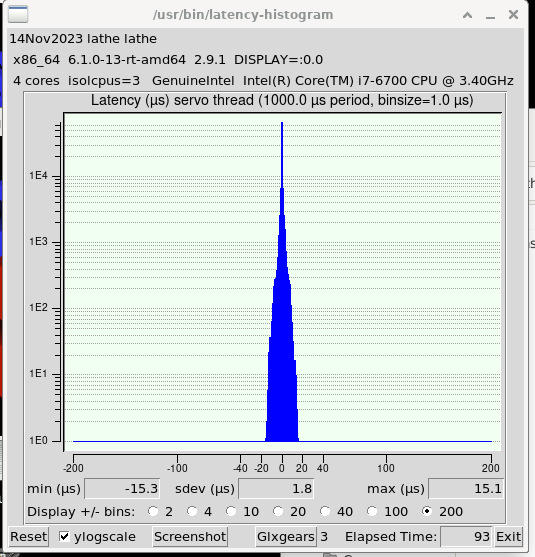
Good latency after fiddling with grub. Just copied the above from the latency thread, don't really understand the backstage stuff.
LCNC terminal output:
Warning: Spoiler!athe@lathe:~$ linuxcnc
LINUXCNC - 2.9.1
/usr/bin/linuxcnc: line 338: cd: $'/home/lathe/linuxcnc/configs\n.\n2)': No such file or directory
Machine configuration directory is '/home/lathe/linuxcnc/configs/LATHE_REV0 (DAY 2)'
Machine configuration file is 'LATHE_REV0.ini'
Starting LinuxCNC...
linuxcnc TPMOD=tpmod HOMEMOD=homemod EMCMOT=motmod
Note: Using POSIX realtime
twopass:invoked with <> options
twopass:found ./01MAIN.hal
twopass:found ./02IO.hal
twopass:found ./03SPINDLE.hal
twopass:found ./04CONSOLE.hal
twopass:pass0: loadusr -W hal_manualtoolchange
hm2: loading Mesa HostMot2 driver version 0.15
hm2_eth: loading Mesa AnyIO HostMot2 ethernet driver version 0.2
hm2_eth: 10.10.10.10: INFO: Hardware address (MAC): 00:60:1b:16:84:f0
hm2_eth: discovered 7I96S
hm2/hm2_7i96s.0: Low Level init 0.15
hm2/hm2_7i96s.0: Smart Serial Firmware Version 43
Board hm2_7i96s.0.7i84.0.0 Hardware Mode 0 = standard
Board hm2_7i96s.0.7i84.0.0 Software Mode 0 = input_output
Board hm2_7i96s.0.7i84.0.0 Software Mode 1 = io_analog_fieldvoltage
Board hm2_7i96s.0.7i84.0.0 Software Mode 2 = io_encoder_analog
Board hm2_7i96s.0.7i73.0.1 Hardware Mode 0 = nokeyboardnodisplay
Board hm2_7i96s.0.7i73.0.1 Software Mode 0 = inputoutputencoder
Board hm2_7i96s.0.7i73.0.1 Software Mode 1 = inputoutputencoderanalog
Board hm2_7i96s.0.7i73.0.1 Software Mode 2 = inputoutputencoderanalog
Board hm2_7i96s.0.7i73.0.1 Hardware Mode 1 = nokeyboarddisplay
Board hm2_7i96s.0.7i73.0.1 Software Mode 0 = inputoutputencoderdisplay
Board hm2_7i96s.0.7i73.0.1 Software Mode 1 = inputoutputencoderanalogdisplay
Board hm2_7i96s.0.7i73.0.1 Software Mode 2 = inputoutputencoderanalogwidedisplay
Board hm2_7i96s.0.7i73.0.1 Hardware Mode 2 = keyboard4by8nodisplay
Board hm2_7i96s.0.7i73.0.1 Software Mode 0 = inputoutputencoderkeycode4by8
Board hm2_7i96s.0.7i73.0.1 Software Mode 1 = inputoutputencoderanalogkeycode4by8
Board hm2_7i96s.0.7i73.0.1 Software Mode 2 = inputoutputencoderanalogkeycode4by8
Board hm2_7i96s.0.7i73.0.1 Hardware Mode 3 = keyboard4by8display
Board hm2_7i96s.0.7i73.0.1 Software Mode 0 = inputoutputencoderdisplaykeycode4by8
Board hm2_7i96s.0.7i73.0.1 Software Mode 1 = inputoutputencoderanalogdisplaykeycode4by8
Board hm2_7i96s.0.7i73.0.1 Software Mode 2 = inputoutputencoderanalogwidedisplaykeycode4by8
Board hm2_7i96s.0.7i73.0.1 Hardware Mode 4 = keyboard8by8nodisplay
Board hm2_7i96s.0.7i73.0.1 Software Mode 0 = inputoutputencoderkeycode8by8
Board hm2_7i96s.0.7i73.0.1 Software Mode 1 = inputoutputencoderanalogkeycode8by8
Board hm2_7i96s.0.7i73.0.1 Software Mode 2 = inputoutputencoderanalogkeycode8by8
Board hm2_7i96s.0.7i73.0.1 Hardware Mode 5 = keyboard8by8display
Board hm2_7i96s.0.7i73.0.1 Software Mode 0 = inputoutputencoderdisplaykeycode8by8
Board hm2_7i96s.0.7i73.0.1 Software Mode 1 = inputoutputencoderanalogdisplaykeycode8by8
Board hm2_7i96s.0.7i73.0.1 Software Mode 2 = inputoutputencoderanalogwidedisplaykeycode8by8
hm2/hm2_7i96s.0: 51 I/O Pins used:
hm2/hm2_7i96s.0: IO Pin 000 (TB3-01): InM Input Module #0, pin in0 (Input)
hm2/hm2_7i96s.0: IO Pin 001 (TB3-02): InM Input Module #0, pin in1 (Input)
hm2/hm2_7i96s.0: IO Pin 002 (TB3-03): InM Input Module #0, pin in2 (Input)
hm2/hm2_7i96s.0: IO Pin 003 (TB3-04): InM Input Module #0, pin in3 (Input)
hm2/hm2_7i96s.0: IO Pin 004 (TB3-05): InM Input Module #0, pin in4 (Input)
hm2/hm2_7i96s.0: IO Pin 005 (TB3-06): InM Input Module #0, pin in5 (Input)
hm2/hm2_7i96s.0: IO Pin 006 (TB3-07): InM Input Module #0, pin in6 (Input)
hm2/hm2_7i96s.0: IO Pin 007 (TB3-08): InM Input Module #0, pin in7 (Input)
hm2/hm2_7i96s.0: IO Pin 008 (TB3-09): InM Input Module #0, pin in8 (Input)
hm2/hm2_7i96s.0: IO Pin 009 (TB3-10): InM Input Module #0, pin in9 (Input)
hm2/hm2_7i96s.0: IO Pin 010 (TB3-11): InM Input Module #0, pin in10 (Input)
hm2/hm2_7i96s.0: IO Pin 011 (TB3-13/TB3-14): SSR #0, pin Out-00 (Output)
hm2/hm2_7i96s.0: IO Pin 012 (TB3-15/TB3-16): SSR #0, pin Out-01 (Output)
hm2/hm2_7i96s.0: IO Pin 013 (TB3-17/TB3-18): SSR #0, pin Out-02 (Output)
hm2/hm2_7i96s.0: IO Pin 014 (TB3-19/TB3-20): SSR #0, pin Out-03 (Output)
hm2/hm2_7i96s.0: IO Pin 015 (TB3-21/TB3-22): OutM Output Module #0, pin Out-04 (Output)
hm2/hm2_7i96s.0: IO Pin 016 (TB3-23/TB3-24): OutM Output Module #0, pin Out-05 (Output)
hm2/hm2_7i96s.0: IO Pin 017 (TB1-02/TB1-03): StepGen #0, pin Step (Output)
hm2/hm2_7i96s.0: IO Pin 018 (TB1-04/TB1-05): StepGen #0, pin Direction (Output)
hm2/hm2_7i96s.0: IO Pin 019 (TB1-08/TB1-09): StepGen #1, pin Step (Output)
hm2/hm2_7i96s.0: IO Pin 020 (TB1-10/TB1-11): StepGen #1, pin Direction (Output)
hm2/hm2_7i96s.0: IO Pin 021 (TB1-14/TB1-15): StepGen #2, pin Step (Output)
hm2/hm2_7i96s.0: IO Pin 022 (TB1-16/TB1-17): StepGen #2, pin Direction (Output)
hm2/hm2_7i96s.0: IO Pin 023 (TB1-20/TB1-21): StepGen #3, pin Step (Output)
hm2/hm2_7i96s.0: IO Pin 024 (TB1-22-TB1-23): StepGen #3, pin Direction (Output)
hm2/hm2_7i96s.0: IO Pin 025 (TB2-02/TB2-03): StepGen #4, pin Step (Output)
hm2/hm2_7i96s.0: IO Pin 026 (TB2-04/TB2-05): StepGen #4, pin Direction (Output)
hm2/hm2_7i96s.0: IO Pin 027 (TB2-07/TB2-08): Muxed Encoder #2, pin Muxed A (Input)
hm2/hm2_7i96s.0: IO Pin 028 (TB2-10/TB2-11): Muxed Encoder #2, pin Muxed B (Input)
hm2/hm2_7i96s.0: IO Pin 029 (TB2-13/TB2-14): Muxed Encoder #2, pin Muxed Index (Input)
hm2/hm2_7i96s.0: IO Pin 030 (TB2-16/TB2-17): Smart Serial Interface #0, pin rx0 (Input)
hm2/hm2_7i96s.0: IO Pin 031 (TB2-18/TB2-19): Smart Serial Interface #0, pin tx0 (Output)
hm2/hm2_7i96s.0: IO Pin 032 (internal): Smart Serial Interface #0, pin txen0 (Output)
hm2/hm2_7i96s.0: IO Pin 033 (internal): SSR #0, pin AC Ref (internal) (Output)
hm2/hm2_7i96s.0: IO Pin 034 (P1-01/DB25-01): Smart Serial Interface #0, pin rx1 (Input)
hm2/hm2_7i96s.0: IO Pin 035 (P1-02/DB25-14): Smart Serial Interface #0, pin tx1 (Output)
hm2/hm2_7i96s.0: IO Pin 036 (P1-03/DB25-02): StepGen #8, pin Step (Output)
hm2/hm2_7i96s.0: IO Pin 037 (P1-04/DB25-15): StepGen #8, pin Direction (Output)
hm2/hm2_7i96s.0: IO Pin 038 (P1-05/DB25-03): StepGen #7, pin Step (Output)
hm2/hm2_7i96s.0: IO Pin 039 (P1-06/DB25-16): StepGen #7, pin Direction (Output)
hm2/hm2_7i96s.0: IO Pin 040 (P1-07/DB25-04): StepGen #6, pin Step (Output)
hm2/hm2_7i96s.0: IO Pin 041 (P1-08/DB25-17): StepGen #6, pin Direction (Output)
hm2/hm2_7i96s.0: IO Pin 042 (P1-09/DB25-05): StepGen #5, pin Step (Output)
hm2/hm2_7i96s.0: IO Pin 043 (P1-11/DB25-06): StepGen #5, pin Direction (Output)
hm2/hm2_7i96s.0: IO Pin 044 (P1-13/DB25-07): Muxed Encoder Select #0, pin Mux Select 0 (Output)
hm2/hm2_7i96s.0: IO Pin 045 (P1-15/DB25-08): Muxed Encoder #0, pin Muxed A (Input)
hm2/hm2_7i96s.0: IO Pin 046 (P1-17/DB25-09): Muxed Encoder #0, pin Muxed B (Input)
hm2/hm2_7i96s.0: IO Pin 047 (P1-19/DB25-10): Muxed Encoder #0, pin Muxed Index (Input)
hm2/hm2_7i96s.0: IO Pin 048 (P1-21/DB25-11): Muxed Encoder #1, pin Muxed A (Input)
hm2/hm2_7i96s.0: IO Pin 049 (P1-23/DB25-12): Muxed Encoder #1, pin Muxed B (Input)
hm2/hm2_7i96s.0: IO Pin 050 (P1-25/DB25-13): Muxed Encoder #1, pin Muxed Index (Input)
hm2/hm2_7i96s.0: registered
creating ladder-state
note: MAXV max: 0.500 units/sec 30.000 units/min
note: LJOG max: 0.500 units/sec 30.000 units/min
note: LJOG default: 0.500 units/sec 30.000 units/min
note: jog_order='ZX'
note: jog_invert=set()
hm2/hm2_7i96s.0: error finishing read! iter=4596
hm2/hm2_7i96s.0: error finishing read! iter=4596
Ping times
Warning: Spoiler!lathe@lathe:~$ ping 10.10.10.10
PING 10.10.10.10 (10.10.10.10) 56(84) bytes of data.
64 bytes from 10.10.10.10: icmp_seq=1 ttl=64 time=0.214 ms
64 bytes from 10.10.10.10: icmp_seq=2 ttl=64 time=0.121 ms
64 bytes from 10.10.10.10: icmp_seq=3 ttl=64 time=0.120 ms
64 bytes from 10.10.10.10: icmp_seq=4 ttl=64 time=0.121 ms
64 bytes from 10.10.10.10: icmp_seq=5 ttl=64 time=0.120 ms
64 bytes from 10.10.10.10: icmp_seq=6 ttl=64 time=0.120 ms
64 bytes from 10.10.10.10: icmp_seq=7 ttl=64 time=0.121 ms
64 bytes from 10.10.10.10: icmp_seq=8 ttl=64 time=0.122 ms
64 bytes from 10.10.10.10: icmp_seq=9 ttl=64 time=0.120 ms
64 bytes from 10.10.10.10: icmp_seq=10 ttl=64 time=0.120 ms
^C
--- 10.10.10.10 ping statistics ---
10 packets transmitted, 10 received, 0% packet loss, time 9215ms
rtt min/avg/max/mdev = 0.120/0.129/0.214/0.028 ms
Would trying a later kernel (6.3,6.4,etc.) help? I did see mention elsewhere here that there is a recently fixed bug related to Intel i219LM NICs...but don't know if that's related or when the fix will make it to kernels appropriate for LCNC.
ThxI
Please Log in or Create an account to join the conversation.
Please Log in or Create an account to join the conversation.
Please Log in or Create an account to join the conversation.

