
Mesa hm2/hm2_7i96s.0: error finishing read

More
4 years 2 weeks ago #254065 by JT
Been running LinuxCNC for 24 hours now without an issue.

JT
The following user(s) said Thank You: rodw

Please Log in or Create an account to join the conversation.

More
4 years 2 weeks ago #254066 by tommylight
Reboot, start LinuxCNC as soon as the PC boots.
That will error out on my current PC.
Stating it again will work all day without issues.
I have it on auto start, so i will add a 15 second delay and see if it errors again.
Might be because i have also other programs that run on startup...

Please Log in or Create an account to join the conversation.

More
4 years 2 weeks ago #254068 by rodw
My little favourite PC has been re-released as the Odroid H3+ I'm tempted to grab one but it uses 2 x Realtek RTL8125 NIC's. Much better option thna the PI with An Intel Celeron.. if the NIC works... USD $165 so not a bad price for something that fits in the palm of your hand... I have a couple of the Odroid H2+ but th eone I use for LCNC is running Ethercat

Please Log in or Create an account to join the conversation.

More
4 years 2 weeks ago #254213 by bensttech
Gents,
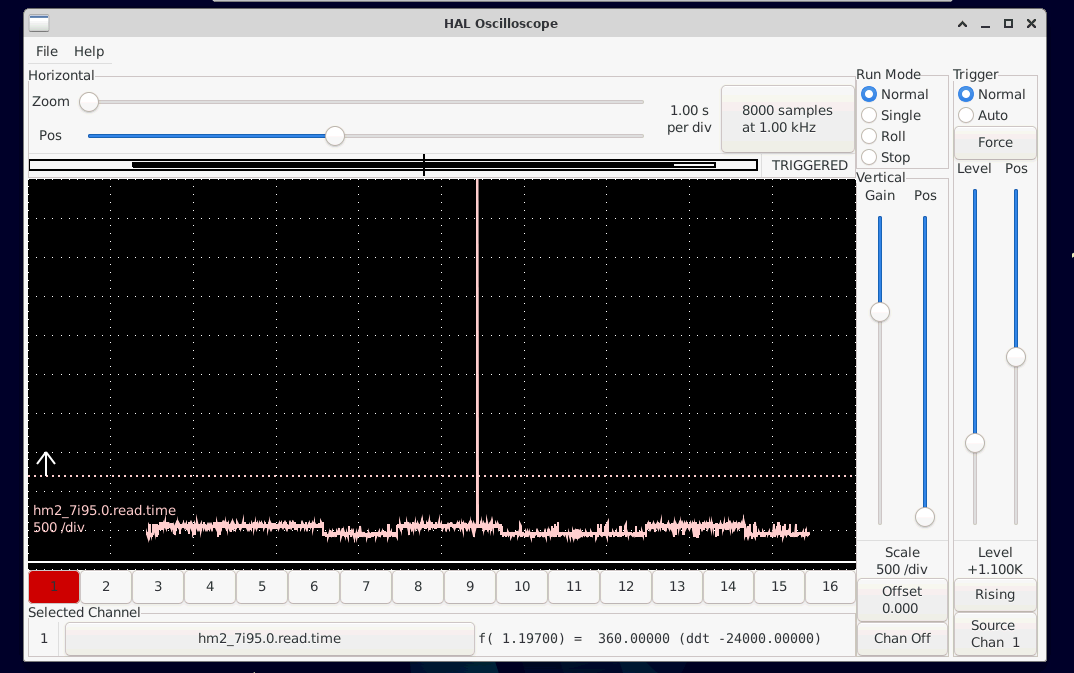
          I am seeing something similar with an 7i95, The machine was stable on 2.8 but we have made our own GUI with qtpyvcp and python 3 and to run this we need 2.9 and running 2.9 we are getting spurious error finishing read! iter= error, I have been trying to pin this down as to what is going but am struggling. As can be seen from the HAL scope attached the latency is good most of the time then every so often (every coupe of seconds) the hm2_7i95.0.read.time jumps by factor of 10x then sure enough the read timeout error occurs. I have played around with kernel settings this has virtualy no effect, using the r8168-dkms driver has massive effect on bringing down the general read.time but the the spurious spikes are still there.
5.10.0-18-rt-amd64
PRETTY_NAME="Debian GNU/Linux 11 (bullseye)"
model name      : Intel(R) Celeron(R) CPU  J1900  @ 1.99GHz


The following user(s) said Thank You: arvidb

Please Log in or Create an account to join the conversation.

More
4 years 2 weeks ago - 4 years 2 weeks ago #254218 by PCW
How large is the latency spike?
What are your kernel command line parameters?
Are all power management options,speed switching/C states >C1 disabled in the BIOS?
(ms latencies are often related to power management/clock speed switching)
Last edit: 4 years 2 weeks ago by PCW.

Please Log in or Create an account to join the conversation.
More
4 years 2 weeks ago #254221 by bensttech
i will need to measure it again but its something in 1432312`s
i have tried combinations of "intel_idle.max_cstate=0 processor.max_cstate=0 idle=poll" and also isolcpus=2,3. it seems system load does change the how periodicaly it happens. power management is off in the bios.

Please Log in or Create an account to join the conversation.

Moderators: PCW, jmelson
Time to create page: 0.455 seconds
Powered by Kunena Forum
