
- Posts: 113
- Thank you received: 22
Light Machine Corp. Benchman XTr (retrofit)
- x-Intelitek Engineer
- Offline
- Premium Member
-

Less
More
7 years 3 months ago #140951
by x-Intelitek Engineer
Replied by x-Intelitek Engineer on topic Light Machine Corp. Benchman XTr (retrofit)
Pegasus,
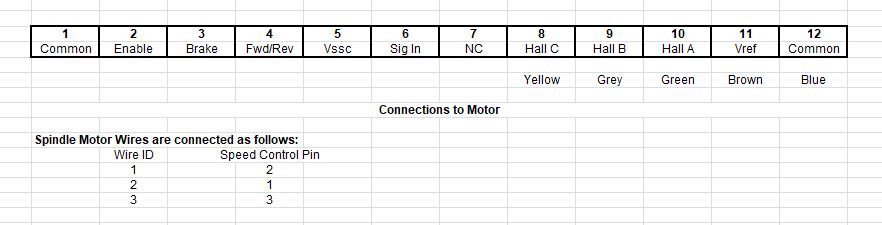
The attached file shows how to connect the motor to the speed control.
Pin 1 is the inboard-most location. It is the WHT wire in my previous photo.
The motor connects to pins 8-10 of the big orange connector and to the 3 male spade connections on the speed control.
The hall cells connect to the connector you show on pins: 24, 25, & 26. They are used strictly for determining spindle speed; whether it is turning or not and if it is at speed.
I am also attaching a copy of the schematic for your main control board (with the cuts and jumpers identified).
I drew this back in 1999 to develop a universal control board for next generation machine (Benchman XT).
I believe it is accurate, but please use it as a guide and not as 100% guaranteed fact.
Please let me know what else is needed.
The attached file shows how to connect the motor to the speed control.
Pin 1 is the inboard-most location. It is the WHT wire in my previous photo.
The motor connects to pins 8-10 of the big orange connector and to the 3 male spade connections on the speed control.
The hall cells connect to the connector you show on pins: 24, 25, & 26. They are used strictly for determining spindle speed; whether it is turning or not and if it is at speed.
I am also attaching a copy of the schematic for your main control board (with the cuts and jumpers identified).
I drew this back in 1999 to develop a universal control board for next generation machine (Benchman XT).
I believe it is accurate, but please use it as a guide and not as 100% guaranteed fact.
Please let me know what else is needed.
Please Log in or Create an account to join the conversation.
- project-pegasus
- Visitor
-

7 years 3 months ago #141036
by project-pegasus
Replied by project-pegasus on topic Light Machine Corp. Benchman XTr (retrofit)
Thank you, X. That it going to help a lot. It might be a week or so before I can get back into the machine but I will let you know how it turns out. Thanks again.
Please Log in or Create an account to join the conversation.
- project-pegasus
- Visitor
-
7 years 2 months ago #143497
by project-pegasus
Replied by project-pegasus on topic Light Machine Corp. Benchman XTr (retrofit)
X-Intelitek Engineer,
Thank you again for your help. I have been able to figure out most of the wiring based on the schematics you gave me but I still have a couple of questions. On the larger orange connector with 12 positions I've been able to figure out that position 1(Common) goes to J109-18, position 2 (Enable) goes to J109-15, position 5 (Vssc) goes to J109-2, and Hall A,B,C correspond to J109-24,25,26. But on position 3 you list as (Brake) I can't find a corresponding J109 pin in the schematics, similarly with position 4 (Fwd/Rev) and position 7 (NC). Would those terms correspond to other terminology in the wiring schematics, I noticed you listed "Sig In" for position 6 on the orange connector but I think that it is called "V_SPDL_CMD" in the schematics at J109-2? And do you have any idea what wires from J109 would go to the spindle's vref and common, pins 11 and 12 on the orange connector. Thanks again.
Thank you again for your help. I have been able to figure out most of the wiring based on the schematics you gave me but I still have a couple of questions. On the larger orange connector with 12 positions I've been able to figure out that position 1(Common) goes to J109-18, position 2 (Enable) goes to J109-15, position 5 (Vssc) goes to J109-2, and Hall A,B,C correspond to J109-24,25,26. But on position 3 you list as (Brake) I can't find a corresponding J109 pin in the schematics, similarly with position 4 (Fwd/Rev) and position 7 (NC). Would those terms correspond to other terminology in the wiring schematics, I noticed you listed "Sig In" for position 6 on the orange connector but I think that it is called "V_SPDL_CMD" in the schematics at J109-2? And do you have any idea what wires from J109 would go to the spindle's vref and common, pins 11 and 12 on the orange connector. Thanks again.
Please Log in or Create an account to join the conversation.
- x-Intelitek Engineer
- Offline
- Premium Member
-
Less
More
- Posts: 113
- Thank you received: 22
7 years 2 months ago #143682
by x-Intelitek Engineer
Replied by x-Intelitek Engineer on topic Light Machine Corp. Benchman XTr (retrofit)
Position 1 goes to J109-18 - Correct
Position 2 goes to J109-15 - Correct
Position 5 (Vssc) should go to J109-12 not J109-2
Hall A,B,C go to J109-24,25,26 - Correct
Position 3 (Brake) should go to J109-4 I believe.
J109-4 and J109-15 should be inverted from each other. In other words: Enable=no Brake, Disable=Brake.
You should to check the polarity.
Position 4 (FWD/REV) should go to J109-7.
J109-7 and J109-10 should be inverted from each other. In other words: FWD = not REV, Not FWD = REV.
You should to check polarity.
Position 7 (NC) is No Connect - Do not connect anything to this location
Position 6 is called "SIG IN" by the speed control, it is called "V_SPDL_CMD" on the PCB. It is J109-2.
J109 should not connect to the Vref and Common (pins11 & 12) those only go to the spindle to power the internal hall circuitry.
I think that is correct. 95%+ confidence level.
Position 2 goes to J109-15 - Correct
Position 5 (Vssc) should go to J109-12 not J109-2
Hall A,B,C go to J109-24,25,26 - Correct
Position 3 (Brake) should go to J109-4 I believe.
J109-4 and J109-15 should be inverted from each other. In other words: Enable=no Brake, Disable=Brake.
You should to check the polarity.
Position 4 (FWD/REV) should go to J109-7.
J109-7 and J109-10 should be inverted from each other. In other words: FWD = not REV, Not FWD = REV.
You should to check polarity.
Position 7 (NC) is No Connect - Do not connect anything to this location
Position 6 is called "SIG IN" by the speed control, it is called "V_SPDL_CMD" on the PCB. It is J109-2.
J109 should not connect to the Vref and Common (pins11 & 12) those only go to the spindle to power the internal hall circuitry.
I think that is correct. 95%+ confidence level.
Please Log in or Create an account to join the conversation.
- project-pegasus
- Visitor
-
7 years 2 months ago #143686
by project-pegasus
Replied by project-pegasus on topic Light Machine Corp. Benchman XTr (retrofit)
Thank you, X.
We will get this figured out!
We will get this figured out!
Please Log in or Create an account to join the conversation.
- SOSMachining
- Offline
- New Member
-

Less
More
- Posts: 7
- Thank you received: 1
7 years 1 month ago #146491
by SOSMachining
Replied by SOSMachining on topic Light Machine Corp. Benchman XTr (retrofit)
Hey Guys,
Newbie here but I love this forum. A few years ago I stumbled across a craigslist auction for two of these machines and have been tinkering with them ever since. After a couple of new parts to the old PC and some practice learning g-code on Youtube, I've been able to sling pretty steady aluminum chips from one of the machines so it's been a pretty cool project. I've attached a couple pictures of the machines with some upgraded aquarium lights below.
The one issue that I have is that it seems like my tool holders are struggling to repeatably get all the way up inside the drawbar. I've tried to do some aligning and re-homing of the ATC following the instructions in the manual but I still see anywhere between 0.004" and 0.020" variation between tool changes. I'll probably need to do some heavier dis-assembly and re-assembly of the ATC one of these weeks but I haven't made it there yet. Recently I've become pretty curious about the possibility of adding a tool-length offset probe inside the machine to verify the offset after a tool change but I'm not sure if my machine has the right main board to support a probe.
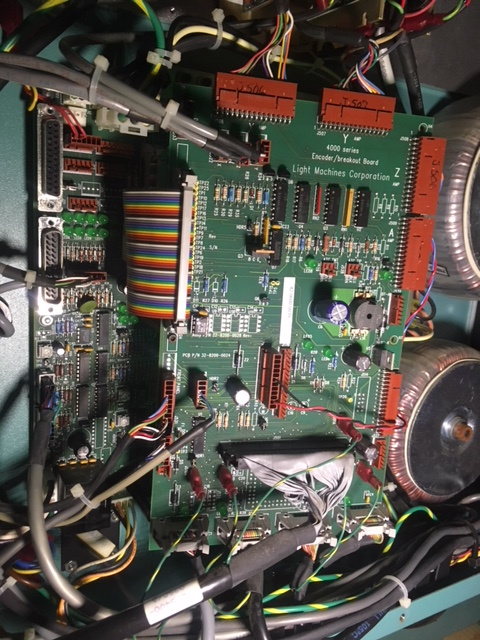
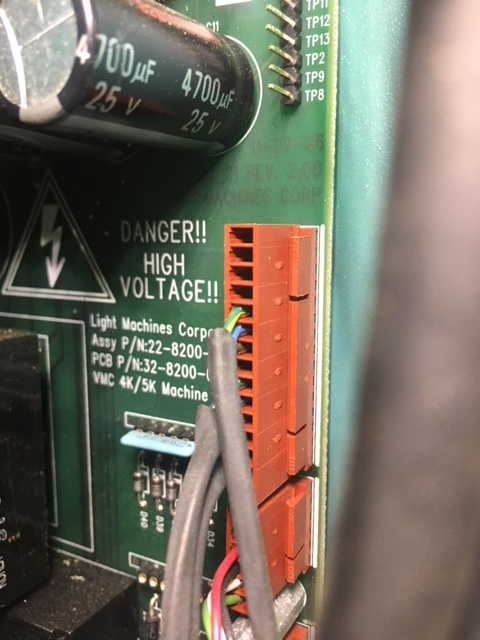
I've attached a couple picture that show the setup inside my control panel because it looks quite a bit different than the other posts in this forum. It looks like my main board on this machine is very similar to that of the ProLight machines and I have ASI motion controller card inside the PC rather than and PCI cards.
In looking I definitely don't have the wiring for the probe connector on the back of the front panel inside the machine like the probe-offset manual says I should. I can attach more pictures if necessary, but I guess my question is, does anyone know if this machine is capable of using a tool-length-offset probe, and if so, which pins input the signal from the probe?
Thanks, guys! This forum has been a huge help in getting my machines up and running!
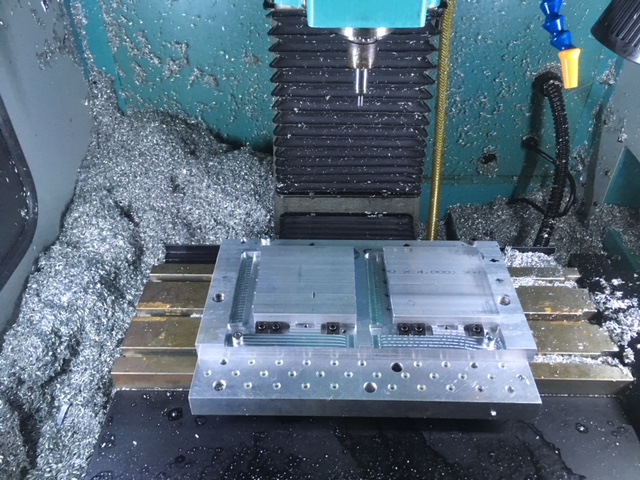

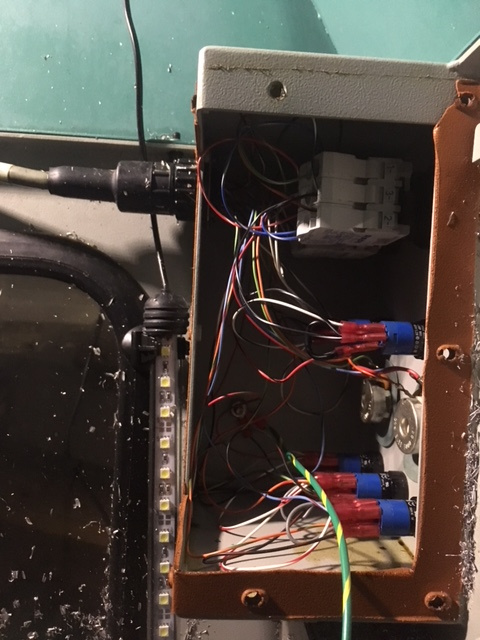
Newbie here but I love this forum. A few years ago I stumbled across a craigslist auction for two of these machines and have been tinkering with them ever since. After a couple of new parts to the old PC and some practice learning g-code on Youtube, I've been able to sling pretty steady aluminum chips from one of the machines so it's been a pretty cool project. I've attached a couple pictures of the machines with some upgraded aquarium lights below.
The one issue that I have is that it seems like my tool holders are struggling to repeatably get all the way up inside the drawbar. I've tried to do some aligning and re-homing of the ATC following the instructions in the manual but I still see anywhere between 0.004" and 0.020" variation between tool changes. I'll probably need to do some heavier dis-assembly and re-assembly of the ATC one of these weeks but I haven't made it there yet. Recently I've become pretty curious about the possibility of adding a tool-length offset probe inside the machine to verify the offset after a tool change but I'm not sure if my machine has the right main board to support a probe.
I've attached a couple picture that show the setup inside my control panel because it looks quite a bit different than the other posts in this forum. It looks like my main board on this machine is very similar to that of the ProLight machines and I have ASI motion controller card inside the PC rather than and PCI cards.
In looking I definitely don't have the wiring for the probe connector on the back of the front panel inside the machine like the probe-offset manual says I should. I can attach more pictures if necessary, but I guess my question is, does anyone know if this machine is capable of using a tool-length-offset probe, and if so, which pins input the signal from the probe?
Thanks, guys! This forum has been a huge help in getting my machines up and running!
Please Log in or Create an account to join the conversation.
Time to create page: 0.491 seconds