Mini wannabe datron build

More
3 years 1 month ago #279786 by ihavenofish
Thanks

As it turns out i HAVE a 7i84 although i do not know where it is right now. I did not realise it could "be" a keyboard. My keyboard is 71 keys. (your math is right i think, but it would take all the outputs) This could make things interesting. However, the downside is it costs $80usd, and a raspberry pi 2040 mcu is $6 which makes it less ideal for a future product beyond just my personal machine.

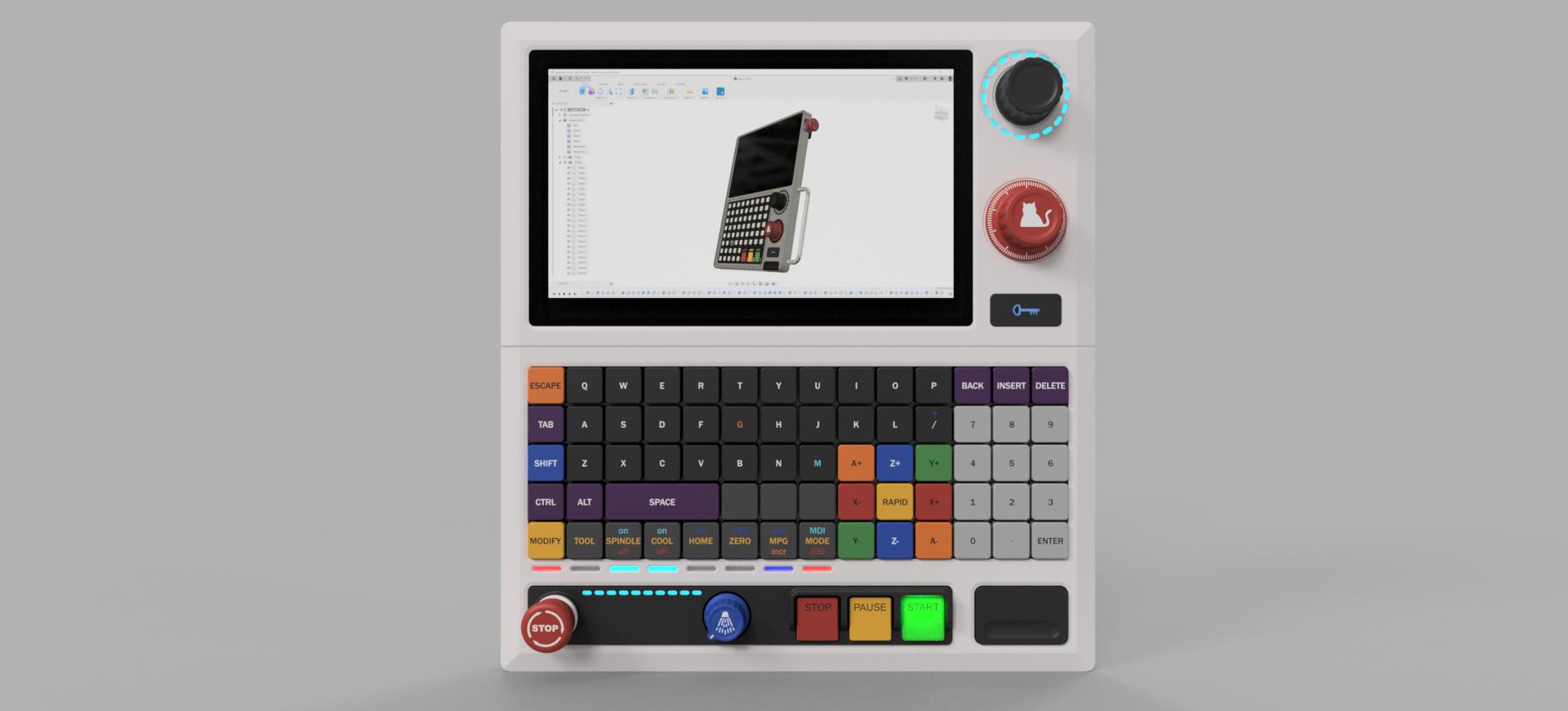
As for the layout, this is a very small panel for a very small machine, so it will naturally not have every single button you fond on a fanuc control. That said, my brother machines had almost nothing either. The DDCS has like 12 or 14 total keys. The touch screen is purely for navigation in linux when required in place of a mouse. The keyboard is a "full" 65% board but i will be rearranging various keys. It will be no worse than just using a pc keyboard as far as number of inputs. The overrides are primarily for feeds on this machine. the spindle almost always lives at full speed. A more idiot proof compromise might be a shift key to change it's function to spindle override. Much like the xyza controls have a middle "rapid" shift button.

7" is a pretty standard size on vmc's. Seimens 808d is 7", I think my brothers had 8". Larger screens are pretty but take too much space and cost way more. A lot of this is modeled on the basic features of the 808d actually.

Vertical keyboard is standard on most machines. Almost all. It sucks if you want to write a novel sure, but it is a necessary evil because there is literally no where else to put it. I drew one up with an angle and it was more trouble than it is worth finding a place for it, wiring, pivots and hinges etc. Simple is best here.

Please Log in or Create an account to join the conversation.

More
3 years 1 month ago #279787 by ihavenofish
Most of the keys labeled so it should be a little more clear how it gets used. It really is just a "regular" pc keyboard with some rearranging and some key labels that show the linuxcnc function (cursor/page up down for example, and the right shift key is rapid). I will likely have sub labeling for the shift functions. Some pc keys i have eliminated as well, like capslock and the windows key as i don't think they are necessary here.(if you really did need full key functions you just plug in a real keybaord).


Please Log in or Create an account to join the conversation.

More
3 years 1 month ago #279829 by spumco
Replied by spumco on topic Mini wannabe datron build
Sounds like you're all set with the basic layout and components then.

As I mentioned, multiswitch.comp is pretty clever way to cycle through values with a single input.  I've also found multiclick.comp and knob2float.comp to be helpful.

As to the 7i84, matrix.comp doesn't require an 8x8 array.  The 7i73 is limited to 4x8 or 8x8 if the built-in matrix is used, but the 7i84 could be set up with a different array pattern to save IO if you only needed a few buttons.

I'd imagine the rpi might also be programmed with a similar matrix function.  I think I read somewhere here that keystroke values can be mapped to HAL pins?

Please Log in or Create an account to join the conversation.

More
3 years 1 month ago #279832 by ihavenofish
Thanks

The pi has an off the shelf "make an HID keyboard" project, so it is near zero work in that regard. Also, it fits inside the panel. The mesa card would need 20-30 wires running to it to the cabinet. I will likely use the mesa on my machine for more general IO, mpg, etc, but the keyboard portion I think will just be a usb keyboard.

A number of things in linuxcnc had hotkeys (R to start program for example). I imagine I would tie keystrokes to other functions the same way. Just need to be context aware (if I need to type the letter R for example in a box, it cant go starting a program).

The biggest open "hardware" questions are back to led interaction.

I'm not sure what the multiswitch does for me. I have no switches on the mesa.

Please Log in or Create an account to join the conversation.

More
3 years 1 month ago #279837 by ihavenofish
Reading up on using keystrokes i see a number of potential issues.

Gave me a thought. Still have the RP2040 as a usb keyboard, but add a modifier that can alternately send certain key presses out to the mesa. 2 keyboards in one if that makes sense. No modifier, keys map like a regular keyboard (with text written on them for that). Modifier engaged and special functions go to the mesa either single or in a matrix. Modifier On is probably default, and if you need to type etc, you engage it. Would probably want to remove/disable the default axis key mapping to functions if possible.

So the mesa doesn't need to deal with dumb stuff taking pins like qwerty letters. But it can deal in hardware with M functions, Jogging, etc. RP2040 IO is 3.3v, will need a level shifter.

Hmmm.

Please Log in or Create an account to join the conversation.

More
3 years 1 month ago #279847 by ihavenofish
Hmmm
 
The following user(s) said Thank You: besriworld

Please Log in or Create an account to join the conversation.

Time to create page: 0.065 seconds
Powered by Kunena Forum