
- Posts: 255
- Thank you received: 13
1 or 2 dedicated 120VAC circuits for my CNC?
- Sray69
- Offline
- Elite Member
-

Less
More
3 years 8 months ago - 3 years 8 months ago #264516
by Sray69
Replied by Sray69 on topic 1 or 2 dedicated 120VAC circuits for my CNC?
Hey real quick question. I just want to confirm that I am wiring the limit switches correctly. I got this diagram for a GRBL setup. I am thinking the switches can be wired the same (in series/per axis) but connected to the Mesa board differently. Do I just run the green wire to the Field Power (V+) and the others to the Digital Inputs? Please see attachment.
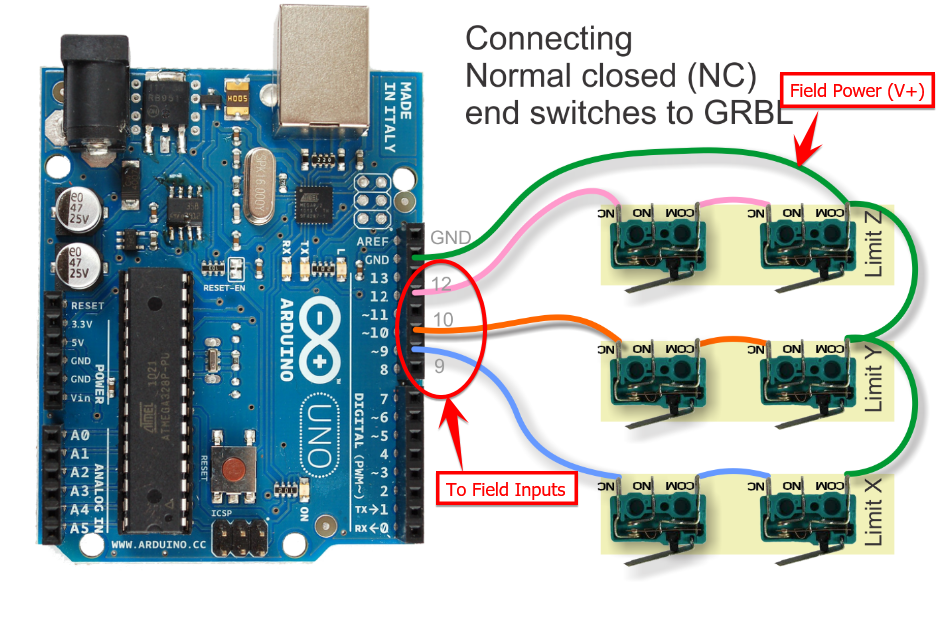
Thanks
Thanks
Last edit: 3 years 8 months ago by Sray69.
Please Log in or Create an account to join the conversation.
- spumco
- Offline
- Platinum Member
-

Less
More
- Posts: 2180
- Thank you received: 905
3 years 8 months ago #264549
by spumco
Replied by spumco on topic 1 or 2 dedicated 120VAC circuits for my CNC?
Yep. The pic had me confused for a minute, but if you wire it like your annotation you're GTG.
The following user(s) said Thank You: Sray69
Please Log in or Create an account to join the conversation.
- Sray69
- Offline
- Elite Member
-
Less
More
- Posts: 255
- Thank you received: 13
3 years 8 months ago #264896
by Sray69
Replied by Sray69 on topic 1 or 2 dedicated 120VAC circuits for my CNC?
Alright I have finished running all the electrical and have fired up the cabinet. No smoke or fire so far 
There is power to my Mesa board and I ran an Ethernet cable to my Debian computer. I have manually setup the ethernet connection as shown in this post .
But when I try to communicate with the Mesa using the commands shown in the post, I get nothing. I can't ping it (From 10.10.10.11 icmp_seq=1 Destination Host Unreachable) or use the mesaflash command (bash: mesaflash: command not found).
I tried installing network-manager or network-manager-gnome AND uninstalling WiCD but it appears that network-manager's are already installed and there does not appear to be a WiCD installed. There appears to be upgrades to the network-manager's but I get errors when I try to upgrade them. Do I need to add some repositories in order to upgrade?
I am using Debian Bookworm/sid with LinuxCNC v2.9.
Would appreciate some guidance. Thanks
There is power to my Mesa board and I ran an Ethernet cable to my Debian computer. I have manually setup the ethernet connection as shown in this post .
But when I try to communicate with the Mesa using the commands shown in the post, I get nothing. I can't ping it (From 10.10.10.11 icmp_seq=1 Destination Host Unreachable) or use the mesaflash command (bash: mesaflash: command not found).
I tried installing network-manager or network-manager-gnome AND uninstalling WiCD but it appears that network-manager's are already installed and there does not appear to be a WiCD installed. There appears to be upgrades to the network-manager's but I get errors when I try to upgrade them. Do I need to add some repositories in order to upgrade?
I am using Debian Bookworm/sid with LinuxCNC v2.9.
Would appreciate some guidance. Thanks
Please Log in or Create an account to join the conversation.
- Sray69
- Offline
- Elite Member
-
Less
More
- Posts: 255
- Thank you received: 13
3 years 8 months ago #264900
by Sray69
Replied by Sray69 on topic 1 or 2 dedicated 120VAC circuits for my CNC?
I get a "404 Not Found [IP: 151.101.22.132 80]" message when I try to upgrade the network-manager's.
I just installed mesaflash and I am still unable to connect to the mesa.
I just installed mesaflash and I am still unable to connect to the mesa.
Please Log in or Create an account to join the conversation.
- Sray69
- Offline
- Elite Member
-
Less
More
- Posts: 255
- Thank you received: 13
3 years 8 months ago - 3 years 8 months ago #264910
by Sray69
Replied by Sray69 on topic 1 or 2 dedicated 120VAC circuits for my CNC?
I finally got connected to the Mesa board by editing /etc/network/interfaces.d/setup and moving the W3 jumper.
I noticed though that when I left click on the Network Manager in the tray it shows VPN as the only option. I no longer see other connection options. Is this normal? Not that it matters much as I will probably only run LCNC on this PC.
Now I am kind of lost on setting up my ini/hal files. I am running the Pncconf Wizard but not real sure how to set it up. I am running a YYXZ axis setup and I want my home in the lower (front) left corner of my table. I am kind of confused on how I would set my limit switches on the 7i76 I/O TB6 tab. Would I use "X Maximum Limit + Home" or "X Minimum Limit + Home" or "X Both Limit + Home"? And do I need to invert them?
Any guidance on setting these files up and testing my axis's would be appreciated!
I noticed though that when I left click on the Network Manager in the tray it shows VPN as the only option. I no longer see other connection options. Is this normal? Not that it matters much as I will probably only run LCNC on this PC.
Now I am kind of lost on setting up my ini/hal files. I am running the Pncconf Wizard but not real sure how to set it up. I am running a YYXZ axis setup and I want my home in the lower (front) left corner of my table. I am kind of confused on how I would set my limit switches on the 7i76 I/O TB6 tab. Would I use "X Maximum Limit + Home" or "X Minimum Limit + Home" or "X Both Limit + Home"? And do I need to invert them?
Any guidance on setting these files up and testing my axis's would be appreciated!
Last edit: 3 years 8 months ago by Sray69.
Please Log in or Create an account to join the conversation.
- PCW
- Offline
- Moderator
-

Less
More
- Posts: 18115
- Thank you received: 5334
3 years 8 months ago #264914
by PCW
Replied by PCW on topic 1 or 2 dedicated 120VAC circuits for my CNC?
What does the command
ip a
report?
ip a
report?
Please Log in or Create an account to join the conversation.
Time to create page: 5.645 seconds