
- Posts: 255
- Thank you received: 13
1 or 2 dedicated 120VAC circuits for my CNC?
- Sray69
- Offline
- Elite Member
-

Less
More
3 years 7 months ago - 3 years 7 months ago #266950
by Sray69
Replied by Sray69 on topic 1 or 2 dedicated 120VAC circuits for my CNC?
From what I could find, would I add the following to my HAL file?
# --- ROUTER-ON ---
net motion.spindle-on => hm2_7i76e.0.7i76.0.0.output-15
Not sure what else I would need to do. Like I said, I would like the router to come on when a job begins as well as a way to turn it on/off manually if needed.
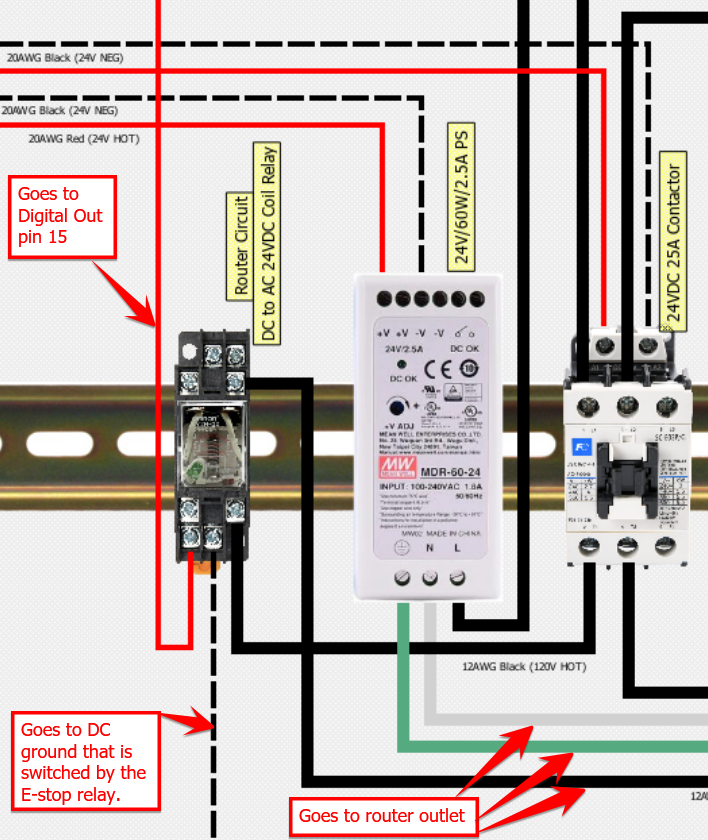
Here is a diagram of how the router circuit is setup. See the notes in the diagram for wiring.
# --- ROUTER-ON ---
net motion.spindle-on => hm2_7i76e.0.7i76.0.0.output-15
Not sure what else I would need to do. Like I said, I would like the router to come on when a job begins as well as a way to turn it on/off manually if needed.
Here is a diagram of how the router circuit is setup. See the notes in the diagram for wiring.
Last edit: 3 years 7 months ago by Sray69.
Please Log in or Create an account to join the conversation.
- Sray69
- Offline
- Elite Member
-
Less
More
- Posts: 255
- Thank you received: 13
3 years 7 months ago - 3 years 7 months ago #267325
by Sray69
Replied by Sray69 on topic 1 or 2 dedicated 120VAC circuits for my CNC?
Needing help figuring out how to enable my dust collector and router circuits? I was able to work out the wiring and how to hook it all up by the help of this forum. Now I could use some guidance on how to get the circuits working in LCNC.
I could also use some advice on best practice for controlling the router and dust collector circuits. I was thinking of having them come on when a job starts and turn off when a job ends. But also would like to be able to manually turn them on/off for testing situations. What is the best way to do this?
Let me know what info you may need and I will do my best to provide it.
Thanks
I could also use some advice on best practice for controlling the router and dust collector circuits. I was thinking of having them come on when a job starts and turn off when a job ends. But also would like to be able to manually turn them on/off for testing situations. What is the best way to do this?
Let me know what info you may need and I will do my best to provide it.
Thanks
Last edit: 3 years 7 months ago by Sray69.
Please Log in or Create an account to join the conversation.
- tommylight
- Online
- Moderator
-

Less
More
- Posts: 22011
- Thank you received: 7491
3 years 7 months ago #267328
by tommylight
Replied by tommylight on topic 1 or 2 dedicated 120VAC circuits for my CNC?
Use the Mist and/or Flood pins that already exist in LinuxCNC, just having those in hal will enable them and also show them in the Axis GUI.
Append the output pin to them, then in gcode adding M7 and/or M8 with M9 will happily turn on or off whatever is wired to those pins.
Something like
net coolant-flood hm2_pci-5i25.0.0.7i77.output-12
net coolant-mist hm2_pci-5i25.0.0.7i77.output-13
Edit the pins to suit your system/boards/wiring.
Append the output pin to them, then in gcode adding M7 and/or M8 with M9 will happily turn on or off whatever is wired to those pins.
Something like
net coolant-flood hm2_pci-5i25.0.0.7i77.output-12
net coolant-mist hm2_pci-5i25.0.0.7i77.output-13
Edit the pins to suit your system/boards/wiring.
Please Log in or Create an account to join the conversation.
- Sray69
- Offline
- Elite Member
-
Less
More
- Posts: 255
- Thank you received: 13
3 years 7 months ago #267329
by Sray69
Replied by Sray69 on topic 1 or 2 dedicated 120VAC circuits for my CNC?
Thanks Tommy. This will get me headed in the right direction. What if I am using gmoccopy? Will I have to do something different?Use the Mist and/or Flood pins that already exist in LinuxCNC, just having those in hal will enable them and also show them in the Axis GUI.
Append the output pin to them, then in gcode adding M7 and/or M8 with M9 will happily turn on or off whatever is wired to those pins.
Something like
net coolant-flood hm2_pci-5i25.0.0.7i77.output-12
net coolant-mist hm2_pci-5i25.0.0.7i77.output-13
Edit the pins to suit your system/boards/wiring.
Please Log in or Create an account to join the conversation.
- tommylight
- Online
- Moderator
-
Less
More
- Posts: 22011
- Thank you received: 7491
3 years 7 months ago #267331
by tommylight
Replied by tommylight on topic 1 or 2 dedicated 120VAC circuits for my CNC?
The gcode should work, for sure if you add those line in hal, but not sure if you get the buttons on screen.
Please Log in or Create an account to join the conversation.
- Sray69
- Offline
- Elite Member
-
Less
More
- Posts: 255
- Thank you received: 13
3 years 7 months ago #267333
by Sray69
Replied by Sray69 on topic 1 or 2 dedicated 120VAC circuits for my CNC?
OK so I added the following lines to my HAL file.
# external output signals
# --- ROUTER-ON ---
net coolant-mist => hm2_7i76e.0.7i76.0.0.output-15
# --- DUST-COLLECTOR-ON
net coolant-flood => hm2_7i76e.0.7i76.0.0.output-01
# ---coolant signals---
net coolant-mist <= iocontrol.0.coolant-mist
net coolant-flood <= iocontrol.0.coolant-flood
I am able to see them trigger ON in Halshow using M7 & M8. I can also trigger them OFF with M9. BUT when they are triggered ON there is no power to my circuits (Output pins 15 and 01). I must be missing something.
# external output signals
# --- ROUTER-ON ---
net coolant-mist => hm2_7i76e.0.7i76.0.0.output-15
# --- DUST-COLLECTOR-ON
net coolant-flood => hm2_7i76e.0.7i76.0.0.output-01
# ---coolant signals---
net coolant-mist <= iocontrol.0.coolant-mist
net coolant-flood <= iocontrol.0.coolant-flood
I am able to see them trigger ON in Halshow using M7 & M8. I can also trigger them OFF with M9. BUT when they are triggered ON there is no power to my circuits (Output pins 15 and 01). I must be missing something.
Please Log in or Create an account to join the conversation.
Time to create page: 0.710 seconds