
- Posts: 2180
- Thank you received: 905
1 or 2 dedicated 120VAC circuits for my CNC?
- spumco
- Offline
- Platinum Member
-

Less
More
3 years 11 months ago #258051
by spumco
Yep, except for the other Mesa connections (VIN, etc.)
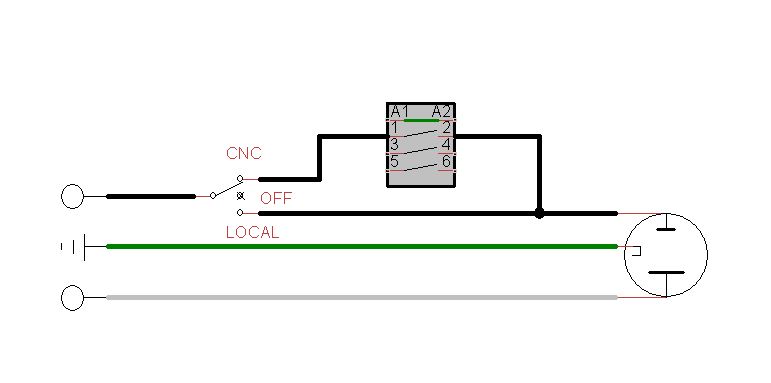
If you're really dead-set on having local/remote control of the vacuum, a 2 or 3-position changover switch mounted at the dust collector recepticle would work. Position 1 is local, position 2 is CNC. Center off if you want a 3-pos. Switch must be rated for full load.
See if this makes sense:
Replied by spumco on topic 1 or 2 dedicated 120VAC circuits for my CNC?
Is this correct?
Yep, except for the other Mesa connections (VIN, etc.)
If you're really dead-set on having local/remote control of the vacuum, a 2 or 3-position changover switch mounted at the dust collector recepticle would work. Position 1 is local, position 2 is CNC. Center off if you want a 3-pos. Switch must be rated for full load.
See if this makes sense:
The following user(s) said Thank You: Sray69
Please Log in or Create an account to join the conversation.
- spumco
- Offline
- Platinum Member
-
Less
More
- Posts: 2180
- Thank you received: 905
3 years 11 months ago #258052
by spumco
You're overthinking it. Use the NO contacts, and only supply 24vdc when you want the dust collector to run.
Replied by spumco on topic 1 or 2 dedicated 120VAC circuits for my CNC?
I feel like I am overthinking this. If I use the NC terminal for the 120VAC then when I turn the power to the cabinet off, the dust collector circuit should still have power, correct?
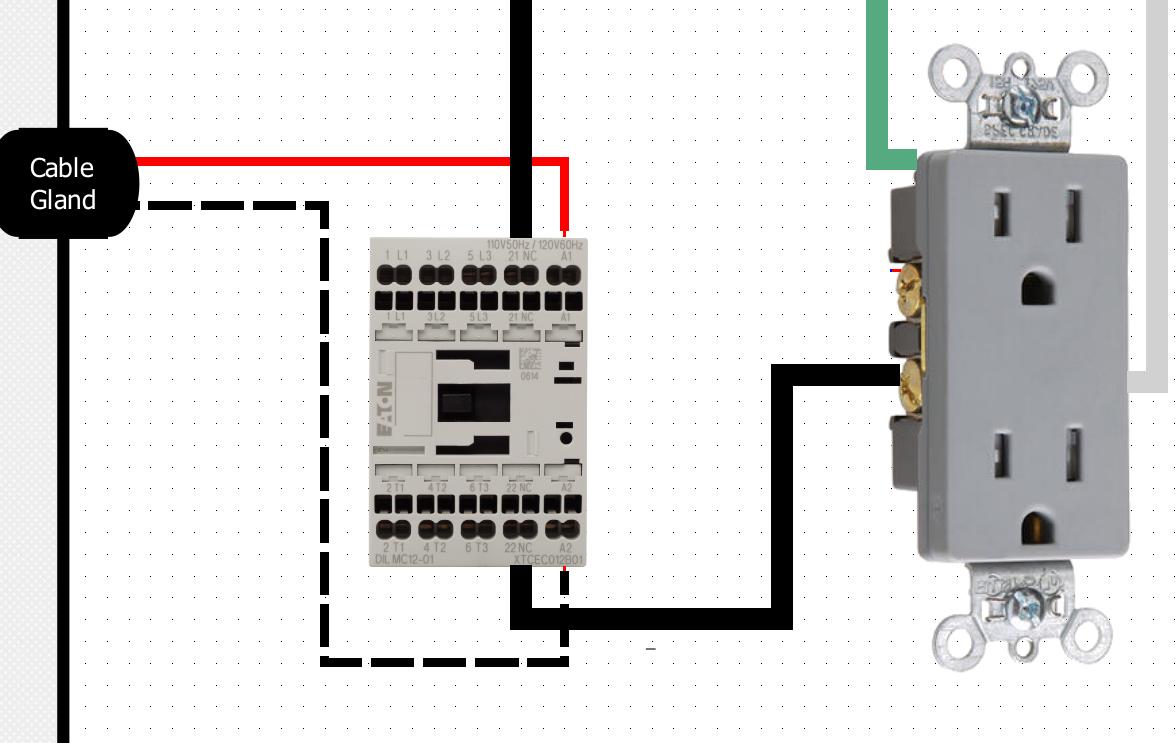
Would I use the inverted "NOT" state for the 24VDC signal so it would provide power to the contactor when the CNC is not running, keeping the contacts open? Then when the CNC starts I would then have it cut power to the contactor closing the contacts, providing power to the dust collector. Is this correct? Or is this a too simplified approach? Is there more steps needed to make it work better/safer?
You're overthinking it. Use the NO contacts, and only supply 24vdc when you want the dust collector to run.
The following user(s) said Thank You: Sray69
Please Log in or Create an account to join the conversation.
- Sray69
- Offline
- Elite Member
-

Less
More
- Posts: 255
- Thank you received: 13
3 years 11 months ago #258056
by Sray69
Anyway, did I connect the DC 24VDC wires correctly?
I am good with a 3-way switch. Although I would like to try and relocate it into the CNC room just to make it easier to access and remember. But I can figure that out.
Thanks
Replied by Sray69 on topic 1 or 2 dedicated 120VAC circuits for my CNC?
Not sure exactly what you mean. Do you mean I am missing all the other Mesa connections for my cabinet? I hid all the other connections in order to just show the dust collector (DC) circuit. If you saw my diagram it is very hard to follow all the circuits. Trying to make it easy to understand.Yep, except for the other Mesa connections (VIN, etc.)
Anyway, did I connect the DC 24VDC wires correctly?
I am good with a 3-way switch. Although I would like to try and relocate it into the CNC room just to make it easier to access and remember. But I can figure that out.
Thanks
Please Log in or Create an account to join the conversation.
- spumco
- Offline
- Platinum Member
-
Less
More
- Posts: 2180
- Thank you received: 905
3 years 11 months ago #258086
by spumco
Replied by spumco on topic 1 or 2 dedicated 120VAC circuits for my CNC?
DC contactor connection - yes, terminals A1 & A2 are the +/- coil terminals.
And yes, if you hid the other connections to simplify things that's fine. I just didn't want to assume anything when I replied.
And yes, if you hid the other connections to simplify things that's fine. I just didn't want to assume anything when I replied.
The following user(s) said Thank You: Sray69
Please Log in or Create an account to join the conversation.
- Sray69
- Offline
- Elite Member
-
Less
More
- Posts: 255
- Thank you received: 13
3 years 11 months ago #258160
by Sray69
Replied by Sray69 on topic 1 or 2 dedicated 120VAC circuits for my CNC?
I believe I am finished with my initial (1st draft) electrical diagram. It is not a technical drawing. I created it for my own visual reference. It is NOT to scale, but is a rough representation of how I am planning to lay everything out. You will notice I have done my best to segregate the 120V circuits from the low voltage circuits.
I had to upload the image to my Google drive because of the size. I wanted it big enough to be able to zoom in. I would appreciate any feedback.
Cabinet Diagram
Thanks
I had to upload the image to my Google drive because of the size. I wanted it big enough to be able to zoom in. I would appreciate any feedback.
Cabinet Diagram
Thanks
The following user(s) said Thank You: spumco
Please Log in or Create an account to join the conversation.
- spumco
- Offline
- Platinum Member
-
Less
More
- Posts: 2180
- Thank you received: 905
3 years 11 months ago #258171
by spumco
Replied by spumco on topic 1 or 2 dedicated 120VAC circuits for my CNC?
That diagram is really hard to follow... where you've used dashed/dotted lines, it's hard (or impossible) to see where they connect to other wires or terminals/components.
One thing I noticed is that your two estop buttons look...odd. I don't understand why you've got the 24vdc wires split and going to both button contact sets. Since I can't see the actual switch contacts I can't tell which wire pairs are connected via NC, but I think if you push either button the other one will still pass 24vdc to the Mesa input.
Estops should be a chain - wired in series.
You put a ton of work in to that diagram, I get it. But can I suggest you have a go with one of the free circuit diagram software packages? I use TinyCAD, but others here like a couple other (probably better) packages.
Do a forum search for "schematic" or "diagram" in the thread title. There's been a few discussions this year that should pop up and get you going.
One thing I noticed is that your two estop buttons look...odd. I don't understand why you've got the 24vdc wires split and going to both button contact sets. Since I can't see the actual switch contacts I can't tell which wire pairs are connected via NC, but I think if you push either button the other one will still pass 24vdc to the Mesa input.
Estops should be a chain - wired in series.
You put a ton of work in to that diagram, I get it. But can I suggest you have a go with one of the free circuit diagram software packages? I use TinyCAD, but others here like a couple other (probably better) packages.
Do a forum search for "schematic" or "diagram" in the thread title. There's been a few discussions this year that should pop up and get you going.
Please Log in or Create an account to join the conversation.
Time to create page: 0.802 seconds