
- Posts: 806
- Thank you received: 502
Cad/Cam software for Linux
- meister
- Offline
- Platinum Member
-

Less
More
4 years 2 months ago #250316
by meister
Replied by meister on topic Cad/Cam software for Linux
i think the icon path is fixed in the next version.
# Where can I specify that my zero point is on the machine table?
What you mean ? your zero-z-point is the table ?
there are no setting for this
I set always the Zero point to the top of the Workpiece.
If you have zero on the table, you must also enter the height of the workpiece in the cam !?!?
If you explain it to me in more detail, I can include it
# Where can I specify that my zero point is on the machine table?
What you mean ? your zero-z-point is the table ?
there are no setting for this
I set always the Zero point to the top of the Workpiece.
If you have zero on the table, you must also enter the height of the workpiece in the cam !?!?
If you explain it to me in more detail, I can include it
- mgm
- Offline
- Elite Member
-

Less
More
- Posts: 210
- Thank you received: 13
4 years 2 months ago #250317
by mgm
Replied by mgm on topic Cad/Cam software for Linux
For me, and I'm sure for others as well, there is for example
G54 Z0 on the machine table.
Yes, so the workpiece thickness would have to be specified in the cam.
I measure the tool length automatically against the machine table.
If you could add that, then that would be great!
G54 Z0 on the machine table.
Yes, so the workpiece thickness would have to be specified in the cam.
I measure the tool length automatically against the machine table.
If you could add that, then that would be great!
- meister
- Offline
- Platinum Member
-
Less
More
- Posts: 806
- Thank you received: 502
4 years 2 months ago - 4 years 2 months ago #250322
by meister
Replied by meister on topic Cad/Cam software for Linux
Hope this will help, i have no better idea at the moment to implement this feature, but if you have a better, tell me
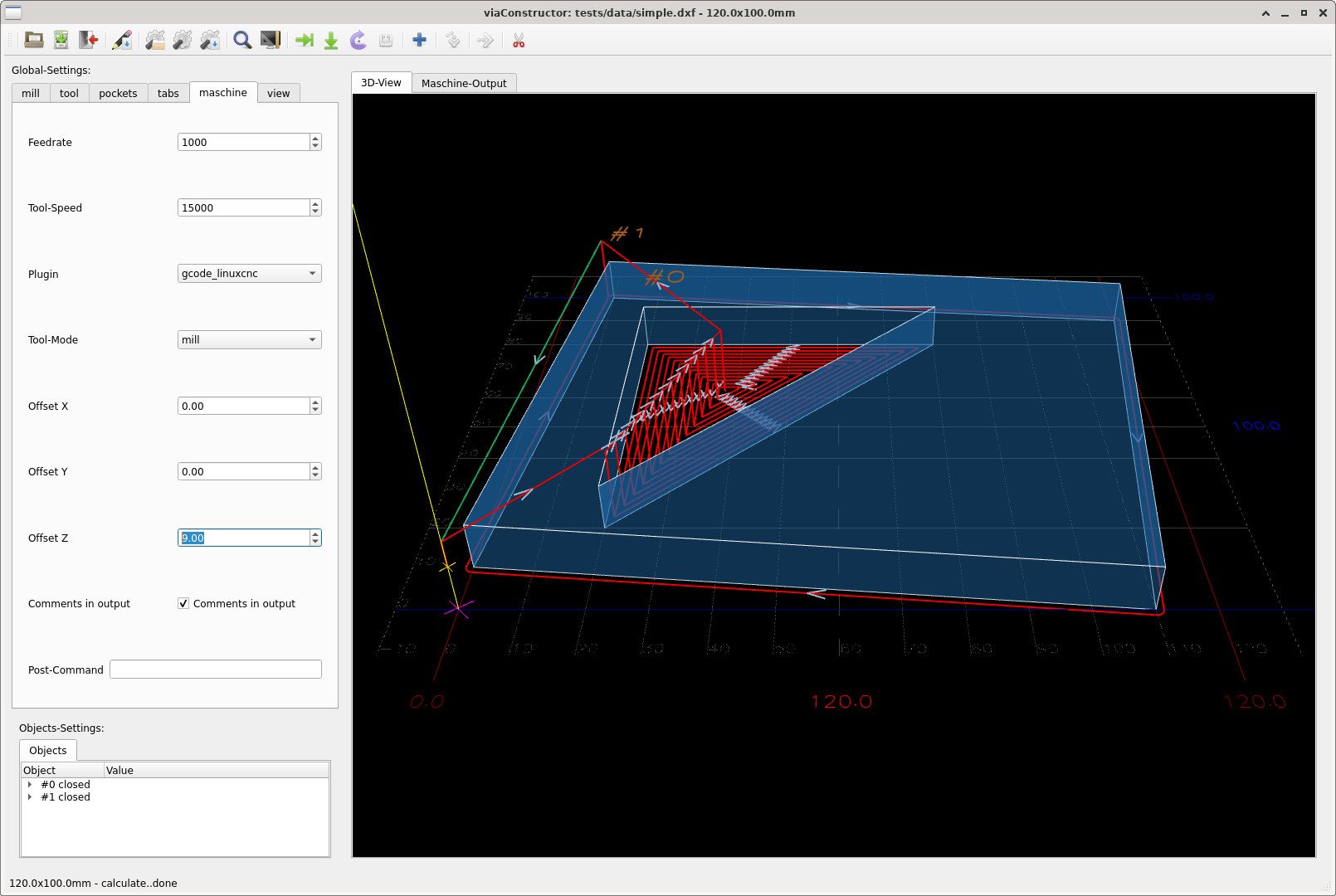
Code:
python3.9 -m pip install viaconstructor --upgrade
# new version is: 0.3.7
This will only add a 'G54 X0.0 Y0.0 Z9.0' line to the gcode output
Last edit: 4 years 2 months ago by meister.
- mgm
- Offline
- Elite Member
-
Less
More
- Posts: 210
- Thank you received: 13
4 years 2 months ago #250326
by mgm
Replied by mgm on topic Cad/Cam software for Linux
The line 'G54 X0.0 Y0.0 Z9.0' does not work.
does not work it makes no sense!
You can't assign any parameters to G54!
There should be an input field for the workpiece thickness.
The machining depth would then have to be subtracted from this workpiece thickness.
If I make for example a subprogram routine for NGCGUI
I use for the workpiece thickness a variable with which afterwards in the g-code is worked. Maybe something like this is possible?
It would be great if you could choose whether "Z0" is machine table or workpiece surface, for users who touch your workpiece surface.
I hope it is okay if I note something?
does not work it makes no sense!
You can't assign any parameters to G54!
There should be an input field for the workpiece thickness.
The machining depth would then have to be subtracted from this workpiece thickness.
If I make for example a subprogram routine for NGCGUI
I use for the workpiece thickness a variable with which afterwards in the g-code is worked. Maybe something like this is possible?
It would be great if you could choose whether "Z0" is machine table or workpiece surface, for users who touch your workpiece surface.
I hope it is okay if I note something?
- meister
- Offline
- Platinum Member
-
Less
More
- Posts: 806
- Thank you received: 502
4 years 2 months ago #250327
by meister
Replied by meister on topic Cad/Cam software for Linux
somehow I still do not quite understand the G54 command,
I thought I can set the offsets over it and a G0 Z0 drives then not to the table but to the new offset.
It is no problem to offset the gcode data, but for that, i need no G54
I thought I can set the offsets over it and a G0 Z0 drives then not to the table but to the new offset.
It is no problem to offset the gcode data, but for that, i need no G54
- mgm
- Offline
- Elite Member
-
Less
More
- Posts: 210
- Thank you received: 13
4 years 2 months ago #250329
by mgm
Replied by mgm on topic Cad/Cam software for Linux
Correct !
G54 was also just an example of the coordinate system and is not needed . It was apparently confusing!
[url] www.linuxcnc.org/docs/2.7/html/gcode/coordinates.html [/url]
G54 was also just an example of the coordinate system and is not needed . It was apparently confusing!
[url] www.linuxcnc.org/docs/2.7/html/gcode/coordinates.html [/url]
Time to create page: 0.327 seconds