
- Posts: 508
- Thank you received: 94
simple linux cam
- Reinhard
- Offline
- Platinum Member
-

Less
More
4 years 7 months ago - 4 years 7 months ago #238899
by Reinhard
Replied by Reinhard on topic simple linux cam
Hi Grotius,
> I followed your CavalierContour link. And the solution is to use "cavalier's pocket operation" instead of " cavalier's offset
> operation".
Sorry, but you did not get the point. I did not use pocket operation by intention. That's not what I want!
I want the outline offset contour cut by the workpiece shape (cylinder or box), so result should be open polylines (which I want to connect at my will)
All CavalierContour curves are concentric curves - and that is pretty useless for milling.
Anyway - I'm working to get desired result by using opencascade stuff. Hardcore coding
This concentric curves are created with opencascade only. Now I need to cut out the unwanted parts ...
> Do you need a Cavaliercontour interface where you can put in a "occt unordered wire" and it then gives back a pocket shape
> result in the form off a compound?
No, I already have that interfaces worked out. Actually I don't see any benefit from using CavalierContour respect to toolpath creation. The only benefit for me is the easy to use storage format and for so I can store compact contours.
> I followed your CavalierContour link. And the solution is to use "cavalier's pocket operation" instead of " cavalier's offset
> operation".
Sorry, but you did not get the point. I did not use pocket operation by intention. That's not what I want!
I want the outline offset contour cut by the workpiece shape (cylinder or box), so result should be open polylines (which I want to connect at my will)
All CavalierContour curves are concentric curves - and that is pretty useless for milling.
Anyway - I'm working to get desired result by using opencascade stuff. Hardcore coding
This concentric curves are created with opencascade only. Now I need to cut out the unwanted parts ...
> Do you need a Cavaliercontour interface where you can put in a "occt unordered wire" and it then gives back a pocket shape
> result in the form off a compound?
No, I already have that interfaces worked out. Actually I don't see any benefit from using CavalierContour respect to toolpath creation. The only benefit for me is the easy to use storage format and for so I can store compact contours.
Last edit: 4 years 7 months ago by Reinhard.
- Grotius
- Offline
- Platinum Member
-
Less
More
- Posts: 2419
- Thank you received: 2349
4 years 7 months ago #238907
by Grotius
Replied by Grotius on topic simple linux cam
Hi Reinhard,
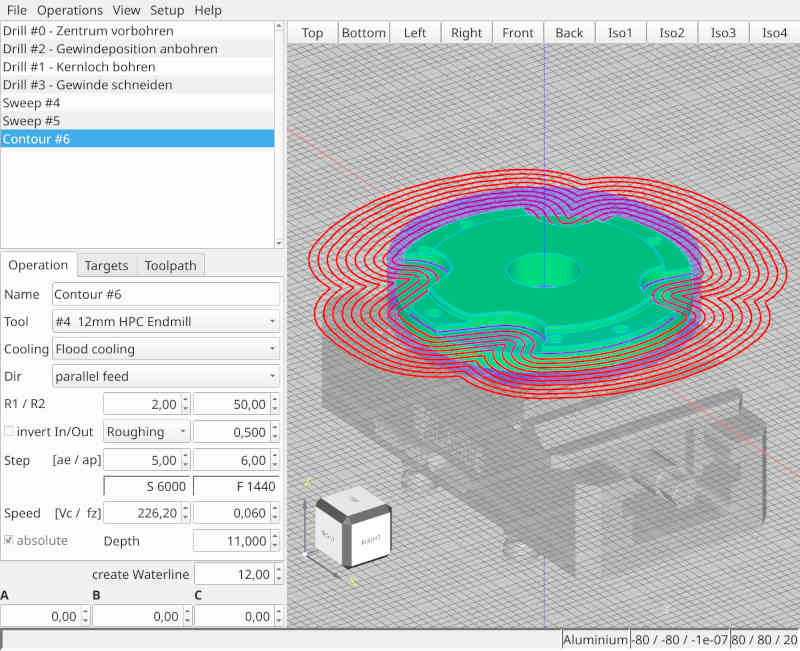
For my understanding, if you look at the first contour offset path in red, you need the intersection points with the
raw material (purple shape) and then do a trim. (trim away the red contour outside the raw material)?
For my understanding, if you look at the first contour offset path in red, you need the intersection points with the
raw material (purple shape) and then do a trim. (trim away the red contour outside the raw material)?
- Reinhard
- Offline
- Platinum Member
-
Less
More
- Posts: 508
- Thank you received: 94
4 years 7 months ago - 4 years 7 months ago #238909
by Reinhard
Replied by Reinhard on topic simple linux cam
Hi,
> you need the intersection points with the raw material (purple shape) and then do a trim. (trim away the red contour outside
> the raw material)?
Of cause. Using a CAD I'd know how to do that.
With opencascade its not that easy.
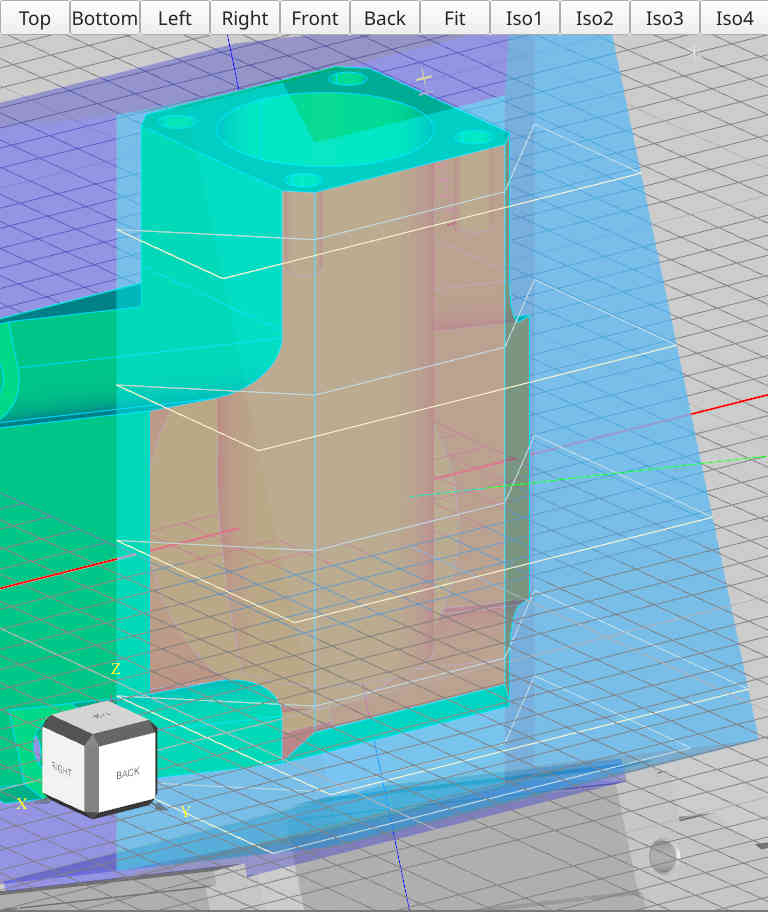
Here I cut the rotated blue box by planes containing the selected faces - and result looks as expected (well I joined 3 cut parts into one cyan part)
Trying similar with the offset curves gives this ridiculous result:
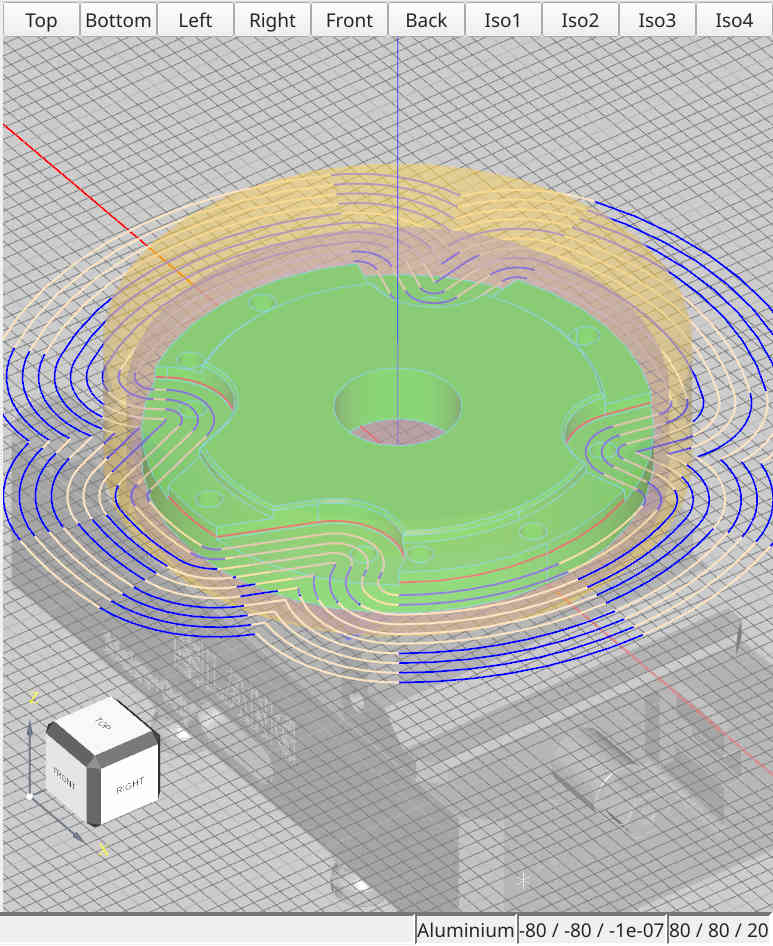
I cut each offset curve by the golden cylinder, which is a bit bigger than the blue one.
According to opencascade docs the splitter splits the objects and result contains both parts.
I display result with alternating colors (yellow and blue) to see, which is inside of cutpoint and what is outside.
From what I see on screen, I can't recognize any cutpoint at all.
Sadly I don't know how to cut CavalierContour curves
> you need the intersection points with the raw material (purple shape) and then do a trim. (trim away the red contour outside
> the raw material)?
Of cause. Using a CAD I'd know how to do that.
With opencascade its not that easy.
Here I cut the rotated blue box by planes containing the selected faces - and result looks as expected (well I joined 3 cut parts into one cyan part)
Trying similar with the offset curves gives this ridiculous result:
I cut each offset curve by the golden cylinder, which is a bit bigger than the blue one.
According to opencascade docs the splitter splits the objects and result contains both parts.
I display result with alternating colors (yellow and blue) to see, which is inside of cutpoint and what is outside.
From what I see on screen, I can't recognize any cutpoint at all.
Sadly I don't know how to cut CavalierContour curves
Last edit: 4 years 7 months ago by Reinhard.
- Grotius
- Offline
- Platinum Member
-
Less
More
- Posts: 2419
- Thank you received: 2349
4 years 7 months ago - 4 years 7 months ago #238929
by Grotius
Replied by Grotius on topic simple linux cam
Hi Reinhard,
Lets focus on the last picture. I got a idea for you.
Let's consider the contour offset, produced by the Cavaliercontours library.
To check if the offset is inside the raw material shape, you can check this with the "point in polygon" function.
For this function, you can iterate trough the offset result, no order is required.
See the polygon as the raw material shape (segmented contour, for example a circle with 50 side's).
1. You pass every line or arc points into the "point in polygon" function.
2. If points are outside the "point in polygon", you know this line or arc has to be trimmed at shape intersection.
For now you can try to colorize line's or arc's inside the shape, intersecting at the shape or fully outside the shape.
Next step is to calculate the intersection, we do this in next forum post when you are ready.
I will post the "point in polygon" function as header only file within one hour.
3. To refine item 2.
A. If firstpoint & secondpoint is inside the polygon. Keep it as it is.
B. If firstpoint is in the polygon and second point is outside the polygon or visa versa,
we are intersecting the raw material shape. Later on we will do the trim for this.
C. If firstpoint & secondpoint is outside the polygon, delete this line or arc from the produced contour.
Lets focus on the last picture. I got a idea for you.
Let's consider the contour offset, produced by the Cavaliercontours library.
To check if the offset is inside the raw material shape, you can check this with the "point in polygon" function.
For this function, you can iterate trough the offset result, no order is required.
See the polygon as the raw material shape (segmented contour, for example a circle with 50 side's).
1. You pass every line or arc points into the "point in polygon" function.
2. If points are outside the "point in polygon", you know this line or arc has to be trimmed at shape intersection.
For now you can try to colorize line's or arc's inside the shape, intersecting at the shape or fully outside the shape.
Next step is to calculate the intersection, we do this in next forum post when you are ready.
I will post the "point in polygon" function as header only file within one hour.
3. To refine item 2.
A. If firstpoint & secondpoint is inside the polygon. Keep it as it is.
B. If firstpoint is in the polygon and second point is outside the polygon or visa versa,
we are intersecting the raw material shape. Later on we will do the trim for this.
C. If firstpoint & secondpoint is outside the polygon, delete this line or arc from the produced contour.
Last edit: 4 years 7 months ago by Grotius.
- Grotius
- Offline
- Platinum Member
-
Less
More
- Posts: 2419
- Thank you received: 2349
4 years 7 months ago - 4 years 7 months ago #238935
by Grotius
Replied by Grotius on topic simple linux cam
Hi Reinhard,
Attached a PointInPolygon header file. This can be used to determine wich primitives (arc's, lines) are inside the
raw material shape, or completely outside the raw material shape.
If one point of primitive is inside and one point of primitive is outside, you have intersection with raw material.
The implementation is of this algo is done in a 2d xy plane. For 3d we need a different approach.
Let me know if you can use this.
Link : github.com/grotius-cnc/occt-samples-qope...ons/PointInPolygon.h
Attached a PointInPolygon header file. This can be used to determine wich primitives (arc's, lines) are inside the
raw material shape, or completely outside the raw material shape.
If one point of primitive is inside and one point of primitive is outside, you have intersection with raw material.
The implementation is of this algo is done in a 2d xy plane. For 3d we need a different approach.
Let me know if you can use this.
Link : github.com/grotius-cnc/occt-samples-qope...ons/PointInPolygon.h
Last edit: 4 years 7 months ago by Grotius.
- Reinhard
- Offline
- Platinum Member
-
Less
More
- Posts: 508
- Thank you received: 94
4 years 7 months ago #238971
by Reinhard
Replied by Reinhard on topic simple linux cam
Hi,
I'm a bit confused and I have to confess, that I don't understand your "PointInPolygon" at all.
In my understanding I don't have any point that I could use for your calculations.
2D-math is fine, as I don't plan to do any 3D milling ...
... but if I follow the math from opencascade docs (brep specification), than it does not make a big difference, if calculation is done in 2D or 3D space.
From opencascades brep specs I got these formulas:
My days in school are long ago - sometimes I think it was another life before ...
... but if I remember well, cutpoints are calculated by setting both formulas as equal.
Speeking in general, my raw material is either round or rectangle.
Iterating over all edges of the contour wire I need to perform 2 calculations on each:
As opencascade uses parameters for all geom objects I guess it should be possible to calculate parameters from formula and then validate the result based on the parameters.
Well, I'm only talking about an idea. Don't know, whether it is possible and I'm not able to do the required maths on my own.
I'm a bit confused and I have to confess, that I don't understand your "PointInPolygon" at all.
In my understanding I don't have any point that I could use for your calculations.
2D-math is fine, as I don't plan to do any 3D milling ...
... but if I follow the math from opencascade docs (brep specification), than it does not make a big difference, if calculation is done in 2D or 3D space.
From opencascades brep specs I got these formulas:
Code:
line: anyPoint(u) = Origin + u * Dir
circle: anyPoint(u) = Origin + r * cos(u) * Dir{x} + sin(u) * Dir{y}
ellipse: anyPoint(u) = Origin + r_{maj} * cos(u) * Dir{maj} + r_{min} * sin(u) * Dir_{min}
plane: anyPoint(u, v) = Origin + u * Dir{u} + v * Dir{v}
My days in school are long ago - sometimes I think it was another life before ...
... but if I remember well, cutpoints are calculated by setting both formulas as equal.
Speeking in general, my raw material is either round or rectangle.
Iterating over all edges of the contour wire I need to perform 2 calculations on each:
- calculate cutpoint(s) between edge and rectangle/circle from raw material. If there are cutpoints, I have to split edge into several peaces (one more for each cutpoint)
- determine for each edge (original if no cutpoints or all edges created from cutpoints) if the edge is inside the raw material shape or outside
As opencascade uses parameters for all geom objects I guess it should be possible to calculate parameters from formula and then validate the result based on the parameters.
Well, I'm only talking about an idea. Don't know, whether it is possible and I'm not able to do the required maths on my own.
Time to create page: 0.167 seconds