
- Posts: 2419
- Thank you received: 2349
simple linux cam
- Grotius
- Offline
- Platinum Member
-

Less
More
4 years 7 months ago #238987
by Grotius
Replied by Grotius on topic simple linux cam
Hi Reinhard,
I have made a little example for you how it works.
We draw a circle, this is raw material shape.
We draw 3 lines. One line is inside the circle, one line intersects and one line is fully outside the circle.
The implementation below, calculates the status for each line.
Implementation :
Mainwindow line 241
Used functions :
functions
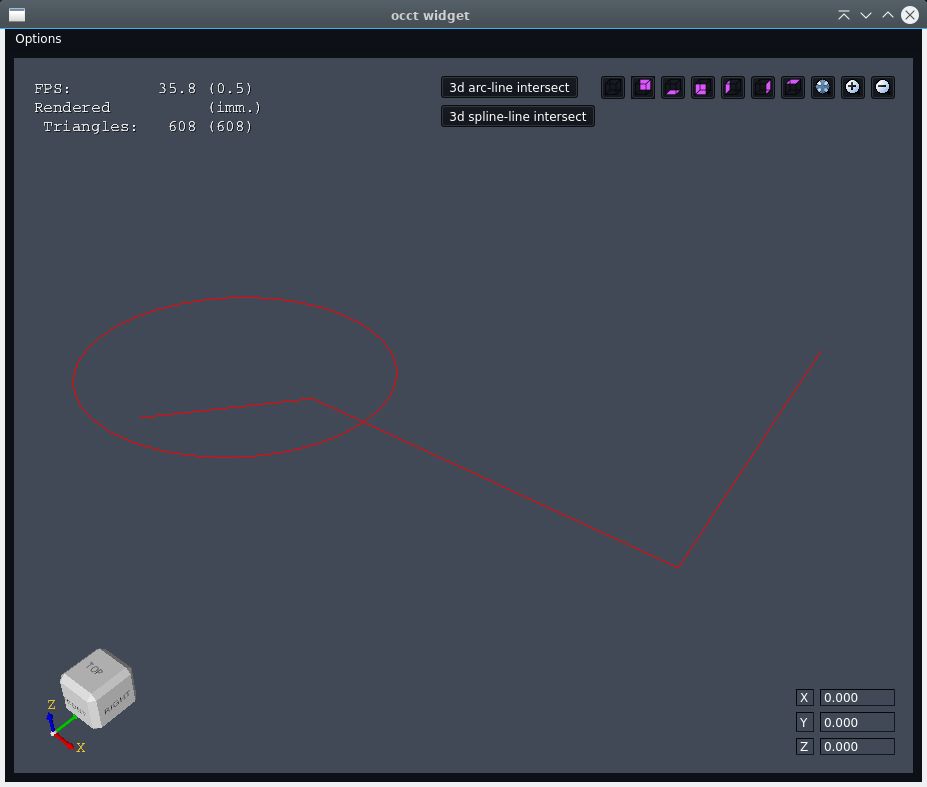
I have made a little example for you how it works.
We draw a circle, this is raw material shape.
We draw 3 lines. One line is inside the circle, one line intersects and one line is fully outside the circle.
The implementation below, calculates the status for each line.
Implementation :
Mainwindow line 241
Used functions :
functions
- Grotius
- Offline
- Platinum Member
-
Less
More
- Posts: 2419
- Thank you received: 2349
4 years 7 months ago - 4 years 7 months ago #238988
by Grotius
Replied by Grotius on topic simple linux cam
Walk trough this code :
Program output
Item 1 startpoint: InPolygon: 1
Item 1 endpoint: InPolygon: 1
Item 2 startpoint: InPolygon: 1
Item 2 endpoint: InPolygon: 0
Item 3 startpoint: InPolygon: 0
Item 3 endpoint: InPolygon: 0
Code:
//! 0. Draw the raw material.
Handle(AIS_Shape) myShape=CirlceShape({50,50,0},{0,50,0}).ShapeTopPlane();
occt_viewer->show_shape(myShape);
//! 1. Draw a contour offset line.
myShape=LineShape({50,10,0},{80,50,0}).Shape();
occt_viewer->show_shape(myShape);
//! 2. Draw a contour offset line.
myShape=LineShape({80,50,0},{200,50,0}).Shape();
occt_viewer->show_shape(myShape);
//! 3. Draw a contour offset line.
myShape=LineShape({200,50,0},{200,200,0}).Shape();
occt_viewer->show_shape(myShape);
//! Check if 1 is inside the circle, checking startpoint.
int InPolygon=0;
PointInPolygon({50,10,0}).TubeShape({50,50,0},50,InPolygon);
std::cout<<"Item 1 startpoint: InPolygon: "<<InPolygon<<std::endl;
//! Check if 1 is inside the circle, checking endpoint.
InPolygon=0;
PointInPolygon({80,50,0}).TubeShape({50,50,0},50,InPolygon);
std::cout<<"Item 1 endpoint: InPolygon: "<<InPolygon<<std::endl;
//! Check if 2 is inside the circle, checking startpoint.
InPolygon=0;
PointInPolygon({80,50,0}).TubeShape({50,50,0},50,InPolygon);
std::cout<<"Item 2 startpoint: InPolygon: "<<InPolygon<<std::endl;
//! Check if 2 is inside the circle, checking endpoint.
InPolygon=0;
PointInPolygon({200,50,0}).TubeShape({50,50,0},50,InPolygon);
std::cout<<"Item 2 endpoint: InPolygon: "<<InPolygon<<std::endl;
//! Check if 3 is inside the circle, checking startpoint.
InPolygon=0;
PointInPolygon({200,50,0}).TubeShape({50,50,0},50,InPolygon);
std::cout<<"Item 3 startpoint: InPolygon: "<<InPolygon<<std::endl;
//! Check if 3 is inside the circle, checking endpoint.
InPolygon=0;
PointInPolygon({200,200,0}).TubeShape({50,50,0},50,InPolygon);
std::cout<<"Item 3 endpoint: InPolygon: "<<InPolygon<<std::endl;
Program output
Item 1 startpoint: InPolygon: 1
Item 1 endpoint: InPolygon: 1
Item 2 startpoint: InPolygon: 1
Item 2 endpoint: InPolygon: 0
Item 3 startpoint: InPolygon: 0
Item 3 endpoint: InPolygon: 0
Last edit: 4 years 7 months ago by Grotius.
- Grotius
- Offline
- Platinum Member
-
Less
More
- Posts: 2419
- Thank you received: 2349
4 years 7 months ago - 4 years 7 months ago #238989
by Grotius
Replied by Grotius on topic simple linux cam
I'm a bit confused and I have to confess, that I don't understand your "PointInPolygon" at all.
That is ok, no worry. In previous post i tried to explain how "PointinPolygon" works.
In my understanding I don't have any point that I could use for your calculations.
The Cavaliercontour output contains lines, arc's etc.
At lower level you compare start & endpoints with PointInPolygon.
So I think, calculations should be possible without cutting the edge into dots
The PointInPolygon needs this dots. It's just a fast preprocess for calculating the exact intersection point.
When you think my previous post example is usefull, i can expand this example with calculating the exact intersection point.
The workflow :
1. Do the PIP for each line or arc and retrieve the status.
2. Todo: calculate the exact intersection point when status=intersecting. We know already wich side has to be trimmed.
3. Trim the piece we don't want from the shape. This process could be automized by useing the Occt SelectionModel to highlight
the current shape that has to be edited. And then reload the shape.
That is ok, no worry. In previous post i tried to explain how "PointinPolygon" works.
In my understanding I don't have any point that I could use for your calculations.
The Cavaliercontour output contains lines, arc's etc.
At lower level you compare start & endpoints with PointInPolygon.
So I think, calculations should be possible without cutting the edge into dots
The PointInPolygon needs this dots. It's just a fast preprocess for calculating the exact intersection point.
When you think my previous post example is usefull, i can expand this example with calculating the exact intersection point.
The workflow :
1. Do the PIP for each line or arc and retrieve the status.
2. Todo: calculate the exact intersection point when status=intersecting. We know already wich side has to be trimmed.
3. Trim the piece we don't want from the shape. This process could be automized by useing the Occt SelectionModel to highlight
the current shape that has to be edited. And then reload the shape.
Last edit: 4 years 7 months ago by Grotius.
- HansU
- Offline
- Platinum Member
-
Less
More
- Posts: 730
- Thank you received: 217
4 years 7 months ago #238991
by HansU
Replied by HansU on topic simple linux cam
@Reinhard Do you know
pycam.sourceforge.net/screenshots/
?
Sometimes it feels for me that everyone is building their own CAM tool. And I wonder if it is not better to concentrate the energy and work all together on one CAM tool.
Sometimes it feels for me that everyone is building their own CAM tool. And I wonder if it is not better to concentrate the energy and work all together on one CAM tool.
- Reinhard
- Offline
- Platinum Member
-
Less
More
- Posts: 508
- Thank you received: 94
4 years 6 months ago #238999
by Reinhard
Replied by Reinhard on topic simple linux cam
> Sometimes it feels for me that everyone is building their own CAM tool. And I wonder if it is not better to concentrate the
> energy and work all together on one CAM tool.
Yes, you're right! I didn't know the linked tool, but I tested every cam available for hobby users that I could find. Lot of them are abandoned or dead and others are left unfinished ...
For me the best are Cambam and Deskproto - the later is beautiful for 3D milling with 4 or 5 axis.
Cambam seems to be abandoned too and Deskproto does not really support technical pieces.
I read a lot about blender cam, but I never was able to get it working. Same is true for FreeCad cam.
So I tried to create an easy to use cam for technical pieces with up to 5 axis. I'm not interested in milling 3d surfaces like the linked sample. My testing data is a simple chuck adapter for a lathe (or 4th axis) that I milled many years ago.
That time I tried to use available cams to create toolpaths, but none of them was able to work it out so I ended up with manual coding.
And that adapter is nothing complicated.
That time I had no plans to write a cam. When linux version of deskproto came out, I spent much time with testing. The bugs of deskproto made me start coding a dxf-viewer. Just to see, whether my ideas are realistic and manageable.
When the dxf-viewer was working, I thought, well, I could try to create a cam.
But then on brainstorming about what features I want to support, I came to the conclusion, that I don't want to bother with DXF.
I never did some 2D drawings in CAD. Always used 3D.
... and as I already used opencascade for the linuxcnc controller app, I just investiged, what is possible with opencascade.
My sampledata is some CAD drawings created with freecad and exported in different formats ...
Actually I like the work and I love challenges that exceed my abilities
May be, I'm able to create something useful ...
>> So I think, calculations should be possible without cutting the edge into dots
> The PointInPolygon needs this dots. It's just a fast preprocess for calculating the exact intersection point.
> When you think my previous post example is usefull, i can expand this example with calculating the exact intersection point.
Thank you very much for your time and your support.
I stil don't understand PIP function, but I finally got into TubeShape.
Sorry, but your code may be sophisticated for some complicated shapes, but for my problems its a very poor implementation.
TubeShape cuts the circle into more than 600 pieces and then it iterates over these pieces.
As written, in my case workpiece may be either round or rectangle. I don't plan to support other shapes.
To find out, whether a point is inside of a circle, you just need to calculate the distance to the center of the circle. That's one call of sqrt() - so I guess, calculation will be much faster than iterating over 600 segments of a circle.
Calculation whether a point is inside a rectangle could be faster than the calculation of point in circle.
So the only missing math is to calculate the cutpoints with my offset contours. But I'm confident, that I find that out too.
> energy and work all together on one CAM tool.
Yes, you're right! I didn't know the linked tool, but I tested every cam available for hobby users that I could find. Lot of them are abandoned or dead and others are left unfinished ...
For me the best are Cambam and Deskproto - the later is beautiful for 3D milling with 4 or 5 axis.
Cambam seems to be abandoned too and Deskproto does not really support technical pieces.
I read a lot about blender cam, but I never was able to get it working. Same is true for FreeCad cam.
So I tried to create an easy to use cam for technical pieces with up to 5 axis. I'm not interested in milling 3d surfaces like the linked sample. My testing data is a simple chuck adapter for a lathe (or 4th axis) that I milled many years ago.
That time I tried to use available cams to create toolpaths, but none of them was able to work it out so I ended up with manual coding.
And that adapter is nothing complicated.
That time I had no plans to write a cam. When linux version of deskproto came out, I spent much time with testing. The bugs of deskproto made me start coding a dxf-viewer. Just to see, whether my ideas are realistic and manageable.
When the dxf-viewer was working, I thought, well, I could try to create a cam.
But then on brainstorming about what features I want to support, I came to the conclusion, that I don't want to bother with DXF.
I never did some 2D drawings in CAD. Always used 3D.
... and as I already used opencascade for the linuxcnc controller app, I just investiged, what is possible with opencascade.
My sampledata is some CAD drawings created with freecad and exported in different formats ...
Actually I like the work and I love challenges that exceed my abilities
May be, I'm able to create something useful ...
>> So I think, calculations should be possible without cutting the edge into dots
> The PointInPolygon needs this dots. It's just a fast preprocess for calculating the exact intersection point.
> When you think my previous post example is usefull, i can expand this example with calculating the exact intersection point.
Thank you very much for your time and your support.
I stil don't understand PIP function, but I finally got into TubeShape.
Sorry, but your code may be sophisticated for some complicated shapes, but for my problems its a very poor implementation.
TubeShape cuts the circle into more than 600 pieces and then it iterates over these pieces.
As written, in my case workpiece may be either round or rectangle. I don't plan to support other shapes.
To find out, whether a point is inside of a circle, you just need to calculate the distance to the center of the circle. That's one call of sqrt() - so I guess, calculation will be much faster than iterating over 600 segments of a circle.
Calculation whether a point is inside a rectangle could be faster than the calculation of point in circle.
So the only missing math is to calculate the cutpoints with my offset contours. But I'm confident, that I find that out too.
- Grotius
- Offline
- Platinum Member
-
Less
More
- Posts: 2419
- Thank you received: 2349
4 years 6 months ago - 4 years 6 months ago #239008
by Grotius
Replied by Grotius on topic simple linux cam
Hi Reinhard,
Your conclusion is ok. Just check the sqrt function for circles and for a square simple math will do the job.
When using more diffucult raw material shapes, like L-shapes the Pip function will help you out.
Iterating 600x an be reduced to change the parameter in the for loop.
Orignal :
for(double i=0; i<;(2*M_PI); i+=0.01*M_PI){
Edited :
for(double i=0; i<;(2*M_PI); i+=0.5*M_PI){
This is for custom shapes :
PointInPolygon(gp_Pnt aPoint).CustomShape(std::vector<gp_Pnt> PointVec, int &InPolygon));
For calculating the final intersection i used Csharp examples in the past wich i converted to C++.
You don't have to understand how it works, It's important that it works, so you can go on with coding without
thinking how things work at mathematical level. I often tried to understand things, but when it's too complicated,
i let it go. For me it's important if somethings works, it's fine for me. For example kdl inverse kinematics, i don't
have to understand how inverse kinmematics works. But i can play with the library very well !
In different Cadcam repositories of previous work, you can find them conversed from Csharp to C++.
csharphelper.com/blog/2014/08/determine-...ines-intersect-in-c/
csharphelper.com/blog/2014/09/determine-...sects-a-circle-in-c/
After conversion you get something like for 3d line-line intersection c++:
github.com/grotius-cnc/occt-samples-qope...functions/LineLine.h
for 3d line-arc intersection in c++:
github.com/grotius-cnc/occt-samples-qope...nctions/LineSphere.h
2d trim + extend functions c++ :
github.com/grotius-cnc/qt_cadcam/tree/ma...cad_modify_functions
Your conclusion is ok. Just check the sqrt function for circles and for a square simple math will do the job.
When using more diffucult raw material shapes, like L-shapes the Pip function will help you out.
Iterating 600x an be reduced to change the parameter in the for loop.
Orignal :
for(double i=0; i<;(2*M_PI); i+=0.01*M_PI){
Edited :
for(double i=0; i<;(2*M_PI); i+=0.5*M_PI){
This is for custom shapes :
PointInPolygon(gp_Pnt aPoint).CustomShape(std::vector<gp_Pnt> PointVec, int &InPolygon));
For calculating the final intersection i used Csharp examples in the past wich i converted to C++.
You don't have to understand how it works, It's important that it works, so you can go on with coding without
thinking how things work at mathematical level. I often tried to understand things, but when it's too complicated,
i let it go. For me it's important if somethings works, it's fine for me. For example kdl inverse kinematics, i don't
have to understand how inverse kinmematics works. But i can play with the library very well !
In different Cadcam repositories of previous work, you can find them conversed from Csharp to C++.
csharphelper.com/blog/2014/08/determine-...ines-intersect-in-c/
csharphelper.com/blog/2014/09/determine-...sects-a-circle-in-c/
After conversion you get something like for 3d line-line intersection c++:
github.com/grotius-cnc/occt-samples-qope...functions/LineLine.h
for 3d line-arc intersection in c++:
github.com/grotius-cnc/occt-samples-qope...nctions/LineSphere.h
2d trim + extend functions c++ :
github.com/grotius-cnc/qt_cadcam/tree/ma...cad_modify_functions
Last edit: 4 years 6 months ago by Grotius.
Time to create page: 0.338 seconds