
- Posts: 23
- Thank you received: 4
simple linux cam
- silopolis
- Offline
- Junior Member
-

Less
More
4 years 3 months ago #248253
by silopolis
Replied by silopolis on topic simple linux cam
Re,
Not fond of it neither.
Maybe "areas" are more easily seen from top:
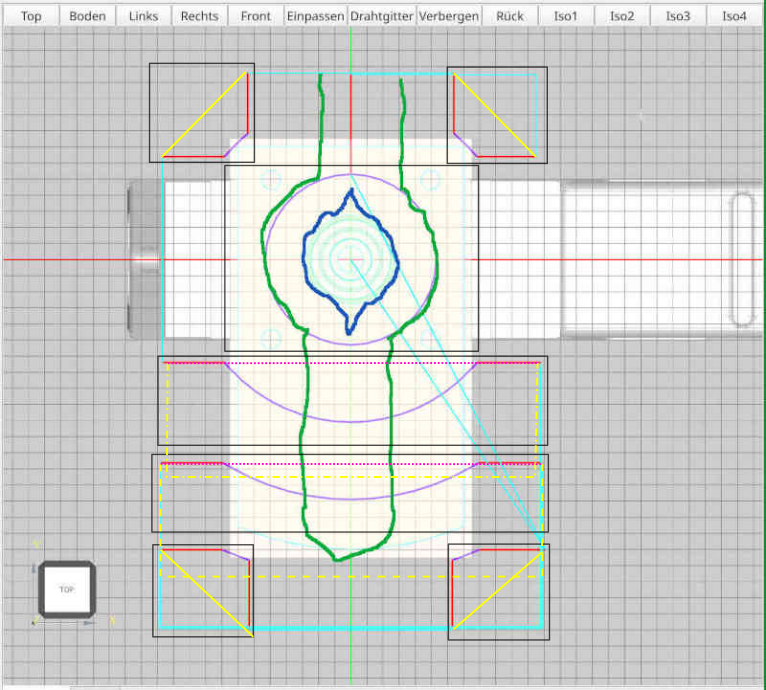
Also:
My "by area" and "stay down" suggestions was only potential optimizations that I believe could be beneficial for some kind of parts.
TY
J
This is perfect for a broad range of cases, if not most of them. Like said in previous message, this can become from less than optimal on larger parts with distant machined areas and eventually problematic when there can be obstacles in the way... Which in turn makes me think a "force retract" (between each cutting fragment) option could be a life saver in some cases !I took a closer look at cylinder job and how to optimize it. Regarding "stay low" - all movements for one z-height are already performed as "stay low", which means, changing Z happens only, when a new Z-height will be milled.
An alternate (shorter?) path might look like this (the green line) - from top view: [...]
but I fear, that with this path, the cylinder is not round but something like the blue line. So I need a full turn around the cylinder anyway. Drawback of the green path - it works only as long as the workpiece is smaller that double the diameter of the tool.
Not fond of it neither.
Maybe "areas" are more easily seen from top:
Also:
- yellow plain lines can be "stayed" down rapids
- yellow dashed and point dashed could be "stayed" down rapids with an optional small clearance retract like in adaptive path
- pink dotted lines could be shortest path safe height retracted rapids
Like I said originally, I very much like it and next best thing would be an adaptive path !My actual variant works for any shape and any dimension of the face below the cylinder.
My "by area" and "stay down" suggestions was only potential optimizations that I believe could be beneficial for some kind of parts.
I believe "both direction" strategy always delivers the shortest path as you don't have to go find the next suitable lead in and just reach the nearest as fast as possibleSo I think, a really shorter workpath could be created, if you don't care for cutting direction (alternating parallel feed and against feed).
TY
J
- Reinhard
- Offline
- Platinum Member
-

Less
More
- Posts: 508
- Thank you received: 94
4 years 3 months ago #248259
by Reinhard
Replied by Reinhard on topic simple linux cam
Hi silopolis,
thank you for your attention!
Tower processing is an interesting option, but I believe, its not always the best way.
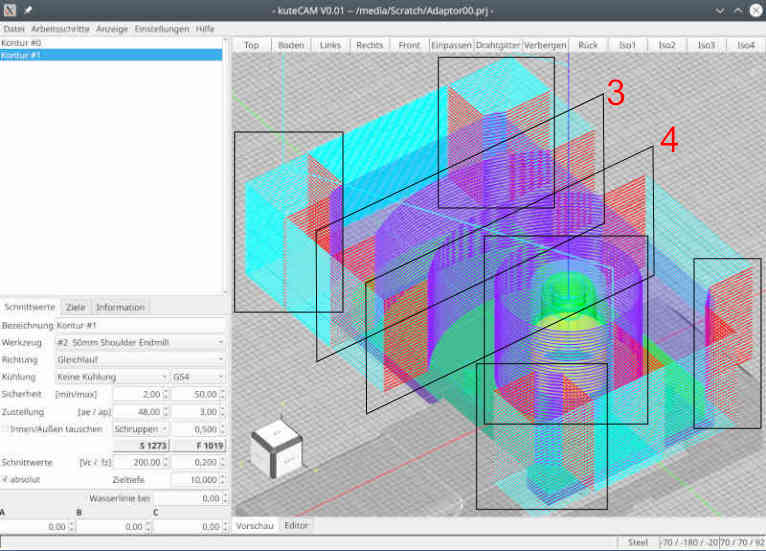
I think, it works good for the 4 corners, but does not work for towers 3 and 4 ...
This is the workpiece:
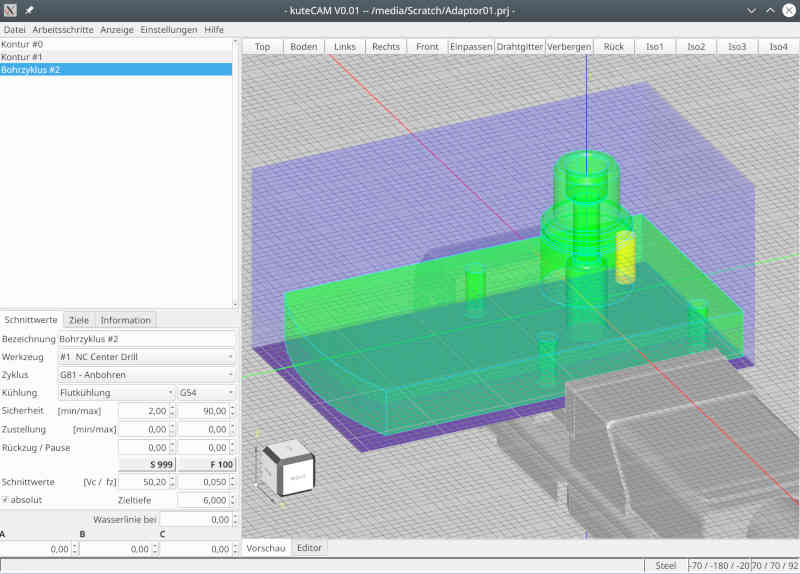
so on processing towers 3 and 4 you have to lift the tool or move around the workpiece.
So I guess, I stay at the moment with current path creation and keep the tower processing in mind for later optimization.
Path processing with alternating cut direction will lead to completely different toolpath.
> I believe "both direction" strategy always delivers the shortest path as you don't have to go find the next suitable lead in and
> just reach the nearest as fast as possible
Sure! But the shortest toolpath is not the best respect to tool lifetime. Some machines don't support "parallel feed" and "against feed" might kill the milling tool earlier. So I think, user should decide, what to generate ...
> I'm actually using it quite often, with adaptive strategies too.
I read about adaptive path generation quite often, but I don't know, what it means. I can only think of, how I would code the path on my machine. In certain situation I already generate paths, which I would never code manually, but because its too much work coding it manually.
So may be I could improve path generation when I know, what adaptive intends to provide ...
> Path fragments colorization is, IMHO, as helpful and thus important as syntax highlighting in the code editor !
> May I suggest a different color for leads in and and leads out ?
Path colorization is far from final. Actually I change colors by the needs on working at path generation.
My final path actually just distinguishes between fast move and moves with work feed. I thought about attaching a color to certain tool, so that it is easier to distinguish.
... but I'm open to suggestions.
Looking at the star - the red lines are leadin/leadout.
Working at the open pockets from the round chuck adapter I used different colors for start and end of the path - just to be sure, that it goes in the right direction ...
... but I removed the coloring on publishing the feature
> Also:
Yellow plain lines won't work "down rapid". Lead out is about 0.6D, so yellow plain lines crashes the part.
Yellow dashed lines of cause need a retract of tool
Pink dotted - yes, could move in safe height.
Guess I have to create a sample to calculate whether it really saves fast moves
Thank you for your valuable input!
thank you for your attention!
Tower processing is an interesting option, but I believe, its not always the best way.
I think, it works good for the 4 corners, but does not work for towers 3 and 4 ...
This is the workpiece:
so on processing towers 3 and 4 you have to lift the tool or move around the workpiece.
So I guess, I stay at the moment with current path creation and keep the tower processing in mind for later optimization.
Path processing with alternating cut direction will lead to completely different toolpath.
> I believe "both direction" strategy always delivers the shortest path as you don't have to go find the next suitable lead in and
> just reach the nearest as fast as possible
Sure! But the shortest toolpath is not the best respect to tool lifetime. Some machines don't support "parallel feed" and "against feed" might kill the milling tool earlier. So I think, user should decide, what to generate ...
> I'm actually using it quite often, with adaptive strategies too.
I read about adaptive path generation quite often, but I don't know, what it means. I can only think of, how I would code the path on my machine. In certain situation I already generate paths, which I would never code manually, but because its too much work coding it manually.
So may be I could improve path generation when I know, what adaptive intends to provide ...
> Path fragments colorization is, IMHO, as helpful and thus important as syntax highlighting in the code editor !
> May I suggest a different color for leads in and and leads out ?
Path colorization is far from final. Actually I change colors by the needs on working at path generation.
My final path actually just distinguishes between fast move and moves with work feed. I thought about attaching a color to certain tool, so that it is easier to distinguish.
... but I'm open to suggestions.
Looking at the star - the red lines are leadin/leadout.
Working at the open pockets from the round chuck adapter I used different colors for start and end of the path - just to be sure, that it goes in the right direction ...
... but I removed the coloring on publishing the feature
> Also:
- yellow plain lines can be "stayed" down rapids
- yellow dashed and point dashed could be "stayed" down rapids with an optional small clearance retract like in adaptive path
- pink dotted lines could be shortest path safe height retracted rapids
Yellow plain lines won't work "down rapid". Lead out is about 0.6D, so yellow plain lines crashes the part.
Yellow dashed lines of cause need a retract of tool
Pink dotted - yes, could move in safe height.
Guess I have to create a sample to calculate whether it really saves fast moves
Thank you for your valuable input!
Time to create page: 0.412 seconds