
- Posts: 508
- Thank you received: 94
simple linux cam
- Reinhard
- Offline
- Platinum Member
-

Less
More
4 years 4 months ago #244676
by Reinhard
Replied by Reinhard on topic simple linux cam
Hi,
i finally got my circle class working, so just added support for circular pockets
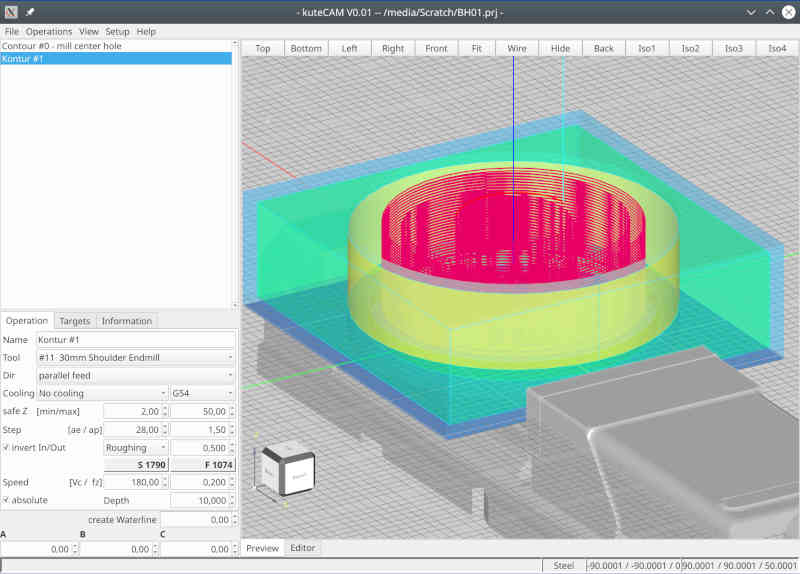
and milling of cylinders on top of a face
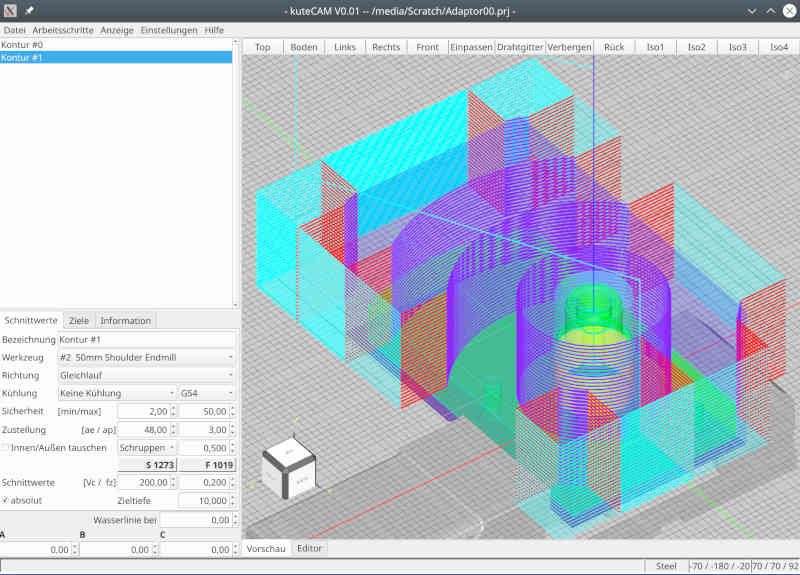
Additionally added translation for german and i18n handling to build system.
Have fun
i finally got my circle class working, so just added support for circular pockets
and milling of cylinders on top of a face
Additionally added translation for german and i18n handling to build system.
Have fun
The following user(s) said Thank You: silopolis
- silopolis
- Offline
- Junior Member
-

Less
More
- Posts: 23
- Thank you received: 4
4 years 4 months ago #244688
by silopolis
Replied by silopolis on topic simple linux cam
Path for cylinder on a face tooks darn nice ! :+1:
Do you have an option to machine "by area" instead of "by depth" ? Could avoid a bunch of rapid moves, furthermore with a "stay down"...
I'll add kuteCAM to my translation backlog, already have @bigjohnt 's MesaCT waiting in line
Do you have an option to machine "by area" instead of "by depth" ? Could avoid a bunch of rapid moves, furthermore with a "stay down"...
I'll add kuteCAM to my translation backlog, already have @bigjohnt 's MesaCT waiting in line
- Reinhard
- Offline
- Platinum Member
-
Less
More
- Posts: 508
- Thank you received: 94
4 years 4 months ago #244722
by Reinhard
Replied by Reinhard on topic simple linux cam
Thank you for your attention and your flowers
Keep in mind, that I'm at the very beginning of a huge project ...
I plan the application in such a way that the user selects some elements from the model and I, or rather kuteCAM, then knows what to do.
In no case I plan to reinvent a CAD.
Even though I am at the very beginning, I'm already very satisfied with my progress (I have very little sparetime) and so far I have been able to implement everything as planned. Therefore, I am confident and continue to follow my plans.
"Stay down" is an (important) option for finishing. So far, I am dealing exclusively with roughing and stay down is not important for roughing. My test models are intentionally complex enough to keep me busy with challenges in the long run.

Currently, I am still working on implementing general purpose processing. So far from any optimization. To visualize the way my processing works, take this picture:
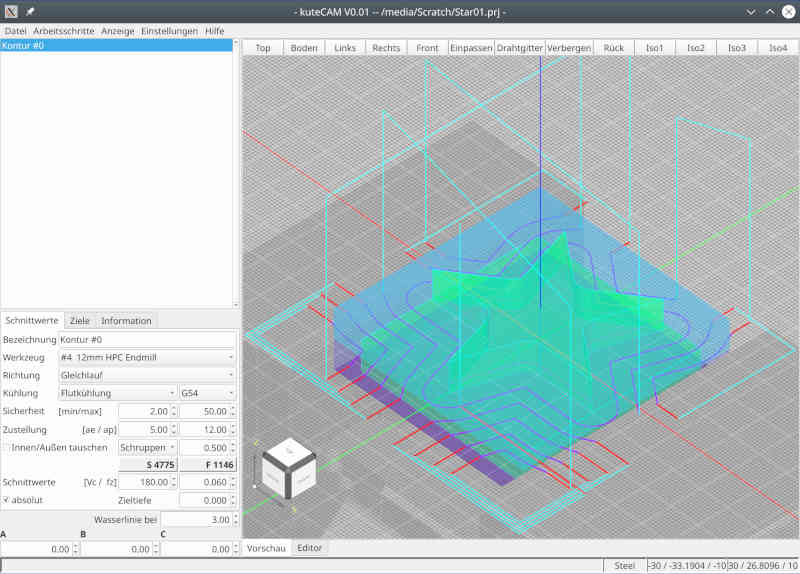
The dark blue lines are the "real workpath" where the tool should cut material. The red lines are "lead-in" and "lead-out" to ensure, that the tool is completely outside of the model. I extended the red lines for debugging purpose (just to be able to visualize the order of movements).
I cut the virtual working area into smaller areas and as long as the tool stays in one area, the tool will stay down.
For area changes, I move up to save retraction layer. That's a place for later optimization, but actually I don't waste a thought on it.
Looking back, I have to confess, that I lost most dev-time in debugging and understanding randomly/unpredictably results from occ and creating a reliable layer between occ and my app. Apparently occ has no interest supporting hobby users, so I have to fight my battle alone (not my preferred way of working)
So I'm not sure how much effort I'll still putting into occ. I have the impression by using occ it always goes one step forward and yet two steps back - or to put it another way: occ is the most expensive foreign library I have ever looked into. Even though I think I've understood quite a bit, I'm sure I've only lightly scratched the surface.
... so I have no idea where the journey will take me.
Keep in mind, that I'm at the very beginning of a huge project ...
Don't know what you mean with "by area" and don't know neither whether I got you right.Do you have an option to machine "by area" instead of "by depth" ? Could avoid a bunch of rapid moves,
I plan the application in such a way that the user selects some elements from the model and I, or rather kuteCAM, then knows what to do.
In no case I plan to reinvent a CAD.
Even though I am at the very beginning, I'm already very satisfied with my progress (I have very little sparetime) and so far I have been able to implement everything as planned. Therefore, I am confident and continue to follow my plans.
"Stay down" is an (important) option for finishing. So far, I am dealing exclusively with roughing and stay down is not important for roughing. My test models are intentionally complex enough to keep me busy with challenges in the long run.
Currently, I am still working on implementing general purpose processing. So far from any optimization. To visualize the way my processing works, take this picture:
The dark blue lines are the "real workpath" where the tool should cut material. The red lines are "lead-in" and "lead-out" to ensure, that the tool is completely outside of the model. I extended the red lines for debugging purpose (just to be able to visualize the order of movements).
I cut the virtual working area into smaller areas and as long as the tool stays in one area, the tool will stay down.
For area changes, I move up to save retraction layer. That's a place for later optimization, but actually I don't waste a thought on it.
Looking back, I have to confess, that I lost most dev-time in debugging and understanding randomly/unpredictably results from occ and creating a reliable layer between occ and my app. Apparently occ has no interest supporting hobby users, so I have to fight my battle alone (not my preferred way of working)
So I'm not sure how much effort I'll still putting into occ. I have the impression by using occ it always goes one step forward and yet two steps back - or to put it another way: occ is the most expensive foreign library I have ever looked into. Even though I think I've understood quite a bit, I'm sure I've only lightly scratched the surface.
... so I have no idea where the journey will take me.
The following user(s) said Thank You: silopolis
- Reinhard
- Offline
- Platinum Member
-
Less
More
- Posts: 508
- Thank you received: 94
4 years 4 months ago #244747
by Reinhard
Replied by Reinhard on topic simple linux cam
Hi silopolis,
I took a closer look at cylinder job and how to optimize it. Regarding "stay low" - all movements for one z-height are already performed as "stay low", which means, changing Z happens only, when a new Z-height will be milled.
An alternate (shorter?) path might look like this (the green line) - from top view:
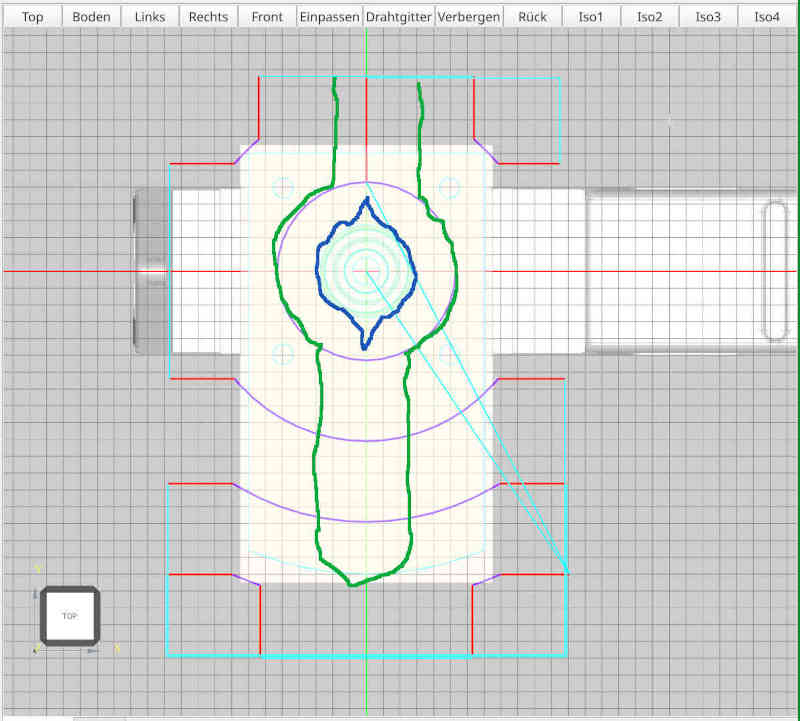
but I fear, that with this path, the cylinder is not round but something like the blue line. So I need a full turn around the cylinder anyway. Drawback of the green path - it works only as long as the workpiece is smaller that double the diameter of the tool.
My actual variant works for any shape and any dimension of the face below the cylinder.
So I think, a really shorter workpath could be created, if you don't care for cutting direction (alternating parallel feed and against feed).
What do you think?
I took a closer look at cylinder job and how to optimize it. Regarding "stay low" - all movements for one z-height are already performed as "stay low", which means, changing Z happens only, when a new Z-height will be milled.
An alternate (shorter?) path might look like this (the green line) - from top view:
but I fear, that with this path, the cylinder is not round but something like the blue line. So I need a full turn around the cylinder anyway. Drawback of the green path - it works only as long as the workpiece is smaller that double the diameter of the tool.
My actual variant works for any shape and any dimension of the face below the cylinder.
So I think, a really shorter workpath could be created, if you don't care for cutting direction (alternating parallel feed and against feed).
What do you think?
The following user(s) said Thank You: silopolis
- Reinhard
- Offline
- Platinum Member
-
Less
More
- Posts: 508
- Thank you received: 94
4 years 4 months ago #244929
by Reinhard
Replied by Reinhard on topic simple linux cam
Hi,
I just added motion preview of toolpaths with speed control:
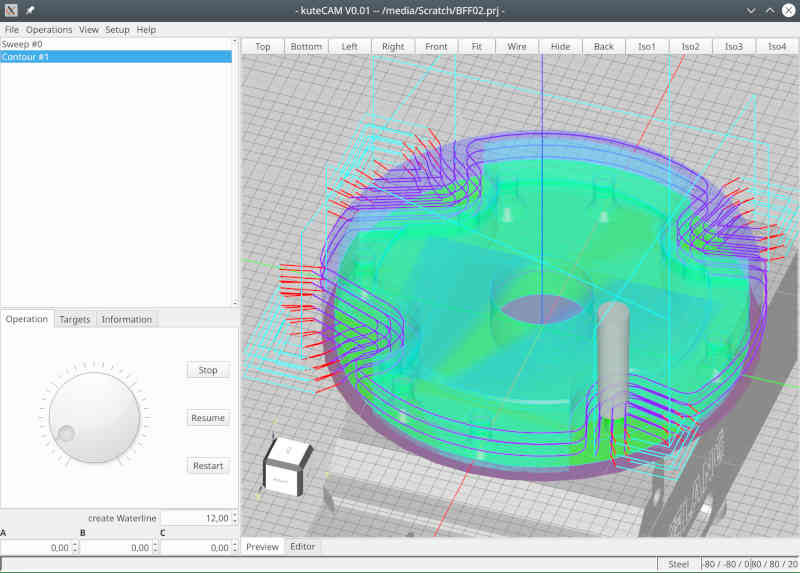
Tool shape is created based on informations from tooltable.
I just added motion preview of toolpaths with speed control:
Tool shape is created based on informations from tooltable.
- silopolis
- Offline
- Junior Member
-
Less
More
- Posts: 23
- Thank you received: 4
4 years 3 months ago #248249
by silopolis
Replied by silopolis on topic simple linux cam
Hi,
Sorry for the delay man, missed notification
You're very welcome, and I'm both very conscious and aware of the job at hand, so let me renew my support !
Well, this is a lingo I got from another CAM package for an option that is reordering path fragments into "towers" instead of layers, if I can explain it like that.
Maybe with this it will be clearer:
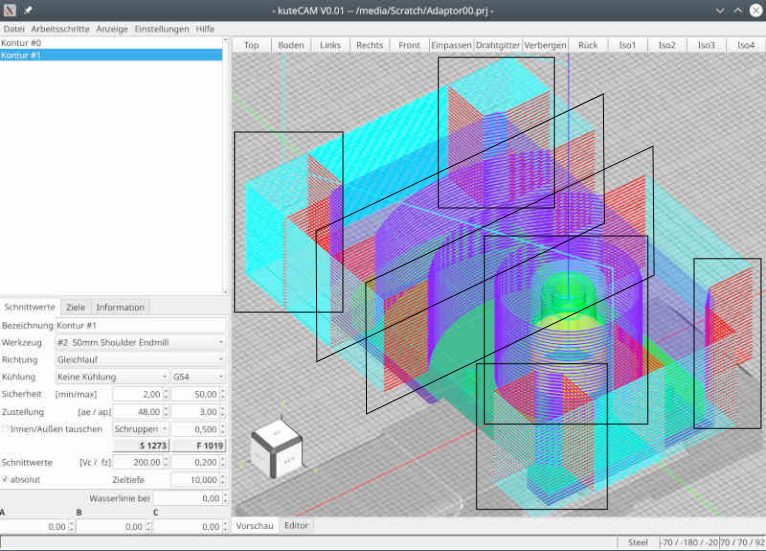
Path fragments piled up in each rectangle are machined one after the other with decreasing Z height until final Z depth is reached. Then machining moves to another "area" or "pile", and again same fragments of decreasing height are processed.
Instead of having all fragments at the same Z height machined, with transitions between fragments (which may have to avoid obstacles), and return to "layer" start point (obstacles again ?), this is frequently an interesting optimization both in terms of machining time because total path length is shorter as you spend less time in transition rapids, as well as safety as having moves confined in areas diminish risks by reducing transition rapid moves to the minimum.
When part shape and generated path allows, being able to add a "stay down" option to this can lead to huge air cutting time savings
Next best things after automatic features recognition, but let's keep that for v0.2
Yes, please lol
Excellent, strong and steady !
See my comment above. I'm actually using it quite often, with adaptive strategies too.
Path fragments colorization is, IMHO, as helpful and thus important as syntax highlighting in the code editor !
May I suggest a different color for leads in and and leads out ? In some cases like small holes, it can get tricky to easily and clearly distinguish them.
The "by area" option would then be to machine everything in that area down to final depth before leaving it with retraction to safe height.
Every time this lib is mentioned, it is to express pain and suffering
I'm wondering what CAMotics uses ?!
Keep up the great work
TY
J
Sorry for the delay man, missed notification
Thank you for your attention and your flowers
Keep in mind, that I'm at the very beginning of a huge project ...
You're very welcome, and I'm both very conscious and aware of the job at hand, so let me renew my support !
Do you have an option to machine "by area" instead of "by depth" ? Could avoid a bunch of rapid moves,
Don't know what you mean with "by area" and don't know neither whether I got you right.
Well, this is a lingo I got from another CAM package for an option that is reordering path fragments into "towers" instead of layers, if I can explain it like that.
Maybe with this it will be clearer:
Path fragments piled up in each rectangle are machined one after the other with decreasing Z height until final Z depth is reached. Then machining moves to another "area" or "pile", and again same fragments of decreasing height are processed.
Instead of having all fragments at the same Z height machined, with transitions between fragments (which may have to avoid obstacles), and return to "layer" start point (obstacles again ?), this is frequently an interesting optimization both in terms of machining time because total path length is shorter as you spend less time in transition rapids, as well as safety as having moves confined in areas diminish risks by reducing transition rapid moves to the minimum.
When part shape and generated path allows, being able to add a "stay down" option to this can lead to huge air cutting time savings
I plan the application in such a way that the user selects some elements from the model and I, or rather kuteCAM, then knows what to do.
Next best things after automatic features recognition, but let's keep that for v0.2
In no case I plan to reinvent a CAD.
Yes, please lol
Even though I am at the very beginning, I'm already very satisfied with my progress (I have very little sparetime) and so far I have been able to implement everything as planned. Therefore, I am confident and continue to follow my plans.
Excellent, strong and steady !
"Stay down" is an (important) option for finishing. So far, I am dealing exclusively with roughing and stay down is not important for roughing.
See my comment above. I'm actually using it quite often, with adaptive strategies too.
Currently, I am still working on implementing general purpose processing. So far from any optimization. To visualize the way my processing works, take this picture:
The dark blue lines are the "real workpath" where the tool should cut material. The red lines are "lead-in" and "lead-out" to ensure, that the tool is completely outside of the model.
Path fragments colorization is, IMHO, as helpful and thus important as syntax highlighting in the code editor !
May I suggest a different color for leads in and and leads out ? In some cases like small holes, it can get tricky to easily and clearly distinguish them.
I cut the virtual working area into smaller areas and as long as the tool stays in one area, the tool will stay down.
For area changes, I move up to save retraction layer. That's a place for later optimization, but actually I don't waste a thought on it.
The "by area" option would then be to machine everything in that area down to final depth before leaving it with retraction to safe height.
Looking back, I have to confess, that I lost most dev-time in debugging and understanding randomly/unpredictably results from occ and creating a reliable layer between occ and my app. Apparently occ has no interest supporting hobby users, so I have to fight my battle alone (not my preferred way of working)
So I'm not sure how much effort I'll still putting into occ. I have the impression by using occ it always goes one step forward and yet two steps back - or to put it another way: occ is the most expensive foreign library I have ever looked into. Even though I think I've understood quite a bit, I'm sure I've only lightly scratched the surface.
Every time this lib is mentioned, it is to express pain and suffering
I'm wondering what CAMotics uses ?!
Keep up the great work
TY
J
Time to create page: 0.295 seconds