
- Posts: 33
- Thank you received: 0
Competing interests of VFD and XHC-HB04 (with my own ignorance!)
- TRAUPMANN00
- Offline
- Junior Member
-

Less
More
8 years 4 months ago #112657
by TRAUPMANN00
Replied by TRAUPMANN00 on topic Competing interests of VFD and XHC-HB04 (with my own ignorance!)
Have you tried issuing the other suggested commands in the terminal window to verify you can manually start the spindle as well?
YES but with no results at the spindle.
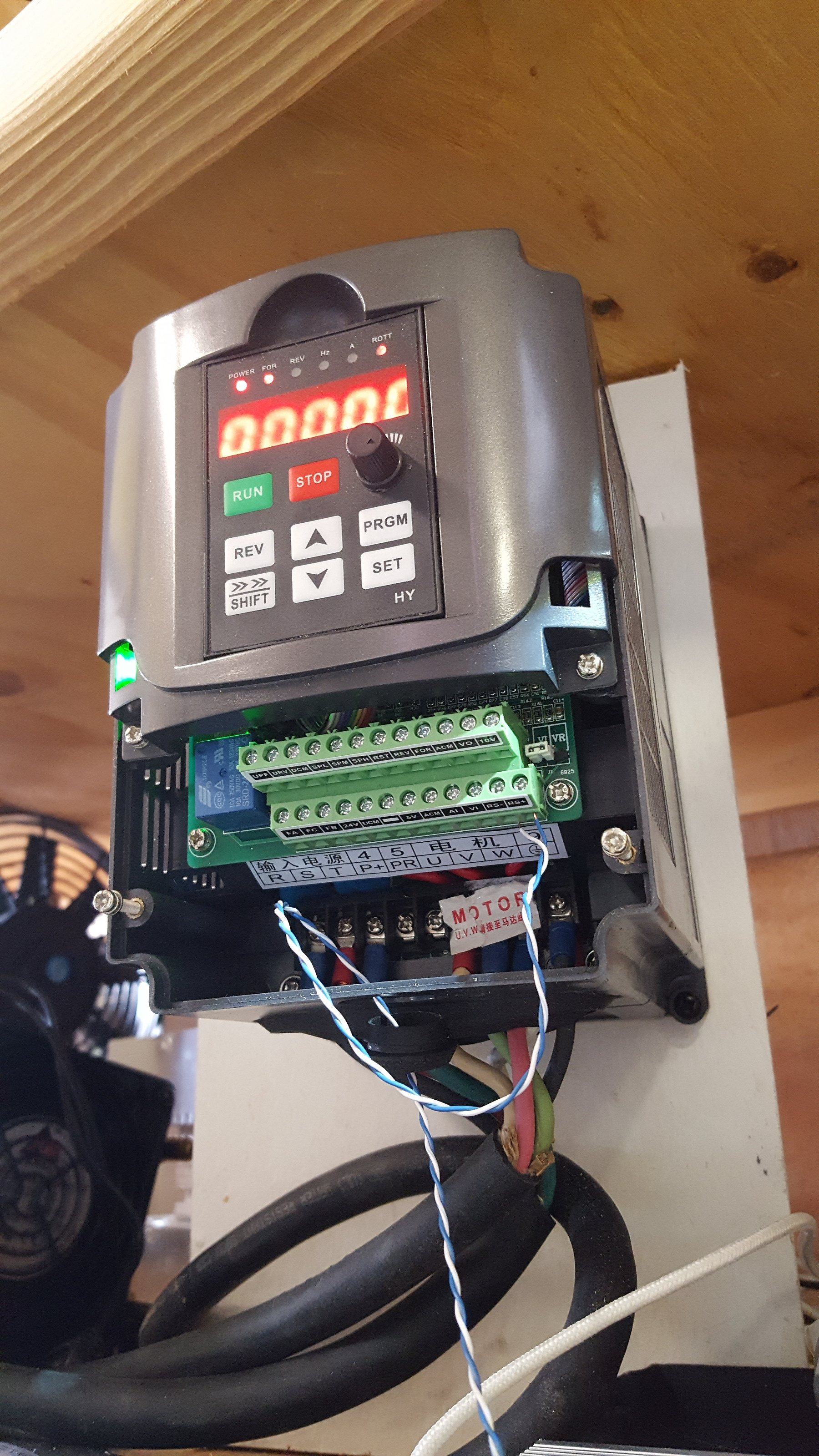
the only feedback I see but don't quite understand is this
I have checked the settings from hy_vfd numerous times and they are set on the VFD and the program to the suggested values ( I have changed them back and forth to see if that did any difference
I have switched the twisted pair plus to minus and back - nothing
is there an output from the VFD to the computer that shows all the settings of the VFD other than pins? PD001 to PD250?
Something must be set incorrectly, but I've been unable to find it.
YES but with no results at the spindle.
the only feedback I see but don't quite understand is this
I have checked the settings from hy_vfd numerous times and they are set on the VFD and the program to the suggested values ( I have changed them back and forth to see if that did any difference
I have switched the twisted pair plus to minus and back - nothing
is there an output from the VFD to the computer that shows all the settings of the VFD other than pins? PD001 to PD250?
Something must be set incorrectly, but I've been unable to find it.
Please Log in or Create an account to join the conversation.
- curtisa
- Offline
- Premium Member
-

Less
More
- Posts: 88
- Thank you received: 15
8 years 4 months ago #112664
by curtisa
Replied by curtisa on topic Competing interests of VFD and XHC-HB04 (with my own ignorance!)
Here's a quick breakdown of what should be happening. The following lines of manually-entered text in a Terminal window should be:
...which manually starts the HAL module. Terminal should respond with:
...to signify it's ready to accept HAL codes and commands from the user. Then typing:
...tells HAL to load the included hy_vfd module with a default data bit length = 8, baudrate = 38400, parity = odd, stop bits = 1 and slave address = 1. These must match whatever settings you have in the Huanyang. If, for example your VFD is set for comms baudrate = 19200 and even parity, then the above command that needs to be issued should be modified to:
Note that communications has not yet been started with the VFD. All that's happened thus far is to initiate the hy_vfd HAL module with the intended communications settings. Then typing:
...is only used to verify the hy_vfd module has successfully loaded by listing the HAL input/output virtual pins available to use. Comms still hasn't started yet. If you can already get this far there's no reason to continue typing this command everytime you want to test the HAL module, nor does it need to be included in your custom.hal file. The next command:
...is what starts comms with the VFD. The correct reponse in Terminal should just be the next 'halcmd' prompt. At this point you appear to come up with errors that indicate that HAL can't talk to the VFD at all, hence the response:
So either:
FWIW, I have set my Huanyang VFD as the following:
Thus, the corresponding 'loadusr' command I need to issue to correctly initiate the hy_vfd HAL component is:
After that, all the other HAL commands Andy suggests in the post I linked to earlier should just work. If not then it's likely that either items 2, 3 or 4 in the above list are the culprits.
I have also seen reports floating around on the Net that indicate that some versions of the Huanyang VFD didn't ship with the RS485 chip soldered onto the PCB. If you have been unlucky enough to buy a VFD that falls into this category then unfortunately no amount of HAL commands are going to get the VFD working via RS485.
Code:
halrun
...which manually starts the HAL module. Terminal should respond with:
Code:
halcmd
...to signify it's ready to accept HAL codes and commands from the user. Then typing:
Code:
loadusr -W hy_vfd -d /dev/ttyUSB0
...tells HAL to load the included hy_vfd module with a default data bit length = 8, baudrate = 38400, parity = odd, stop bits = 1 and slave address = 1. These must match whatever settings you have in the Huanyang. If, for example your VFD is set for comms baudrate = 19200 and even parity, then the above command that needs to be issued should be modified to:
Code:
loadusr -W hy_vfd -d /dev/ttyUSB0 -p even -r 19200
Note that communications has not yet been started with the VFD. All that's happened thus far is to initiate the hy_vfd HAL module with the intended communications settings. Then typing:
Code:
show pin
...is only used to verify the hy_vfd module has successfully loaded by listing the HAL input/output virtual pins available to use. Comms still hasn't started yet. If you can already get this far there's no reason to continue typing this command everytime you want to test the HAL module, nor does it need to be included in your custom.hal file. The next command:
Code:
setp hy_vfd.enable 1
...is what starts comms with the VFD. The correct reponse in Terminal should just be the next 'halcmd' prompt. At this point you appear to come up with errors that indicate that HAL can't talk to the VFD at all, hence the response:
Code:
halcmd: WAIT_DATA(): comms time out
ERROR Communication time out (-12)
error reading setup from VFD, retrying
So either:
- The 'loadusr' command you are issuing doesn't include the necessary settings and switches to match your VFD settings
- Your RS485 wiring and/or terminations are faulty
- Your USB-to-RS485 converter is faulty
- The RS485 interface on the VFD is faulty
FWIW, I have set my Huanyang VFD as the following:
- PD001 = 2 (Accept commands via RS485)
- PD002 = 2 (Accept drive frequency commands via RS485)
- PD163 = 1 (Set RS485 slave address to 1)
- PD164 = 1 (Set RS485 baud rate to 9600)
- PD165 = 3 (Set RS485 comms parameters to 8 bits, no parity, 1 stop bit)
Thus, the corresponding 'loadusr' command I need to issue to correctly initiate the hy_vfd HAL component is:
Code:
loadusr -W hy_vfd -d /dev/ttyUSB0 -p none -r 9600
After that, all the other HAL commands Andy suggests in the post I linked to earlier should just work. If not then it's likely that either items 2, 3 or 4 in the above list are the culprits.
I have also seen reports floating around on the Net that indicate that some versions of the Huanyang VFD didn't ship with the RS485 chip soldered onto the PCB. If you have been unlucky enough to buy a VFD that falls into this category then unfortunately no amount of HAL commands are going to get the VFD working via RS485.
Please Log in or Create an account to join the conversation.
- TRAUPMANN00
- Offline
- Junior Member
-
Less
More
- Posts: 33
- Thank you received: 0
8 years 4 months ago #112679
by TRAUPMANN00
Replied by TRAUPMANN00 on topic Competing interests of VFD and XHC-HB04 (with my own ignorance!)
First, thanks for the extensive explanation.
Second, it appears that upon initiating the loadusr hy_vfd there is discussion with the VFD.
With the twisted pair in the wrong orientation I get.
When I changed the twisted pair I got a bit farther, but not far enough.
As you can see I did a show pin just prior to the hy_vfd.enable to show that the previous commands took in LinuxCNC
The Hyanyang manual provides no error message nor have I found any for LinuxCNC to explain (-12) and (-22).
Earlier I did a reset on the VFD (PD013 in case this unit had been used before (no real evidence) and not reset. I then set the numbers as
PD001 = 2 (Accept commands via RS485)
PD002 = 2 (Accept drive frequency commands via RS485)
PD163 = 1 (Set RS485 slave address to 1)
PD164 = 2 (Set RS485 baud rate to 19200)
PD165 = 3 (Set RS485 comms parameters to 8 bits, no parity, 1 stop bit)
It looks to me that we are at either 3 or 4 on your list.
Second, it appears that upon initiating the loadusr hy_vfd there is discussion with the VFD.
With the twisted pair in the wrong orientation I get.
When I changed the twisted pair I got a bit farther, but not far enough.
As you can see I did a show pin just prior to the hy_vfd.enable to show that the previous commands took in LinuxCNC
The Hyanyang manual provides no error message nor have I found any for LinuxCNC to explain (-12) and (-22).
Earlier I did a reset on the VFD (PD013
in case this unit had been used before (no real evidence) and not reset. I then set the numbers asPD001 = 2 (Accept commands via RS485)
PD002 = 2 (Accept drive frequency commands via RS485)
PD163 = 1 (Set RS485 slave address to 1)
PD164 = 2 (Set RS485 baud rate to 19200)
PD165 = 3 (Set RS485 comms parameters to 8 bits, no parity, 1 stop bit)
It looks to me that we are at either 3 or 4 on your list.
Please Log in or Create an account to join the conversation.
- curtisa
- Offline
- Premium Member
-
Less
More
- Posts: 88
- Thank you received: 15
8 years 4 months ago #112681
by curtisa
That's pointing to a different problem.
...suggests that your USB-to-RS485 converter couldn't be found at ttyUSB0 when you called the 'loadusr...' command. Maybe it was unplugged slightly from the USB port? Maybe it hadn't had time to register on the USB bus when you typed the command? Maybe it was appearing at a different ttyUSBn location?
Yep, that's the same error as I posted about just before - the hy_vfd component can't find anything to talk to at the other end of the RS485 data link after you issued 'setp hy_vfd.enable 1'.
Yes, as much as I love LinuxCNC, at times the documentation can be a little confusing to wade through.
Error (-12) is comms timeout (nothing responding on the RS485 comms network, as per above).
Maybe I missed it, but I don't think I've seen error (-22) in your attached txt files?
It could still be a wiring swap-over (item 2). Your first test doesn't appear to have eliminated that as a possibility because LinuxCNC couldn't find the RS485 converter to begin with.
The little USB-to-RS485 converters are quite cheap (item 3). You can always buy a few to try out to eliminate it as a possibility.
Replied by curtisa on topic Competing interests of VFD and XHC-HB04 (with my own ignorance!)
Second, it appears that upon initiating the loadusr hy_vfd there is discussion with the VFD.
With the twisted pair in the wrong orientation I get.
File Attachment:
File Name: HY_comm_er...wist.txt
File Size:0 KB
That's pointing to a different problem.
Code:
ERROR Can't open the device /dev/ttyUSB0 (errno 5)
hy_vfd: ERROR: couldn't open serial device
...suggests that your USB-to-RS485 converter couldn't be found at ttyUSB0 when you called the 'loadusr...' command. Maybe it was unplugged slightly from the USB port? Maybe it hadn't had time to register on the USB bus when you typed the command? Maybe it was appearing at a different ttyUSBn location?
When I changed the twisted pair I got a bit farther, but not far enough.
File Attachment:
File Name: HY_comm_er...wist.txt
File Size:2 KB
Yep, that's the same error as I posted about just before - the hy_vfd component can't find anything to talk to at the other end of the RS485 data link after you issued 'setp hy_vfd.enable 1'.
The Hyanyang manual provides no error message nor have I found any for LinuxCNC to explain (-12) and (-22).
Yes, as much as I love LinuxCNC, at times the documentation can be a little confusing to wade through.
Error (-12) is comms timeout (nothing responding on the RS485 comms network, as per above).
Maybe I missed it, but I don't think I've seen error (-22) in your attached txt files?
It looks to me that we are at either 3 or 4 on your list.
It could still be a wiring swap-over (item 2). Your first test doesn't appear to have eliminated that as a possibility because LinuxCNC couldn't find the RS485 converter to begin with.
The little USB-to-RS485 converters are quite cheap (item 3). You can always buy a few to try out to eliminate it as a possibility.
Please Log in or Create an account to join the conversation.
- curtisa
- Offline
- Premium Member
-
Less
More
- Posts: 88
- Thank you received: 15
8 years 4 months ago #112682
by curtisa
Just noticed another error in your testing. In your second txt file you attached where you were still getting (-12) errors after issuing 'setp hy_vfd.enable 1', you've used the incorrect 'loadusr' command for the given PD165 VFD setting:
This should be:
loadusr -W hy_vfd -d /dev/ttyUSB0 -p none-r 19200
Replied by curtisa on topic Competing interests of VFD and XHC-HB04 (with my own ignorance!)
Earlier I did a reset on the VFD (PD013
PD001 = 2 (Accept commands via RS485)
PD002 = 2 (Accept drive frequency commands via RS485)
PD163 = 1 (Set RS485 slave address to 1)
PD164 = 2 (Set RS485 baud rate to 19200)
PD165 = 3 (Set RS485 comms parameters to 8 bits, no parity, 1 stop bit)
Just noticed another error in your testing. In your second txt file you attached where you were still getting (-12) errors after issuing 'setp hy_vfd.enable 1', you've used the incorrect 'loadusr' command for the given PD165 VFD setting:
Code:
loadusr -W hy_vfd -d /dev/ttyUSB0 -p even -r 19200
This should be:
loadusr -W hy_vfd -d /dev/ttyUSB0 -p none-r 19200
Please Log in or Create an account to join the conversation.
- TRAUPMANN00
- Offline
- Junior Member
-
Less
More
- Posts: 33
- Thank you received: 0
8 years 4 months ago #112810
by TRAUPMANN00
Replied by TRAUPMANN00 on topic Competing interests of VFD and XHC-HB04 (with my own ignorance!)
The baud and parity have been in a constant of testing. I am becoming convinced the unit is bad. I will attempt a return after I try 2 more RS-285 units coming tomorrow.
Will advise.
Will advise.
Please Log in or Create an account to join the conversation.
Time to create page: 0.995 seconds