
- Posts: 19899
- Thank you received: 4655
Lost Step Counter
- andypugh
- Offline
- Moderator
-

Less
More
8 years 2 weeks ago #118726
by andypugh
Replied by andypugh on topic Lost Step Counter
This seems to work.
Save this as a file called "miss_step" and make it executable.
Then load it in the HAL file
Then in the HAL file connect the pins for each axis
Or whatever signal axis.0.motor-pos-cmd is linked to
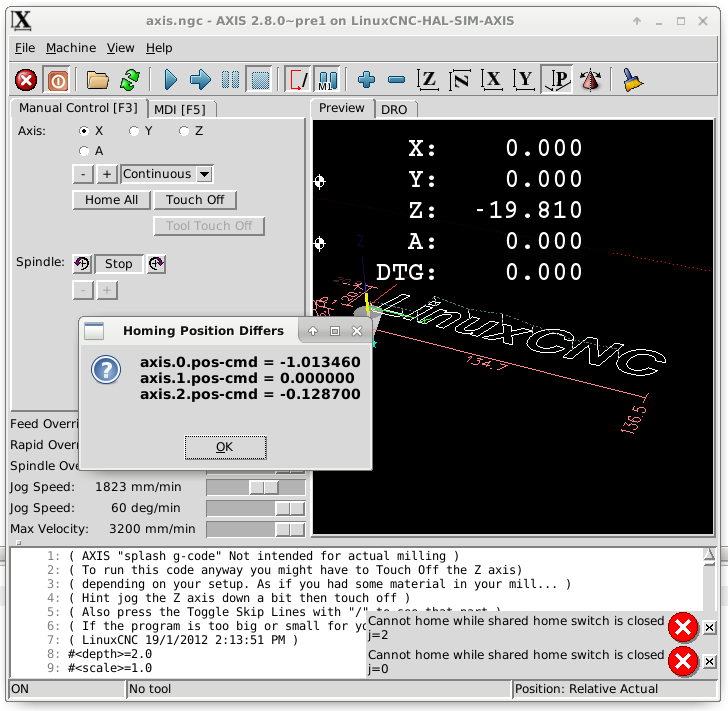
Save this as a file called "miss_step" and make it executable.
Code:
#!/usr/bin/python
import hal, time
import sys
from Tkinter import *
import tkMessageBox
root = Tk()
root.withdraw()
h = hal.component("miss_step")
count = 1
for opt in sys.argv[1:]:
(dummy, count) = opt.split("=")
if dummy != "count":
count = 1
pins = []
for i in range(int(count)):
p1 = "axis.%i.pos-cmd" %i
p2 = "axis.%i.motor-pos-cmd" %i
d = 0
t = [p1, p2, d]
pins.append(t)
h.newpin(p1, hal.HAL_FLOAT, hal.HAL_IN)
h.newpin(p2, hal.HAL_FLOAT, hal.HAL_IN)
h.ready()
try:
flag = False
while 1:
time.sleep (1)
for t in pins:
if h[t[0]]-h[t[1]] != t[2]:
flag = True
t[2] = h[t[0]]-h[t[1]]
if flag == True:
flag = False
message = ""
for t in pins:
message = message + t[0] + " = %f\n"%t[2]
ret = tkMessageBox._show("Homing Position Differs",
message,
tkMessageBox.QUESTION, tkMessageBox.OK)
root.update()
except KeyboardInterrupt:
raise SystemExit
Then load it in the HAL file
Code:
loadusr miss_step count=3
Code:
net check0 miss_step.axis.0.pos-cmd axis.0.pos-cmd
net Xpos miss_step.axis.0.motor-pos-cmd
The following user(s) said Thank You: tommylight
Please Log in or Create an account to join the conversation.
- DieselJoe
- Offline
- New Member
-

Less
More
- Posts: 16
- Thank you received: 1
8 years 2 weeks ago #118727
by DieselJoe
Replied by DieselJoe on topic Lost Step Counter
Thank you.
Incredible.
I am not familiar with add-ons modules on linuxcnc, but I will work on it this weekend
Incredible.
I am not familiar with add-ons modules on linuxcnc, but I will work on it this weekend
Please Log in or Create an account to join the conversation.
- DieselJoe
- Offline
- New Member
-
Less
More
- Posts: 16
- Thank you received: 1
8 years 2 weeks ago #118889
by DieselJoe
Replied by DieselJoe on topic Lost Step Counter
Hi,
Sorry I'm newbie in Hal files.
I tried what you told me , and also i'am trying to read and understand documents on HAL files.
I made the miss_step file, made it executable (chmod -x right ?)
positioned the file in /.../linuxcnc/configs/ma-machine
then added in custom.hal :
loadusr miss_step count=3
net check0 miss_step.axis.0.pos-cmd axis.0.pos-cmd
net Xpos miss_step.axis.0.motor-pos-cmd
Is it the right procedure ?
I have a lot of errors and linuxcnc doesn't want to launch
Sorry I'm newbie in Hal files.
I tried what you told me , and also i'am trying to read and understand documents on HAL files.
I made the miss_step file, made it executable (chmod -x right ?)
positioned the file in /.../linuxcnc/configs/ma-machine
then added in custom.hal :
loadusr miss_step count=3
net check0 miss_step.axis.0.pos-cmd axis.0.pos-cmd
net Xpos miss_step.axis.0.motor-pos-cmd
Is it the right procedure ?
I have a lot of errors and linuxcnc doesn't want to launch
Please Log in or Create an account to join the conversation.
- andypugh
- Offline
- Moderator
-
Less
More
- Posts: 19899
- Thank you received: 4655
8 years 2 weeks ago #118890
by andypugh
Replied by andypugh on topic Lost Step Counter
I think that the python file needs to go in usr/bin/linuxcnc
(or you can give the complete path to the file in the loadusr statement)
Can you attach the error listing?
(or you can give the complete path to the file in the loadusr statement)
Can you attach the error listing?
Please Log in or Create an account to join the conversation.
- DieselJoe
- Offline
- New Member
-
Less
More
- Posts: 16
- Thank you received: 1
8 years 2 weeks ago #118892
by DieselJoe
Replied by DieselJoe on topic Lost Step Counter
Debug file information:
.
./custom.hal:3: Warning: File contains DOS-style line endings.
./custom.hal:4: Pin 'miss_step.axis.0.pos-cmd' does not exist
7165
PID TTY STAT TIME COMMAND
Stopping realtime threads
Unloading hal components
.
./custom.hal:3: Warning: File contains DOS-style line endings.
./custom.hal:4: Pin 'miss_step.axis.0.pos-cmd' does not exist
7165
PID TTY STAT TIME COMMAND
Stopping realtime threads
Unloading hal components
Please Log in or Create an account to join the conversation.
- DieselJoe
- Offline
- New Member
-
Less
More
- Posts: 16
- Thank you received: 1
8 years 2 weeks ago #118898
by DieselJoe
Replied by DieselJoe on topic Lost Step Counter
I have to mention that I am running this test on a small laptop which is not my actual cnc PC, and has no real parallel port.
Linuxcnc version 2.7.8
Linuxcnc version 2.7.8
Please Log in or Create an account to join the conversation.
Time to create page: 0.347 seconds