
- Posts: 3
- Thank you received: 0
adding auto leveling to linuxCnc
- zdebel
- Offline
- New Member
-

Less
More
4 years 8 months ago #235644
by zdebel
Replied by zdebel on topic adding auto leveling to linuxCnc
I've recorded videos where you can see how the Z compensation is lagging.
I've probed the tape, removed the probe and I'd like to see the Z axis "draw" the arc, as you can see it's lagging very badly.
I've probed the tape, removed the probe and I'd like to see the Z axis "draw" the arc, as you can see it's lagging very badly.
Please Log in or Create an account to join the conversation.
- ds.lithographie
- Offline
- New Member
-
Less
More
- Posts: 6
- Thank you received: 6
4 years 8 months ago - 4 years 8 months ago #235650
by ds.lithographie
Replied by ds.lithographie on topic adding auto leveling to linuxCnc
Ah I see, when feed rate is high it wont keep up.
In Compensation.run() method definition there is a time.sleep() function sitting in the while True loop. Modifying its value may give better or worse lagging behaviors.
Think of the Python script as a real-time module in the HAL file. After initialization (loadMap()), and clicking enable in the GUI, this script is just constantly comparing current machine position with the generated heightmap, and outputting height adjustment to the joints.
This obviously will take specific amount of time that is dependent on the particular Linux machine running the script.
I have not benchmarked the timing behaviors, but I think it is possible to add time stamping like this and review the numbers in the terminal. Python can print to the terminal if you invoke Linuxcnc from the command line by calling "linuxcnc":
```
import time
print_every = 1000
time_counter = 0
t_total = 0.0
t1 = 0.0
t2 = 0.0
while True:
time.sleep(UPDATE_INTERVAL)
t1 = time.time()
##start of original while loop code
##end of original while loop code
t2 = time.time()
time_total += t2-t1
time_counter += 1
if time_counter > 1000:
print("average execution time is %f "% (time_total / time_counter))
time_counter = 0
```
If decreasing the sleep interval does not help or causes problem, another way is to just decrease your feed rate to below your (resolution / UPDATE_INTERVAL). Unit here is machine unit per second
In Compensation.run() method definition there is a time.sleep() function sitting in the while True loop. Modifying its value may give better or worse lagging behaviors.
Think of the Python script as a real-time module in the HAL file. After initialization (loadMap()), and clicking enable in the GUI, this script is just constantly comparing current machine position with the generated heightmap, and outputting height adjustment to the joints.
This obviously will take specific amount of time that is dependent on the particular Linux machine running the script.
I have not benchmarked the timing behaviors, but I think it is possible to add time stamping like this and review the numbers in the terminal. Python can print to the terminal if you invoke Linuxcnc from the command line by calling "linuxcnc":
```
import time
print_every = 1000
time_counter = 0
t_total = 0.0
t1 = 0.0
t2 = 0.0
while True:
time.sleep(UPDATE_INTERVAL)
t1 = time.time()
##start of original while loop code
##end of original while loop code
t2 = time.time()
time_total += t2-t1
time_counter += 1
if time_counter > 1000:
print("average execution time is %f "% (time_total / time_counter))
time_counter = 0
```
If decreasing the sleep interval does not help or causes problem, another way is to just decrease your feed rate to below your (resolution / UPDATE_INTERVAL). Unit here is machine unit per second
Last edit: 4 years 8 months ago by ds.lithographie.
Please Log in or Create an account to join the conversation.
- SrLange61
- Offline
- Junior Member
-

Less
More
- Posts: 39
- Thank you received: 5
4 years 7 months ago - 4 years 7 months ago #236238
by SrLange61
Replied by SrLange61 on topic adding auto leveling to linuxCnc
I've now been using it and its great. The dial shows that my table level variance has been reduced from .3mm down to .05. The milled parts come out much better. My next job is to move off VDFMOD to MB2HAL.
srl
srl


Last edit: 4 years 7 months ago by SrLange61.
The following user(s) said Thank You: ds.lithographie
Please Log in or Create an account to join the conversation.
- andypugh
- Offline
- Moderator
-

Less
More
- Posts: 19899
- Thank you received: 4655
4 years 7 months ago #236294
by andypugh
There are examples of this sort of thing, where a userspace module handles file access etc and passes data to a realtime module. See for example sampler and halsampler. linuxcnc.org/docs/2.8/html/man/man1/halsampler.1.html (halsampler is userspace and sampler is realtime)
Replied by andypugh on topic adding auto leveling to linuxCnc
Unfortunately Python can never truly be realtime. If true realtime behaviour is needed then the calculations would need to be done in C in an actual realtime module.Think of the Python script as a real-time module in the HAL file.
There are examples of this sort of thing, where a userspace module handles file access etc and passes data to a realtime module. See for example sampler and halsampler. linuxcnc.org/docs/2.8/html/man/man1/halsampler.1.html (halsampler is userspace and sampler is realtime)
The following user(s) said Thank You: ds.lithographie
Please Log in or Create an account to join the conversation.
- Trihwangyudi1990
- Offline
- Junior Member
-
Less
More
- Posts: 32
- Thank you received: 0
4 years 6 months ago #239879
by Trihwangyudi1990
Replied by Trihwangyudi1990 on topic adding auto leveling to linuxCnc
I use g-code ripper almost 1 year.. Can i save the g-code with probe data ? I mean when i start to run g-code from g code ripper, at the half of running this program i have to shut down my machine, so can i save the probing data then i continue run my gcode later?
Please Log in or Create an account to join the conversation.
- rajsekhar
- Offline
- Elite Member
-

Less
More
- Posts: 206
- Thank you received: 12
4 years 3 months ago #248296
by rajsekhar
Replied by rajsekhar on topic adding auto leveling to linuxCnc
Dear friends,
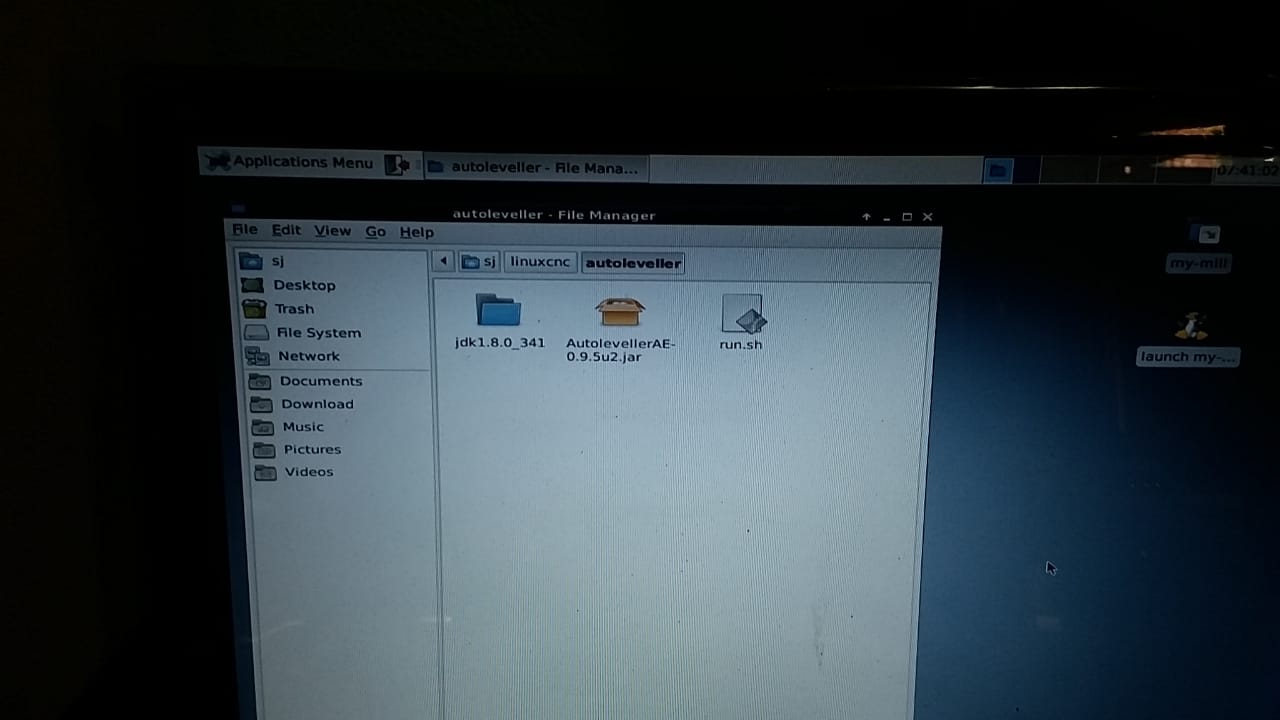
I tried to use the autoleveller and got the error report as attached.
I followed ds.lithographie steps and did followings:
1. copied compensation folder unzip under the same folder ini file is.
2. Offset added under Z axis and Halfile added in ini file.
3. postgui halfile modified (attached).
4. custompanel.xml changed (attached). I am doubtful If I made any thing wrong.
5. downloaded autoleveller jar and placed as per attached photo.
6. downloaded jdk 8 u341 from oracle www.oracle.com/java/technologies/downloads/#license-lightbox .
My system is 32 bit. Not sure there is any mistake.
tar used and extracted folder pasted in autoleveller folder as per attached photo.
7. created run.sh (attached as test file) and moved to bin folder. Not sure if I typed the address right in the run.sh file, big doubt.
8. error report attached. it says "No module named scipy.interpolate". If any such module needed, please mention the source and how/where to paste/install it.
Thanks in advance for any help.
I tried to use the autoleveller and got the error report as attached.
I followed ds.lithographie steps and did followings:
1. copied compensation folder unzip under the same folder ini file is.
2. Offset added under Z axis and Halfile added in ini file.
3. postgui halfile modified (attached).
4. custompanel.xml changed (attached). I am doubtful If I made any thing wrong.
5. downloaded autoleveller jar and placed as per attached photo.
6. downloaded jdk 8 u341 from oracle www.oracle.com/java/technologies/downloads/#license-lightbox .
My system is 32 bit. Not sure there is any mistake.
tar used and extracted folder pasted in autoleveller folder as per attached photo.
7. created run.sh (attached as test file) and moved to bin folder. Not sure if I typed the address right in the run.sh file, big doubt.
8. error report attached. it says "No module named scipy.interpolate". If any such module needed, please mention the source and how/where to paste/install it.
Thanks in advance for any help.
Please Log in or Create an account to join the conversation.
Time to create page: 0.291 seconds