mesa 7i96 connection refused

More
5 years 6 months ago #206404 by Aaron3309
Pardon my ignorance but i dont know what that means, what do i need to do to fix my issue?

Please Log in or Create an account to join the conversation.

More
5 years 6 months ago - 5 years 6 months ago #206406 by PCW
Replied by PCW on topic mesa 7i96 connection refused
Adding this to your interfaces file should fix it:

auto enp3s0
iface enp3s0 inet static
address 10.10.10.100/24

Then set the interface up with

sudo ifup -a

Then verify that it worked by running

ip a
Last edit: 5 years 6 months ago by PCW.

Please Log in or Create an account to join the conversation.
More
5 years 6 months ago #206411 by Aaron3309
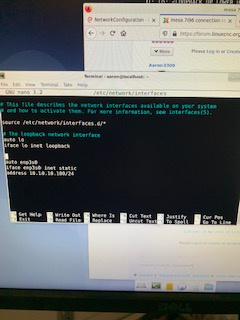
Did i put it in the right place? (attachment) i did the sudo ifup -a and nothing took, did sudo if up enp3s0 and it said network already up, tried down them back up and still nothing took.

If i type ip a with the mesa card powerd up i get

2: enp3s0: <BROADCAST,MULTICAST,UP,LOWER_UP> mtu 1500 qdisc pfifo_fast state UP group default qlen 1000
link/ether f0:4d:a2:fe:86:3e brd ff:ff:ff:ff:ff:ff
inet 10.10.10.10/8 brd 10.255.255.255 scope global enp3s0
valid_lft forever preferred_lft forever
inet6 fe80::f24d:a2ff:fefe:863e/64 scope link
valid_lft forever preferred_lft forever

If i do it with the mesa card off i get

2: enp3s0: <BROADCAST,MULTICAST,UP,LOWER_UP> mtu 1500 qdisc pfifo_fast state UP group default qlen 1000
link/ether f0:4d:a2:fe:86:3e brd ff:ff:ff:ff:ff:ff
inet6 fe80::f24d:a2ff:fefe:863e/64 scope link
valid_lft forever preferred_lft forever

Please Log in or Create an account to join the conversation.

More
5 years 6 months ago - 5 years 6 months ago #206417 by PCW
Replied by PCW on topic mesa 7i96 connection refused
Could you please copy/paste you interfaces file here

If the interfaces file does not take, it usually because there is a error/typo in the file
Last edit: 5 years 6 months ago by PCW.

Please Log in or Create an account to join the conversation.

More
5 years 6 months ago #206420 by Aaron3309
# This file describes the network interfaces available on your system
# and how to activate them. For more information, see interfaces(5).

source /etc/network/interfaces.d/*

# The loopback network interface
auto lo
iface lo inet loopback


auto enp3s0
iface enp3s0 inet static
address 10.10.10.100/24

Please Log in or Create an account to join the conversation.

More
5 years 6 months ago - 5 years 6 months ago #206426 by PCW
Replied by PCW on topic mesa 7i96 connection refused
Are you editing the correct file?

The file would be

/etc/network/interfaces

and you need to use sudo when launching the editor

sudo gedit /etc/network/interfaces

(substitute your own text editor for gedit if you dont have gedit)

You can also check for syntax errors in the interface file with:

sudo ifup --no-act enp3s0
Last edit: 5 years 6 months ago by PCW.

Please Log in or Create an account to join the conversation.

Time to create page: 0.364 seconds
Powered by Kunena Forum
