
- Posts: 1682
- Thank you received: 784
Trajectory Planner using Ruckig Lib
- Lcvette
- Offline
- Platinum Member
-

Less
More
2 years 5 months ago #301589
by Lcvette
Replied by Lcvette on topic Trajectory Planner using Ruckig Lib
Back when i was testing things i tried using different p and q values but it never removed all of the shake and in many cases very little difference. is your post processor for fusion 360? if so i will gladly test it and video the result. I do like the fact that a post processor has a little more finesse in selecting the PQ values based on stock to leave and the machining operation!
Please Log in or Create an account to join the conversation.
- hmnijp
- Offline
- Senior Member
-

Less
More
- Posts: 42
- Thank you received: 49
2 years 5 months ago #301594
by hmnijp
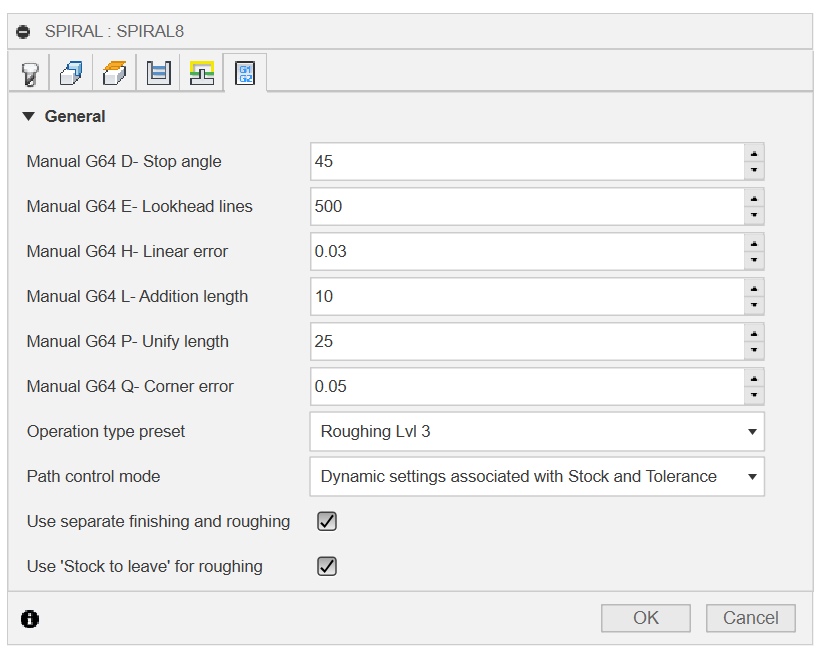
Modern postprocessors have added the initializeSmoothing function, which uses many parameters and the properties-scopes block. Give me a little time to understand it and remember the nuances, and I will try to transfer everything to the linuxcnc post-processor, in its original form it requires some corrections.
Replied by hmnijp on topic Trajectory Planner using Ruckig Lib
yes, fusion 360, but actually on the work machine I use UCCNC. it has exactly the same planner algorithm as linuxcnc (but the developer also plans to switch to S-curves with nurbs interpolation - uccnc CV toolpath smoothing ), differing only in the names of the G64 parameters and their number. I wrote a post processor for this CNC with many fixes quite a long time ago.
Modern postprocessors have added the initializeSmoothing function, which uses many parameters and the properties-scopes block. Give me a little time to understand it and remember the nuances, and I will try to transfer everything to the linuxcnc post-processor, in its original form it requires some corrections.
The following user(s) said Thank You: akb1212, tivoi, Lcvette
Please Log in or Create an account to join the conversation.
- Lcvette
- Offline
- Platinum Member
-
Less
More
- Posts: 1682
- Thank you received: 784
2 years 5 months ago #301603
by Lcvette
Replied by Lcvette on topic Trajectory Planner using Ruckig Lib
Excellent! That would be greatly appreciated @hmnijp
@grotius, I don't want this to hijack your thread in anyway, so let me know if this testing is helpful or if it is noise in your working thread and I will gladly move it elsewhere if so desired. ( I suspect it may be helpful, especially establishing baselines and real world testing on machines with speeds higher than stepper motor machine with ballscrews. my machine is not crazy fast but it is faster than most stepper dovetail conversions and has some mass too it ~6klbs with xy rapids of 708ipm and cuting feed rates maxxing out around 200ipm.
I am camming up a test part that doesn't waste too much stock material for each testing and would be happy to take input for features that would be good to test. I would gladly run the test using different trajectory planners, post processors, settings etc and film it. just let me know!
Chris
@grotius, I don't want this to hijack your thread in anyway, so let me know if this testing is helpful or if it is noise in your working thread and I will gladly move it elsewhere if so desired. ( I suspect it may be helpful, especially establishing baselines and real world testing on machines with speeds higher than stepper motor machine with ballscrews. my machine is not crazy fast but it is faster than most stepper dovetail conversions and has some mass too it ~6klbs with xy rapids of 708ipm and cuting feed rates maxxing out around 200ipm.
I am camming up a test part that doesn't waste too much stock material for each testing and would be happy to take input for features that would be good to test. I would gladly run the test using different trajectory planners, post processors, settings etc and film it. just let me know!
Chris
The following user(s) said Thank You: Grotius
Please Log in or Create an account to join the conversation.
- andrew2085
- Offline
- Junior Member
-

Less
More
- Posts: 28
- Thank you received: 42
2 years 5 months ago #301642
by andrew2085
Replied by andrew2085 on topic Trajectory Planner using Ruckig Lib
That library only implements line-to-line bi-clothoids from the paper. They only have a starting and ending angle because the curvature on the ends is zero to match a line's curvature. You also need the line-to-arc and arc-to-arc variations. Those are more complex to solve because there are more constraints. The clothoid needs to match the angle as well as the curvature of the arc at the point it joins.
You wouldn't fit the clothoid iteratively over the arc like that though, you use them to blend the joint's between lines to arcs, and arcs to arcs. The arc is already curvature continuous over itself, so there's no need to mess with it beyond whats needed for blending.
The s-curve solver I've been working on is almost done. Right now it averages 5700ns per solution on my PC. I'm not sure how that compares with other methods. I've mostly been spending time fixing corner cases where the precision is lower by having it solve billions of randomly generated problems until it detects something go wrong, then investigate and fix. The paper I was reading also didn't actually address the case where it isn't possible to reach the requested final velocity given the path length and initial velocity, so I had to figure that part out, but its working now.
I don't know how you're actually solving the s-curves now. But I imagine you must be projecting the 3d path and constraints down to one dimension and then solving right?
You wouldn't fit the clothoid iteratively over the arc like that though, you use them to blend the joint's between lines to arcs, and arcs to arcs. The arc is already curvature continuous over itself, so there's no need to mess with it beyond whats needed for blending.
The s-curve solver I've been working on is almost done. Right now it averages 5700ns per solution on my PC. I'm not sure how that compares with other methods. I've mostly been spending time fixing corner cases where the precision is lower by having it solve billions of randomly generated problems until it detects something go wrong, then investigate and fix. The paper I was reading also didn't actually address the case where it isn't possible to reach the requested final velocity given the path length and initial velocity, so I had to figure that part out, but its working now.
I don't know how you're actually solving the s-curves now. But I imagine you must be projecting the 3d path and constraints down to one dimension and then solving right?
The following user(s) said Thank You: Grotius
Please Log in or Create an account to join the conversation.
- Grotius
- Offline
- Platinum Member
-
Less
More
- Posts: 2419
- Thank you received: 2349
2 years 5 months ago #301650
by Grotius
Replied by Grotius on topic Trajectory Planner using Ruckig Lib
@hmnijp,
Thank you for excellent contribution.
The zigzag example is a great example how to solve smooth path planning.
I think i know one exception for this example.
I like the picture where you have all the G64 [x][value] characters available for input.
If we just could choose a pluggable path solver in the linuxcnc gui, and it shows the result before program is running.
Offline optimalisation and preview, this would be perfect isnt it?
@Lcvette,
I don't want this to hijack your thread in anyway,
It's ok for me. No problem.
I would gladly run the test using different trajectory planners, post processors, settings etc and film it. just let me know!
That's nice to hear!
Yesterday i tested once again on the production machine. This time i was using the ngc file from robh.
It was a test, just to see how the planner worked on real machine using this tiny line segments.
When i enabled velocity end for next gcode line, when upcoming angle < 5 degrees. It was running a
velocity curve over the tiny lines without lowering speeds every tiny segment.
The machine gave no following error.
@Andrew,
That library only implements line-to-line bi-clothoids from the paper. They only have a starting and ending angle because the curvature on the ends is zero to match a line's curvature. You also need the line-to-arc and arc-to-arc variations. Those are more complex to solve because there are more constraints. The clothoid needs to match the angle as well as the curvature of the arc at the point it joins.
Indeed i have not seen clothoid's doing a line-arc G2 solving. a 3D clothoid would be nice. In science papers they
are talking about this 3d clothoid. But i have not looked further into it.
The paper I was reading also didn't actually address the case where it isn't possible to reach the requested final velocity given the path length and initial velocity, so I had to figure that part out, but its working now.
This is common indeed. In my algo it outputs a lower ve, if ve can not be reached. The path lenght is crucial.
I don't know how you're actually solving the s-curves now.
The scurve planner is only solving one input motion at a time. So a gcode line or arc is one motion.
It takes the path_begin, path_end, vo, ve, vm, jerk, as inputs and calculates the scurve.
If you are halfway the motion and give a new path_end position, this is no problem for the algo.
The cycletime is also a input parameter for the algo. But this can give problems, because it's a divider.
So when you have a strange cycletime 0.022 and a pathlenght of 100mm. It happens that you can simply not reach
endpoint. The algo endpoint can be 99.999987 or 100.000225 for example. To solve that problem in the
downcurve i use a extra divider that solves the difference i mention above over the downcurve cycles. It's like cheating,
but it works perfect.
But I imagine you must be projecting the 3d path and constraints down to one dimension and then solving right?
Yes, 1 dimension. Just an array of line lenghts to solve. And you got info about vo,ve,vm,acs,ace for each line.
I count them up.
line_0 lenght = 100mm
line_0 start = 0
line_0 end = 100
line_1 lenght = 150
line_0 start = 100
line_0 end = 250
and so on.
Thank you for excellent contribution.
The zigzag example is a great example how to solve smooth path planning.
I think i know one exception for this example.
I like the picture where you have all the G64 [x][value] characters available for input.
If we just could choose a pluggable path solver in the linuxcnc gui, and it shows the result before program is running.
Offline optimalisation and preview, this would be perfect isnt it?
@Lcvette,
I don't want this to hijack your thread in anyway,
It's ok for me. No problem.
I would gladly run the test using different trajectory planners, post processors, settings etc and film it. just let me know!
That's nice to hear!
Yesterday i tested once again on the production machine. This time i was using the ngc file from robh.
It was a test, just to see how the planner worked on real machine using this tiny line segments.
When i enabled velocity end for next gcode line, when upcoming angle < 5 degrees. It was running a
velocity curve over the tiny lines without lowering speeds every tiny segment.
The machine gave no following error.
@Andrew,
That library only implements line-to-line bi-clothoids from the paper. They only have a starting and ending angle because the curvature on the ends is zero to match a line's curvature. You also need the line-to-arc and arc-to-arc variations. Those are more complex to solve because there are more constraints. The clothoid needs to match the angle as well as the curvature of the arc at the point it joins.
Indeed i have not seen clothoid's doing a line-arc G2 solving. a 3D clothoid would be nice. In science papers they
are talking about this 3d clothoid. But i have not looked further into it.
The paper I was reading also didn't actually address the case where it isn't possible to reach the requested final velocity given the path length and initial velocity, so I had to figure that part out, but its working now.
This is common indeed. In my algo it outputs a lower ve, if ve can not be reached. The path lenght is crucial.
I don't know how you're actually solving the s-curves now.
The scurve planner is only solving one input motion at a time. So a gcode line or arc is one motion.
It takes the path_begin, path_end, vo, ve, vm, jerk, as inputs and calculates the scurve.
If you are halfway the motion and give a new path_end position, this is no problem for the algo.
The cycletime is also a input parameter for the algo. But this can give problems, because it's a divider.
So when you have a strange cycletime 0.022 and a pathlenght of 100mm. It happens that you can simply not reach
endpoint. The algo endpoint can be 99.999987 or 100.000225 for example. To solve that problem in the
downcurve i use a extra divider that solves the difference i mention above over the downcurve cycles. It's like cheating,
but it works perfect.
But I imagine you must be projecting the 3d path and constraints down to one dimension and then solving right?
Yes, 1 dimension. Just an array of line lenghts to solve. And you got info about vo,ve,vm,acs,ace for each line.
I count them up.
line_0 lenght = 100mm
line_0 start = 0
line_0 end = 100
line_1 lenght = 150
line_0 start = 100
line_0 end = 250
and so on.
Please Log in or Create an account to join the conversation.
- Grotius
- Offline
- Platinum Member
-
Less
More
- Posts: 2419
- Thank you received: 2349
2 years 5 months ago #301657
by Grotius
Replied by Grotius on topic Trajectory Planner using Ruckig Lib
@mr Morley,
The g64 P tollerance is set by this function in the planner code :
int tpSetTermCond(TP_STRUCT * const tp, int cond, double tolerance){
tp->termCond = cond;
tp->tolerance = tolerance;
printf("tpSetTermCond, tollerance: %f \n",tp->tolerance);
return 0;
}
Then where should be the Q value to be found in the source? For G64 P0.1 Q1
Q is of type integer, turns on or off native cam.
@All,
I was thinking about the planner and the last contributions on this thread.
Today i want to do a test to load gcode and try to perform a heavy calculation that exceeds the planner's cycletime,
If we can make this work, we can perform the whole path optimalisation at once. I think we create a thread for this that
run's seperate from the planners cycle. Otherwise a signal 11 will occur, followed by a memory dump.
Then i think we have to use a opencascade cad viewer to simply demonstrate path optimalisation in the lcnc gui.
This then can be done offline, before program starts.
In this way, user just can select a optimalisation strategy. For me it's now difficult to see blending result at forehand
without opencascade.
The g64 P tollerance is set by this function in the planner code :
int tpSetTermCond(TP_STRUCT * const tp, int cond, double tolerance){
tp->termCond = cond;
tp->tolerance = tolerance;
printf("tpSetTermCond, tollerance: %f \n",tp->tolerance);
return 0;
}
Then where should be the Q value to be found in the source? For G64 P0.1 Q1
Q is of type integer, turns on or off native cam.
@All,
I was thinking about the planner and the last contributions on this thread.
Today i want to do a test to load gcode and try to perform a heavy calculation that exceeds the planner's cycletime,
If we can make this work, we can perform the whole path optimalisation at once. I think we create a thread for this that
run's seperate from the planners cycle. Otherwise a signal 11 will occur, followed by a memory dump.
Then i think we have to use a opencascade cad viewer to simply demonstrate path optimalisation in the lcnc gui.
This then can be done offline, before program starts.
In this way, user just can select a optimalisation strategy. For me it's now difficult to see blending result at forehand
without opencascade.
Please Log in or Create an account to join the conversation.
Time to create page: 3.342 seconds