
- Posts: 2419
- Thank you received: 2349
Trajectory Planner using Ruckig Lib
- Grotius
- Offline
- Platinum Member
-

Less
More
2 years 5 months ago #301670
by Grotius
Replied by Grotius on topic Trajectory Planner using Ruckig Lib
To enable extensive computations in the planner added
seperate thread creation
And when all gcode is loaded we request exstensive calculation by calling start calculation thread
This then is the framework to create a path optimalisation without staying within the planner cycletime.
Now next thing to test is running the c++ linuxcnc axis gui wich has the gremlin opencascade viewer under the hood.
Here we can show the original gcode path, and the updated gcode path, this then can be done offline, or online.
And when all gcode is loaded we request exstensive calculation by calling start calculation thread
This then is the framework to create a path optimalisation without staying within the planner cycletime.
Now next thing to test is running the c++ linuxcnc axis gui wich has the gremlin opencascade viewer under the hood.
Here we can show the original gcode path, and the updated gcode path, this then can be done offline, or online.
The following user(s) said Thank You: John313
Please Log in or Create an account to join the conversation.
- andrew2085
- Offline
- Junior Member
-

Less
More
- Posts: 28
- Thank you received: 42
2 years 5 months ago #301685
by andrew2085
Replied by andrew2085 on topic Trajectory Planner using Ruckig Lib
This seems like the right way to do it. I don't know much about the LinuxCNC internals, but I think the blending and s-curve planning should all be happening non-real-time. Once the plan has been updated it can be passed to the real-time thread where its job is to just follow the plan. The number of segments in the plan should be large enough so that during normal operation the real-time thread doesn't run out of segments to follow before the plan is updated by the non-real-time thread. I think the last segment of the plan should always end in zero velocity in case the real-time thread does actually reach it. I think that would have to happen anyway if for example in the g-code you have an if statement or a loop. You can't plan beyond that because the conditions should be evaluated once the machine has actually reached that point.
I put the s-curve stuff I've been working on here: github.com/a-downing/scurvy . I didn't realize you were working off the same paper as I was. For some reason I though you were solving it iteratively.
I might look at that bi-clothoid blending paper.
I put the s-curve stuff I've been working on here: github.com/a-downing/scurvy . I didn't realize you were working off the same paper as I was. For some reason I though you were solving it iteratively.
I might look at that bi-clothoid blending paper.
The following user(s) said Thank You: Grotius
Please Log in or Create an account to join the conversation.
- hmnijp
- Offline
- Senior Member
-

Less
More
- Posts: 42
- Thank you received: 49
2 years 5 months ago #301686
by hmnijp
There have been proposals to move path calculations to non-realtime, and it seems to be working successfully there.
forum.linuxcnc.org/38-general-linuxcnc-q...on-real-time?start=0
OpenCN also does trajectory optimization (feedopt) in non-realtime.
Also, inverse kinematic transformations for 5axis with RTCP require a lot of calculations. There were many opinions that this also requires moving path planning to non-realtime and doing sequential execution from a buffer. This may have to be done in the future...
There is one more thing that you may need to consider - 3D processing programs are often very large. sometimes it’s 100-200MB of code. In the current implementation, the interpreter loads the entire list, taking up a lot of RAM.
G64 is not standardized. Each CNC has its own parameters for setting up its planner version (Siemens cycle 832, fanuc g05.1, etc.), moreover, they changed and added new parameters in each new version. A common method is when many settings are made in the GUI(ini), and while g-code is running, presets for roughing or finishing operations (roughing lvl) are switched.
If your code requires changes and new variables to configure the path, I don’t think this will be a big problem, because the algorithms may become different.
The only relatively common parameter is tolerance.
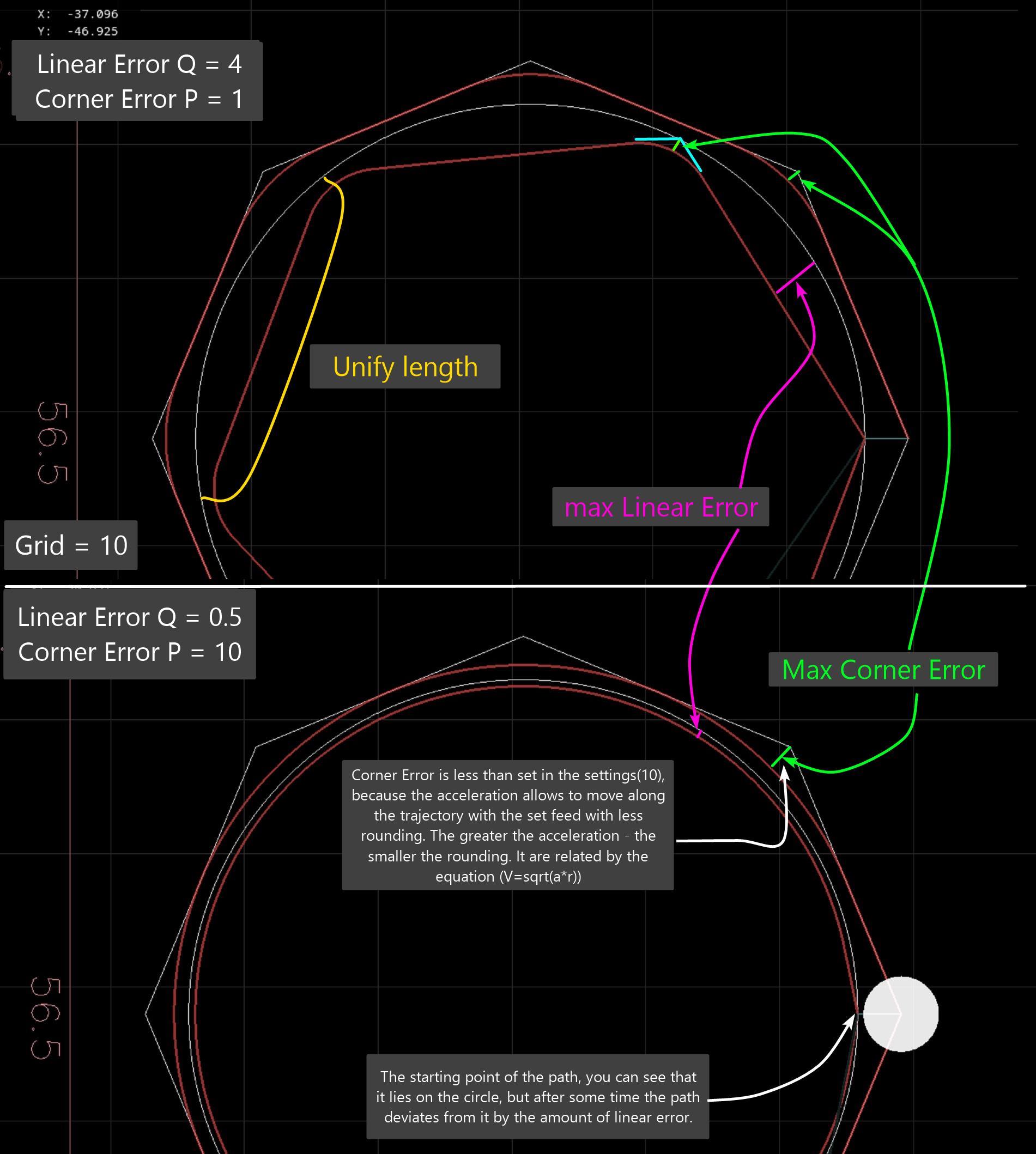
The current planner has two different tolerances - Q for deviation of the naive cam from straight sections, and P for deviation from corners.. This is not entirely obvious to users. Two parameters are needed only for the old planner algorithm...
a picture showing how using different combinations of P and Q naive cam can make a circle from a polygon, and a polygon from a circle in the code. Naive cam first divides the circle into straight lines with deviation Q, then they are rounded with deviation P from the corners.
Replied by hmnijp on topic Trajectory Planner using Ruckig Lib
Check out the discussions in this thread.
The g64 P tollerance is set by this function in the planner code :
int tpSetTermCond(TP_STRUCT * const tp, int cond, double tolerance){
tp->termCond = cond;
tp->tolerance = tolerance;
printf("tpSetTermCond, tollerance: %f \n",tp->tolerance);
return 0;
}
Then where should be the Q value to be found in the source? For G64 P0.1 Q1
Q is of type integer, turns on or off native cam.
@All,
I was thinking about the planner and the last contributions on this thread.
Today i want to do a test to load gcode and try to perform a heavy calculation that exceeds the planner's cycletime,
If we can make this work, we can perform the whole path optimalisation at once. I think we create a thread for this that
run's seperate from the planners cycle. Otherwise a signal 11 will occur, followed by a memory dump.
Then i think we have to use a opencascade cad viewer to simply demonstrate path optimalisation in the lcnc gui.
This then can be done offline, before program starts.
In this way, user just can select a optimalisation strategy. For me it's now difficult to see blending result at forehand
without opencascade.
There have been proposals to move path calculations to non-realtime, and it seems to be working successfully there.
forum.linuxcnc.org/38-general-linuxcnc-q...on-real-time?start=0
OpenCN also does trajectory optimization (feedopt) in non-realtime.
Also, inverse kinematic transformations for 5axis with RTCP require a lot of calculations. There were many opinions that this also requires moving path planning to non-realtime and doing sequential execution from a buffer. This may have to be done in the future...
There is one more thing that you may need to consider - 3D processing programs are often very large. sometimes it’s 100-200MB of code. In the current implementation, the interpreter loads the entire list, taking up a lot of RAM.
G64 is not standardized. Each CNC has its own parameters for setting up its planner version (Siemens cycle 832, fanuc g05.1, etc.), moreover, they changed and added new parameters in each new version. A common method is when many settings are made in the GUI(ini), and while g-code is running, presets for roughing or finishing operations (roughing lvl) are switched.
If your code requires changes and new variables to configure the path, I don’t think this will be a big problem, because the algorithms may become different.
The only relatively common parameter is tolerance.
The current planner has two different tolerances - Q for deviation of the naive cam from straight sections, and P for deviation from corners.. This is not entirely obvious to users. Two parameters are needed only for the old planner algorithm...
a picture showing how using different combinations of P and Q naive cam can make a circle from a polygon, and a polygon from a circle in the code. Naive cam first divides the circle into straight lines with deviation Q, then they are rounded with deviation P from the corners.
The following user(s) said Thank You: tommylight, Grotius
Please Log in or Create an account to join the conversation.
- Grotius
- Offline
- Platinum Member
-
Less
More
- Posts: 2419
- Thank you received: 2349
2 years 5 months ago #301691
by Grotius
Replied by Grotius on topic Trajectory Planner using Ruckig Lib
@hmnijp,
, the interpreter loads the entire list, taking up a lot of RAM.
For the gcode preview it loads the entire list.
In the planner the interpreter sends a bulk of lines that are in between G0 moves. This consumes little memory.
Sometimes i see about 100 lines in the buffer, but there are also times there are 10 lines buffered.
I will make a hal_u32_t pin for it to count the extrema of the used buffer size and report later.
G64 is not standardized.
I don't know if actually multiple G64 commands are valid in the gcode. Never did that.
In the lcnc interpreter, so far i know there is only the P word to pass a value. The example you provided using
multipe chars would be nice to have in lcnc. I have modified the sai (stand alone interpreter) to retrieve more information
about the loaded gcode. But this in the sence of current plane, positions etc.
I never used anything from naive cam. So i have no experience using that.
@Andrew,
This seems like the right way to do it. I don't know much about the LinuxCNC internals, but I think the blending and s-curve planning should all be happening non-real-time.
There are a few things to mention. If you change the vm at runtime, you can't go non-realtime planning the scurve.
Blending current and upcoming segments, can done in realtime, blending more, use non-realtime.
Once the plan has been updated it can be passed to the real-time thread where its job is to just follow the plan.
This is correct.
The number of segments in the plan should be large enough so that during normal operation the real-time thread doesn't run out of segments to follow before the plan is updated by the non-real-time thread.
There is a period when the interpreter dumps new lines. This period is during a G0. During this period the non realtime
thread can do the path planning. For huge g1 content, this may take time. But machine may start moving the first segment. As
usually the first new G0 may stay as it is.
Another method is to request a interpreter gcode dump, right after the first dump is optimized and running.
I think the last segment of the plan should always end in zero velocity in case the real-time thread does actually reach it. I think that would have to happen anyway if for example in the g-code you have an if statement or a loop. You can't plan beyond that because the conditions should be evaluated once the machine has actually reached that point.
Yes.
For some reason I though you were solving it iteratively.
I have made more scurve libs in the past. The first one's where using sampling.
I might look at that bi-clothoid blending paper.
Ok, nice.
, the interpreter loads the entire list, taking up a lot of RAM.
For the gcode preview it loads the entire list.
In the planner the interpreter sends a bulk of lines that are in between G0 moves. This consumes little memory.
Sometimes i see about 100 lines in the buffer, but there are also times there are 10 lines buffered.
I will make a hal_u32_t pin for it to count the extrema of the used buffer size and report later.
G64 is not standardized.
I don't know if actually multiple G64 commands are valid in the gcode. Never did that.
In the lcnc interpreter, so far i know there is only the P word to pass a value. The example you provided using
multipe chars would be nice to have in lcnc. I have modified the sai (stand alone interpreter) to retrieve more information
about the loaded gcode. But this in the sence of current plane, positions etc.
I never used anything from naive cam. So i have no experience using that.
@Andrew,
This seems like the right way to do it. I don't know much about the LinuxCNC internals, but I think the blending and s-curve planning should all be happening non-real-time.
There are a few things to mention. If you change the vm at runtime, you can't go non-realtime planning the scurve.
Blending current and upcoming segments, can done in realtime, blending more, use non-realtime.
Once the plan has been updated it can be passed to the real-time thread where its job is to just follow the plan.
This is correct.
The number of segments in the plan should be large enough so that during normal operation the real-time thread doesn't run out of segments to follow before the plan is updated by the non-real-time thread.
There is a period when the interpreter dumps new lines. This period is during a G0. During this period the non realtime
thread can do the path planning. For huge g1 content, this may take time. But machine may start moving the first segment. As
usually the first new G0 may stay as it is.
Another method is to request a interpreter gcode dump, right after the first dump is optimized and running.
I think the last segment of the plan should always end in zero velocity in case the real-time thread does actually reach it. I think that would have to happen anyway if for example in the g-code you have an if statement or a loop. You can't plan beyond that because the conditions should be evaluated once the machine has actually reached that point.
Yes.
For some reason I though you were solving it iteratively.
I have made more scurve libs in the past. The first one's where using sampling.
I might look at that bi-clothoid blending paper.
Ok, nice.
Please Log in or Create an account to join the conversation.
- Grotius
- Offline
- Platinum Member
-
Less
More
- Posts: 2419
- Thank you received: 2349
2 years 5 months ago #301695
by Grotius
Replied by Grotius on topic Trajectory Planner using Ruckig Lib
@Mr. Morley,
I have a question about starting a linux cnc gui.
This is my output :
user@debian10:~/linuxcnc/scripts$ linuxcnc
LINUXCNC - 2.10.0~pre0
Machine configuration directory is '/home/user/linuxcnc/configs/sim/axis'
Machine configuration file is 'qt_axis_mm.ini'
Starting LinuxCNC...
linuxcncsvr (488746) emcsvr: machine 'LinuxCNC-HAL-SIM-AXIS' version '1.1'
linuxcnc TPMOD=tpmod HOMEMOD=homemod EMCMOT=motmod
Note: Using POSIX realtime
milltask (488761) task: machine 'LinuxCNC-HAL-SIM-AXIS' version '1.1'
halui (488764) halui: machine 'LinuxCNC-HAL-SIM-AXIS' version '1.1'
Found file(lib): /home/user/linuxcnc/lib/hallib/core_sim.hal
Found file(lib): /home/user/linuxcnc/lib/hallib/sim_spindle_encoder.hal
Found file(lib): /home/user/linuxcnc/lib/hallib/axis_manualtoolchange.hal
Found file(lib): /home/user/linuxcnc/lib/hallib/simulated_home.hal
Found file(REL): ./cooling.hal
USRMOT: ERROR: command 30 timeout
This starts a qt c++ app from the ini file. However this gui only starts correclty, i mean you can jog, home etc.
if an axis gui is already running.
Did i miss something related to USRMOT?
I have a question about starting a linux cnc gui.
This is my output :
user@debian10:~/linuxcnc/scripts$ linuxcnc
LINUXCNC - 2.10.0~pre0
Machine configuration directory is '/home/user/linuxcnc/configs/sim/axis'
Machine configuration file is 'qt_axis_mm.ini'
Starting LinuxCNC...
linuxcncsvr (488746) emcsvr: machine 'LinuxCNC-HAL-SIM-AXIS' version '1.1'
linuxcnc TPMOD=tpmod HOMEMOD=homemod EMCMOT=motmod
Note: Using POSIX realtime
milltask (488761) task: machine 'LinuxCNC-HAL-SIM-AXIS' version '1.1'
halui (488764) halui: machine 'LinuxCNC-HAL-SIM-AXIS' version '1.1'
Found file(lib): /home/user/linuxcnc/lib/hallib/core_sim.hal
Found file(lib): /home/user/linuxcnc/lib/hallib/sim_spindle_encoder.hal
Found file(lib): /home/user/linuxcnc/lib/hallib/axis_manualtoolchange.hal
Found file(lib): /home/user/linuxcnc/lib/hallib/simulated_home.hal
Found file(REL): ./cooling.hal
USRMOT: ERROR: command 30 timeout
This starts a qt c++ app from the ini file. However this gui only starts correclty, i mean you can jog, home etc.
if an axis gui is already running.
Did i miss something related to USRMOT?
Please Log in or Create an account to join the conversation.
- hmnijp
- Offline
- Senior Member
-
Less
More
- Posts: 42
- Thank you received: 49
2 years 5 months ago #301699
by hmnijp
The beginning of the program is roughing. At the end is finishing, and the G64 parameters change accordingly.
Replied by hmnijp on topic Trajectory Planner using Ruckig Lib
Yes, this is required.@hmnijp,
I don't know if actually multiple G64 commands are valid in the gcode. Never did that.
The beginning of the program is roughing. At the end is finishing, and the G64 parameters change accordingly.
The following user(s) said Thank You: Grotius
Please Log in or Create an account to join the conversation.
Time to create page: 0.789 seconds