
- Posts: 28
- Thank you received: 42
Trajectory Planner using Ruckig Lib
- andrew2085
- Offline
- Junior Member
-

Less
More
2 years 4 months ago - 2 years 4 months ago #302323
by andrew2085
Replied by andrew2085 on topic Trajectory Planner using Ruckig Lib
Isn't this the code for jogging? The s-curve solver I'm working on is for planning, where the final velocity and distance are known ahead of time and the seven segment time periods need to be solved. I don't think that would work for this. Currently, to get a solution, quadratic, cubic, and quartic polynomial roots need to be solved for. I'm pretty sure if an initial and final acceleration constraint were added it would turn into a problem with no closed-form solutions and need to be solved by some type of iterative algorithm which would be much slower and more complex.
The acceleration here is just linear acceleration. You can still use this even in the middle of a curve. The constraints you would need to set are the max jerk, max acceleration, and max velocity. The velocity on the curve would determine the centripetal acceleration and jerk, and the total jerk and acceleration would be those plus the linear acceleration and jerk where all of them are vectors.
The acceleration here is just linear acceleration. You can still use this even in the middle of a curve. The constraints you would need to set are the max jerk, max acceleration, and max velocity. The velocity on the curve would determine the centripetal acceleration and jerk, and the total jerk and acceleration would be those plus the linear acceleration and jerk where all of them are vectors.
Last edit: 2 years 4 months ago by andrew2085.
Please Log in or Create an account to join the conversation.
- Grotius
- Offline
- Platinum Member
-

Less
More
- Posts: 2419
- Thank you received: 2349
2 years 4 months ago #302328
by Grotius
Replied by Grotius on topic Trajectory Planner using Ruckig Lib
@Andrew,
Isn't this the code for jogging?
It's for both jogging & auto mode (planning).
There is a demo program written in qt that shows auto mode & jog mode.
I am curious to your solution.

Isn't this the code for jogging?
It's for both jogging & auto mode (planning).
There is a demo program written in qt that shows auto mode & jog mode.
I am curious to your solution.
Please Log in or Create an account to join the conversation.
- andrew2085
- Offline
- Junior Member
-
Less
More
- Posts: 28
- Thank you received: 42
2 years 4 months ago #302330
by andrew2085
Replied by andrew2085 on topic Trajectory Planner using Ruckig Lib
Yes, I'm also super curious how yours works in planning mode. If you give yours the same problem to solve, what does the graph look like compared to mine? The problem in my graph is 100 segments of:
// units of inches and seconds, so 100in/min etc
V = 100.0/60; // max velocity
A = 40.0/60; // max acceleration
D = 40.0/60; // max deceleration
J = 20.0/60; // max jerk
L = 1.0; // distance
The initial velocity of the first segment is constrained to 0, and the final velocity of the last segment is constrained to 0. Since there are one-hundred 1in segments, the total distance traveled should be 100in.
// units of inches and seconds, so 100in/min etc
V = 100.0/60; // max velocity
A = 40.0/60; // max acceleration
D = 40.0/60; // max deceleration
J = 20.0/60; // max jerk
L = 1.0; // distance
The initial velocity of the first segment is constrained to 0, and the final velocity of the last segment is constrained to 0. Since there are one-hundred 1in segments, the total distance traveled should be 100in.
Please Log in or Create an account to join the conversation.
- TheRoslyak
- Offline
- Elite Member
-

Less
More
- Posts: 238
- Thank you received: 37
2 years 4 months ago #302377
by TheRoslyak
Replied by TheRoslyak on topic Trajectory Planner using Ruckig Lib
hi Grotius.
Listen, I wanted to consult with you about the trajectory planner. As I understand, you chose a G-code-based planner for LinuxCNC. I have already figured out the Ruckig library and made a fully functional utility that works with an EtherCAT motor. Now, I want to find a convenient trajectory planner. I initially chose MoveIt2 because it is recommended on the Ruckig page. However, it seems to be overly complicated, and I've been trying to set it up with GPT chat for a day now. Additionally, ROS2 needs to be installed, and so on. In general, do you have any recommendations for a planner? There's also the option of Tesseract, but maybe there is something more convenient?
best regard
Listen, I wanted to consult with you about the trajectory planner. As I understand, you chose a G-code-based planner for LinuxCNC. I have already figured out the Ruckig library and made a fully functional utility that works with an EtherCAT motor. Now, I want to find a convenient trajectory planner. I initially chose MoveIt2 because it is recommended on the Ruckig page. However, it seems to be overly complicated, and I've been trying to set it up with GPT chat for a day now. Additionally, ROS2 needs to be installed, and so on. In general, do you have any recommendations for a planner? There's also the option of Tesseract, but maybe there is something more convenient?
best regard
The following user(s) said Thank You: Grotius
Please Log in or Create an account to join the conversation.
- Grotius
- Offline
- Platinum Member
-
Less
More
- Posts: 2419
- Thank you received: 2349
2 years 4 months ago #302382
by Grotius
Replied by Grotius on topic Trajectory Planner using Ruckig Lib
@Andrew,
When i find some time later on, will run your values and report back.
@TheRoslyak,
If you grab the ~/vendor/scurve dir, there are trajectory examples that can run in a qt demo app. For jogging & auto mode.
You could try these out. It only uses qt dependencies, so you can run it i think without any nasty problems.
If you failed to do it, just let me know.
To advise about planner, i don't know what you wanna do. Run a gcode or run just a motor from a to b?
I have the sai interpreter stand alone running to load gcode data. The sai is little modified to get more info.
This goes ok. Maybe you can use it too.
@All,
I started making a algo using a even distribution of waypoints. I thought yeahh good idea.
Then followed by an arc overlay.
Output was not ok for me. I have output picture on request.
In the end just adding fillets to corners, had the nicest output.
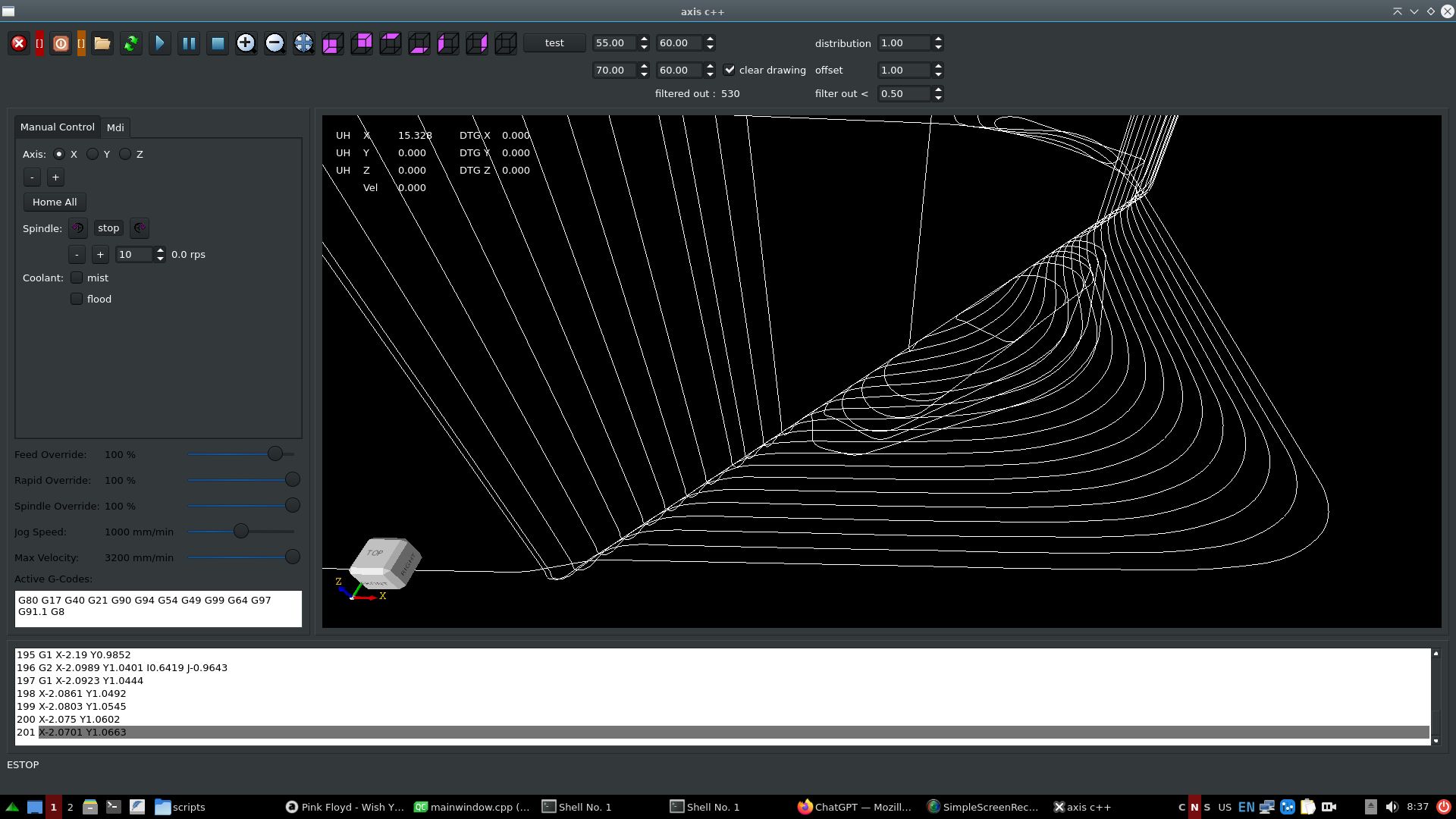
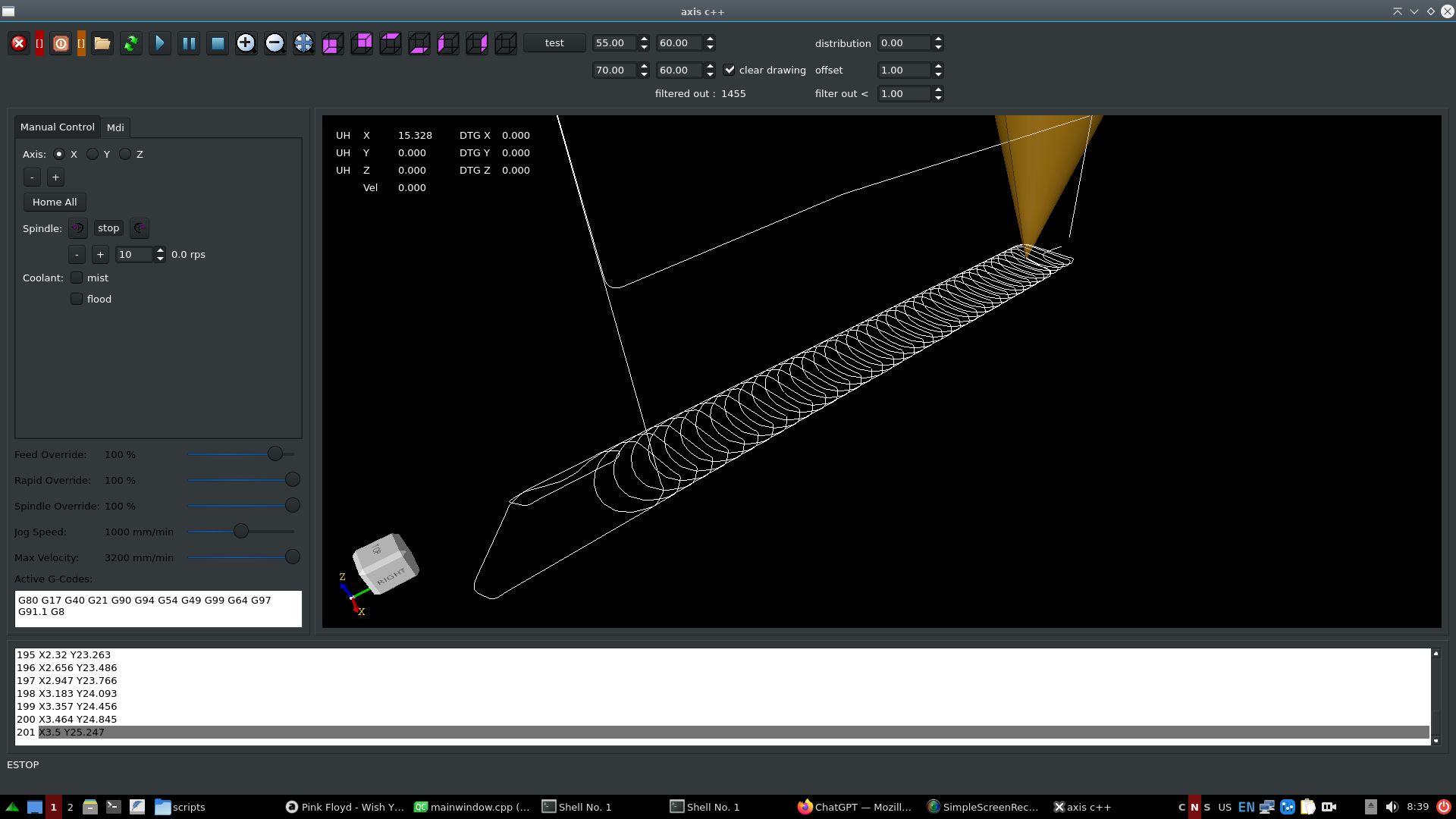
1. Coded the gcode to filter out tiny segments, given a filter value in mm. This is like a path compressor.
2. Then the path deviation is set by a offset value. This connects all gcode lines with tri-clothoids inbetween in 3d.
Gcode file from robh:
Filters out 530 lines. Transforms path into G2 continious.
Gcode file from lcevette:
Filters out 1455 lines. Transforms path into G2 continious.
I think this output is a nice result for today. Now what should be done better?
When i find some time later on, will run your values and report back.
@TheRoslyak,
If you grab the ~/vendor/scurve dir, there are trajectory examples that can run in a qt demo app. For jogging & auto mode.
You could try these out. It only uses qt dependencies, so you can run it i think without any nasty problems.
If you failed to do it, just let me know.
To advise about planner, i don't know what you wanna do. Run a gcode or run just a motor from a to b?
I have the sai interpreter stand alone running to load gcode data. The sai is little modified to get more info.
This goes ok. Maybe you can use it too.
@All,
I started making a algo using a even distribution of waypoints. I thought yeahh good idea.
Then followed by an arc overlay.
Output was not ok for me. I have output picture on request.
In the end just adding fillets to corners, had the nicest output.
1. Coded the gcode to filter out tiny segments, given a filter value in mm. This is like a path compressor.
2. Then the path deviation is set by a offset value. This connects all gcode lines with tri-clothoids inbetween in 3d.
Gcode file from robh:
Filters out 530 lines. Transforms path into G2 continious.
Gcode file from lcevette:
Filters out 1455 lines. Transforms path into G2 continious.
I think this output is a nice result for today. Now what should be done better?
The following user(s) said Thank You: pommen, Lcvette, hmnijp
Please Log in or Create an account to join the conversation.
- hmnijp
- Offline
- Senior Member
-

Less
More
- Posts: 42
- Thank you received: 49
2 years 4 months ago #302425
by hmnijp
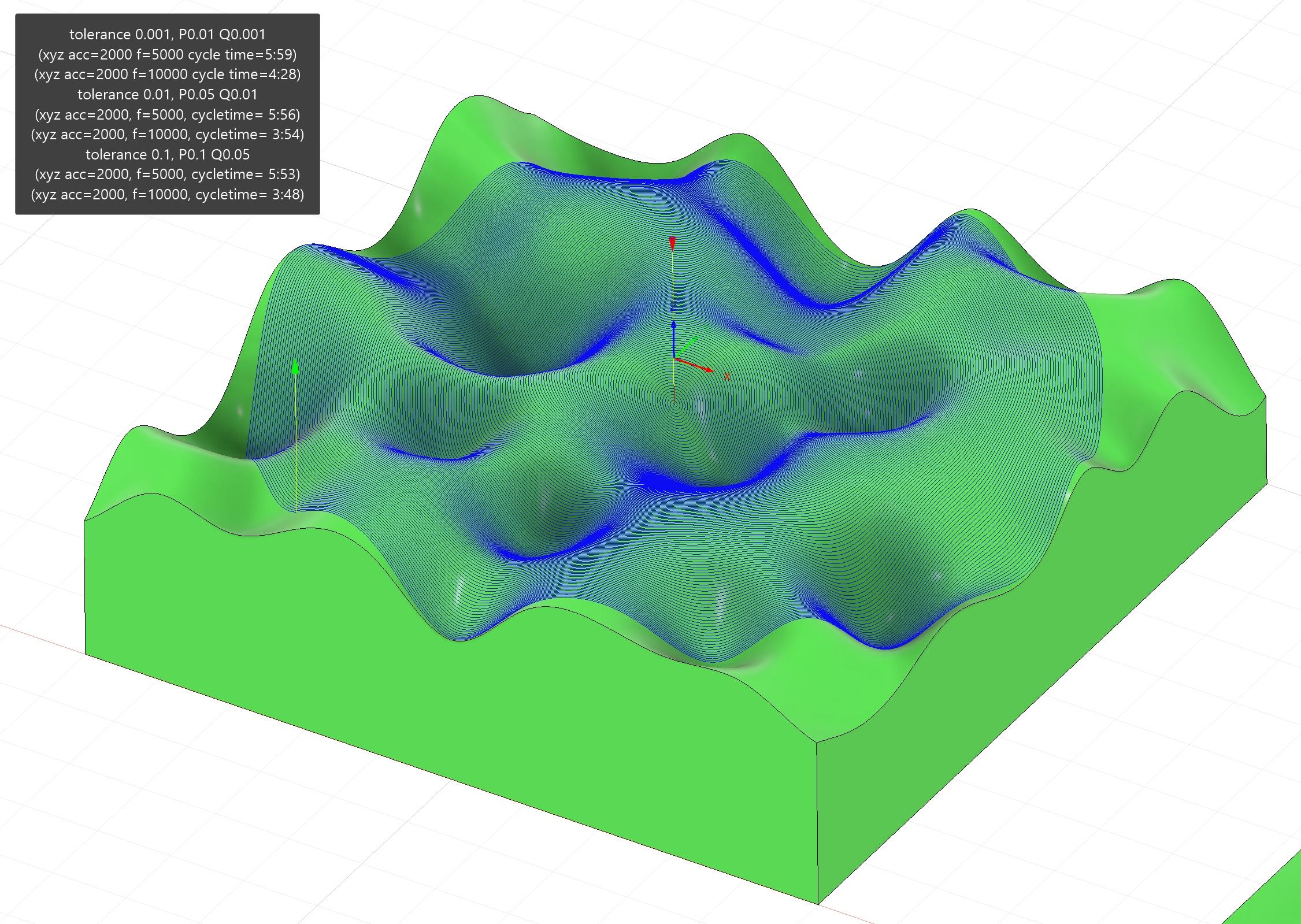
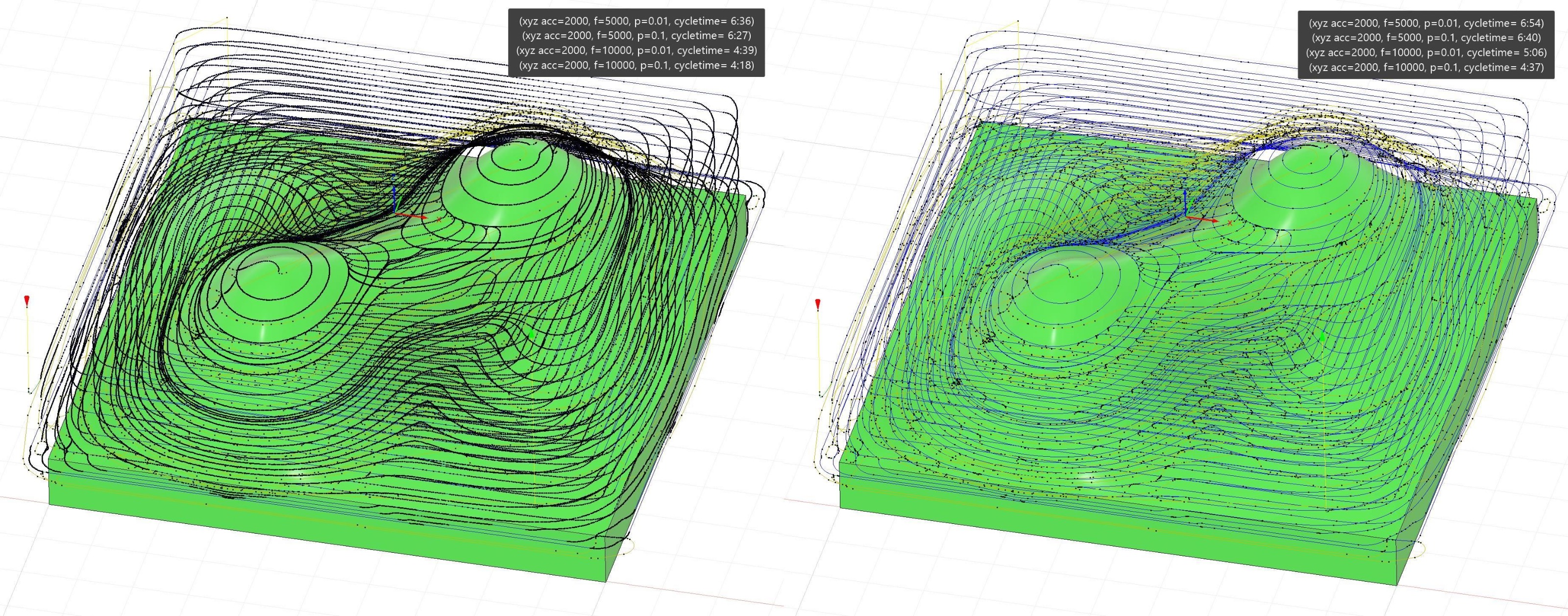
You can test 3D surface G-code with a large number of points. Its original surface is very smooth, without a sharp change in the direction of the tool path, which tells us that the speed graph should show a smooth speed without jumps, close to the maximum. Stops and speed changes create milling defects on the surface of the material due to shaking.
One important metric could be comparing code execution time with the old planner and other cnc - it is obvious that S-curves are slower on a trajectory with sharp corners, but on smooth surface in theory there should not be a very big difference. (as an example, a strong difference in execution time can be seen in the graphs in the message - these are the consequences of not compressing small segments into one overall curve with smooth acceleration - a separate S for each small segment increases the overall acceleration time.)
I can share a test G-code similar to the one used in real work, which I used to adjust the PQ parameters of the post processor. There are several types of operations(adaptive and surface finishing), and several variants of the same trajectory, but with a different number of points = using different parameters P. The execution time of the code at a fixed acceleration and speed is also written in the comments. (10k-200k lines, ±5min machinig time)
drive.google TP g-code tests
There is also a list of plans for the future:
2) We need to figure out how to solve the problem of mixing linear and rotary axes at the same time - this is a big problem with the current planner - it does not do smoothing when connecting any rotary axis, and this problem does not allow working with rotary axes at sufficient speed. A solution to this problem has been requested by all A/BC axle users for many years...
The question may arise: how to calculate the geometric accuracy of this path?
after all, smoothing with a certain tolerance may require inverse kinematic transformations. But I know that many take into account only XYZ axis tolerance, and separately speed-acceleration and angle tolerance limitations for each ABC axis. Maybe someone can give some ideas...
Another feature: when using rotary axes, inverse time feed G93 is usually used - which sets not the speed, but the execution time of each line of code = for synchronous movement of linear and angular axes. Without G93 it is impossible to control them simultaneously, because F1000 mm/min ≠ 1000degree/min.
Can calculating the average speed for each section complicate the compressor and planner algorithm?
g93-g94-g95
I also shared a couple of these files for tests.
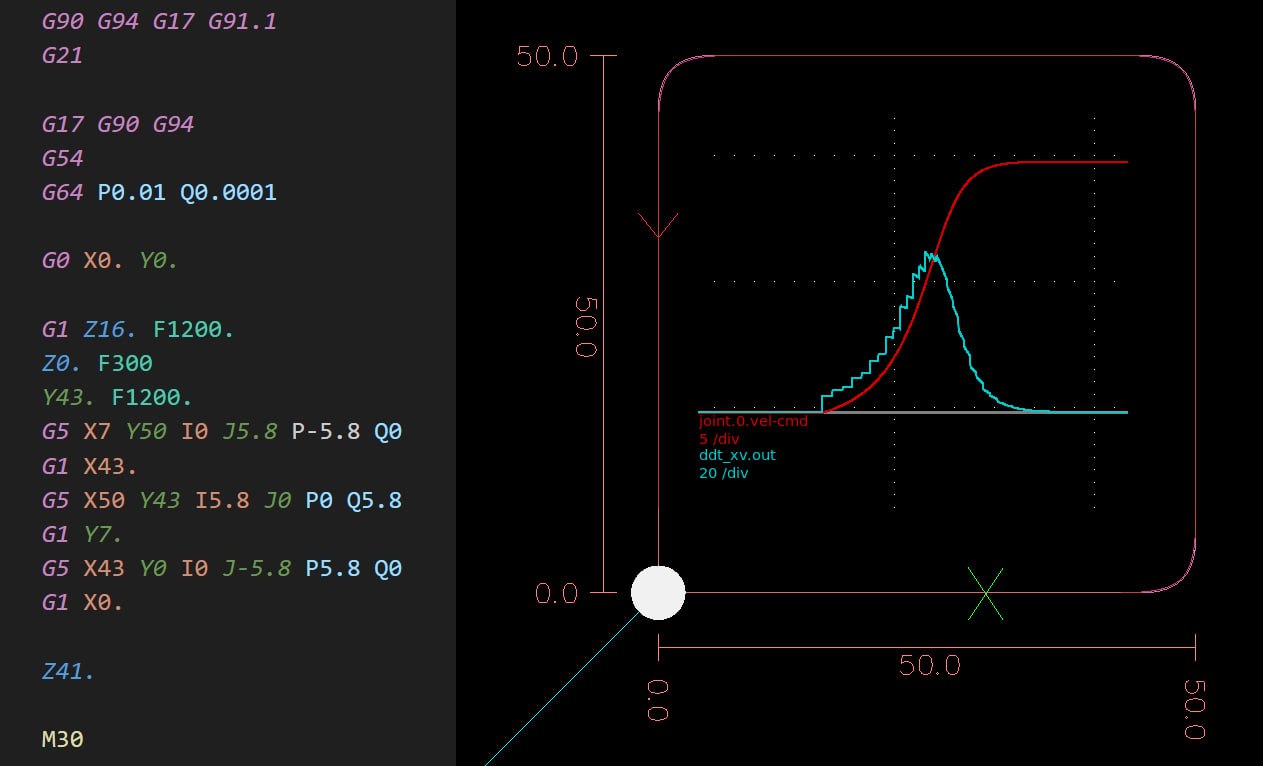
3) The linuxcnc interpreter has support for interpolation G5 Cubic Spline, G5.1 Quadratic Spline, G5.2 G5.3 NURBS Block - They are not so popular, and there are few CAMs that can generate such code (mastercam and siemensNX can do this, with the corresponding post-processors), I'm not sure if they have an advantage over a good polyline smoothing algorithm, but at least it allows you to use less code to describe the curve. so it would be nice to use them for backward compatibility, maybe someone will need it...
g5-g5.1 splines, g5.2-g5.3 nurbs
One day I experimented with them, and recorded the log of speed and acceleration using them - it's similar to S-curve)
Replied by hmnijp on topic Trajectory Planner using Ruckig Lib
Great job!@All,
I started making...
I think this output is a nice result for today. Now what should be done better?
You can test 3D surface G-code with a large number of points. Its original surface is very smooth, without a sharp change in the direction of the tool path, which tells us that the speed graph should show a smooth speed without jumps, close to the maximum. Stops and speed changes create milling defects on the surface of the material due to shaking.
One important metric could be comparing code execution time with the old planner and other cnc - it is obvious that S-curves are slower on a trajectory with sharp corners, but on smooth surface in theory there should not be a very big difference. (as an example, a strong difference in execution time can be seen in the graphs in the message - these are the consequences of not compressing small segments into one overall curve with smooth acceleration - a separate S for each small segment increases the overall acceleration time.)
I can share a test G-code similar to the one used in real work, which I used to adjust the PQ parameters of the post processor. There are several types of operations(adaptive and surface finishing), and several variants of the same trajectory, but with a different number of points = using different parameters P. The execution time of the code at a fixed acceleration and speed is also written in the comments. (10k-200k lines, ±5min machinig time)
drive.google TP g-code tests
There is also a list of plans for the future:
2) We need to figure out how to solve the problem of mixing linear and rotary axes at the same time - this is a big problem with the current planner - it does not do smoothing when connecting any rotary axis, and this problem does not allow working with rotary axes at sufficient speed. A solution to this problem has been requested by all A/BC axle users for many years...
The question may arise: how to calculate the geometric accuracy of this path?
after all, smoothing with a certain tolerance may require inverse kinematic transformations. But I know that many take into account only XYZ axis tolerance, and separately speed-acceleration and angle tolerance limitations for each ABC axis. Maybe someone can give some ideas...
Another feature: when using rotary axes, inverse time feed G93 is usually used - which sets not the speed, but the execution time of each line of code = for synchronous movement of linear and angular axes. Without G93 it is impossible to control them simultaneously, because F1000 mm/min ≠ 1000degree/min.
Can calculating the average speed for each section complicate the compressor and planner algorithm?
g93-g94-g95
I also shared a couple of these files for tests.
3) The linuxcnc interpreter has support for interpolation G5 Cubic Spline, G5.1 Quadratic Spline, G5.2 G5.3 NURBS Block - They are not so popular, and there are few CAMs that can generate such code (mastercam and siemensNX can do this, with the corresponding post-processors), I'm not sure if they have an advantage over a good polyline smoothing algorithm, but at least it allows you to use less code to describe the curve. so it would be nice to use them for backward compatibility, maybe someone will need it...
g5-g5.1 splines, g5.2-g5.3 nurbs
One day I experimented with them, and recorded the log of speed and acceleration using them - it's similar to S-curve)
The following user(s) said Thank You: Grotius, Aciera
Please Log in or Create an account to join the conversation.
Time to create page: 0.177 seconds