
- Posts: 94
- Thank you received: 2
Original Gmoccopy setting all gone
- raychar
- Offline
- Premium Member
-

Less
More
1 year 11 months ago #315382
by raychar
Replied by raychar on topic Original Gmoccopy setting all gone
I think I did the stupid thing that I copied old LinuxCNC startup icon from the old computer screen and paste to new one, I haven't create a new one instead. Let me check all the things first
Please Log in or Create an account to join the conversation.
- raychar
- Offline
- Premium Member
-
Less
More
- Posts: 94
- Thank you received: 2
1 year 11 months ago #315384
by raychar
Replied by raychar on topic Original Gmoccopy setting all gone
Then, the Linux CNC Configuration Selector appears, on the left hand side, when I click all the showed ini files, the right hand side shows "No details available". Obviously, it didn't refer to mine one ? The path location of my ini. and other files are : /home/my_user_name/linuxcnc/config/my_LinuxCNC_machine. Are there something wrong?Since you seem to be loading some custom panels you may have a Python/Gtk version issue. Linuxcnc version 2.9 and up no longer supports Python2 /Gtk2 but only Python3/Gtk3.
I would suggest to open a terminal (Ctrl + Alt + t) and start linuxcnc from the comand line:
Code:linuxcnc Choose your config and check the terminal output for errors.
Please Log in or Create an account to join the conversation.
- Aciera
- Offline
- Administrator
-

Less
More
- Posts: 4819
- Thank you received: 2177
1 year 11 months ago #315389
by Aciera
Replied by Aciera on topic Original Gmoccopy setting all gone
Not sure but what you can do is this:
1. Open you config the way you are used to.
2. Close linuxcnc
3. open terminal and run (note the minus + letter 'L' which should automatically open the last config you used):
1. Open you config the way you are used to.
2. Close linuxcnc
3. open terminal and run (note the minus + letter 'L' which should automatically open the last config you used):
Code:
linuxcnc -l
Please Log in or Create an account to join the conversation.
- raychar
- Offline
- Premium Member
-
Less
More
- Posts: 94
- Thank you received: 2
1 year 11 months ago #315397
by raychar
Replied by raychar on topic Original Gmoccopy setting all gone
Not sure but what you can do is this:1. Open you config the way you are used to.2. Close linuxcnc3. open terminal and run (note the minus letter 'L' which should automatically open the last config you used):
Code:linuxcnc -lPlease see attachment, afterwards, the came out Gmocapy screen still not okay
Please Log in or Create an account to join the conversation.
- Aciera
- Offline
- Administrator
-
Less
More
- Posts: 4819
- Thank you received: 2177
1 year 11 months ago #315400
by Aciera
Indeed a python2 vs python3 issue. If you have not customized 'stdglue.py' you can try and replace stdglue.py in your config/python directory with the current file:
'configs/sim/gmoccapy/python/stdglue.py'
Replied by Aciera on topic Original Gmoccopy setting all gone
Code:
File "/home/raychar/linuxcnc/configs/my_LinuxCNC_machine/python/stdglue.py", line 59
print "change_prolog: Toolchanger soft fault %d" % int(self.params[5601])
^^^^^^^^^^^^^^^^^^^^^^^^^^^^^^^^^^^^^^^^^^^^^^^^^^^^^^^^^^^^^^^^^^^^^^^^^
SyntaxError: Missing parentheses in call to 'print'. Did you mean print(...)?
Indeed a python2 vs python3 issue. If you have not customized 'stdglue.py' you can try and replace stdglue.py in your config/python directory with the current file:
'configs/sim/gmoccapy/python/stdglue.py'
Please Log in or Create an account to join the conversation.
- raychar
- Offline
- Premium Member
-
Less
More
- Posts: 94
- Thank you received: 2
1 year 11 months ago #315459
by raychar
Replied by raychar on topic Original Gmoccopy setting all gone
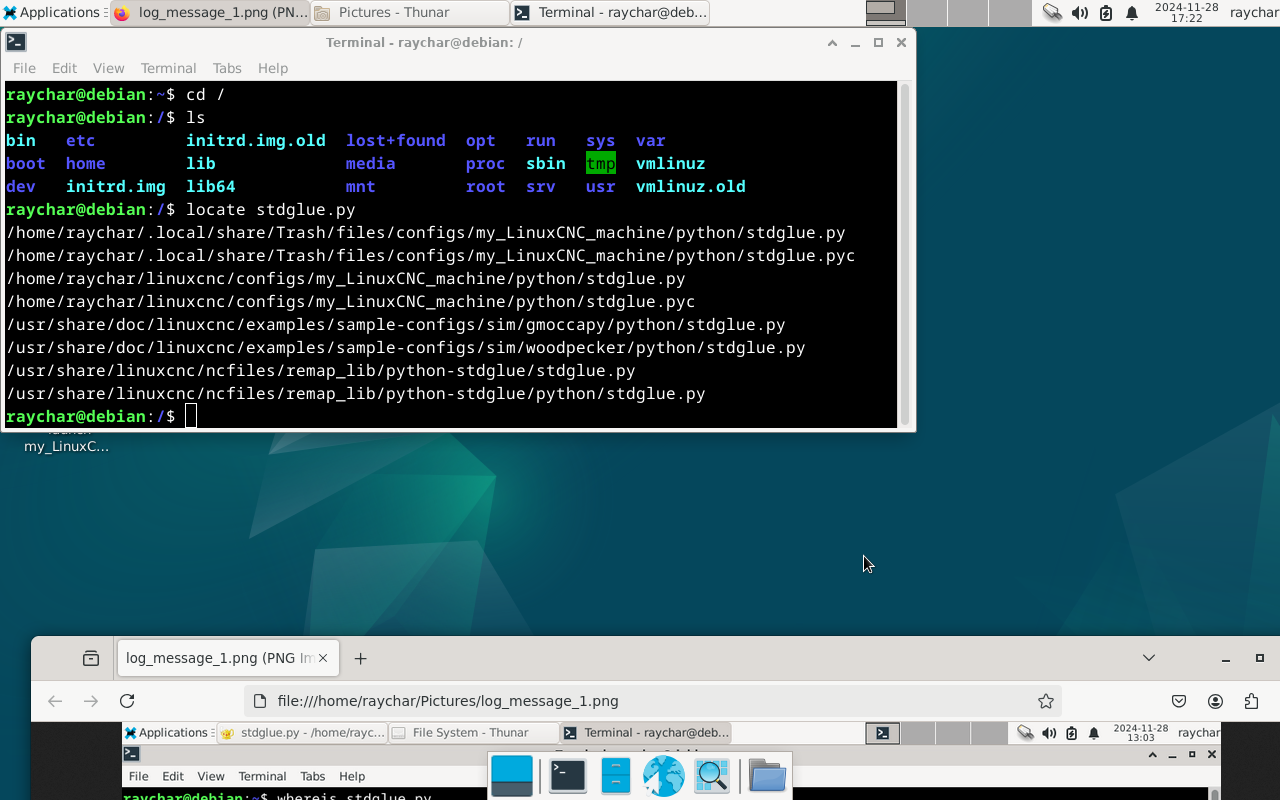
After deleting stdglue.py in those folders, please see as attachment, and replacing with the one in sim/gmoccapy/python/ for them, when opening LinuxCNC, the Gmoccapy screen still not o.k. (there are stdglue.pyc files, I think they won't have effect, I haven't do anything on them)
Please Log in or Create an account to join the conversation.
Time to create page: 0.290 seconds