Ver 10 NEW install

More
2 months 3 weeks ago #348538 by 5280
Replied by 5280 on topic Ver 10 NEW install
Good Day: Adam
"I don't Like it" I just want it to work as prescribed which it does not seem to do when I can not even get past the login screen when i entered the password and user name in the OS install. oh ya I am a old man as U say and still building computers and doing installs from scratch.
have a good day

Please Log in or Create an account to join the conversation.
More
2 months 3 weeks ago #348539 by MaHa
Replied by MaHa on topic Ver 10 NEW install
For autologin you can do this, just after completing installation:


For auto login to Debian open a terminal:

sudo nano /etc/lightdm/lightdm.conf

Uncomment the following and add your user name, be sure to scroll far enough down to get past the comments sections.:

autologin-user=yourusername
autologin-user-timeout=0
 

Please Log in or Create an account to join the conversation.

More
2 months 3 weeks ago #348541 by 5280
Replied by 5280 on topic Ver 10 NEW install
Thanks 4 the info
but I have not been able to get to the terminal yet
cant get past name and password screen yet.
have done 4-5 fresh install of the OS. they all hang up at the same place name and password screen
Thanks

Please Log in or Create an account to join the conversation.

More
2 months 3 weeks ago #348542 by tuxcnc
Replied by tuxcnc on topic Ver 10 NEW install

cant get past name and password screen yet.
 
If you see GRUB but after only blank screen, this may be graphic card issue. In this case try apply nomodeset kernel parameter at grub screen (there are many tutorials on internet). 

Please Log in or Create an account to join the conversation.

More
2 months 3 weeks ago #348544 by 5280
Replied by 5280 on topic Ver 10 NEW install
Good thought but its a laptop an older Dell no video card other than built in Video
don't know if it matters but password login error screen says... "your password is incorrect try again" cancel / log in boxes ...... nothing else and the same thing over and over when entering the password. I was super careful in the setup of these areas during setup
Tks

Please Log in or Create an account to join the conversation.

More
2 months 3 weeks ago #348546 by MaHa
Replied by MaHa on topic Ver 10 NEW install
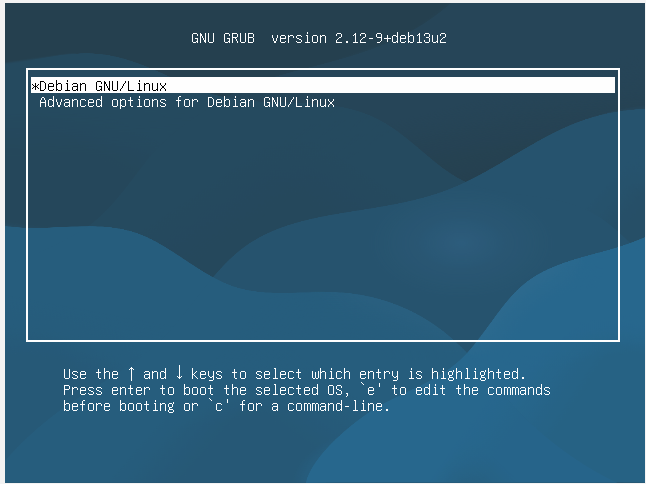
I was able to reproduce this in a virtualbox test-installation. After entering a wrong name/passw  i was locked out. This solution gave me access again. And after that procedure, even entering the password wrong once, did'nt lock me out. Just enter correct password and login.


after this popup


Press the e key to open the boot parameter editor


Warning: Spoiler!

Please Log in or Create an account to join the conversation.

Time to create page: 0.076 seconds
Powered by Kunena Forum
