
- Posts: 7368
- Thank you received: 2181
Gscreen - a GTK / Glade / Python based screen
- cmorley
- Offline
- Moderator
-

Less
More
11 years 1 month ago #63006
by cmorley
Yes making widgets not visible is an easy way to customise the screen.
Which 'skin' are you basing it on?
Chris M
Replied by cmorley on topic Gscreen - a GTK / Glade / Python based screen
csbrady wrote: There are a number of buttons that I would like to remove. To do that the references in gscreen need to be overridden. It ends up being messy to do overrides so I am planning to leave the buttons in, but not make them visible. Am I on the right track?
Yes making widgets not visible is an easy way to customise the screen.
Which 'skin' are you basing it on?
Chris M
Please Log in or Create an account to join the conversation.
- csbrady
- Offline
- Senior Member
-

Less
More
- Posts: 72
- Thank you received: 10
11 years 1 month ago #63013
by csbrady
Replied by csbrady on topic Gscreen - a GTK / Glade / Python based screen
I am working from the default skin, does it have a name? Essentially I am creating a new skin. Mostly I want to simplify by removing all of the buttons that I will not be using. For example I will have external start, stop, estop and power buttons (the machine originals) so those should be removed from the GUI. Also for homing I just want a single button to home the machine. I'll post a screen shot when I get it working.
Please Log in or Create an account to join the conversation.
- cmorley
- Offline
- Moderator
-
Less
More
- Posts: 7368
- Thank you received: 2181
11 years 1 month ago #63068
by cmorley
Replied by cmorley on topic Gscreen - a GTK / Glade / Python based screen
I call it the default screen - I should have named them better 
gaxis is a less buttonny screen to start from.
i really do need to add more docs for gscreen...
looking forward to your creation
Chris M
gaxis is a less buttonny screen to start from.
i really do need to add more docs for gscreen...
looking forward to your creation
Chris M
Please Log in or Create an account to join the conversation.
- LAIR82
- Offline
- Elite Member
-

Less
More
- Posts: 197
- Thank you received: 3
11 years 1 month ago #63136
by LAIR82
I'm sure you know, we're always up for a party
RIck
Replied by LAIR82 on topic Gscreen - a GTK / Glade / Python based screen
cmorley wrote:
I have been building a new screen specifically for lathes and it uses feature that only master will have.
Time will tell if it's any good
Chris M
I'm sure you know, we're always up for a party
RIck
Please Log in or Create an account to join the conversation.
- csbrady
- Offline
- Senior Member
-
Less
More
- Posts: 72
- Thank you received: 10
11 years 1 month ago #63169
by csbrady
Replied by csbrady on topic Gscreen - a GTK / Glade / Python based screen
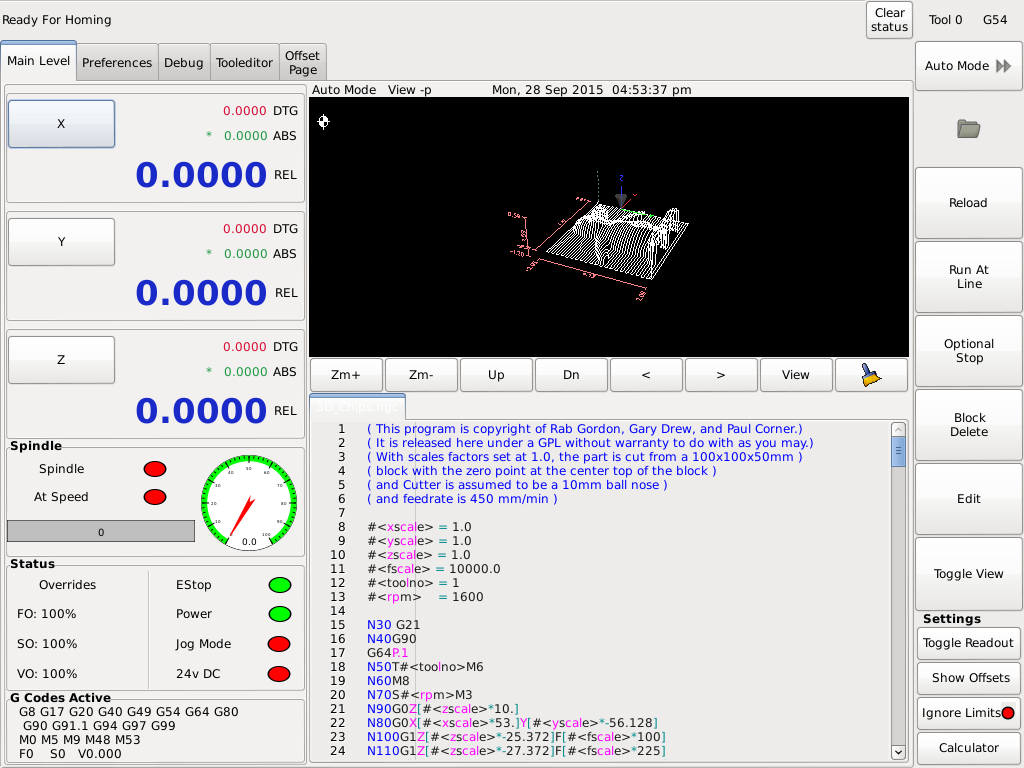
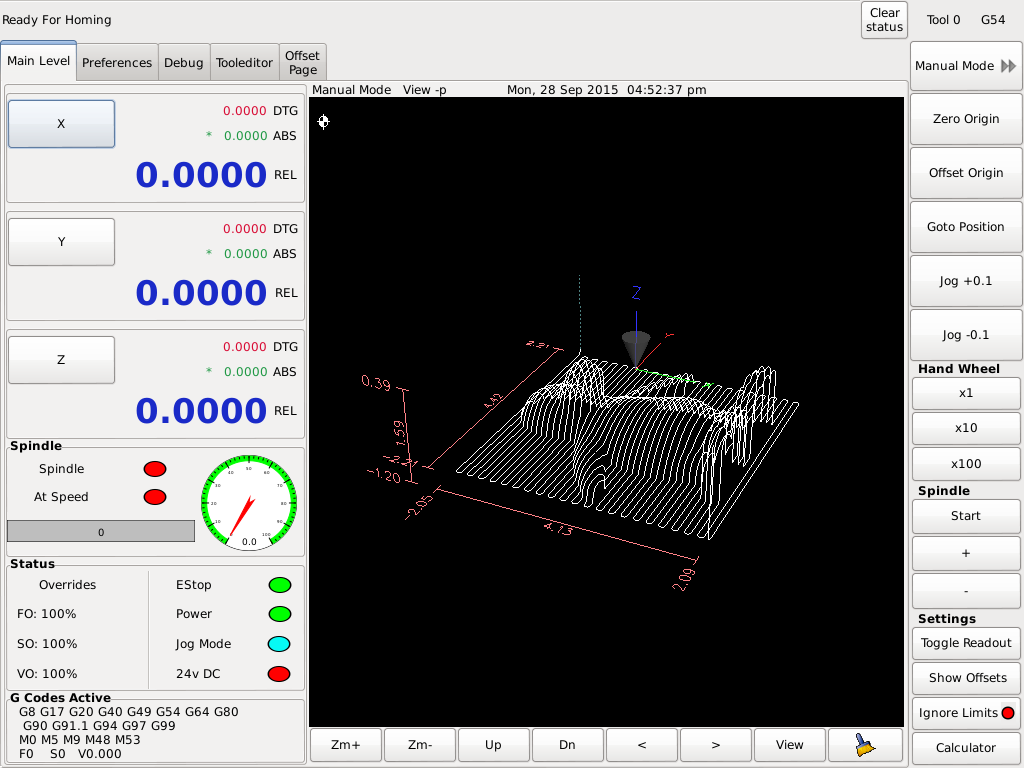
Here are screen shots for my new gscreen skin.
Here are the criteria I came up with for the project:
1) Only show buttons that will get used for my implementation
2) All of the buttons needed for a particular mode are displayed, no paging through buttons.
3) All of the buttons are big enough to work well with a touch screen. They are a little small, but big enough for my 15" screen.
On power up the the Mode button is the Home button and it switches to Mode as soon when the machine is homed. I added jog + & - 0.1 buttons to make it easy to subtract / add the 0.1" offset from a 0.2" edge finder. It's really nice to be able to customize the interface for the way I work.
Most of the buttons work and I just need to work out how to tie this into HAL. Still learning ...
Here are the criteria I came up with for the project:
1) Only show buttons that will get used for my implementation
2) All of the buttons needed for a particular mode are displayed, no paging through buttons.
3) All of the buttons are big enough to work well with a touch screen. They are a little small, but big enough for my 15" screen.
On power up the the Mode button is the Home button and it switches to Mode as soon when the machine is homed. I added jog + & - 0.1 buttons to make it easy to subtract / add the 0.1" offset from a 0.2" edge finder. It's really nice to be able to customize the interface for the way I work.
Most of the buttons work and I just need to work out how to tie this into HAL. Still learning ...
Please Log in or Create an account to join the conversation.
- cmorley
- Offline
- Moderator
-
Less
More
- Posts: 7368
- Thank you received: 2181
11 years 1 month ago #63171
by cmorley
Replied by cmorley on topic Gscreen - a GTK / Glade / Python based screen
hey that looks user friendly!
The gscreen samples all suffer from being development driven and not use driven.
I experimented with all kinds of methodologies, so I can see right away your screen is narrowed to what is needed, rather then a bunch of choices.
you got a name for it
Chris M
The gscreen samples all suffer from being development driven and not use driven.
I experimented with all kinds of methodologies, so I can see right away your screen is narrowed to what is needed, rather then a bunch of choices.
you got a name for it
Chris M
Please Log in or Create an account to join the conversation.
Time to create page: 1.701 seconds