
- Posts: 7368
- Thank you received: 2181
Gscreen - a GTK / Glade / Python based screen
- cmorley
- Offline
- Moderator
-

Less
More
8 years 11 months ago #102327
by cmorley
Replied by cmorley on topic Gscreen - a GTK / Glade / Python based screen
Ok the problem is industrial relies on the extra axes widgets being hidden by default. it then shows the one defined in the INI file.
But when you add a tab to that particular tab widget it resets those hidden widgets to now show.
So we must hide them again.
in the handler file ( under the def initialize_widgets(self): method) look for :
change it to:
Should fix the problem
Chris M
But when you add a tab to that particular tab widget it resets those hidden widgets to now show.
So we must hide them again.
in the handler file ( under the def initialize_widgets(self): method) look for :
Code:
self.widgets["dro_%s1"%i].show()
self.widgets["dro_%s2"%i].show()
self.widgets["dro_%s3"%i].show()
self.widgets["axis_%s"%i].show()
self.widgets["home_%s"%i].show()
change it to:
Code:
for i in ('x','y','z','a','b','c','u','v','w'):
if i in self.data.axis_list:
self.widgets["dro_%s1"%i].show()
self.widgets["dro_%s2"%i].show()
self.widgets["dro_%s3"%i].show()
self.widgets["axis_%s"%i].show()
self.widgets["home_%s"%i].show()
else:
self.widgets["dro_%s1"%i].hide()
self.widgets["dro_%s2"%i].hide()
self.widgets["dro_%s3"%i].hide()
self.widgets["axis_%s"%i].hide()
self.widgets["home_%s"%i].hide()
Should fix the problem
Chris M
The following user(s) said Thank You: Big_Mas74
Please Log in or Create an account to join the conversation.
- Big_Mas74
- Offline
- New Member
-

Less
More
- Posts: 7
- Thank you received: 0
8 years 11 months ago #102329
by Big_Mas74
Replied by Big_Mas74 on topic Gscreen - a GTK / Glade / Python based screen
Perfect worked like a charm 
Masoun
Masoun
Please Log in or Create an account to join the conversation.
- cmorley
- Offline
- Moderator
-
Less
More
- Posts: 7368
- Thank you received: 2181
8 years 11 months ago #102332
by cmorley
Replied by cmorley on topic Gscreen - a GTK / Glade / Python based screen
Excellent.
And kudos for diving into Gscreen modifications!
I'm always happy when someone proves that I didn't waste my time on the project
Chris M
And kudos for diving into Gscreen modifications!
I'm always happy when someone proves that I didn't waste my time on the project
Chris M
The following user(s) said Thank You: Big_Mas74
Please Log in or Create an account to join the conversation.
- Big_Mas74
- Offline
- New Member
-
Less
More
- Posts: 7
- Thank you received: 0
8 years 10 months ago #102611
by Big_Mas74
Replied by Big_Mas74 on topic Gscreen - a GTK / Glade / Python based screen
Hi Chris,
I have a question, regarding the EDITOR in ini file, currently there is no editor specified in it and the screen uses gedit by default ( I presume ), now the problem is the language syntax customisation in it looks deferent if I opened the same file from gedit directly, for example here how looks within linuxcnc
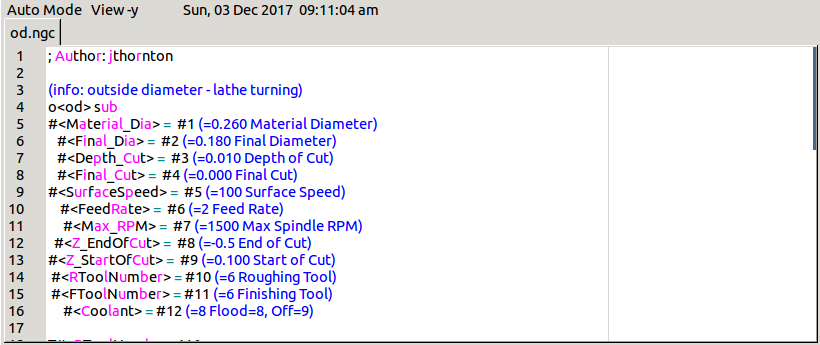
file opened within linuxcnc, while here:
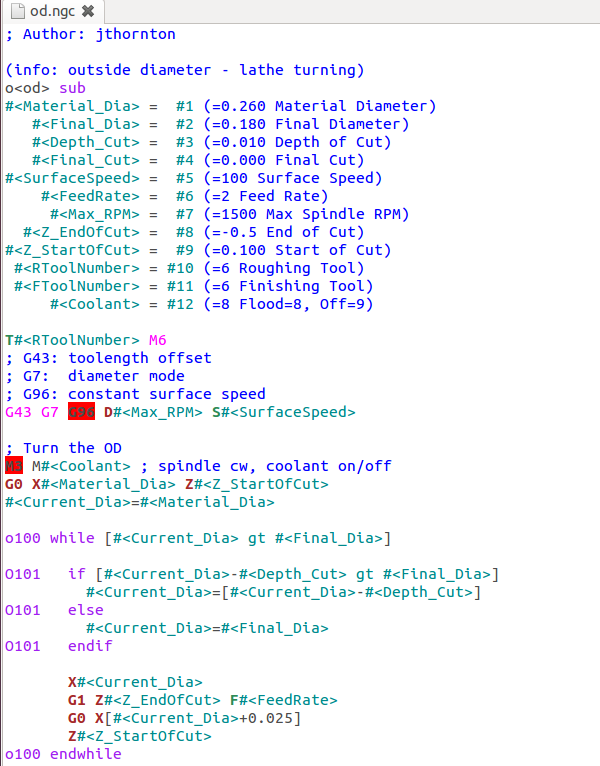
how it looks when open by gedit externally
the gedit version is 3.4.1 and I've installed gcode.lang and/or ngc.lang language to it.
Is this screen limitation or can I do something?
Masoun
I have a question, regarding the EDITOR in ini file, currently there is no editor specified in it and the screen uses gedit by default ( I presume ), now the problem is the language syntax customisation in it looks deferent if I opened the same file from gedit directly, for example here how looks within linuxcnc
file opened within linuxcnc, while here:
how it looks when open by gedit externally
the gedit version is 3.4.1 and I've installed gcode.lang and/or ngc.lang language to it.
Is this screen limitation or can I do something?
Masoun
Please Log in or Create an account to join the conversation.
- cmorley
- Offline
- Moderator
-
Less
More
- Posts: 7368
- Thank you received: 2181
8 years 10 months ago #102614
by cmorley
Replied by cmorley on topic Gscreen - a GTK / Glade / Python based screen
Gscreen uses sourceview 2 looks like there is a sourceview 3 which probably gedit on the system uses.
(sourceview is the underlying library that both use)
You can change the syntax customizer. You just have to do it more manually.
If this is an installed version the folder should be /usr/share/gtksourceview-2.0/language-specs
an RIP version RIP_LINUXCNC_FOLDER/ share/gtksourceview-2.0/language-specs
gscreen uses the 'ngc.lang' description ( I have ngc.lang and gcode.lang on my RIP)
You could rename the gcode.lang to ngc.lang if you wanted gscreen to use it.
I can't say if they will look exactly the same as sourceview3 gedit but it should.
See if that helps.
Chris M
(sourceview is the underlying library that both use)
You can change the syntax customizer. You just have to do it more manually.
If this is an installed version the folder should be /usr/share/gtksourceview-2.0/language-specs
an RIP version RIP_LINUXCNC_FOLDER/ share/gtksourceview-2.0/language-specs
gscreen uses the 'ngc.lang' description ( I have ngc.lang and gcode.lang on my RIP)
You could rename the gcode.lang to ngc.lang if you wanted gscreen to use it.
I can't say if they will look exactly the same as sourceview3 gedit but it should.
See if that helps.
Chris M
Please Log in or Create an account to join the conversation.
- Big_Mas74
- Offline
- New Member
-
Less
More
- Posts: 7
- Thank you received: 0
8 years 10 months ago #102655
by Big_Mas74
Replied by Big_Mas74 on topic Gscreen - a GTK / Glade / Python based screen
Hi Chris,
Apparently there is a deference between gtksourceview2.0 and gtksourceview3.0 because if rename the gcode.lang file to ngc.lang there is no customization while reusing the old one from RIP version still gives me the older result.
I've to look further into it.
Thanks
Masoun
Apparently there is a deference between gtksourceview2.0 and gtksourceview3.0 because if rename the gcode.lang file to ngc.lang there is no customization while reusing the old one from RIP version still gives me the older result.
I've to look further into it.
Thanks
Masoun
Please Log in or Create an account to join the conversation.
Time to create page: 2.256 seconds