
- Posts: 7368
- Thank you received: 2181
Gscreen - a GTK / Glade / Python based screen
- cmorley
- Offline
- Moderator
-

Less
More
7 years 10 months ago #122260
by cmorley
Replied by cmorley on topic Gscreen - a GTK / Glade / Python based screen
Yes let me know about how the new widgets work out - there is more that should be added to them but i was a bit lazy...
The interface to select the options (selecting a digit) does not make me happy but it was quick and easy.
I could also add a spindle rpm status option to it - i think you wanted that. - It's nice because then you don't need to connect a HAL pin for it to work in the screen.
Chris M
The interface to select the options (selecting a digit) does not make me happy but it was quick and easy.
I could also add a spindle rpm status option to it - i think you wanted that. - It's nice because then you don't need to connect a HAL pin for it to work in the screen.
Chris M
Please Log in or Create an account to join the conversation.
- sqmathlete
- Offline
- Premium Member
-

Less
More
- Posts: 118
- Thank you received: 18
7 years 10 months ago - 7 years 10 months ago #122578
by sqmathlete
Replied by sqmathlete on topic Gscreen - a GTK / Glade / Python based screen
Hi Chris,
I had to do a bit of messing around to get my version of glade to update with the new label widgets but, I have it working now. Thanks
Also, NativeCAM is embedded in a tab, and I have managed to figure out a few leds as you can see. However, I am a little unclear about how to access the status, command, and error channel if the info that I want access to is not in gscreens data class. For example the joint dictionary or how to tell if the interpreter is idle before one of my buttons does something? As well as how to update everything when the screen starts up and the operator hasn't pushed a button or anything.
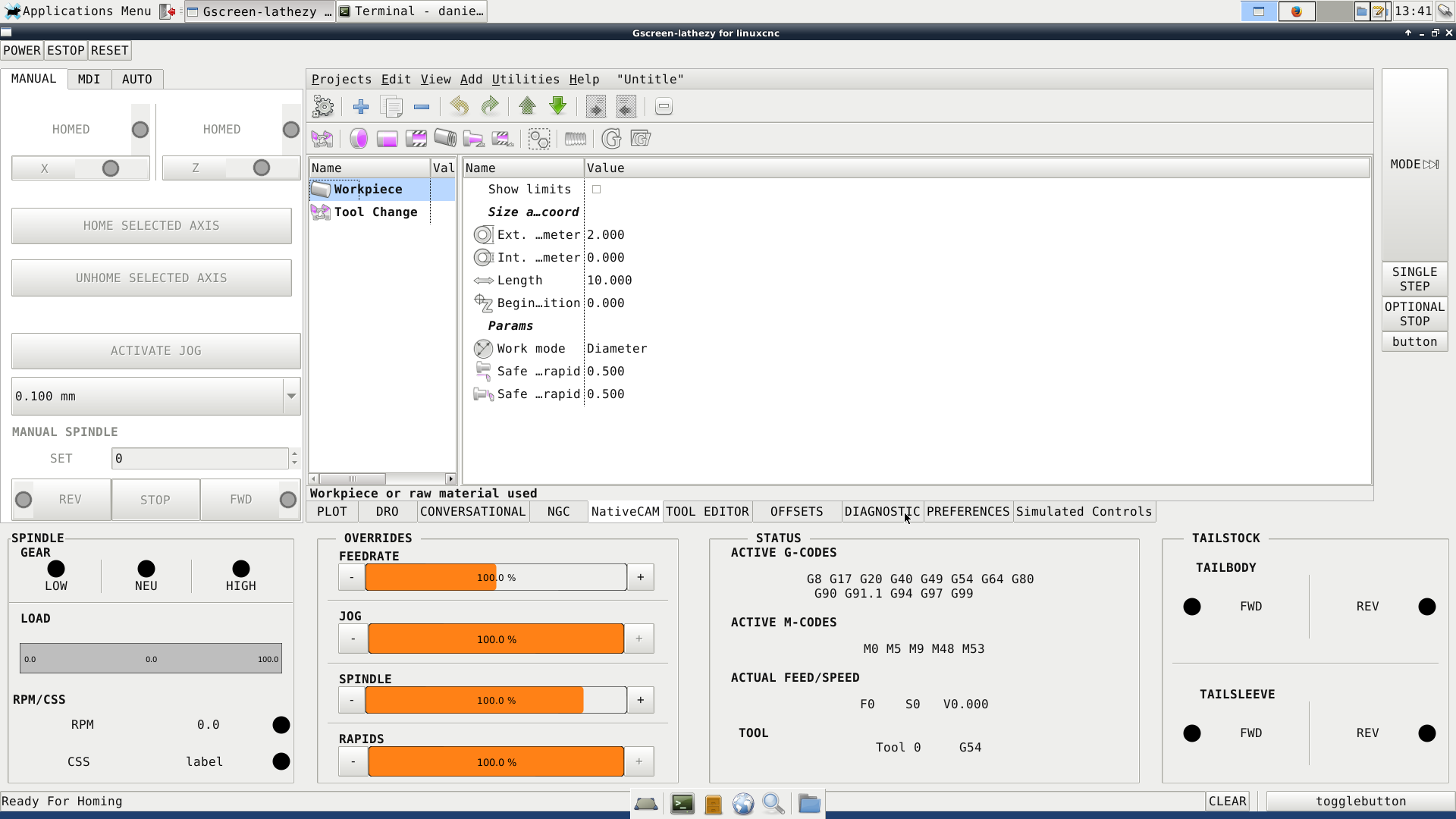
I have posted my files, the commenting is pretty verbose, feel free to add to it. You might need to comment out the embed pyngcgui and cycles tabs in the ini.file since I have all of the ngc files in my config folder. I started with the sim-fanucy lathe config since it already had a remapped tool change that was the same as the original fanuc controller. T202, calls tool 2, applies offset 2, and applies wear offset 100002. T2 calls tool2 , and applies offset 2. Will probably have to make a few changes in the .ngc files to accommodate that behavior. Will deal with that later though.
Thanks in advance,
Dan
I had to do a bit of messing around to get my version of glade to update with the new label widgets but, I have it working now. Thanks
Also, NativeCAM is embedded in a tab, and I have managed to figure out a few leds as you can see. However, I am a little unclear about how to access the status, command, and error channel if the info that I want access to is not in gscreens data class. For example the joint dictionary or how to tell if the interpreter is idle before one of my buttons does something? As well as how to update everything when the screen starts up and the operator hasn't pushed a button or anything.
I have posted my files, the commenting is pretty verbose, feel free to add to it. You might need to comment out the embed pyngcgui and cycles tabs in the ini.file since I have all of the ngc files in my config folder. I started with the sim-fanucy lathe config since it already had a remapped tool change that was the same as the original fanuc controller. T202, calls tool 2, applies offset 2, and applies wear offset 100002. T2 calls tool2 , and applies offset 2. Will probably have to make a few changes in the .ngc files to accommodate that behavior. Will deal with that later though.
Thanks in advance,
Dan
Last edit: 7 years 10 months ago by sqmathlete. Reason: too many file attachmnets
Please Log in or Create an account to join the conversation.
- cmorley
- Offline
- Moderator
-
Less
More
- Posts: 7368
- Thank you received: 2181
7 years 10 months ago - 7 years 10 months ago #122619
by cmorley
Replied by cmorley on topic Gscreen - a GTK / Glade / Python based screen
initialize_widgets() is where to put initialization code.
status,command and error can be accessed by initializing an instance of them in the __INIT__() function with:
self.command = linuxcnc.command()
self.status = linuxcnc.stat()
self.error = linuxcnc.error_channel()
It's probably available through some other code but that is surely the easiest to work with.
In some cases using GSTAT is a better way to go.
GSTAT monitors some key status and will tell you when they change.
linuxcnc.org/docs/devel/html/gui/GStat.html
Chris M
status,command and error can be accessed by initializing an instance of them in the __INIT__() function with:
self.command = linuxcnc.command()
self.status = linuxcnc.stat()
self.error = linuxcnc.error_channel()
It's probably available through some other code but that is surely the easiest to work with.
In some cases using GSTAT is a better way to go.
GSTAT monitors some key status and will tell you when they change.
linuxcnc.org/docs/devel/html/gui/GStat.html
Chris M
Last edit: 7 years 10 months ago by cmorley.
Please Log in or Create an account to join the conversation.
- Ivan_The_Red
- Offline
- Premium Member
-
Less
More
- Posts: 83
- Thank you received: 2
7 years 9 months ago #124483
by Ivan_The_Red
Replied by Ivan_The_Red on topic Gscreen - a GTK / Glade / Python based screen
Is Gscreen being phased out ? If it is ,what avenues are there to upgrade or convert an existing Gscreen user interface.
Please Log in or Create an account to join the conversation.
- cmorley
- Offline
- Moderator
-
Less
More
- Posts: 7368
- Thank you received: 2181
7 years 9 months ago #124503
by cmorley
Replied by cmorley on topic Gscreen - a GTK / Glade / Python based screen
There is no immediate plan to phase out Gscreen.
I just gets harder to get the editor to work on newer distributions to modify it.
I heard rumors of python2 support coming to an end in the future but i bet that will still take awhile.
I hope in time to update Gscreen and Gladevcp for gtk3 and python3 but that would be in long time from now (if ever)
QTvcp is the the next in-tree project for machine control in linuxcnc.
Chris M
I just gets harder to get the editor to work on newer distributions to modify it.
I heard rumors of python2 support coming to an end in the future but i bet that will still take awhile.
I hope in time to update Gscreen and Gladevcp for gtk3 and python3 but that would be in long time from now (if ever)
QTvcp is the the next in-tree project for machine control in linuxcnc.
Chris M
Please Log in or Create an account to join the conversation.
- cmorley
- Offline
- Moderator
-
Less
More
- Posts: 7368
- Thank you received: 2181
7 years 9 months ago #124505
by cmorley
Replied by cmorley on topic Gscreen - a GTK / Glade / Python based screen
I should mention there is a separate PyQtVCP project too.
Chris M
Chris M
Please Log in or Create an account to join the conversation.
Time to create page: 1.471 seconds