oscarconde6 wrote: thanks for the quick reply, do what you tell me I will try to learn a little more and forums have mirare I can do. I'm one. little lost with the codes g. Thank you
The lathe macros include a set of G-code routines, for example turning.ngc looks like this:
Code:
;Turning
O<turning> sub
G8 ; Radius mode (easier maths)
G18 ; XZ Plane
G21 ; Metric Units
G90 ; Absolute Distance
G91.1 ; but not for arcs
M6 T#8 G43
#1 = [#1 / 2] ; because of radius mode
#14 = [#<_x>] (starting X)
#13 = #<_z> (starting Z)
#20 = [#6 * SIN[#7]]
#21 = [#6 * COS[#7]]
#22 = [#6 / COS[#7]]
#23 = [#5 + #6 - #20]
#24 = [[#13 - #23] * TAN[#7]]
G96 D1500 S#2 ; Constant Surface Speed Mode
m3 ;Start Spindle
g95 F#4 ; Feed-Per-Rev Mode
g4p1 ; Wait to reach speed
/ (debug, Turning finish rad #1 start rad #14 start length #13 finish length #5)
/ m1
O100 WHILE [#14 GT [#1 + #3 / 2]]
g0 X #14
#14=[#14-#3 / 2]
G1 X #14
G1 Z #23 X[#14 + #24]
O101 IF [#6 GT 0]
G2 Z#5 X[#14 + #24 + #21] I#21 K#20
G1 X[#14 + #24 + #21 + #3/2]
O101 ELSE
G1 X[#14 + #24 + [#3 * .6]]
O101 ENDIF
O104 IF [#7 LT 0]
G0 X#14
O104 ENDIF
G0 Z[#13]
O100 ENDWHILE
G0 x#1
G1 Z #23 X[#1 + #24]
O102 IF [#6 GT 0]
G2 Z#5 X[#1 + #24 + #21] I#21 K#20
G1 X[#1 + #24 + #21 + #3]
O102 ELSE
G1 X[#1 + #24 + #3]
O102 ENDIF
O106 IF [#7 LT 0]
G0 X#14
O106 ENDIF
G0 Z #13
G0 X #1 ; For touch-off
M5
G7
O<turning> endsub
M2
The important parts are the lines
Code:
G96 D1500 S#2 ; Constant Surface Speed Mode
m3 ;Start Spindle
g95 F#4 ; Feed-Per-Rev Mode
You would need to change those (in each of the routines) to
Code:
G97 S#2 ; Constant RPM Mode
linuxcnc.org/docs/2.7/html/gcode/g-code.html#gcode:g96-g97
Code:
m3 ;Start Spindle
g94 F#4 ; Feed-Per-Minute
linuxcnc.org/docs/2.7/html/gcode/g-code.html#gcode:g93-g94-g95
Then the boxes in the macro tabs are feed-per-min and rpm.
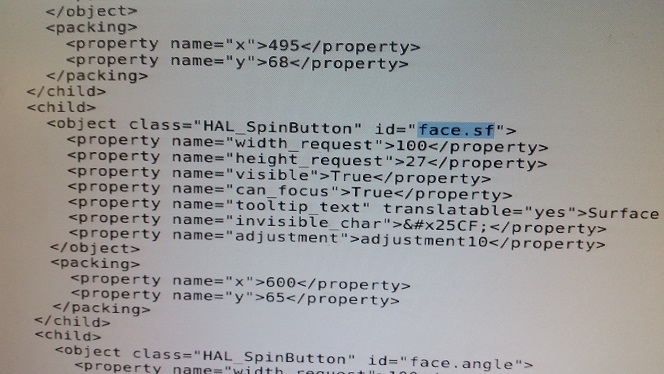
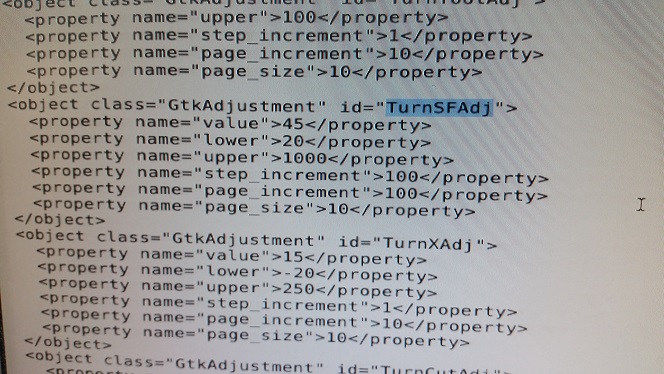
You will find that the surface-speed adjustment does not allow big enough numbers to be a RPM input. So you will need to modify the "Adjustment" properties of the UI. You could do that in the Glade editor, but it it probably easier to do it with a text editor and alter the numbers directly. For example, for turning RPM look for
Code:
<object class="GtkAdjustment" id="TurnSFAdj">
and change the limits and step size. Then work through the other adjustments making them suit too. Unfortunately I have just noticed that I got lazy at giving the adjustments meaningful names. :blush: This means you need to look through the code to find that the "face.sf" control for the facing routine is constrained by "adjustment10"