
- Posts: 2419
- Thank you received: 2349
QT C++ code samples
- Grotius
- Offline
- Platinum Member
-

Less
More
6 years 11 months ago - 6 years 11 months ago #151580
by Grotius
Replied by Grotius on topic QT C++ code samples
Hi,
Today we added the G-code class to the program and did a Linuxcnc test. Users only have to press the cam button to see the
output like this. Below the g-code output in a spoiler.
The lead-in is implemented as a kind of macro behind the screen. This makes it able to use a dxf lead in template for users.
Lead in may be a 3d curve for example. The curve only needs a begin point and endpoint, see it as a vector..
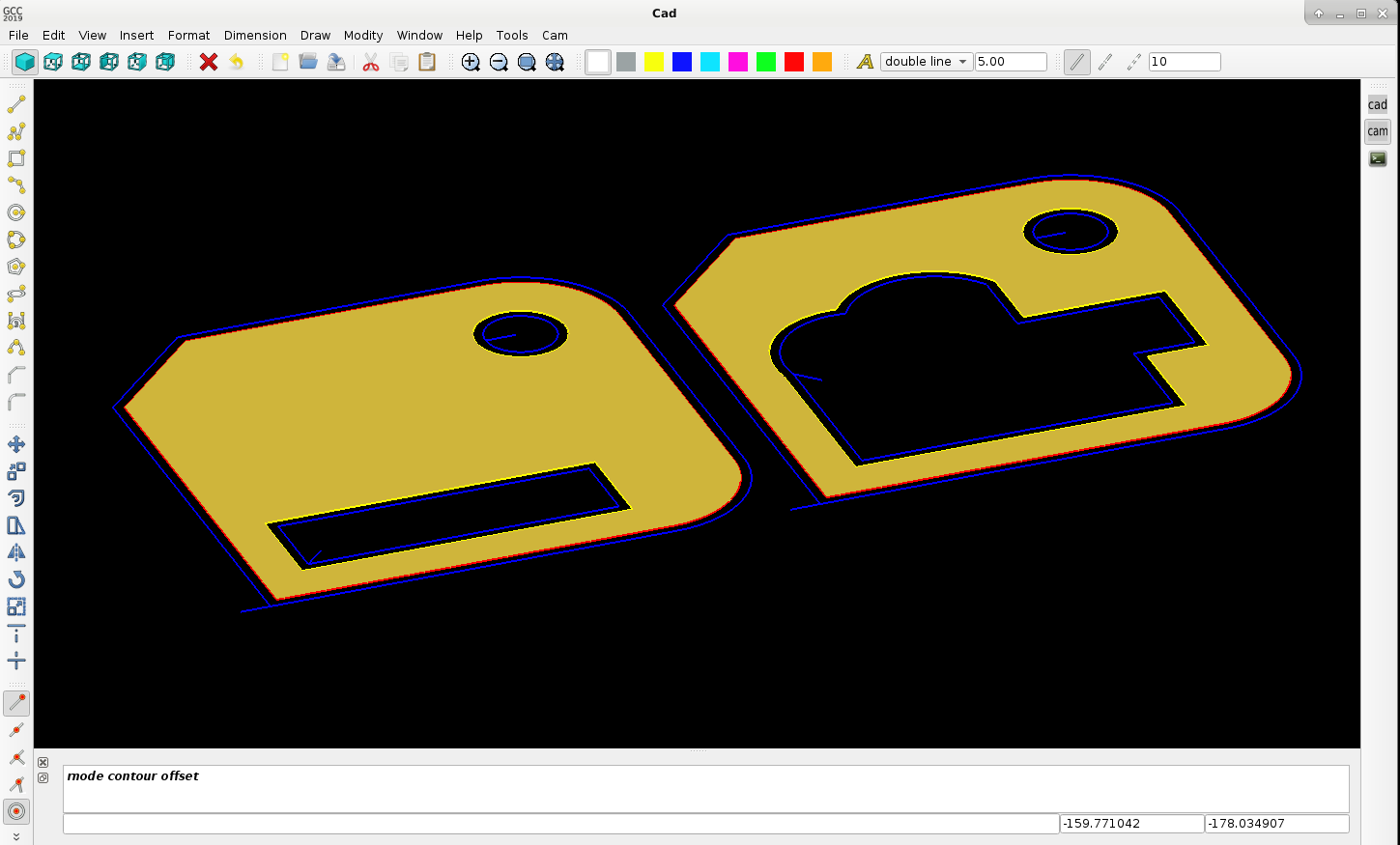
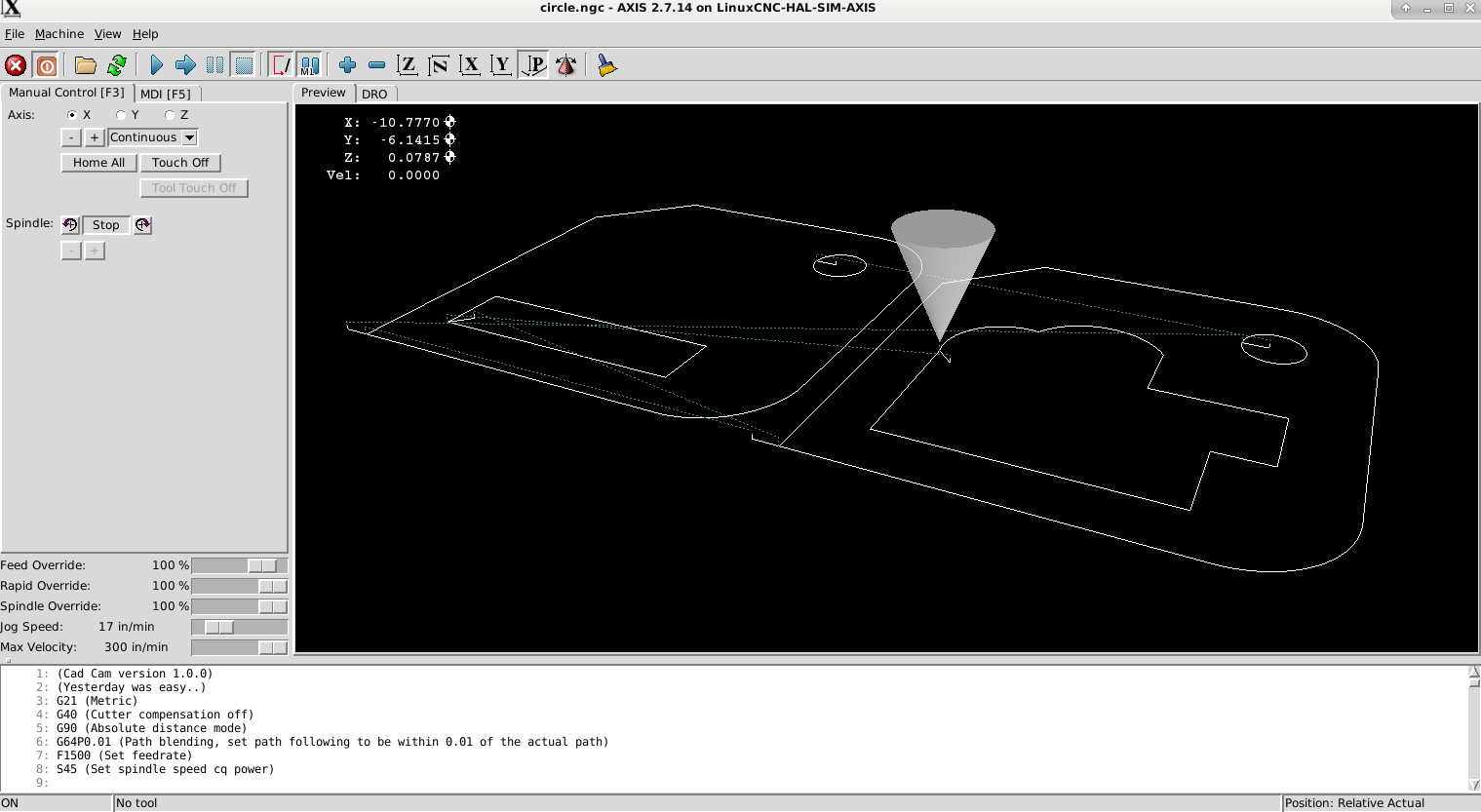
Everything looks good. Have to make a link to the cut sequence (keep parts together), no problem.
I want to ask the linux users to comment about the following items :
- who wants to use code snippets? for example : little holes below .. mm slower .. % or for example a lead in path dxf macro?
- g_code parameters like : pierce Z speed, lead in speed (this is maybe a new item), etc. etc.
- special features.. ??
- PlasmaC features or postprocessor features ??
Attached the test g-code output :
Okey we are at a exiting moment with the program now, have a nice day and don't forget to comment about program features.
Another test today :
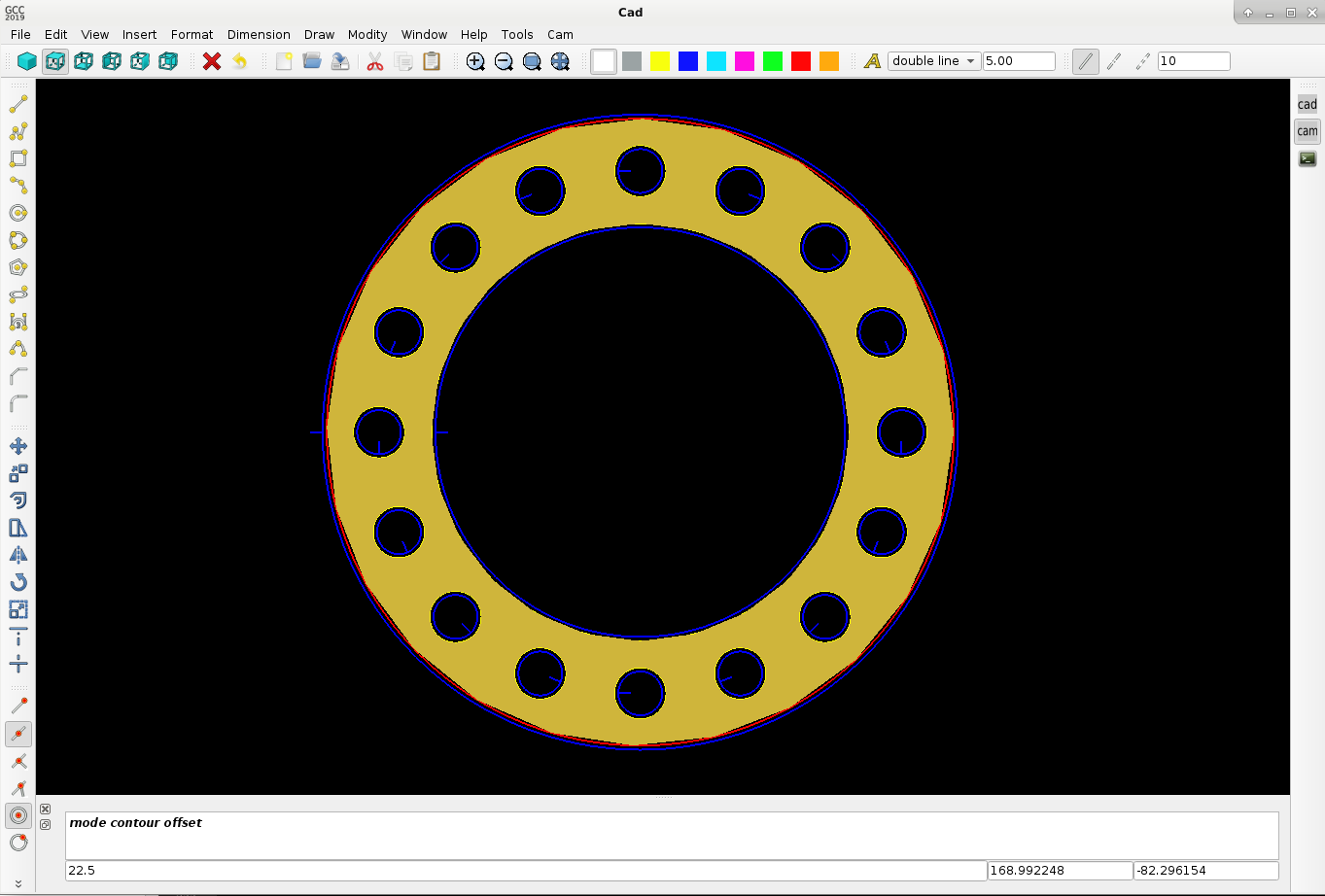
Showing a example of a pipe flange. Here we show how the triangulation is done to get a solid product with opengl.

With triangulation as a solid view :
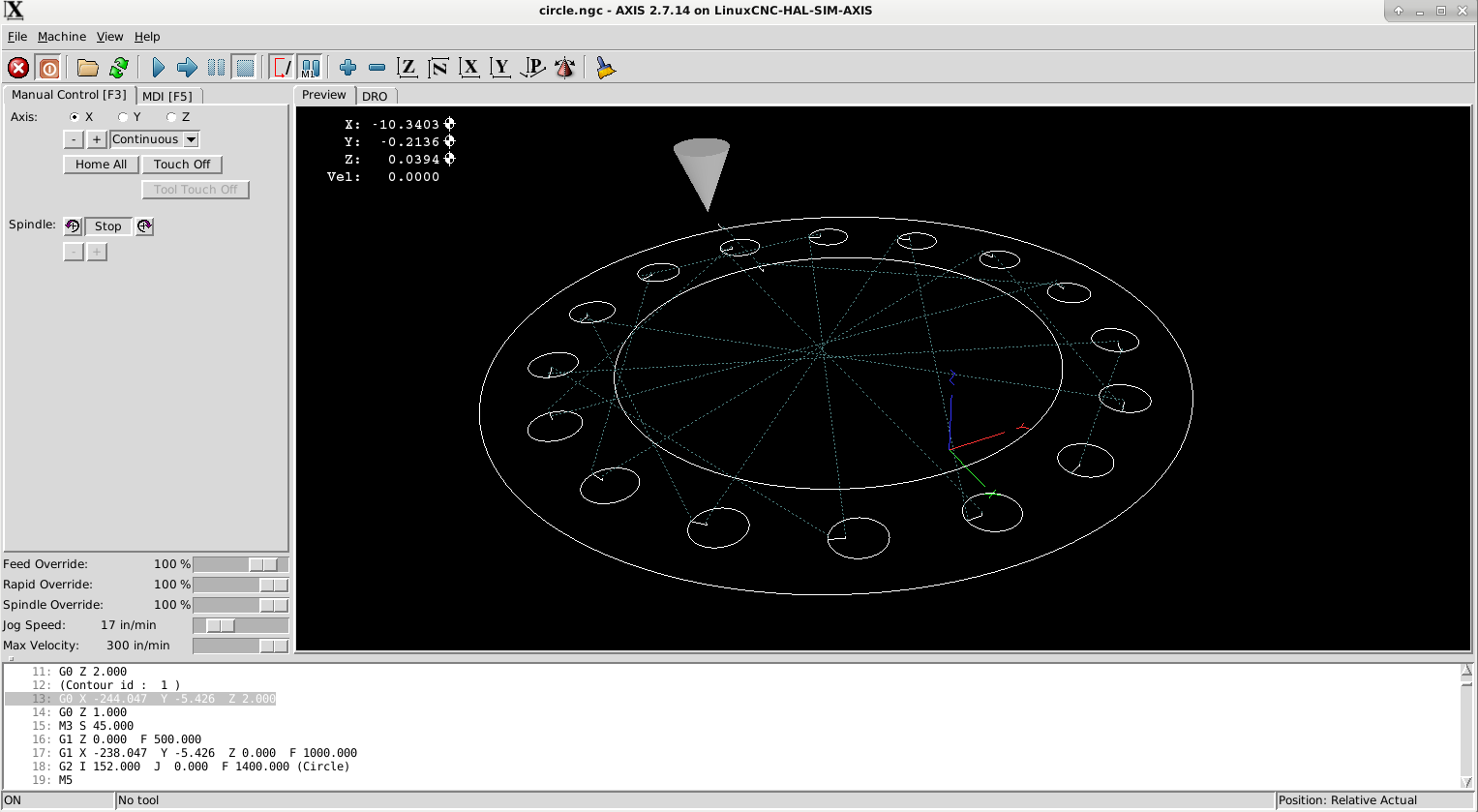
Linuxcnc output :
Gcode of pipe flange in spoiler :
Okey i see we can optimize the holes to do a shortest path with keep parts together..
The lead in is nice.. it point's always to the center of the circle.. even when it's a g2.
Today we added the G-code class to the program and did a Linuxcnc test. Users only have to press the cam button to see the
output like this. Below the g-code output in a spoiler.
The lead-in is implemented as a kind of macro behind the screen. This makes it able to use a dxf lead in template for users.
Lead in may be a 3d curve for example. The curve only needs a begin point and endpoint, see it as a vector..
Everything looks good. Have to make a link to the cut sequence (keep parts together), no problem.
I want to ask the linux users to comment about the following items :
- who wants to use code snippets? for example : little holes below .. mm slower .. % or for example a lead in path dxf macro?
- g_code parameters like : pierce Z speed, lead in speed (this is maybe a new item), etc. etc.
- special features.. ??
- PlasmaC features or postprocessor features ??
Attached the test g-code output :
Warning: Spoiler!
(Cad Cam version 1.0.0)
(Yesterday was easy..)
G21 (Metric)
G40 (Cutter compensation off)
G90 (Absolute distance mode)
G64P0.01 (Path blending, set path following to be within 0.01 of the actual path)
F1500 (Set feedrate)
S45 (Set spindle speed cq power)
(Move to travelheight)
G0 Z 2.000
(Contour id : 1 )
G0 X -317.158 Y -123.101 Z 2.000
G0 Z 1.000
M3 S 45.000
G1 Z 0.000 F 500.000
G1 X -323.158 Y -123.101 Z 0.000 F 1000.000
G3 I 7.034 J 0.000 F 1400.000 (Circle)
M5
G0 Z 2.000
(Contour id : 2 )
G0 X -206.150 Y -123.101 Z 2.000
G0 Z 1.000
M3 S 45.000
G1 Z 0.000 F 500.000
G1 X -212.150 Y -123.101 Z 0.000 F 1000.000
G3 I 7.034 J 0.000 F 1400.000 (Circle)
M5
G0 Z 2.000
(Contour id : 3 )
G0 X -404.124 Y -205.101 Z 2.000
G0 Z 1.000
M3 S 45.000
G1 Z 0.000 F 500.000
G1 X -398.124 Y -205.101 Z 0.000 F 1000.000
G1 X -398.124 Y -122.272 Z 0.000 F 1400.000
G1 X -376.952 Y -101.101 Z 0.000 F 1400.000
G1 X -316.124 Y -101.101 Z 0.000 F 1400.000
G2 X -294.124 Y -123.101 Z 0.000 I 0.000 J -22.000 F 1400.000
G1 X -294.124 Y -183.101 Z 0.000 F 1400.000
G2 X -316.124 Y -205.101 Z 0.000 I -22.000 J -0.000 F 1400.000
G1 X -398.124 Y -205.101 Z 0.000 F 1400.000
M5
G0 Z 2.000
(Contour id : 4 )
G0 X -293.116 Y -205.101 Z 2.000
G0 Z 1.000
M3 S 45.000
G1 Z 0.000 F 500.000
G1 X -287.116 Y -205.101 Z 0.000 F 1000.000
G1 X -287.116 Y -122.272 Z 0.000 F 1400.000
G1 X -265.945 Y -101.101 Z 0.000 F 1400.000
G1 X -205.116 Y -101.101 Z 0.000 F 1400.000
G2 X -183.116 Y -123.101 Z 0.000 I 0.000 J -22.000 F 1400.000
G1 X -183.116 Y -183.101 Z 0.000 F 1400.000
G2 X -205.116 Y -205.101 Z 0.000 I -22.000 J -0.000 F 1400.000
G1 X -287.116 Y -205.101 Z 0.000 F 1400.000
M5
G0 Z 2.000
(Contour id : 5 )
G0 X -381.354 Y -188.098 Z 2.000
G0 Z 1.000
M3 S 45.000
G1 Z 0.000 F 500.000
G1 X -385.597 Y -192.341 Z 0.000 F 1000.000
G1 X -322.853 Y -192.341 Z 0.000 F 1400.000
G1 X -322.853 Y -176.573 Z 0.000 F 1400.000
G1 X -385.597 Y -176.573 Z 0.000 F 1400.000
G1 X -385.597 Y -192.341 Z 0.000 F 1400.000
M5
G0 Z 2.000
(Contour id : 6 )
G0 X -269.494 Y -160.237 Z 2.000
G0 Z 1.000
M3 S 45.000
G1 Z 0.000 F 500.000
G1 X -273.736 Y -155.994 Z 0.000 F 1000.000
G1 X -273.736 Y -192.108 Z 0.000 F 1400.000
G1 X -210.992 Y -192.108 Z 0.000 F 1400.000
G1 X -210.992 Y -171.643 Z 0.000 F 1400.000
G1 X -198.667 Y -171.643 Z 0.000 F 1400.000
G1 X -198.667 Y -152.852 Z 0.000 F 1400.000
G1 X -227.271 Y -152.852 Z 0.000 F 1400.000
G1 X -227.271 Y -136.560 Z 0.000 F 1400.000
G3 X -256.111 Y -137.656 Z 0.000 I -14.080 J -9.469 F 1400.000
G3 X -273.736 Y -155.994 Z 0.000 I -2.637 J -15.105 F 1400.000 (Arc)
M5
G0 Z 2.000
M30
(Yesterday was easy..)
G21 (Metric)
G40 (Cutter compensation off)
G90 (Absolute distance mode)
G64P0.01 (Path blending, set path following to be within 0.01 of the actual path)
F1500 (Set feedrate)
S45 (Set spindle speed cq power)
(Move to travelheight)
G0 Z 2.000
(Contour id : 1 )
G0 X -317.158 Y -123.101 Z 2.000
G0 Z 1.000
M3 S 45.000
G1 Z 0.000 F 500.000
G1 X -323.158 Y -123.101 Z 0.000 F 1000.000
G3 I 7.034 J 0.000 F 1400.000 (Circle)
M5
G0 Z 2.000
(Contour id : 2 )
G0 X -206.150 Y -123.101 Z 2.000
G0 Z 1.000
M3 S 45.000
G1 Z 0.000 F 500.000
G1 X -212.150 Y -123.101 Z 0.000 F 1000.000
G3 I 7.034 J 0.000 F 1400.000 (Circle)
M5
G0 Z 2.000
(Contour id : 3 )
G0 X -404.124 Y -205.101 Z 2.000
G0 Z 1.000
M3 S 45.000
G1 Z 0.000 F 500.000
G1 X -398.124 Y -205.101 Z 0.000 F 1000.000
G1 X -398.124 Y -122.272 Z 0.000 F 1400.000
G1 X -376.952 Y -101.101 Z 0.000 F 1400.000
G1 X -316.124 Y -101.101 Z 0.000 F 1400.000
G2 X -294.124 Y -123.101 Z 0.000 I 0.000 J -22.000 F 1400.000
G1 X -294.124 Y -183.101 Z 0.000 F 1400.000
G2 X -316.124 Y -205.101 Z 0.000 I -22.000 J -0.000 F 1400.000
G1 X -398.124 Y -205.101 Z 0.000 F 1400.000
M5
G0 Z 2.000
(Contour id : 4 )
G0 X -293.116 Y -205.101 Z 2.000
G0 Z 1.000
M3 S 45.000
G1 Z 0.000 F 500.000
G1 X -287.116 Y -205.101 Z 0.000 F 1000.000
G1 X -287.116 Y -122.272 Z 0.000 F 1400.000
G1 X -265.945 Y -101.101 Z 0.000 F 1400.000
G1 X -205.116 Y -101.101 Z 0.000 F 1400.000
G2 X -183.116 Y -123.101 Z 0.000 I 0.000 J -22.000 F 1400.000
G1 X -183.116 Y -183.101 Z 0.000 F 1400.000
G2 X -205.116 Y -205.101 Z 0.000 I -22.000 J -0.000 F 1400.000
G1 X -287.116 Y -205.101 Z 0.000 F 1400.000
M5
G0 Z 2.000
(Contour id : 5 )
G0 X -381.354 Y -188.098 Z 2.000
G0 Z 1.000
M3 S 45.000
G1 Z 0.000 F 500.000
G1 X -385.597 Y -192.341 Z 0.000 F 1000.000
G1 X -322.853 Y -192.341 Z 0.000 F 1400.000
G1 X -322.853 Y -176.573 Z 0.000 F 1400.000
G1 X -385.597 Y -176.573 Z 0.000 F 1400.000
G1 X -385.597 Y -192.341 Z 0.000 F 1400.000
M5
G0 Z 2.000
(Contour id : 6 )
G0 X -269.494 Y -160.237 Z 2.000
G0 Z 1.000
M3 S 45.000
G1 Z 0.000 F 500.000
G1 X -273.736 Y -155.994 Z 0.000 F 1000.000
G1 X -273.736 Y -192.108 Z 0.000 F 1400.000
G1 X -210.992 Y -192.108 Z 0.000 F 1400.000
G1 X -210.992 Y -171.643 Z 0.000 F 1400.000
G1 X -198.667 Y -171.643 Z 0.000 F 1400.000
G1 X -198.667 Y -152.852 Z 0.000 F 1400.000
G1 X -227.271 Y -152.852 Z 0.000 F 1400.000
G1 X -227.271 Y -136.560 Z 0.000 F 1400.000
G3 X -256.111 Y -137.656 Z 0.000 I -14.080 J -9.469 F 1400.000
G3 X -273.736 Y -155.994 Z 0.000 I -2.637 J -15.105 F 1400.000 (Arc)
M5
G0 Z 2.000
M30
Okey we are at a exiting moment with the program now, have a nice day and don't forget to comment about program features.
Another test today :
Showing a example of a pipe flange. Here we show how the triangulation is done to get a solid product with opengl.
With triangulation as a solid view :
Linuxcnc output :
Gcode of pipe flange in spoiler :
Warning: Spoiler!
(Cad Cam version 1.0.0)
(Yesterday was easy..)
G21 (Metric)
G40 (Cutter compensation off)
G90 (Absolute distance mode)
G64P0.01 (Path blending, set path following to be within 0.01 of the actual path)
F1500 (Set feedrate)
S45 (Set spindle speed cq power)
(Move to travelheight)
G0 Z 2.000
(Contour id : 1 )
G0 X -244.047 Y -5.426 Z 2.000
G0 Z 1.000
M3 S 45.000
G1 Z 0.000 F 500.000
G1 X -238.047 Y -5.426 Z 0.000 F 1000.000
G2 I 152.000 J 0.000 F 1400.000 (Circle)
M5
G0 Z 2.000
(Contour id : 2 )
G0 X -178.047 Y -5.426 Z 2.000
G0 Z 1.000
M3 S 45.000
G1 Z 0.000 F 500.000
G1 X -184.047 Y -5.426 Z 0.000 F 1000.000
G3 I 98.000 J 0.000 F 1400.000 (Circle)
M5
G0 Z 2.000
(Contour id : 3 )
G0 X -90.547 Y 119.574 Z 2.000
G0 Z 1.000
M3 S 45.000
G1 Z 0.000 F 500.000
G1 X -96.547 Y 119.574 Z 0.000 F 1000.000
G3 I 10.500 J 0.000 F 1400.000 (Circle)
M5
G0 Z 2.000
(Contour id : 4 )
G0 X -90.547 Y -130.426 Z 2.000
G0 Z 1.000
M3 S 45.000
G1 Z 0.000 F 500.000
G1 X -96.547 Y -130.426 Z 0.000 F 1000.000
G3 I 10.500 J 0.000 F 1400.000 (Circle)
M5
G0 Z 2.000
(Contour id : 5 )
G0 X -211.047 Y -9.926 Z 2.000
G0 Z 1.000
M3 S 45.000
G1 Z 0.000 F 500.000
G1 X -211.047 Y -15.926 Z 0.000 F 1000.000
G3 I 0.000 J 10.500 F 1400.000 (Circle)
M5
G0 Z 2.000
(Contour id : 6 )
G0 X 38.953 Y -9.926 Z 2.000
G0 Z 1.000
M3 S 45.000
G1 Z 0.000 F 500.000
G1 X 38.953 Y -15.926 Z 0.000 F 1000.000
G3 I 0.000 J 10.500 F 1400.000 (Circle)
M5
G0 Z 2.000
(Contour id : 7 )
G0 X -177.617 Y 79.780 Z 2.000
G0 Z 1.000
M3 S 45.000
G1 Z 0.000 F 500.000
G1 X -181.859 Y 75.537 Z 0.000 F 1000.000
G3 I 7.425 J 7.425 F 1400.000 (Circle)
M5
G0 Z 2.000
(Contour id : 8 )
G0 X -0.840 Y -96.997 Z 2.000
G0 Z 1.000
M3 S 45.000
G1 Z 0.000 F 500.000
G1 X -5.083 Y -101.239 Z 0.000 F 1000.000
G3 I 7.425 J 7.425 F 1400.000 (Circle)
M5
G0 Z 2.000
(Contour id : 9 )
G0 X -171.253 Y -96.997 Z 2.000
G0 Z 1.000
M3 S 45.000
G1 Z 0.000 F 500.000
G1 X -167.010 Y -101.239 Z 0.000 F 1000.000
G3 I -7.425 J 7.425 F 1400.000 (Circle)
M5
G0 Z 2.000
(Contour id : 10 )
G0 X 5.524 Y 79.780 Z 2.000
G0 Z 1.000
M3 S 45.000
G1 Z 0.000 F 500.000
G1 X 9.766 Y 75.537 Z 0.000 F 1000.000
G3 I -7.425 J 7.425 F 1400.000 (Circle)
M5
G0 Z 2.000
(Contour id : 11 )
G0 X -138.039 Y 108.337 Z 2.000
G0 Z 1.000
M3 S 45.000
G1 Z 0.000 F 500.000
G1 X -143.583 Y 106.040 Z 0.000 F 1000.000
G3 I 9.701 J 4.018 F 1400.000 (Circle)
M5
G0 Z 2.000
(Contour id : 12 )
G0 X -42.369 Y -122.633 Z 2.000
G0 Z 1.000
M3 S 45.000
G1 Z 0.000 F 500.000
G1 X -47.912 Y -124.929 Z 0.000 F 1000.000
G3 I 9.701 J 4.018 F 1400.000 (Circle)
M5
G0 Z 2.000
(Contour id : 13 )
G0 X -199.809 Y -57.419 Z 2.000
G0 Z 1.000
M3 S 45.000
G1 Z 0.000 F 500.000
G1 X -197.513 Y -62.963 Z 0.000 F 1000.000
G3 I -4.018 J 9.701 F 1400.000 (Circle)
M5
G0 Z 2.000
(Contour id : 14 )
G0 X -203.254 Y 38.252 Z 2.000
G0 Z 1.000
M3 S 45.000
G1 Z 0.000 F 500.000
G1 X -205.550 Y 32.708 Z 0.000 F 1000.000
G3 I 4.018 J 9.701 F 1400.000 (Circle)
M5
G0 Z 2.000
(Contour id : 15 )
G0 X 27.716 Y -57.419 Z 2.000
G0 Z 1.000
M3 S 45.000
G1 Z 0.000 F 500.000
G1 X 25.420 Y -62.963 Z 0.000 F 1000.000
G3 I 4.018 J 9.701 F 1400.000 (Circle)
M5
G0 Z 2.000
(Contour id : 16 )
G0 X -129.724 Y -122.633 Z 2.000
G0 Z 1.000
M3 S 45.000
G1 Z 0.000 F 500.000
G1 X -124.181 Y -124.929 Z 0.000 F 1000.000
G3 I -9.701 J 4.018 F 1400.000 (Circle)
M5
G0 Z 2.000
(Contour id : 17 )
G0 X -34.054 Y 108.337 Z 2.000
G0 Z 1.000
M3 S 45.000
G1 Z 0.000 F 500.000
G1 X -28.510 Y 106.040 Z 0.000 F 1000.000
G3 I -9.701 J 4.018 F 1400.000 (Circle)
M5
G0 Z 2.000
(Contour id : 18 )
G0 X 31.161 Y 38.252 Z 2.000
G0 Z 1.000
M3 S 45.000
G1 Z 0.000 F 500.000
G1 X 33.457 Y 32.708 Z 0.000 F 1000.000
G3 I -4.018 J 9.701 F 1400.000 (Circle)
M5
G0 Z 2.000
M30
(Yesterday was easy..)
G21 (Metric)
G40 (Cutter compensation off)
G90 (Absolute distance mode)
G64P0.01 (Path blending, set path following to be within 0.01 of the actual path)
F1500 (Set feedrate)
S45 (Set spindle speed cq power)
(Move to travelheight)
G0 Z 2.000
(Contour id : 1 )
G0 X -244.047 Y -5.426 Z 2.000
G0 Z 1.000
M3 S 45.000
G1 Z 0.000 F 500.000
G1 X -238.047 Y -5.426 Z 0.000 F 1000.000
G2 I 152.000 J 0.000 F 1400.000 (Circle)
M5
G0 Z 2.000
(Contour id : 2 )
G0 X -178.047 Y -5.426 Z 2.000
G0 Z 1.000
M3 S 45.000
G1 Z 0.000 F 500.000
G1 X -184.047 Y -5.426 Z 0.000 F 1000.000
G3 I 98.000 J 0.000 F 1400.000 (Circle)
M5
G0 Z 2.000
(Contour id : 3 )
G0 X -90.547 Y 119.574 Z 2.000
G0 Z 1.000
M3 S 45.000
G1 Z 0.000 F 500.000
G1 X -96.547 Y 119.574 Z 0.000 F 1000.000
G3 I 10.500 J 0.000 F 1400.000 (Circle)
M5
G0 Z 2.000
(Contour id : 4 )
G0 X -90.547 Y -130.426 Z 2.000
G0 Z 1.000
M3 S 45.000
G1 Z 0.000 F 500.000
G1 X -96.547 Y -130.426 Z 0.000 F 1000.000
G3 I 10.500 J 0.000 F 1400.000 (Circle)
M5
G0 Z 2.000
(Contour id : 5 )
G0 X -211.047 Y -9.926 Z 2.000
G0 Z 1.000
M3 S 45.000
G1 Z 0.000 F 500.000
G1 X -211.047 Y -15.926 Z 0.000 F 1000.000
G3 I 0.000 J 10.500 F 1400.000 (Circle)
M5
G0 Z 2.000
(Contour id : 6 )
G0 X 38.953 Y -9.926 Z 2.000
G0 Z 1.000
M3 S 45.000
G1 Z 0.000 F 500.000
G1 X 38.953 Y -15.926 Z 0.000 F 1000.000
G3 I 0.000 J 10.500 F 1400.000 (Circle)
M5
G0 Z 2.000
(Contour id : 7 )
G0 X -177.617 Y 79.780 Z 2.000
G0 Z 1.000
M3 S 45.000
G1 Z 0.000 F 500.000
G1 X -181.859 Y 75.537 Z 0.000 F 1000.000
G3 I 7.425 J 7.425 F 1400.000 (Circle)
M5
G0 Z 2.000
(Contour id : 8 )
G0 X -0.840 Y -96.997 Z 2.000
G0 Z 1.000
M3 S 45.000
G1 Z 0.000 F 500.000
G1 X -5.083 Y -101.239 Z 0.000 F 1000.000
G3 I 7.425 J 7.425 F 1400.000 (Circle)
M5
G0 Z 2.000
(Contour id : 9 )
G0 X -171.253 Y -96.997 Z 2.000
G0 Z 1.000
M3 S 45.000
G1 Z 0.000 F 500.000
G1 X -167.010 Y -101.239 Z 0.000 F 1000.000
G3 I -7.425 J 7.425 F 1400.000 (Circle)
M5
G0 Z 2.000
(Contour id : 10 )
G0 X 5.524 Y 79.780 Z 2.000
G0 Z 1.000
M3 S 45.000
G1 Z 0.000 F 500.000
G1 X 9.766 Y 75.537 Z 0.000 F 1000.000
G3 I -7.425 J 7.425 F 1400.000 (Circle)
M5
G0 Z 2.000
(Contour id : 11 )
G0 X -138.039 Y 108.337 Z 2.000
G0 Z 1.000
M3 S 45.000
G1 Z 0.000 F 500.000
G1 X -143.583 Y 106.040 Z 0.000 F 1000.000
G3 I 9.701 J 4.018 F 1400.000 (Circle)
M5
G0 Z 2.000
(Contour id : 12 )
G0 X -42.369 Y -122.633 Z 2.000
G0 Z 1.000
M3 S 45.000
G1 Z 0.000 F 500.000
G1 X -47.912 Y -124.929 Z 0.000 F 1000.000
G3 I 9.701 J 4.018 F 1400.000 (Circle)
M5
G0 Z 2.000
(Contour id : 13 )
G0 X -199.809 Y -57.419 Z 2.000
G0 Z 1.000
M3 S 45.000
G1 Z 0.000 F 500.000
G1 X -197.513 Y -62.963 Z 0.000 F 1000.000
G3 I -4.018 J 9.701 F 1400.000 (Circle)
M5
G0 Z 2.000
(Contour id : 14 )
G0 X -203.254 Y 38.252 Z 2.000
G0 Z 1.000
M3 S 45.000
G1 Z 0.000 F 500.000
G1 X -205.550 Y 32.708 Z 0.000 F 1000.000
G3 I 4.018 J 9.701 F 1400.000 (Circle)
M5
G0 Z 2.000
(Contour id : 15 )
G0 X 27.716 Y -57.419 Z 2.000
G0 Z 1.000
M3 S 45.000
G1 Z 0.000 F 500.000
G1 X 25.420 Y -62.963 Z 0.000 F 1000.000
G3 I 4.018 J 9.701 F 1400.000 (Circle)
M5
G0 Z 2.000
(Contour id : 16 )
G0 X -129.724 Y -122.633 Z 2.000
G0 Z 1.000
M3 S 45.000
G1 Z 0.000 F 500.000
G1 X -124.181 Y -124.929 Z 0.000 F 1000.000
G3 I -9.701 J 4.018 F 1400.000 (Circle)
M5
G0 Z 2.000
(Contour id : 17 )
G0 X -34.054 Y 108.337 Z 2.000
G0 Z 1.000
M3 S 45.000
G1 Z 0.000 F 500.000
G1 X -28.510 Y 106.040 Z 0.000 F 1000.000
G3 I -9.701 J 4.018 F 1400.000 (Circle)
M5
G0 Z 2.000
(Contour id : 18 )
G0 X 31.161 Y 38.252 Z 2.000
G0 Z 1.000
M3 S 45.000
G1 Z 0.000 F 500.000
G1 X 33.457 Y 32.708 Z 0.000 F 1000.000
G3 I -4.018 J 9.701 F 1400.000 (Circle)
M5
G0 Z 2.000
M30
Okey i see we can optimize the holes to do a shortest path with keep parts together..
The lead in is nice.. it point's always to the center of the circle.. even when it's a g2.
Last edit: 6 years 11 months ago by Grotius.
The following user(s) said Thank You: tommylight, Clive S
Please Log in or Create an account to join the conversation.
- phillc54
- Offline
- Platinum Member
-
Less
More
- Posts: 5711
- Thank you received: 2100
6 years 11 months ago #151621
by phillc54
Replied by phillc54 on topic QT C++ code samples
This just gets better and better, awesome job...
If users could create their own custom postprocessor, similar to say SheetCam would be good.
If users could create their own custom postprocessor, similar to say SheetCam would be good.
The following user(s) said Thank You: tommylight, Clive S, Grotius
Please Log in or Create an account to join the conversation.
- Grotius
- Offline
- Platinum Member
-
Less
More
- Posts: 2419
- Thank you received: 2349
6 years 10 months ago #151741
by Grotius
Replied by Grotius on topic QT C++ code samples
Hi Phill,
Thank you for your advice.
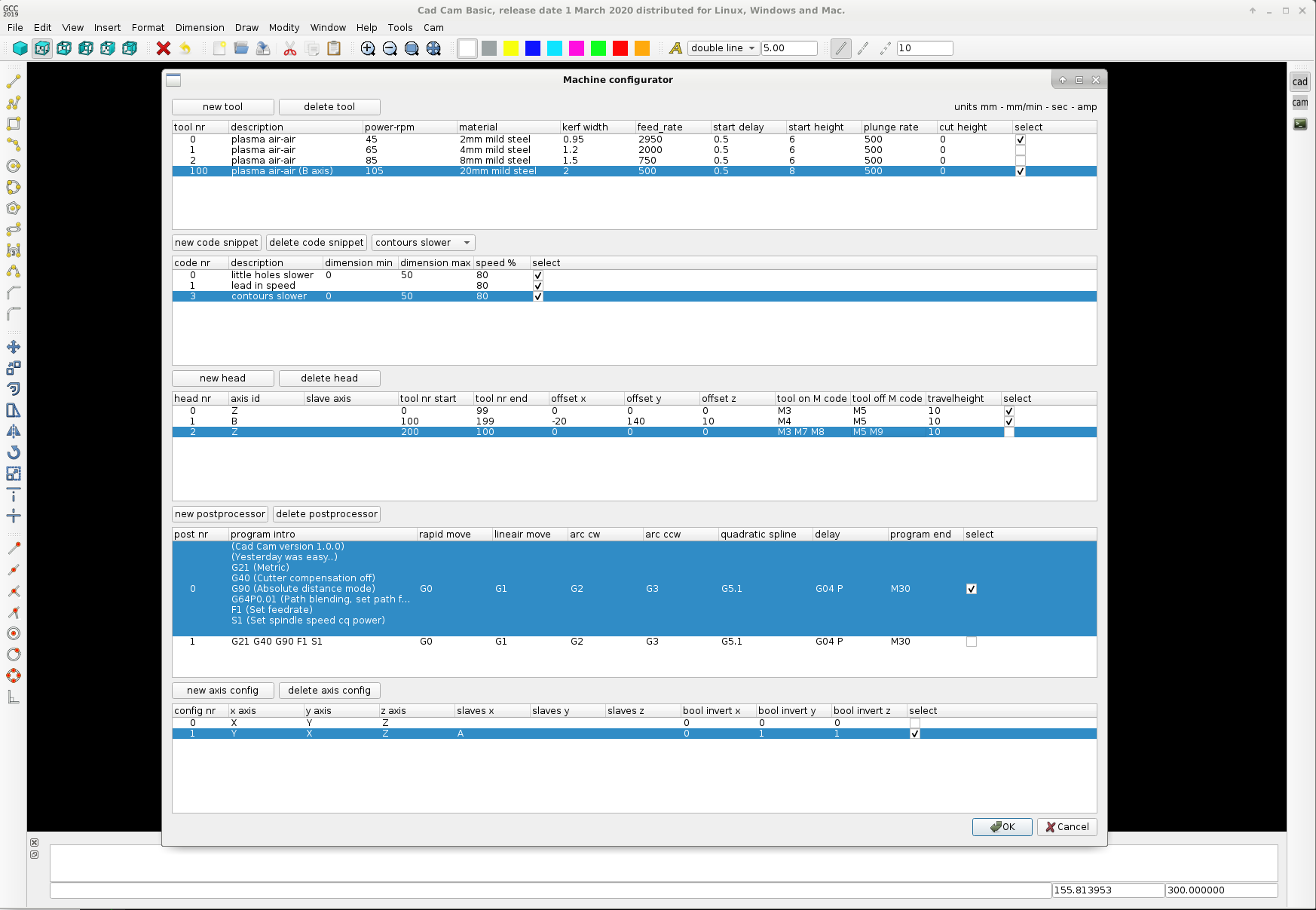
Attached a example of how the post processor can be set up. At least how i think it can be done at this moment.
It has several more items, like a tool library, code snippets and a axis configuration. This all can be loaded and saved in a configuration file related to the program. Editing the configuration file can also be done in Geanny or Wordpad.
I think this Treemodel structure can also be nice for editing the contour cut path's in the main cad cam screen.
- Soon try to add pocket milling operations.
Thank you for your advice.
Attached a example of how the post processor can be set up. At least how i think it can be done at this moment.
It has several more items, like a tool library, code snippets and a axis configuration. This all can be loaded and saved in a configuration file related to the program. Editing the configuration file can also be done in Geanny or Wordpad.
I think this Treemodel structure can also be nice for editing the contour cut path's in the main cad cam screen.
- Soon try to add pocket milling operations.
The following user(s) said Thank You: phillc54, tommylight, Clive S
Please Log in or Create an account to join the conversation.
- Grotius
- Offline
- Platinum Member
-
Less
More
- Posts: 2419
- Thank you received: 2349
6 years 10 months ago #151994
by Grotius
Replied by Grotius on topic QT C++ code samples
Hi,
I programmed the tools in a seperate window. It's done in a tableview format. Just like excel. Tools can be saved and loaded trough the text file tools.txt.
The tooltable can add and delete lines, insert lines at a selected place, the lines can be moved up and down to sort your tool table.
I think this is quite good..
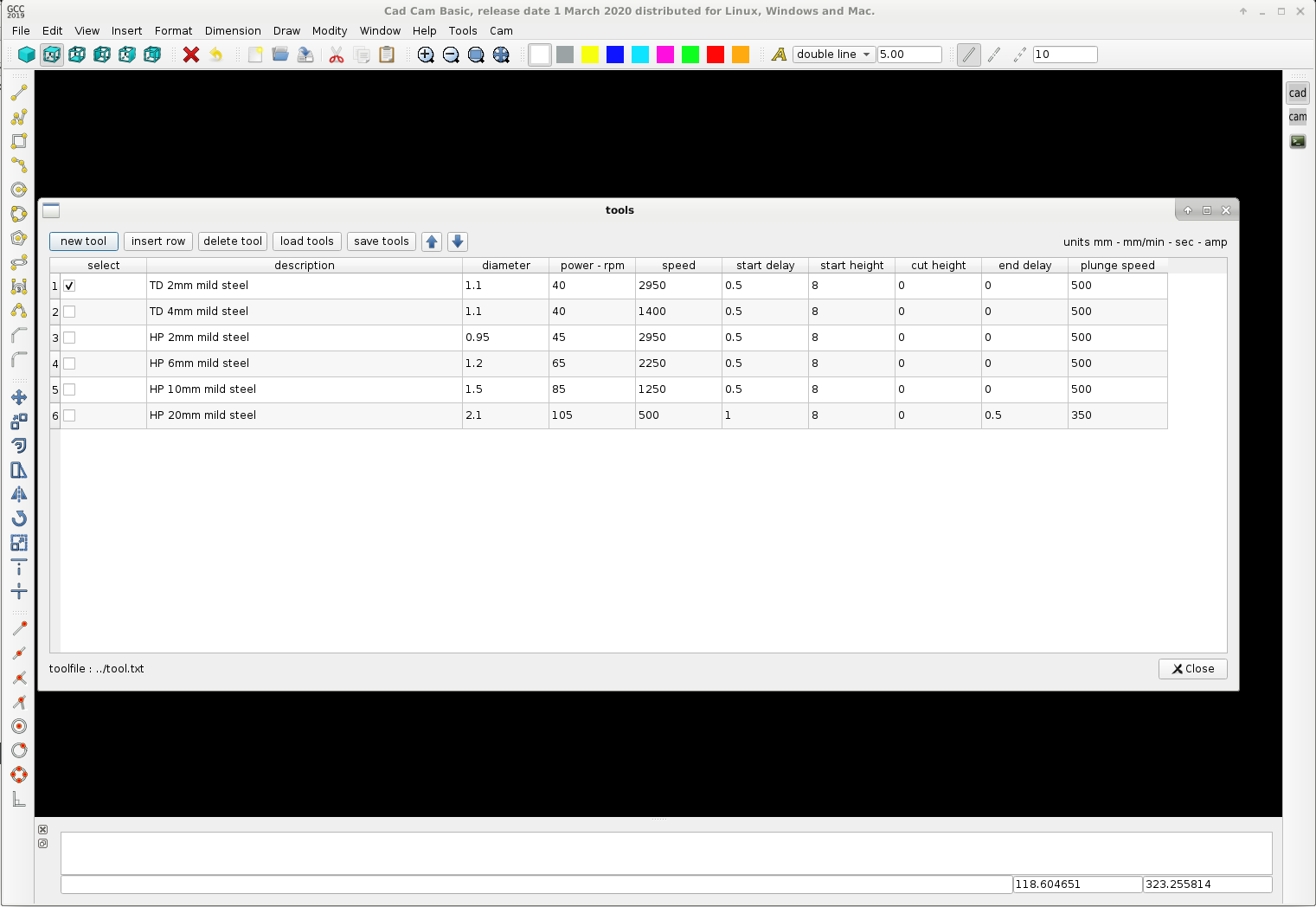
The text file can be edited off line. A tool.txt example output :
Okey this tool window template we can use as template for the postprocessor window and the machine head's window.
Problably the contour editing goes trough a tree structure..
Have a nice day !
I programmed the tools in a seperate window. It's done in a tableview format. Just like excel. Tools can be saved and loaded trough the text file tools.txt.
The tooltable can add and delete lines, insert lines at a selected place, the lines can be moved up and down to sort your tool table.
I think this is quite good..
The text file can be edited off line. A tool.txt example output :
Warning: Spoiler!
Code:
select
2
description
TD 2mm mild steel
diameter
1.1
power - rpm
40
cutspeed
2950
start delay
0.5
start height
8
cut height
0
end delay
0
plunge speed
500
select
0
description
TD 4mm mild steel
diameter
1.1
power - rpm
40
cutspeed
1400
start delay
0.5
start height
8
cut height
0
end delay
0
plunge speed
500
select
0
description
HP 2mm mild steel
diameter
0.95
power - rpm
45
cutspeed
2950
start delay
0.5
start height
8
cut height
0
end delay
0
plunge speed
500
select
0
description
HP 6mm mild steel
diameter
1.2
power - rpm
65
cutspeed
2250
start delay
0.5
start height
8
cut height
0
end delay
0
plunge speed
500
select
0
description
HP 10mm mild steel
diameter
1.5
power - rpm
85
cutspeed
1250
start delay
0.5
start height
8
cut height
0
end delay
0
plunge speed
500
select
0
description
HP 20mm mild steel
diameter
2.1
power - rpm
105
cutspeed
500
start delay
1
start height
8
cut height
0
end delay
0.5
plunge speed
350
Okey this tool window template we can use as template for the postprocessor window and the machine head's window.
Problably the contour editing goes trough a tree structure..
Have a nice day !
The following user(s) said Thank You: phillc54, tommylight
Please Log in or Create an account to join the conversation.
- Grotius
- Offline
- Platinum Member
-
Less
More
- Posts: 2419
- Thank you received: 2349
6 years 10 months ago #152613
by Grotius
Replied by Grotius on topic QT C++ code samples
Hi,
Bit by bit we go on. I had difficult times constructing a combobox with multiple data on the same line and qt has a tiny bug according
to display the toolbar order. So far no problems anymore.
At the moment doing some work on the cam window on the right of the screen. The treewidget is interacting with the contours.
The buttonboxes data in the toolbar are saved and loaded and refreshed during program execution.
I need some more time to make it as espected..
Have a nice day !

Bit by bit we go on. I had difficult times constructing a combobox with multiple data on the same line and qt has a tiny bug according
to display the toolbar order. So far no problems anymore.
At the moment doing some work on the cam window on the right of the screen. The treewidget is interacting with the contours.
The buttonboxes data in the toolbar are saved and loaded and refreshed during program execution.
I need some more time to make it as espected..
Have a nice day !
The following user(s) said Thank You: phillc54, tommylight, Clive S, emilvv
Please Log in or Create an account to join the conversation.
- Grotius
- Offline
- Platinum Member
-
Less
More
- Posts: 2419
- Thank you received: 2349
6 years 10 months ago - 6 years 10 months ago #153606
by Grotius
Replied by Grotius on topic QT C++ code samples
Hi guy's.
Everyone a good new year !
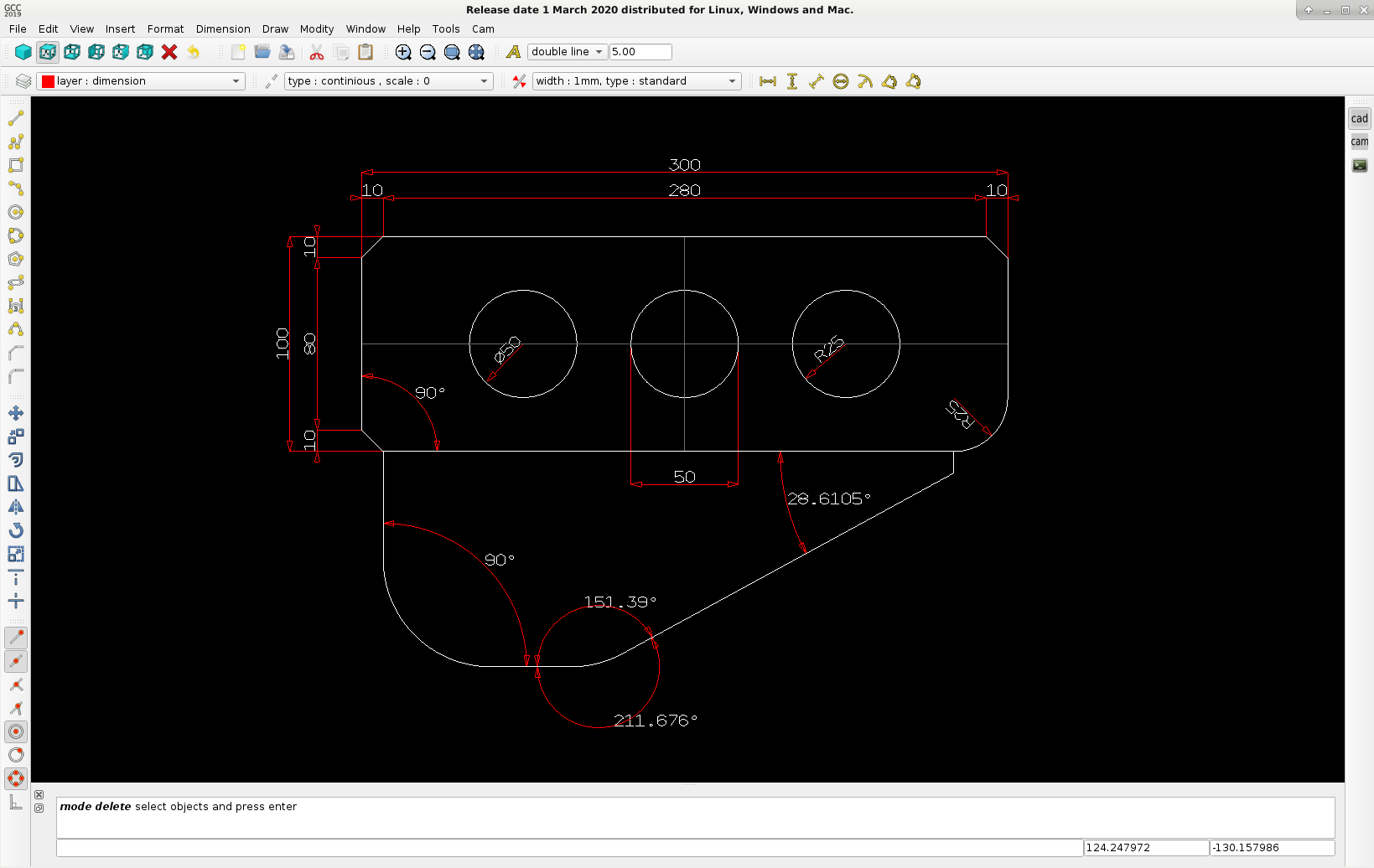
For the cad/cam program i spent some time in adding dimension features, see the example picture.
If users need a factory drawing, it needs dimension's and it must be printed to paper.. If not, it's useless..
I have read some document's about printing the opengl screen. We can save it as png or bitmap,
but that will result in a very bad output for the printer resolution.
So i am more thinking to output a pdf file (vector style) for printing... The pdf file does not need the opengl parameters. It only needs
the array data... I have to investegate more time about setting up a pdf file from scratch with c++.
So far so good, the dimension class works nice !
Everyone a good new year !
For the cad/cam program i spent some time in adding dimension features, see the example picture.
If users need a factory drawing, it needs dimension's and it must be printed to paper.. If not, it's useless..
I have read some document's about printing the opengl screen. We can save it as png or bitmap,
but that will result in a very bad output for the printer resolution.
So i am more thinking to output a pdf file (vector style) for printing... The pdf file does not need the opengl parameters. It only needs
the array data... I have to investegate more time about setting up a pdf file from scratch with c++.
So far so good, the dimension class works nice !
Last edit: 6 years 10 months ago by Grotius.
The following user(s) said Thank You: phillc54, tommylight, Clive S
Please Log in or Create an account to join the conversation.
Time to create page: 1.160 seconds