
- Posts: 2419
- Thank you received: 2349
QT C++ code samples
- Grotius
- Offline
- Platinum Member
-

Less
More
6 years 11 months ago - 6 years 11 months ago #150471
by Grotius
Replied by Grotius on topic QT C++ code samples
Hi Todd, thanks for your input..
Wouldn't it make more sense to start from the outside and work in.
When using sheetcam for example you will mention that the cut order is not from inner products to outher related products. I mean
nested product logic is not available. The only logic wich is usefull in sheetcam is "keep parts together" and "cut direction" for tube cutters. The problem is, when outher related products are cut off (and have inner nested products inside), the inner related product's will lose position very easy when they have no microjoints (taps) or trough thermal distortion heat input.
if you are cutting a piece with a window the inner cut is female, if you are cutting a piece out of the scrap in the window, the inner cut would be male.
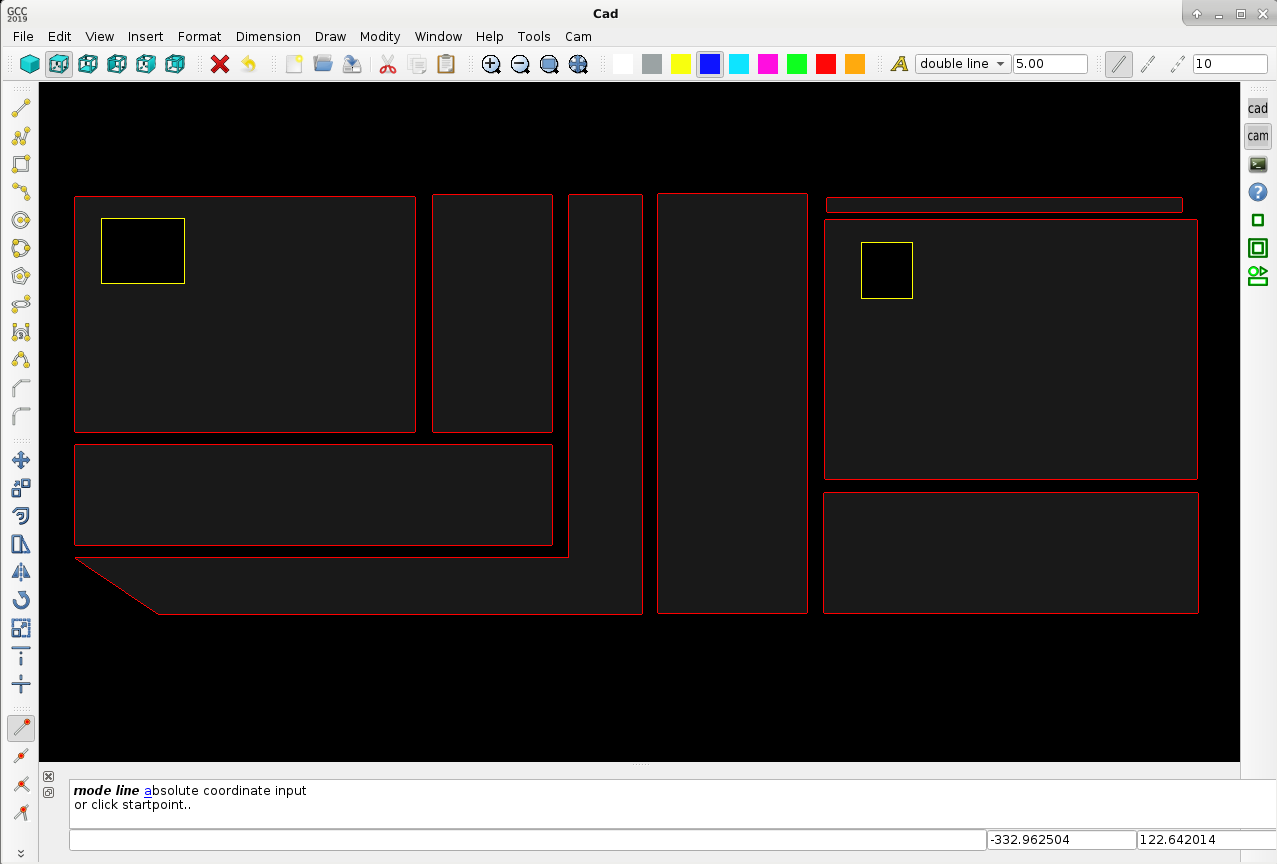
Yes, exactly. In the picture :
1. Red color is cw (clockwise) wich is => outside cut.
2. Yellow color is ccw (counter clockwise) wich is => inside cut.
3. Grey is triangulation to view the product output easy..
4. This example does not contain any inside nested products, wich will be better cutted first. Todd if you think not, please let me know.
5. In the yellow holes can be put a second object for cutting. Sheetcam does not have the logic to start there with cutting.
Attached a code snipped for setting up and use 2d vector / list array's in c++.
There is quite less info how to excess a 2d vector array or list 2d array on the net, especially how to find info in the
second array row with the use of a pointer. Vector array's are nice to use. The Qt library has nice features as "contains" to find
a value very quickly. If you don't use Qt, you can use the std library with "find". Just for info a code snipped :
Wouldn't it make more sense to start from the outside and work in.
When using sheetcam for example you will mention that the cut order is not from inner products to outher related products. I mean
nested product logic is not available. The only logic wich is usefull in sheetcam is "keep parts together" and "cut direction" for tube cutters. The problem is, when outher related products are cut off (and have inner nested products inside), the inner related product's will lose position very easy when they have no microjoints (taps) or trough thermal distortion heat input.
if you are cutting a piece with a window the inner cut is female, if you are cutting a piece out of the scrap in the window, the inner cut would be male.
Yes, exactly. In the picture :
1. Red color is cw (clockwise) wich is => outside cut.
2. Yellow color is ccw (counter clockwise) wich is => inside cut.
3. Grey is triangulation to view the product output easy..
4. This example does not contain any inside nested products, wich will be better cutted first. Todd if you think not, please let me know.
5. In the yellow holes can be put a second object for cutting. Sheetcam does not have the logic to start there with cutting.
Attached a code snipped for setting up and use 2d vector / list array's in c++.
There is quite less info how to excess a 2d vector array or list 2d array on the net, especially how to find info in the
second array row with the use of a pointer. Vector array's are nice to use. The Qt library has nice features as "contains" to find
a value very quickly. If you don't use Qt, you can use the std library with "find". Just for info a code snipped :
Warning: Spoiler!
Code:
#include <stdio.h>
using namespace std;
vector<vector <int>> array;
vector<int>::iterator itv;
vector<vector <int>>::iterator itvv;
array.push_back({100,3});
array.push_back({110,4});
array.push_back({120,5});
array.push_back({130,130});
//C language printout style :
printf("array: %i\n", array[0][0]); //100
//Qt C++ language printout style :
qDebug()<< "array :" << array.at(0); //std::vector(100, 3)
qDebug()<< "array :" << array.at(1); //std::vector(110, 4)
qDebug()<< "array :" << array.at(2); //std::vector(120, 5)
qDebug()<< "array :" << array[0][0]; //100
qDebug()<< "array :" << array[1][0]; //110
qDebug()<< "array :" << array[2][0]; //120
qDebug()<< "array :" << array[0][1]; //3
qDebug()<< "array :" << array[1][1]; //4
qDebug()<< "array :" << array[2][1]; //5
//work with counters :
for(unsigned int i = 0; i < array.size(); ++i){
qDebug()<< "array at pos : " << i << " value : " << array[i][0]; //100, 110, 120..
}
for(unsigned int i = 0; i < array.size(); ++i){
qDebug()<< "array at pos : " << i << " value : " << array[i][1]; //3, 4 ,5
}
//work with pointers :
for(itvv = array.begin(); itvv != array.end(); ++itvv){
qDebug()<< "pointer *itv : " << *itvv;
//output :
//pointer *itv : std::vector(100, 3)
//pointer *itv : std::vector(110, 4)
//pointer *itv : std::vector(120, 5)
}
for(itvv = array.begin(); itvv != array.end(); ++itvv){
qDebug()<< "first row :" << (*itvv)[0];
//output :
//100
//110
//120
qDebug()<< "second row :" << (*itvv)[1];
//output :
//3
//4
//5
if((*itvv)[1] == (*itvv)[0]){ //if first row value = second row value.
qDebug()<< "match found for value : " << *itvv;
//output:
//std::vector(130, 130)
}
}
//don't forget to clean up memory space..
array.empty();
array.shrink_to_fit();
Last edit: 6 years 11 months ago by Grotius.
Please Log in or Create an account to join the conversation.
- Todd Zuercher
- Offline
- Platinum Member
-
Less
More
- Posts: 4793
- Thank you received: 1480
6 years 11 months ago #150472
by Todd Zuercher
Replied by Todd Zuercher on topic QT C++ code samples
I agree the pieces should be cut from inside to out. I was thinking of how your program should calculate the process.
Please Log in or Create an account to join the conversation.
- Grotius
- Offline
- Platinum Member
-
Less
More
- Posts: 2419
- Thank you received: 2349
6 years 11 months ago #150473
by Grotius
Replied by Grotius on topic QT C++ code samples
Hi Todd,
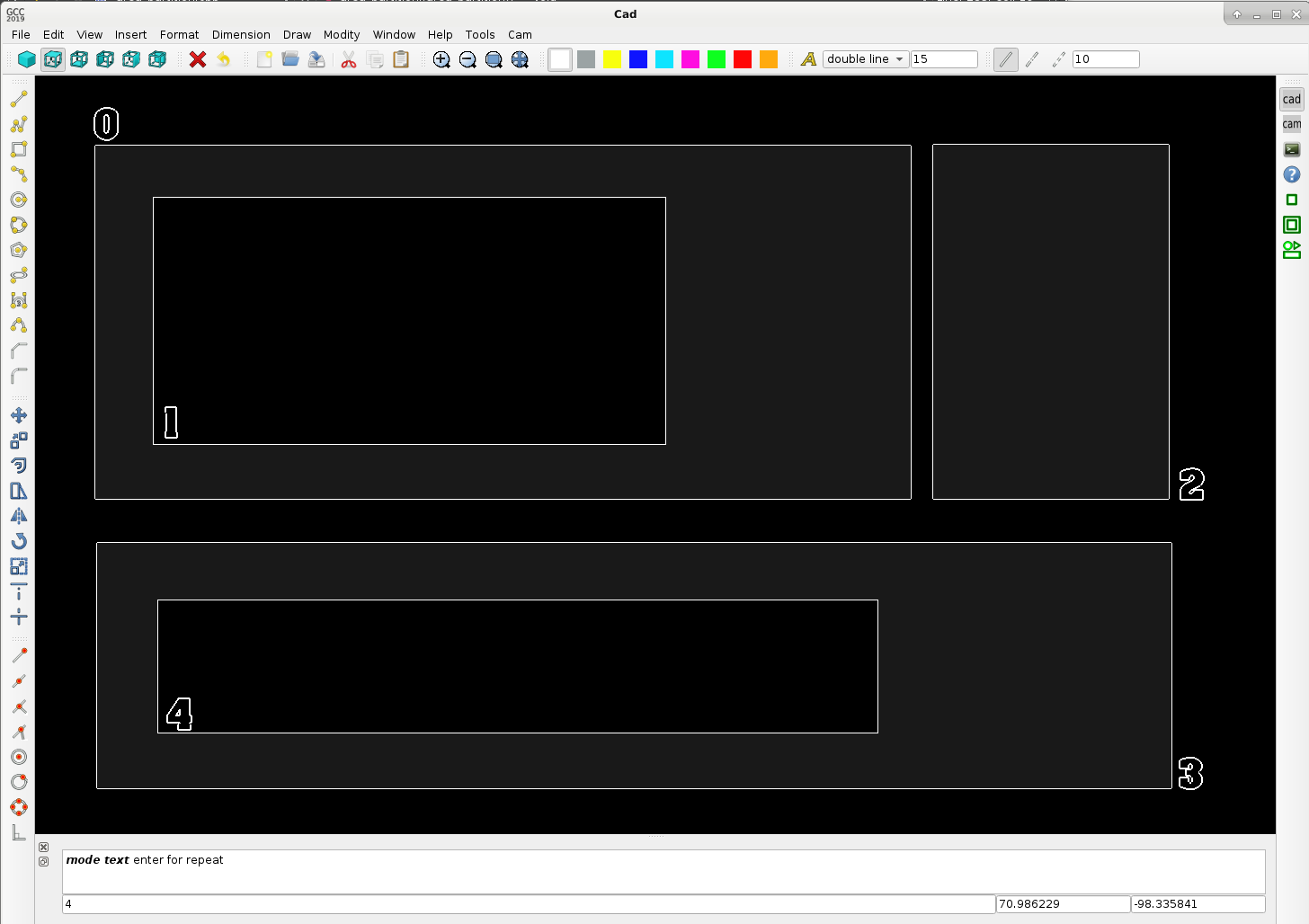
Here is some info what is happening after the algoritme has recognized the objects for inside each other, or not..
This output list, is the base how to go further in the process.. By list manipulation you can make a sequence for cutting.
There is beside that info almost unlimited to acces to info about product contour dimension, shape, area, etc.. that can be used by the process. We got about 75 parameters for each drawed item, divided up into 15 integers and 60 double value's. This includes everything up to dxf, stl, contournumbers, cw or ccw parameters, predifined intersection points, etc. So much info. More then a draftsight drawing. :woohoo:
I was thinking of how your program should calculate the process.
stand alone contour added *it : 2
master : 0 slave : 1
master : 0 slave : 1
master : 0 slave : 1
master : 0 slave : 1
master : 3 slave : 4
master : 3 slave : 4
master : 3 slave : 4
master : 3 slave : 4
Here is some info what is happening after the algoritme has recognized the objects for inside each other, or not..
This output list, is the base how to go further in the process.. By list manipulation you can make a sequence for cutting.
There is beside that info almost unlimited to acces to info about product contour dimension, shape, area, etc.. that can be used by the process. We got about 75 parameters for each drawed item, divided up into 15 integers and 60 double value's. This includes everything up to dxf, stl, contournumbers, cw or ccw parameters, predifined intersection points, etc. So much info. More then a draftsight drawing. :woohoo:
I was thinking of how your program should calculate the process.
stand alone contour added *it : 2
master : 0 slave : 1
master : 0 slave : 1
master : 0 slave : 1
master : 0 slave : 1
master : 3 slave : 4
master : 3 slave : 4
master : 3 slave : 4
master : 3 slave : 4
Please Log in or Create an account to join the conversation.
- Grotius
- Offline
- Platinum Member
-
Less
More
- Posts: 2419
- Thank you received: 2349
6 years 11 months ago #150878
by Grotius
Replied by Grotius on topic QT C++ code samples
Hi there,
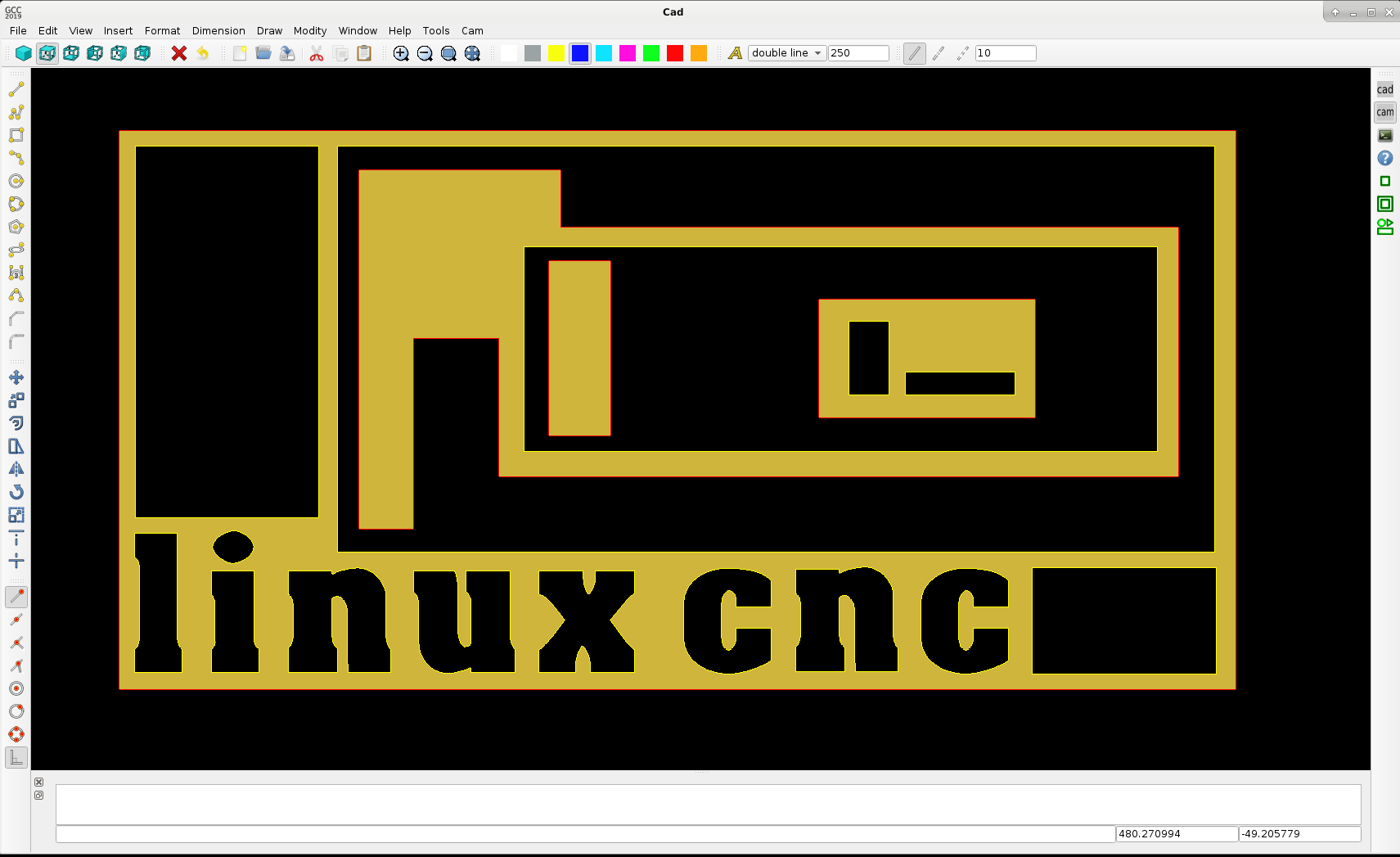
I had some difficult programming time the last day's. But we can now nest 3 parts deep.
This mean's part 1, may contain part 2, and part 2 may contain part 3. It's a very hard logic to write, it takes some up's and down's..
The nice thing is, the g-code logic is from most inner part to most outher part. And is keep part's together. So very good..
The red line is cw, outside cutting.
The yellow line is ccw, inside cutting.
Triangulation is done in the color old gold.
Next step is to implement the contour offset. This will become a tiny blue line around the contours. It will look fantastic...
Example plate 2000x1000mm with some text and parts nested 3 parts deep :
I had some difficult programming time the last day's. But we can now nest 3 parts deep.
This mean's part 1, may contain part 2, and part 2 may contain part 3. It's a very hard logic to write, it takes some up's and down's..
The nice thing is, the g-code logic is from most inner part to most outher part. And is keep part's together. So very good..
The red line is cw, outside cutting.
The yellow line is ccw, inside cutting.
Triangulation is done in the color old gold.
Next step is to implement the contour offset. This will become a tiny blue line around the contours. It will look fantastic...
Example plate 2000x1000mm with some text and parts nested 3 parts deep :
The following user(s) said Thank You: phillc54, tommylight, Clive S
Please Log in or Create an account to join the conversation.
- Grotius
- Offline
- Platinum Member
-
Less
More
- Posts: 2419
- Thank you received: 2349
6 years 11 months ago #151477
by Grotius
Replied by Grotius on topic QT C++ code samples
Hi linux friends,
A little project update for today.
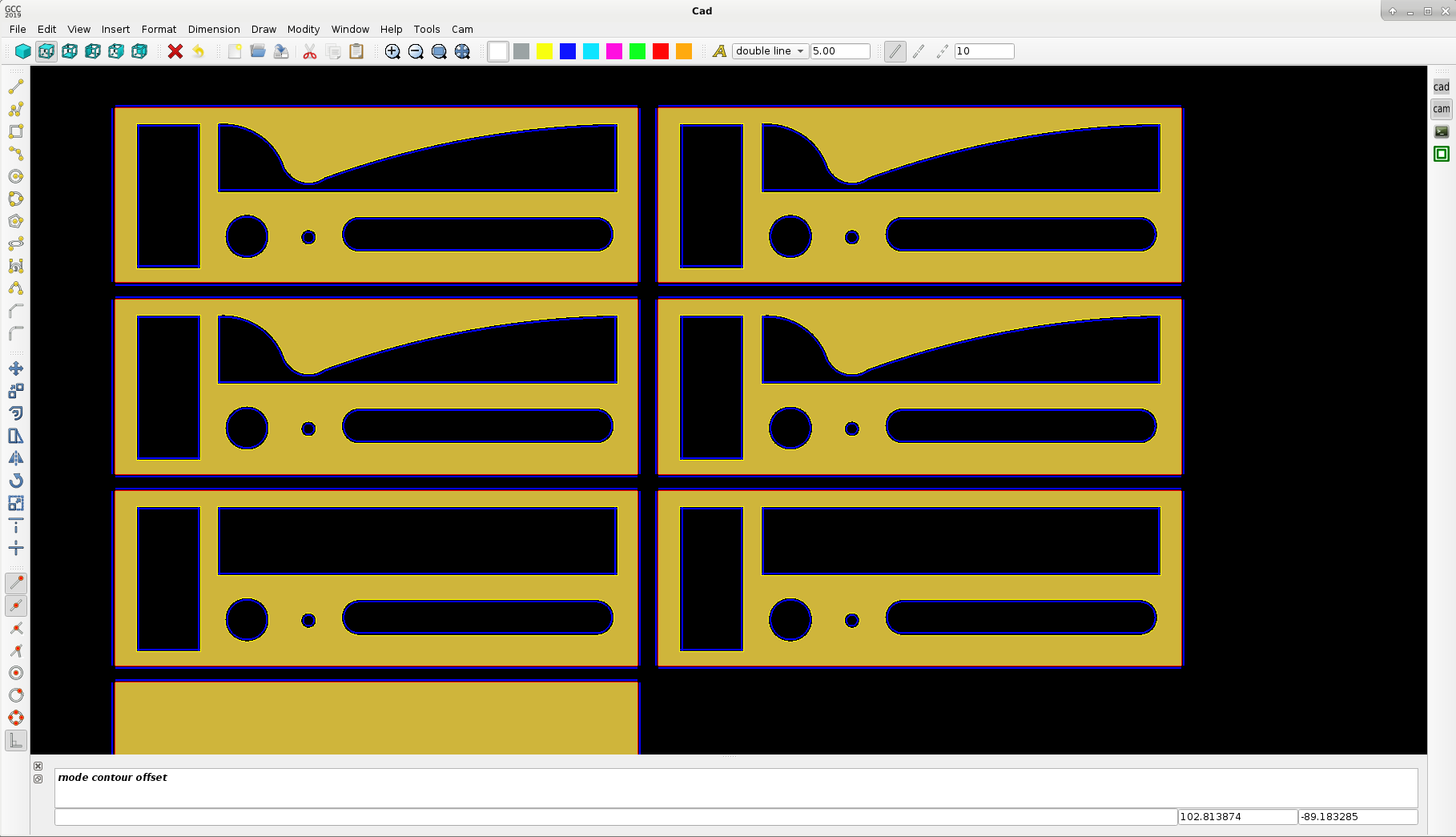
The contour offset class is in progess. Todo is to calculate the new offset intersection point's. line-line, line-arc etc..
The triangulation is a quite a difficult class to get as espected. But we are quite far in coding that class at the moment.
The tiny blue line is the generated tool offset path, chosen a tool diameter of 1.5mm
Red is clockwise contour, Yellow is counter clockwise contour. When the intersection's are done, we make the lead-in and lead out-logic.
So far so good. Have a nice day !
A little project update for today.
The contour offset class is in progess. Todo is to calculate the new offset intersection point's. line-line, line-arc etc..
The triangulation is a quite a difficult class to get as espected. But we are quite far in coding that class at the moment.
The tiny blue line is the generated tool offset path, chosen a tool diameter of 1.5mm
Red is clockwise contour, Yellow is counter clockwise contour. When the intersection's are done, we make the lead-in and lead out-logic.
So far so good. Have a nice day !
The following user(s) said Thank You: phillc54, tommylight, Clive S
Please Log in or Create an account to join the conversation.
- Grotius
- Offline
- Platinum Member
-
Less
More
- Posts: 2419
- Thank you received: 2349
6 years 11 months ago - 6 years 11 months ago #151516
by Grotius
Replied by Grotius on topic QT C++ code samples
Hi,
A short program update of today.
The contour intersection point's of the blue lines are calculated. It seems to work quite nice.
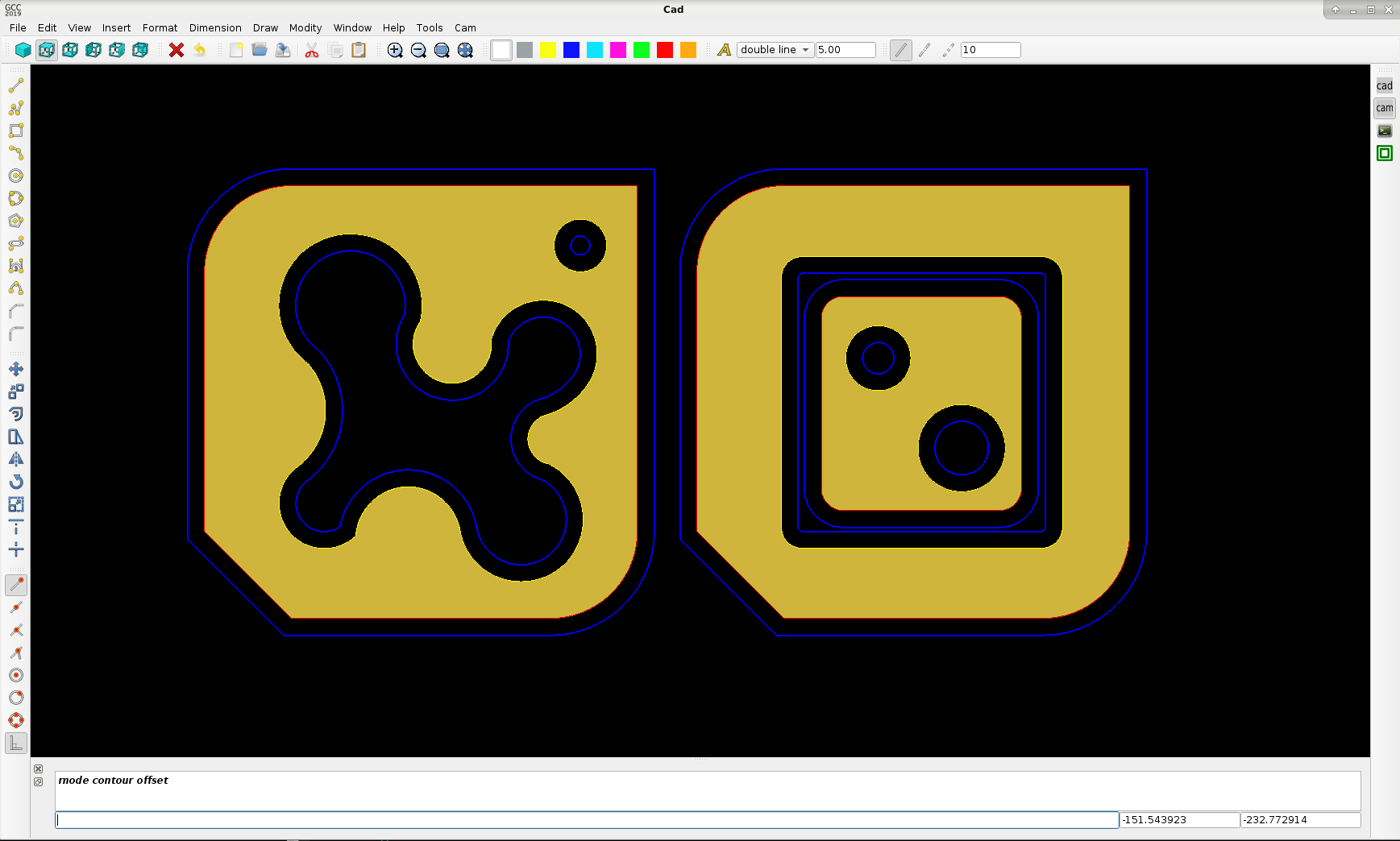
This cam calculation of 32 pieces of 100x100 products takes 1,39717 seconds to generate :
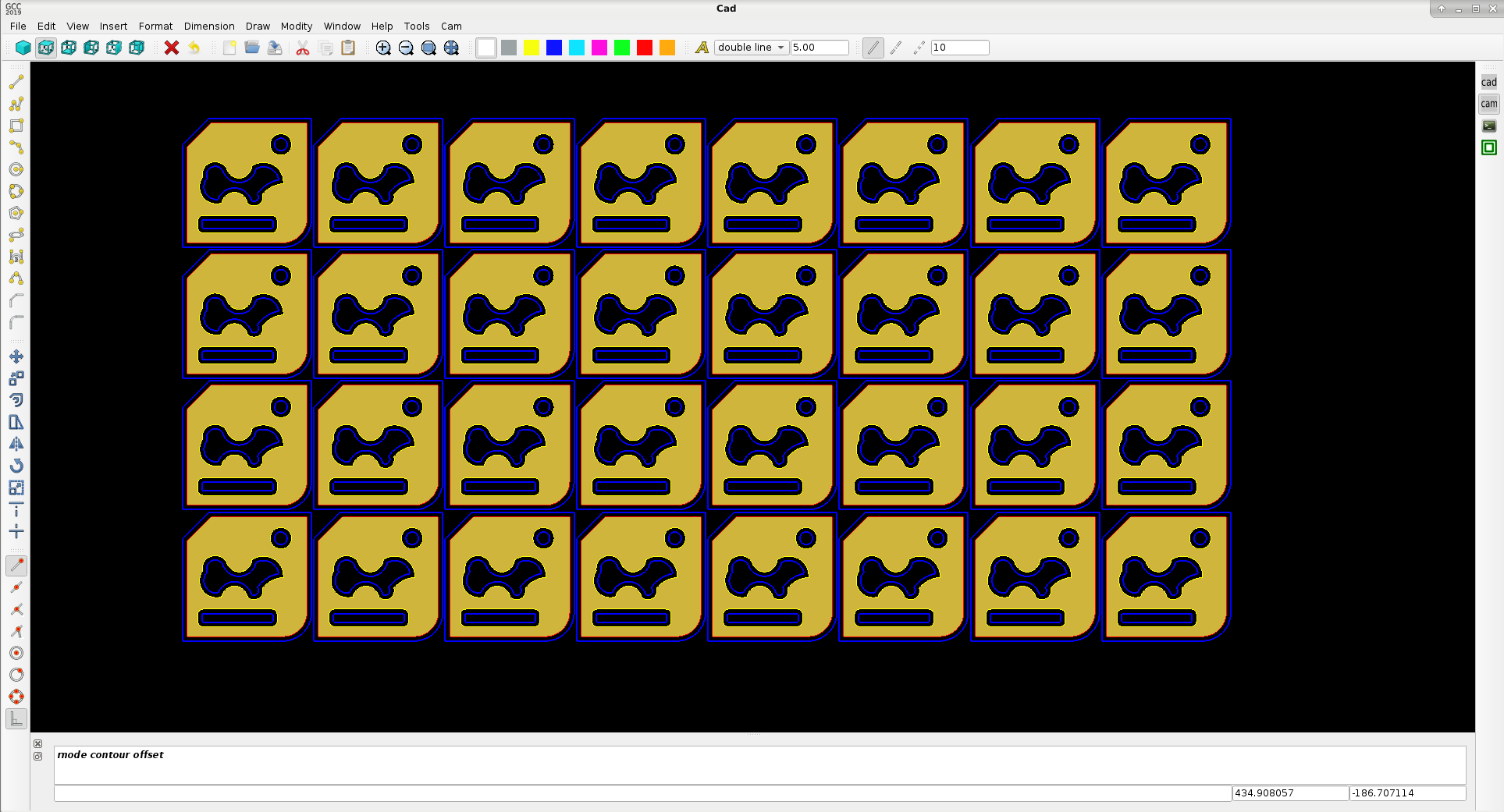
above 32 pieces have 1410 items like line's, arc's and circles.
Okey let's see if we can add lead-in and lead out to the products. Have a nice day !
Update : Auto generated lead in :
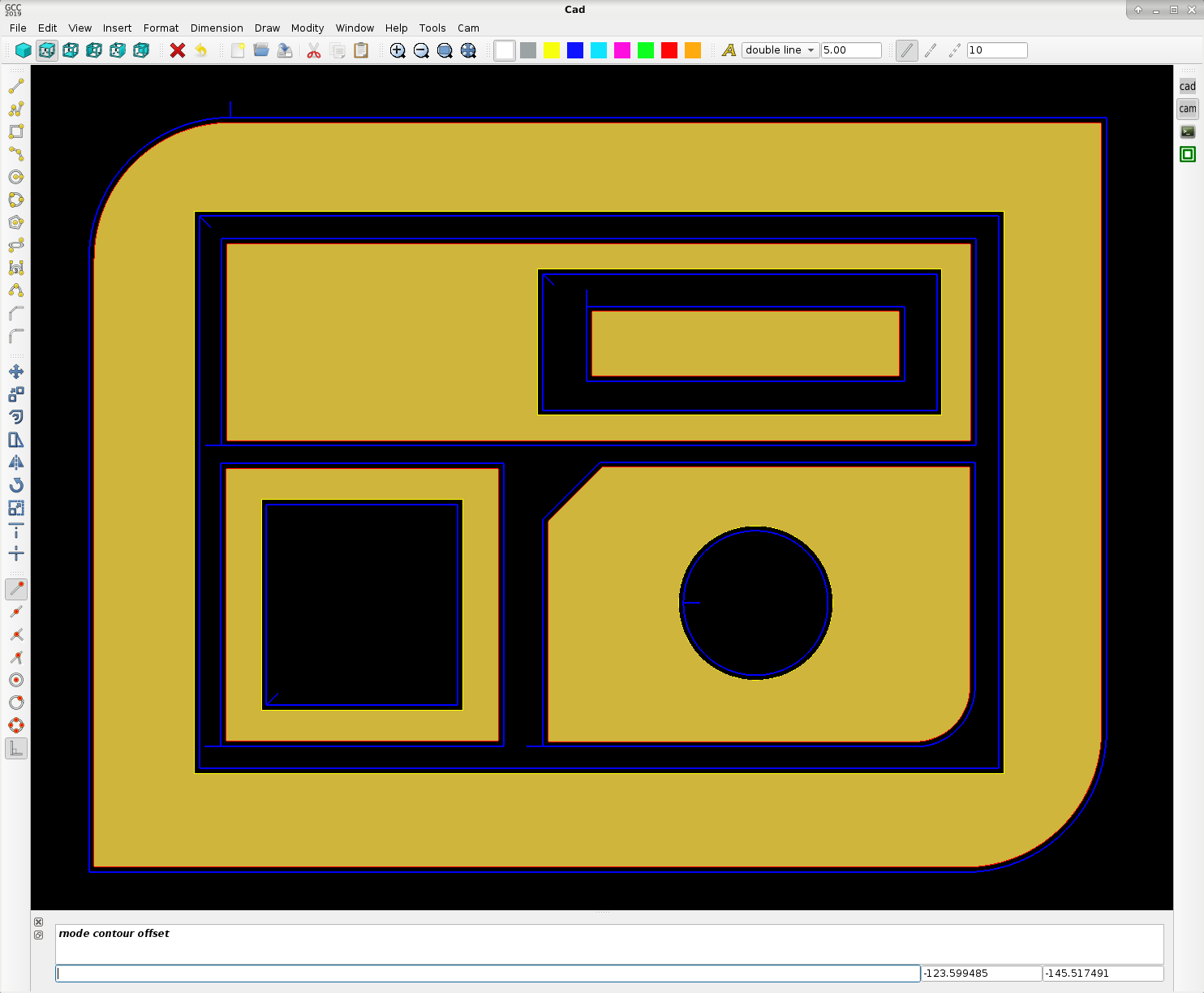
A short program update of today.
The contour intersection point's of the blue lines are calculated. It seems to work quite nice.
This cam calculation of 32 pieces of 100x100 products takes 1,39717 seconds to generate :
above 32 pieces have 1410 items like line's, arc's and circles.
Okey let's see if we can add lead-in and lead out to the products. Have a nice day !
Update : Auto generated lead in :
Last edit: 6 years 11 months ago by Grotius.
The following user(s) said Thank You: phillc54, tommylight, Clive S
Please Log in or Create an account to join the conversation.
Time to create page: 0.795 seconds