
- Posts: 2419
- Thank you received: 2349
QT C++ code samples
- Grotius
- Offline
- Platinum Member
-

Less
More
7 years 2 months ago #141637
by Grotius
Replied by Grotius on topic QT C++ code samples
Hi Clive and Tommy,
Thank you for your kind words!!
It's nice to hear some feedback!! It give's power...
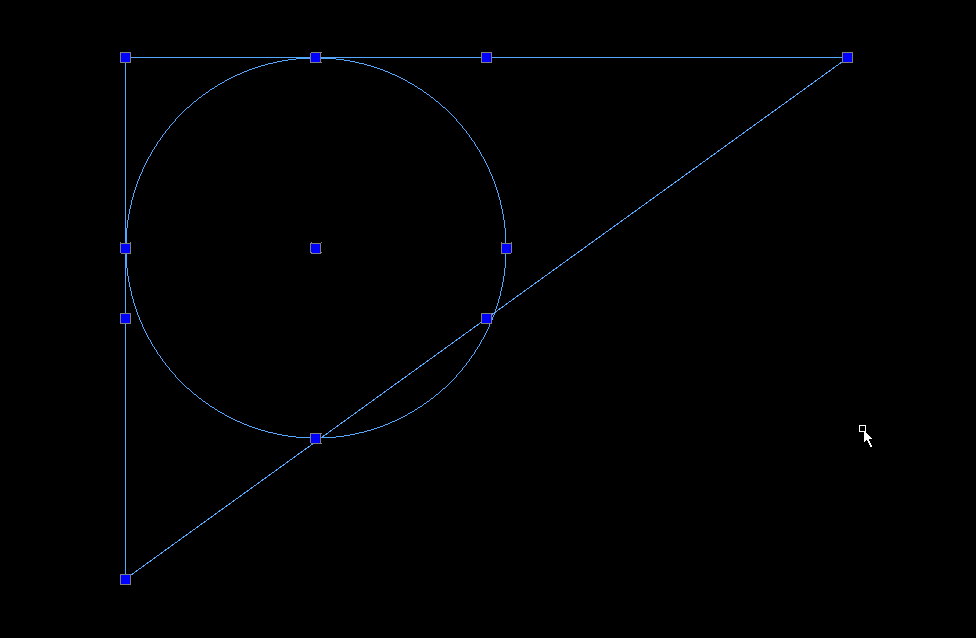
For cad there are so much new function's to integrate, like a button for drawing a inline circle inside a 3 point triangle.
Wich is difficult to draw your own, unless you make some help lines first. Or draw a inline circle inside a contour automaticly.
The more we get involved into this project, the more new solution's we see.
We don't have a time limit.
Some of the code templates are worth more then real diamonts.
Thank you for your kind words!!
It's nice to hear some feedback!! It give's power...
For cad there are so much new function's to integrate, like a button for drawing a inline circle inside a 3 point triangle.
Wich is difficult to draw your own, unless you make some help lines first.
Or draw a inline circle inside a contour automaticly.
The more we get involved into this project, the more new solution's we see.
We don't have a time limit.
Some of the code templates are worth more then real diamonts.
The following user(s) said Thank You: phillc54, tommylight, Clive S
Please Log in or Create an account to join the conversation.
- Grotius
- Offline
- Platinum Member
-
Less
More
- Posts: 2419
- Thank you received: 2349
7 years 2 months ago - 7 years 2 months ago #141820
by Grotius
Replied by Grotius on topic QT C++ code samples
Hi phillc54, tommylight & Clive s,
You are perfect !! Wow. The idea we have a strong community with soul member's.. The open source facility... The interest... The time we invest to make thing better for next generation's.. Wow. We can write history if we go on this way for sure !!
Elon Musk is clear about open source. Everything will be open source within a certain time. Think about where to buy a linux pc or laptop. The trade is not fair at this moment. Every laptop has windows 10 for 150 euro's. I don't need window's ......
Maybe with the next auto window's update, we let the customer choose the system.. let the customer choose : free or non free.
So maybe i tell some authority about trade mistake's that are going on. Customer can deside what he want's on the pc, that is fare trade. Let window's go a few step's down's please...
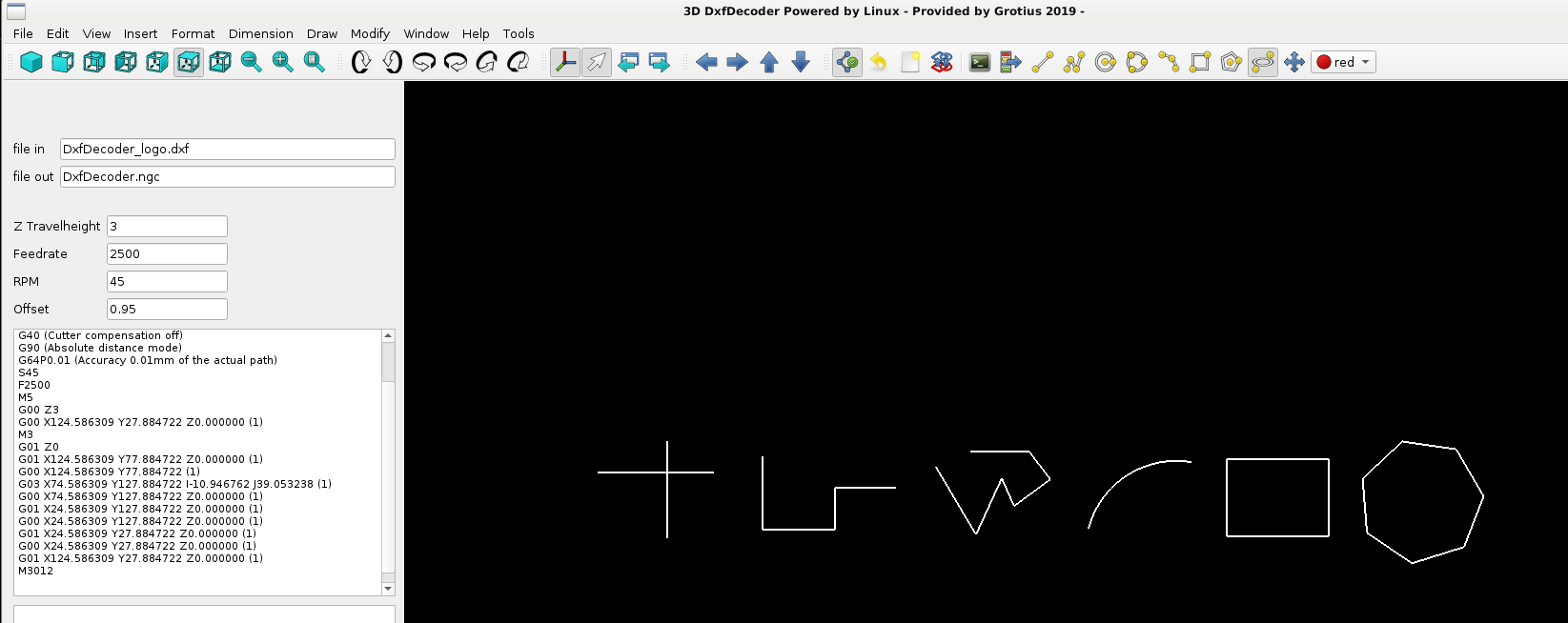
Today we added the polygon function to the cad interface. Yesterday the arc function was ready. The arc source code has exact the same features as autodesk and some improvements related to drawing arc's.. perfect done !!
A screenshot of several cad functions :
- lines ( ortho on or off (F8 toggle) )
- linestrip ( ortho on or off (F8 toggle) )
- arc's ( very clever function for cw and ccw arc's )
- rectangular
- polygon ( give up the sides in terminal, it's react's on even and odd polygon's, output is very good !! )
It looks like a Egyptian hyroglypics text, isn't it...
Now we started coding the ellipse function. This is a nice exotic function to integrate, it's a little special in this case.
We don't want a conventional ellipse (one liner). We can use a ellipse on a cnc when it's build up from multiple arc's. So in that case we must make a ellipse C++ template algortime. Nice !!
The cad template to draw the ellipse is in fact the source code for the C++ template algoritme.
If we follow the steps of drawing the ellipse in cad, we can write the C++ code the same way, so in fact drawing something has the same logic as coding something...
The most difficult part is debugging the step's. ( debugging is in fact : every step you make, check this step in output if it's correct. )
Okey how to define a ellipse in Cad :
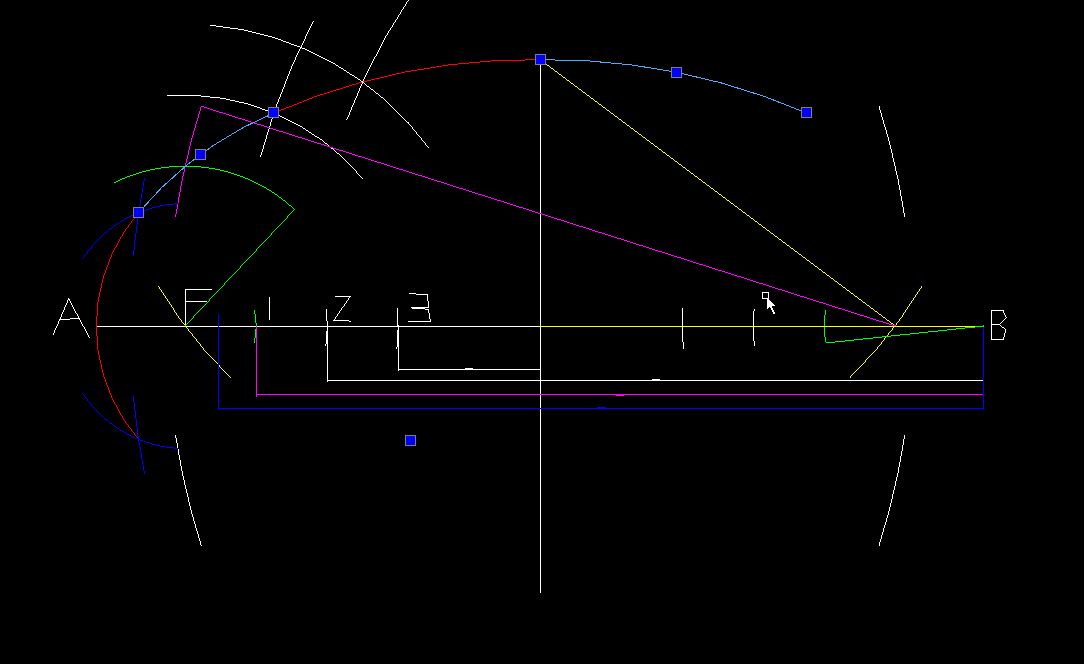
So there was a youtube video about this how to draw (define) a ellipse yourself.
I started coding the ellipse. Within 2 day's it's ready.
Did you realise a kwart 1/4 ellipse can be a perfect chamfer option for 2 lines instead of a segment of a circle or a arc....
An ellipse with the same base and height is a full circle. But it has some improvement's that i did not realise until i start working
with this exotic piece of mathematical workspace.
The ellipse chamfer function, wich does not extist chamfers with material reduction in a natural perfect way. Given a perfect
end shape output. We will show and start that option soon. The ellipse chamfer solution is a nice one for the pocket !!!
Autodesk can not do this, because they use ellipse one liner's...
40 years of autodesk coding, where is the logic? Maybe they can dot it. but have no good coders....
Polygon C++ source code :
Mention... The open gl is no display management sytem...
Everything you have to code yourself... Make your coding stratagy.. That's what top coder's have to say about opengl.
For fun i think about integrating :

In Math's i suspect there is a gab in the Pi value... Can a Pi value be updated? In Radian's it has no unexpected values... but it also in radians we have PI.. or M_PI for C++.. Fuck !! How to get rid of PI and solve the problem...
For example,
if you calculate 4 arc's as ellipse that imagine a full circle in double. (defined as about 16 digit's... (2x accuray of float))
What is the difference when calculating the same as one liner circle with given : M_PI...
Never seen any comparishment's about this....
We will calculate the difference of PI some how in combination of a 4-arc's circle to a one liner circle.
And i think the 4 -arc's are more clever in output before i start the calculation. Why??
It can be a output of ^4 more PI accuracy for example.
You are perfect !! Wow. The idea we have a strong community with soul member's.. The open source facility... The interest... The time we invest to make thing better for next generation's.. Wow. We can write history if we go on this way for sure !!
Elon Musk is clear about open source. Everything will be open source within a certain time. Think about where to buy a linux pc or laptop. The trade is not fair at this moment. Every laptop has windows 10 for 150 euro's. I don't need window's ......
Maybe with the next auto window's update, we let the customer choose the system.. let the customer choose : free or non free.
So maybe i tell some authority about trade mistake's that are going on. Customer can deside what he want's on the pc, that is fare trade. Let window's go a few step's down's please...
Today we added the polygon function to the cad interface. Yesterday the arc function was ready. The arc source code has exact the same features as autodesk and some improvements related to drawing arc's.. perfect done !!
A screenshot of several cad functions :
- lines ( ortho on or off (F8 toggle) )
- linestrip ( ortho on or off (F8 toggle) )
- arc's ( very clever function for cw and ccw arc's )
- rectangular
- polygon ( give up the sides in terminal, it's react's on even and odd polygon's, output is very good !! )
It looks like a Egyptian hyroglypics text, isn't it...
Now we started coding the ellipse function. This is a nice exotic function to integrate, it's a little special in this case.
We don't want a conventional ellipse (one liner). We can use a ellipse on a cnc when it's build up from multiple arc's. So in that case we must make a ellipse C++ template algortime. Nice !!
The cad template to draw the ellipse is in fact the source code for the C++ template algoritme.
If we follow the steps of drawing the ellipse in cad, we can write the C++ code the same way, so in fact drawing something has the same logic as coding something...
The most difficult part is debugging the step's. ( debugging is in fact : every step you make, check this step in output if it's correct. )
Okey how to define a ellipse in Cad :
So there was a youtube video about this how to draw (define) a ellipse yourself.
I started coding the ellipse. Within 2 day's it's ready.
Did you realise a kwart 1/4 ellipse can be a perfect chamfer option for 2 lines instead of a segment of a circle or a arc....
An ellipse with the same base and height is a full circle. But it has some improvement's that i did not realise until i start working
with this exotic piece of mathematical workspace.
The ellipse chamfer function, wich does not extist chamfers with material reduction in a natural perfect way. Given a perfect
end shape output. We will show and start that option soon. The ellipse chamfer solution is a nice one for the pocket !!!
Autodesk can not do this, because they use ellipse one liner's...
40 years of autodesk coding, where is the logic? Maybe they can dot it. but have no good coders....
Polygon C++ source code :
Mention... The open gl is no display management sytem...
Everything you have to code yourself... Make your coding stratagy.. That's what top coder's have to say about opengl.
Warning: Spoiler!
if(drawpolygon_mode == 1){
//result = asin (param) * 180.0 / PI;
//X = Cx + (r * cosine(angle))
//Y = Cy + (r * sine(angle))
//float angle between 2 points = atan2(p1.y - p2.y, p1.x - p2.x)* 180.0 / PI;
double x3;
double y3;
double x4;
double y4;
bool even;
click++;
if(click == 1){
qDebug() << "click = 1";
//mouse clicked center xy of polygon
x_center = gl_mousepos_x; //center x
y_center = gl_mousepos_y; //center y
}
if(click == 2){
qDebug() << "click = 2";
//mouse clicked radius of polygon
x_start = gl_mousepos_x; //radius x
y_start = gl_mousepos_y; //radius y
dist_x = x_start - x_center;
dist_y = y_start - y_center;
radius = sqrt(pow(dist_x,2) + pow(dist_y,2)); //radius
qDebug() << "radius is : " << radius;
cake_angle = 360 / polygon_sides;
qDebug() << "cake angle is : " << cake_angle;
if (terminal_text_int % 2 == 0){
even = 1;
qDebug() << "value is even";
} else {
even = 0;
qDebug() << "value is odd";
}
if(F8 == 0){ //ortho off
if(even == 1){
//next polygon lines....
start_angle = atan2(y_center - y_start, x_center - x_start)* 180.0 / M_PI;
qDebug() << "start_angle = " << start_angle;
for(int i=0; i<polygon_sides; i++){
x3 = x_center + (radius * cos ( start_angle * M_PI / 180.0 ));
y3 = y_center + (radius * sin ( start_angle * M_PI / 180.0 ));
x4 = x_center + (radius * cos ( (start_angle + cake_angle) * M_PI / 180.0 ));
y4 = y_center + (radius * sin ( (start_angle + cake_angle) * M_PI / 180.0 ));
int_cad_array[cad_counter][0][0] = 1; //id is line
double_cad_array[cad_counter][0][0] = x3;
double_cad_array[cad_counter][0][1] = y3;
double_cad_array[cad_counter][0][3] = x4;
double_cad_array[cad_counter][0][4] = y4;
cad_counter++;
start_angle += cake_angle;
//qDebug() << "start_angle = " << start_angle;
}
cad_counter++;;
}
if(even == 0){
//next polygon lines....
start_angle = atan2(y_center - y_start, x_center - x_start)* 180.0 / M_PI;
qDebug() << "start_angle = " << start_angle;
for(int i=0; i<polygon_sides; i++){
x3 = x_center + (radius * cos ( (start_angle + (0.5*cake_angle)) * M_PI / 180.0 ));
y3 = y_center + (radius * sin ( (start_angle + (0.5*cake_angle)) * M_PI / 180.0 ));
x4 = x_center + (radius * cos ( ((start_angle + cake_angle) + (0.5*cake_angle)) * M_PI / 180.0 ));
y4 = y_center + (radius * sin ( ((start_angle + cake_angle) + (0.5*cake_angle)) * M_PI / 180.0 ));
int_cad_array[cad_counter][0][0] = 1; //id is line
double_cad_array[cad_counter][0][0] = x3;
double_cad_array[cad_counter][0][1] = y3;
double_cad_array[cad_counter][0][3] = x4;
double_cad_array[cad_counter][0][4] = y4;
cad_counter++;
start_angle += cake_angle;
//qDebug() << "start_angle = " << start_angle;
}
cad_counter++;
}
}
if(F8 == 1){ //ortho on
//next polygon lines....
start_angle = cake_angle;
for(int i=0; i<polygon_sides; i++){
x3 = x_center + (radius * cos ( start_angle * M_PI / 180.0 ));
y3 = y_center + (radius * sin ( start_angle * M_PI / 180.0 ));
x4 = x_center + (radius * cos ( (start_angle + cake_angle) * M_PI / 180.0 ));
y4 = y_center + (radius * sin ( (start_angle + cake_angle) * M_PI / 180.0 ));
int_cad_array[cad_counter][0][0] = 1; //id is line
double_cad_array[cad_counter][0][0] = x3;
double_cad_array[cad_counter][0][1] = y3;
double_cad_array[cad_counter][0][3] = x4;
double_cad_array[cad_counter][0][4] = y4;
cad_counter++;
start_angle += cake_angle;
//qDebug() << "start_angle = " << start_angle;
}
}
click = 0;
}
}
//result = asin (param) * 180.0 / PI;
//X = Cx + (r * cosine(angle))
//Y = Cy + (r * sine(angle))
//float angle between 2 points = atan2(p1.y - p2.y, p1.x - p2.x)* 180.0 / PI;
double x3;
double y3;
double x4;
double y4;
bool even;
click++;
if(click == 1){
qDebug() << "click = 1";
//mouse clicked center xy of polygon
x_center = gl_mousepos_x; //center x
y_center = gl_mousepos_y; //center y
}
if(click == 2){
qDebug() << "click = 2";
//mouse clicked radius of polygon
x_start = gl_mousepos_x; //radius x
y_start = gl_mousepos_y; //radius y
dist_x = x_start - x_center;
dist_y = y_start - y_center;
radius = sqrt(pow(dist_x,2) + pow(dist_y,2)); //radius
qDebug() << "radius is : " << radius;
cake_angle = 360 / polygon_sides;
qDebug() << "cake angle is : " << cake_angle;
if (terminal_text_int % 2 == 0){
even = 1;
qDebug() << "value is even";
} else {
even = 0;
qDebug() << "value is odd";
}
if(F8 == 0){ //ortho off
if(even == 1){
//next polygon lines....
start_angle = atan2(y_center - y_start, x_center - x_start)* 180.0 / M_PI;
qDebug() << "start_angle = " << start_angle;
for(int i=0; i<polygon_sides; i++){
x3 = x_center + (radius * cos ( start_angle * M_PI / 180.0 ));
y3 = y_center + (radius * sin ( start_angle * M_PI / 180.0 ));
x4 = x_center + (radius * cos ( (start_angle + cake_angle) * M_PI / 180.0 ));
y4 = y_center + (radius * sin ( (start_angle + cake_angle) * M_PI / 180.0 ));
int_cad_array[cad_counter][0][0] = 1; //id is line
double_cad_array[cad_counter][0][0] = x3;
double_cad_array[cad_counter][0][1] = y3;
double_cad_array[cad_counter][0][3] = x4;
double_cad_array[cad_counter][0][4] = y4;
cad_counter++;
start_angle += cake_angle;
//qDebug() << "start_angle = " << start_angle;
}
cad_counter++;;
}
if(even == 0){
//next polygon lines....
start_angle = atan2(y_center - y_start, x_center - x_start)* 180.0 / M_PI;
qDebug() << "start_angle = " << start_angle;
for(int i=0; i<polygon_sides; i++){
x3 = x_center + (radius * cos ( (start_angle + (0.5*cake_angle)) * M_PI / 180.0 ));
y3 = y_center + (radius * sin ( (start_angle + (0.5*cake_angle)) * M_PI / 180.0 ));
x4 = x_center + (radius * cos ( ((start_angle + cake_angle) + (0.5*cake_angle)) * M_PI / 180.0 ));
y4 = y_center + (radius * sin ( ((start_angle + cake_angle) + (0.5*cake_angle)) * M_PI / 180.0 ));
int_cad_array[cad_counter][0][0] = 1; //id is line
double_cad_array[cad_counter][0][0] = x3;
double_cad_array[cad_counter][0][1] = y3;
double_cad_array[cad_counter][0][3] = x4;
double_cad_array[cad_counter][0][4] = y4;
cad_counter++;
start_angle += cake_angle;
//qDebug() << "start_angle = " << start_angle;
}
cad_counter++;
}
}
if(F8 == 1){ //ortho on
//next polygon lines....
start_angle = cake_angle;
for(int i=0; i<polygon_sides; i++){
x3 = x_center + (radius * cos ( start_angle * M_PI / 180.0 ));
y3 = y_center + (radius * sin ( start_angle * M_PI / 180.0 ));
x4 = x_center + (radius * cos ( (start_angle + cake_angle) * M_PI / 180.0 ));
y4 = y_center + (radius * sin ( (start_angle + cake_angle) * M_PI / 180.0 ));
int_cad_array[cad_counter][0][0] = 1; //id is line
double_cad_array[cad_counter][0][0] = x3;
double_cad_array[cad_counter][0][1] = y3;
double_cad_array[cad_counter][0][3] = x4;
double_cad_array[cad_counter][0][4] = y4;
cad_counter++;
start_angle += cake_angle;
//qDebug() << "start_angle = " << start_angle;
}
}
click = 0;
}
}
For fun i think about integrating :
In Math's i suspect there is a gab in the Pi value... Can a Pi value be updated? In Radian's it has no unexpected values... but it also in radians we have PI.. or M_PI for C++.. Fuck !! How to get rid of PI and solve the problem...
For example,
if you calculate 4 arc's as ellipse that imagine a full circle in double. (defined as about 16 digit's... (2x accuray of float))
What is the difference when calculating the same as one liner circle with given : M_PI...
Never seen any comparishment's about this....
We will calculate the difference of PI some how in combination of a 4-arc's circle to a one liner circle.
And i think the 4 -arc's are more clever in output before i start the calculation. Why??
It can be a output of ^4 more PI accuracy for example.
Last edit: 7 years 2 months ago by Grotius.
The following user(s) said Thank You: phillc54, opw, tommylight
Please Log in or Create an account to join the conversation.
- Grotius
- Offline
- Platinum Member
-
Less
More
- Posts: 2419
- Thank you received: 2349
7 years 2 months ago - 7 years 2 months ago #142034
by Grotius
Replied by Grotius on topic QT C++ code samples
Hi,
Thanks Tommy and OPW !!
We have good news today.
Did some extra work on the main window. Will update the icon's soon to new grotius made icon's
Updated the code yesterday for a ellipse. The ellipse is half drawed for now. The half ellipse is build up from multiple arc's what
is nice for a cam output !! This was a very long C++ code to write so far. It has ortho on and off included so far. Later on i will finish
the ellipse draw function and will look for the new ellipse chamfer function.
The opengl screen is now auto resize with the main window and has the screen ratio included.
The opengl timer is updated, i had a problem that the timer was somehow delaying the program after a few minutes. Like a overflow.
The widget margin's are up to date now. Margins are hard to find in QT. But now i know how to set them correctly.
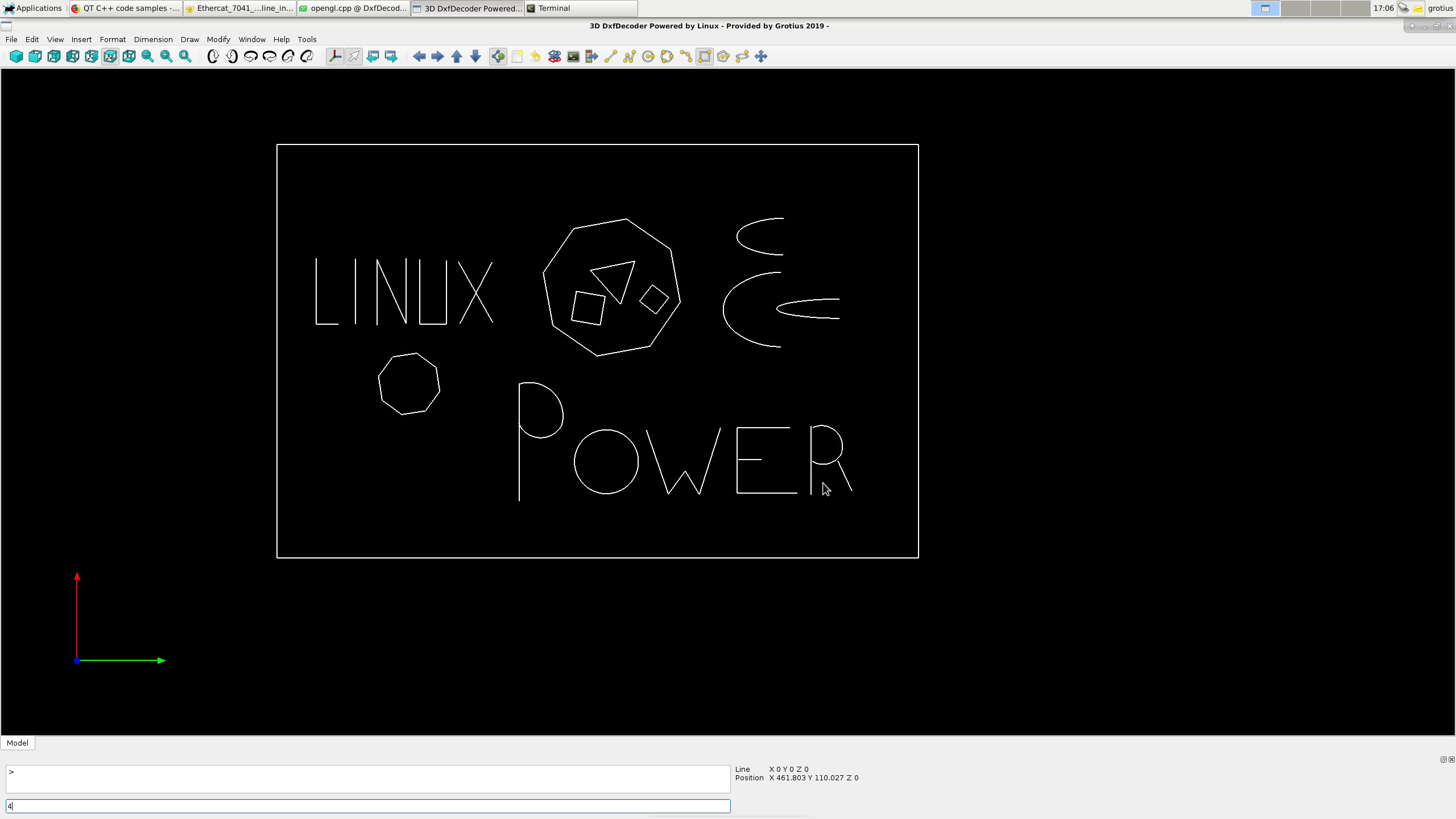
We can draw at this moment :
-line (ortho on or off)
-line strip (ortho on or off)
-2 point circle
-3 point circle
-arc (very good arc function, above expections !)
-rectangular
-polygon with user defined segment's. A 3 side polygon is a triangle, a 4 side polygon is a nice square rectangle, with ortho on and off.
-half ellipse (builded up from multipe arc's, can be expanded to unique ellipse chamfer function)
Thanks Tommy and OPW !!
We have good news today.
Did some extra work on the main window. Will update the icon's soon to new grotius made icon's
Updated the code yesterday for a ellipse. The ellipse is half drawed for now. The half ellipse is build up from multiple arc's what
is nice for a cam output !! This was a very long C++ code to write so far. It has ortho on and off included so far. Later on i will finish
the ellipse draw function and will look for the new ellipse chamfer function.
The opengl screen is now auto resize with the main window and has the screen ratio included.
The opengl timer is updated, i had a problem that the timer was somehow delaying the program after a few minutes. Like a overflow.
The widget margin's are up to date now. Margins are hard to find in QT. But now i know how to set them correctly.
We can draw at this moment :
-line (ortho on or off)
-line strip (ortho on or off)
-2 point circle
-3 point circle
-arc (very good arc function, above expections !)
-rectangular
-polygon with user defined segment's. A 3 side polygon is a triangle, a 4 side polygon is a nice square rectangle, with ortho on and off.
-half ellipse (builded up from multipe arc's, can be expanded to unique ellipse chamfer function)
Last edit: 7 years 2 months ago by Grotius.
The following user(s) said Thank You: phillc54, tommylight
Please Log in or Create an account to join the conversation.
- tommylight
- Offline
- Moderator
-

Less
More
- Posts: 22011
- Thank you received: 7491
7 years 2 months ago #142040
by tommylight
Replied by tommylight on topic QT C++ code samples
Hmmmm......your screen resolution keeps getting bigger and bigger ! 
Thank you for all the effort you are putting in it, and some other things, too.
Thank you for all the effort you are putting in it, and some other things, too.
The following user(s) said Thank You: Grotius
Please Log in or Create an account to join the conversation.
- Grotius
- Offline
- Platinum Member
-
Less
More
- Posts: 2419
- Thank you received: 2349
7 years 2 months ago - 7 years 2 months ago #142098
by Grotius
Replied by Grotius on topic QT C++ code samples
Hi Tommy,
Thanks...
Resolution is a gamer screen 1ms. Very big indeed. But 45 watts. My old screen was consuming a lot of power....
This new screen, it uses the displayport. I had a problem. The screen did not show up.... Hahahaha.

www.lg.com/nl/monitoren/lg-32GK650F
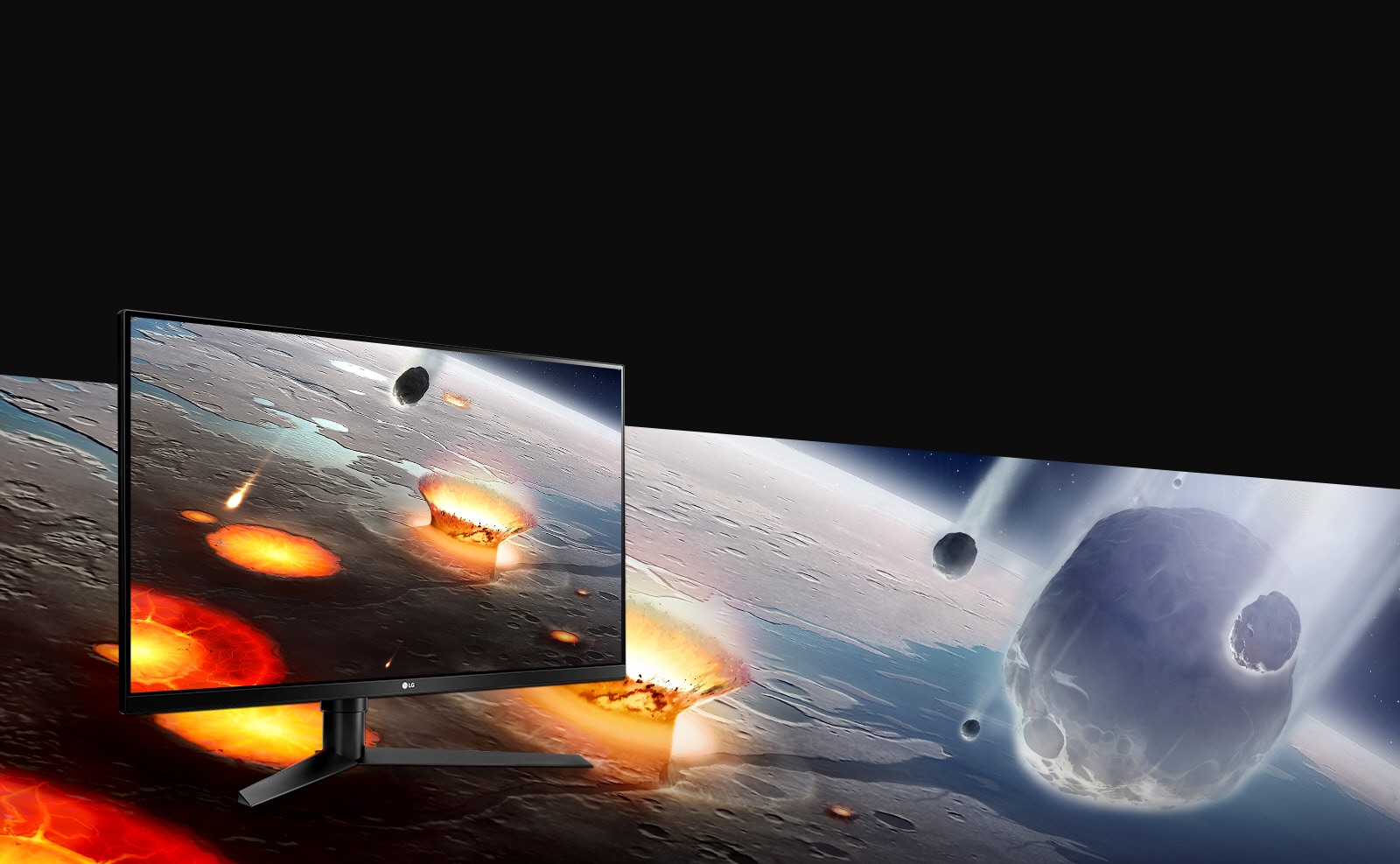
I updated the debian kernel for this. Resolution more then 2500x1400.
On this forum i posted a how to link at a kernel testers topic for debian 9.
Related to the DxfDecoder, the name can be changed in something else. It's not a decoder anymore. This was the first step, at that time a nice name.
One of the next things to write in C++ is a object move and rotate function. The rotate function is quite easy. The move function is quite easy too. The object move and rotation function is in fact a preprocess step of the auto nesting algoritme. A good practice for a lazy sunday. I don't think we can write the nesting algoritme in one lazy sunday... Haha.. :woohoo:
The rotate function is already used for drawing a polygone. The spline function we will not adapt coming time, i think this will take to much time to investegate. And a spline can be funest for Cam. Controlling a cad formed arc-strip can be a better option.
First finish the cad section, then update the cam section. Then provide a free cad/cam version. Must make a auto installer in the mean time too... Hmmm.. nice... I am no autodesk company... But almost looking at autodesk, one of the most richest company's ww. We have soon more exotic features then draftsight ( a autodesk product), i promise the linux users. Hhahahahaha. Just liking the way linux is going to defeat window's and autodesk in a few years from now.
For the cad section i will make also the following function's the coming time :
- snap to endpoint, midpoint, perpendicular intersection etc.
- trim and extend. ( extend a line without selecting a target is possible, this is also a new cad function )
- scale
- stretch
- fillet with radius
- fillet with ellipse (new, material reduction, perfect line's)
- chamfer corners
So a lot to do. But we have time. And it's not very difficult to code anymore. We know what we are doing bro...
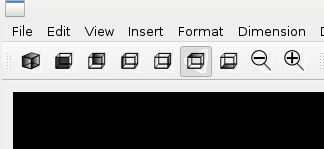
Tonight I made some icon's with inkscape.. Inkscape is a nice free program !!!
Thanks...
Resolution is a gamer screen 1ms. Very big indeed. But 45 watts. My old screen was consuming a lot of power....
This new screen, it uses the displayport. I had a problem. The screen did not show up.... Hahahaha.
www.lg.com/nl/monitoren/lg-32GK650F
I updated the debian kernel for this. Resolution more then 2500x1400.
On this forum i posted a how to link at a kernel testers topic for debian 9.
Related to the DxfDecoder, the name can be changed in something else. It's not a decoder anymore. This was the first step, at that time a nice name.
One of the next things to write in C++ is a object move and rotate function. The rotate function is quite easy. The move function is quite easy too. The object move and rotation function is in fact a preprocess step of the auto nesting algoritme. A good practice for a lazy sunday. I don't think we can write the nesting algoritme in one lazy sunday... Haha.. :woohoo:
The rotate function is already used for drawing a polygone. The spline function we will not adapt coming time, i think this will take to much time to investegate. And a spline can be funest for Cam. Controlling a cad formed arc-strip can be a better option.
First finish the cad section, then update the cam section. Then provide a free cad/cam version. Must make a auto installer in the mean time too... Hmmm.. nice... I am no autodesk company... But almost looking at autodesk, one of the most richest company's ww. We have soon more exotic features then draftsight ( a autodesk product), i promise the linux users. Hhahahahaha. Just liking the way linux is going to defeat window's and autodesk in a few years from now.
For the cad section i will make also the following function's the coming time :
- snap to endpoint, midpoint, perpendicular intersection etc.
- trim and extend. ( extend a line without selecting a target is possible, this is also a new cad function )
- scale
- stretch
- fillet with radius
- fillet with ellipse (new, material reduction, perfect line's)
- chamfer corners
So a lot to do. But we have time. And it's not very difficult to code anymore. We know what we are doing bro...
Tonight I made some icon's with inkscape.. Inkscape is a nice free program !!!
Last edit: 7 years 2 months ago by Grotius.
The following user(s) said Thank You: tommylight
Please Log in or Create an account to join the conversation.
- Grotius
- Offline
- Platinum Member
-
Less
More
- Posts: 2419
- Thank you received: 2349
7 years 2 months ago - 7 years 2 months ago #142448
by Grotius
Replied by Grotius on topic QT C++ code samples
Hi,
For selecting lines and other item's that appear on the screen we had to implement the Opengl selection process.
This was not easy. After 2 day's it's working with a perfect accuracy.
First i tried the Opengl stensil procedure. This worked, but is limited to a buffer of 255 item's. This it's not enough when a drawing has 1000 lines of the same colour.
So we moved on to a glupickmatrix implementation. And this is working very accurate now after 2 day's of work. I had problem's
to solve with the int viewport[4]. It is solved by reading the glGetIntegerv(GL_VIEWPORT, viewport); outside the glRenderMode(GL_SELECT); mode. Conclusion : the int viewport[4] parameters in the select mode are a little different then in modelview mode. This difference is about 5 pixels. But is just enough to get less accuracy. This problem was hard to spot.
But we solved it.
The implementation work's with 3d selection.
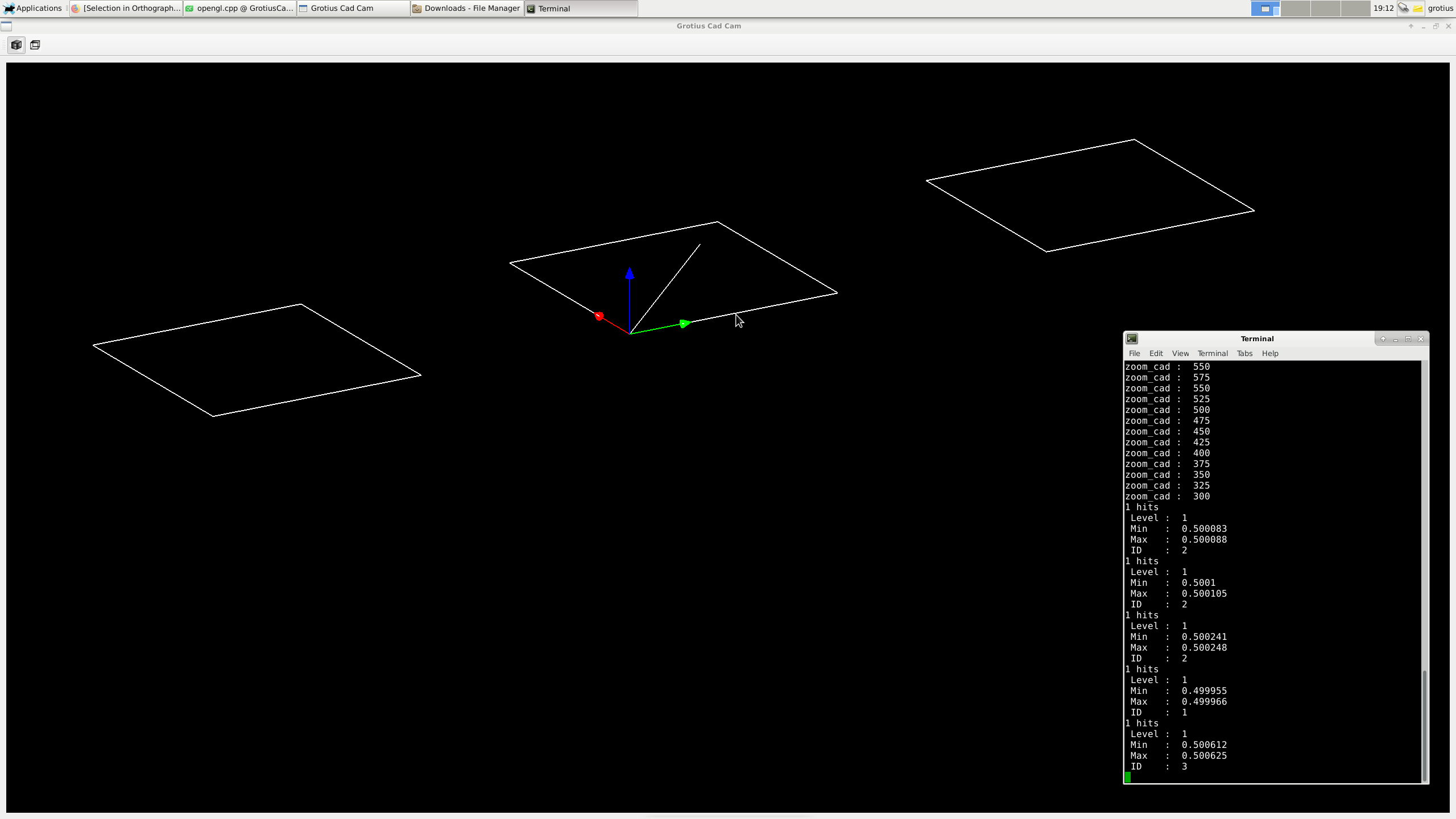
Attached is a nice QT Cad template project for student's or prof's to start with.
It has a gui, a opengl interface. It's a very basic template without drawing function's etc.
It has a quick mouse drag function, mouse zoom function, mouse 3d rotate function and most important the mouse object select function.
Can someone test the compiled version please... It's attached as GrotiusCadCam_compiled.zip
To test the compiled version, unzip and type in terminal : ./GrotiusCadCam
Please let me know if it works without dependencies like Qt_opengl or something like that...
For selecting lines and other item's that appear on the screen we had to implement the Opengl selection process.
This was not easy. After 2 day's it's working with a perfect accuracy.
First i tried the Opengl stensil procedure. This worked, but is limited to a buffer of 255 item's. This it's not enough when a drawing has 1000 lines of the same colour.
So we moved on to a glupickmatrix implementation. And this is working very accurate now after 2 day's of work. I had problem's
to solve with the int viewport[4]. It is solved by reading the glGetIntegerv(GL_VIEWPORT, viewport); outside the glRenderMode(GL_SELECT); mode. Conclusion : the int viewport[4] parameters in the select mode are a little different then in modelview mode. This difference is about 5 pixels. But is just enough to get less accuracy. This problem was hard to spot.
But we solved it.
The implementation work's with 3d selection.
Attached is a nice QT Cad template project for student's or prof's to start with.
It has a gui, a opengl interface. It's a very basic template without drawing function's etc.
It has a quick mouse drag function, mouse zoom function, mouse 3d rotate function and most important the mouse object select function.
Can someone test the compiled version please... It's attached as GrotiusCadCam_compiled.zip
To test the compiled version, unzip and type in terminal : ./GrotiusCadCam
Please let me know if it works without dependencies like Qt_opengl or something like that...
Last edit: 7 years 2 months ago by Grotius.
The following user(s) said Thank You: phillc54, tommylight
Please Log in or Create an account to join the conversation.
Time to create page: 3.707 seconds