
- Posts: 2419
- Thank you received: 2349
QT C++ code samples
- Grotius
- Offline
- Platinum Member
-

Less
More
7 years 3 months ago #140950
by Grotius
Replied by Grotius on topic QT C++ code samples
Hi,
Today i started with calculating the outside contour offset of a product. To compensate kerf width for plasma
and milling. Calculating the inside offset has the same principle. This example is for lines at this moment.
Finding circle and arc intersection's is the next level to do.
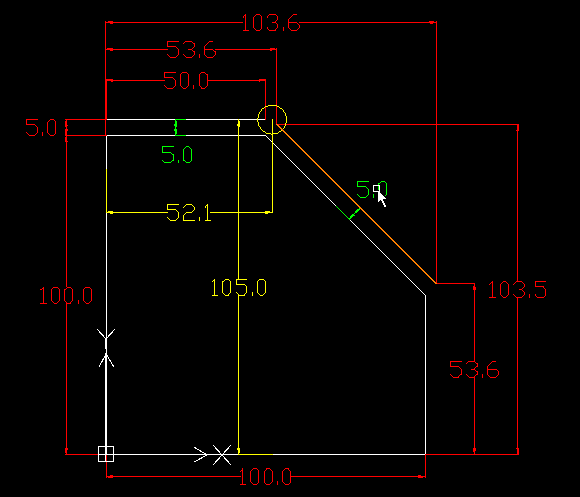
Attached i a picture of a product 100x100mm that have 2 lines that are offset 5mm from the product.
To find the new closed contour point, see the yellow circle, we have to do a calculation for finding this point. It's called intersection point.
The C++ code sample :
The tested console output :
determinant is : -2495
intersection point is x : 52.097 y : 105
So nice that this works !!
Attached the QT intersection project in zip format.
Today i started with calculating the outside contour offset of a product. To compensate kerf width for plasma
and milling. Calculating the inside offset has the same principle. This example is for lines at this moment.
Finding circle and arc intersection's is the next level to do.
Attached i a picture of a product 100x100mm that have 2 lines that are offset 5mm from the product.
To find the new closed contour point, see the yellow circle, we have to do a calculation for finding this point. It's called intersection point.
The C++ code sample :
Warning: Spoiler!
//find intersection point of 2 lines..
www.geeksforgeeks.org/program-for-point-...ection-of-two-lines/
//line 1 to compare :
double startpoint_x0 = 0;
double startpoint_y0 = 105;
double endpoint_x0 = 50;
double endpoint_y0 = 105;
//line 2 to compare :
double startpoint_x1 = 53.6;
double startpoint_y1 = 103.5;
double endpoint_x1 = 103.6;
double endpoint_y1 = 53.6;
//line 1
double delta_y0 = endpoint_y0 - startpoint_y0;
double delta_x0 = startpoint_x0 - endpoint_x0;
double c0 = delta_y0 * startpoint_x0 + delta_x0 * startpoint_y0;
//line 2
double delta_y1 = endpoint_y1 - startpoint_y1;
double delta_x1 = startpoint_x1 - endpoint_x1;
double c1 = delta_y1 * startpoint_x1 + delta_x1 * startpoint_y1;
double determinant = delta_y0*delta_x1 - delta_y1*delta_x0;
qDebug() << "determinant is : " << determinant;
if (determinant == 0) // The lines are parallel.
{
qDebug() << "the lines are parallel";
}
else
{
double x = (delta_x1*c0 - delta_x0*c1)/determinant;
double y = (delta_y0*c1 - delta_y1*c0)/determinant;
qDebug() << " intersection point is x : " << x << " y : " << y;
}
//line 1 to compare :
double startpoint_x0 = 0;
double startpoint_y0 = 105;
double endpoint_x0 = 50;
double endpoint_y0 = 105;
//line 2 to compare :
double startpoint_x1 = 53.6;
double startpoint_y1 = 103.5;
double endpoint_x1 = 103.6;
double endpoint_y1 = 53.6;
//line 1
double delta_y0 = endpoint_y0 - startpoint_y0;
double delta_x0 = startpoint_x0 - endpoint_x0;
double c0 = delta_y0 * startpoint_x0 + delta_x0 * startpoint_y0;
//line 2
double delta_y1 = endpoint_y1 - startpoint_y1;
double delta_x1 = startpoint_x1 - endpoint_x1;
double c1 = delta_y1 * startpoint_x1 + delta_x1 * startpoint_y1;
double determinant = delta_y0*delta_x1 - delta_y1*delta_x0;
qDebug() << "determinant is : " << determinant;
if (determinant == 0) // The lines are parallel.
{
qDebug() << "the lines are parallel";
}
else
{
double x = (delta_x1*c0 - delta_x0*c1)/determinant;
double y = (delta_y0*c1 - delta_y1*c0)/determinant;
qDebug() << " intersection point is x : " << x << " y : " << y;
}
The tested console output :
determinant is : -2495
intersection point is x : 52.097 y : 105
So nice that this works !!
Attached the QT intersection project in zip format.
The following user(s) said Thank You: chimeno, tommylight
Please Log in or Create an account to join the conversation.
- Grotius
- Offline
- Platinum Member
-
Less
More
- Posts: 2419
- Thank you received: 2349
7 years 3 months ago - 7 years 3 months ago #140971
by Grotius
Replied by Grotius on topic QT C++ code samples
Hi,
Thanks to chimeno & tommylight !
Me was lucky today... Made the circle and line intersection code ready quite quickly...
Attached a QT project for searching the intersecting point of a line and a circle.
This basic code can be a template for intersecting lines with arc's too.
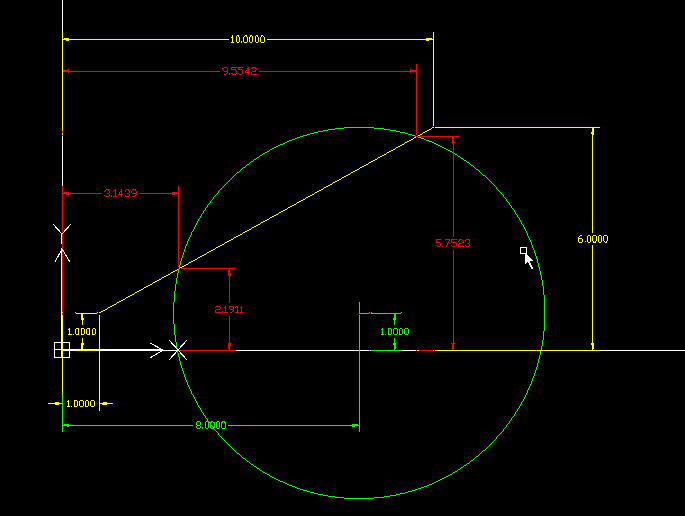
The cad drawing with a line and a circle. The red dimension lines are calculated by the C++ code.
The C++ code :
The console output of this example :
Two solutions x1 : 9.55418 y1 : 5.75232
Two solutions x2 : 3.14394 y2 : 2.19108
This Circle and line intersecting QT C++ project is attached for downloading.
Another offset example :
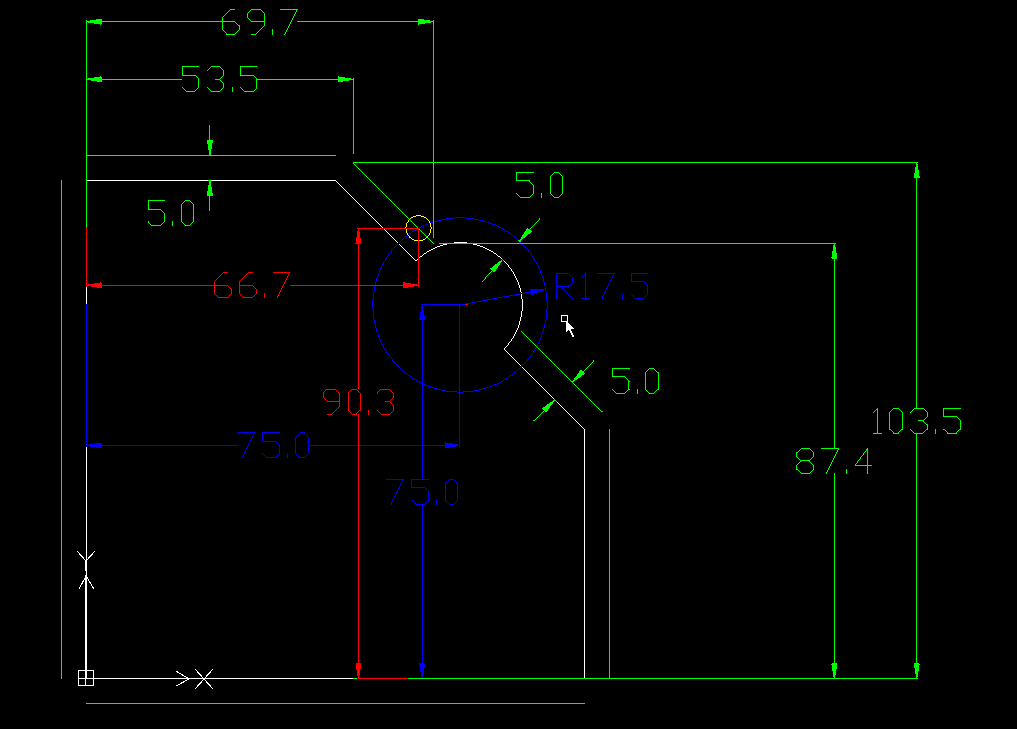
In this example we got a 5mm outside offset for the product.
The green lines are done by the line-line intersection methode in my previous post today.
If we see a line followed by an arc in the memory array, we do a line-circle intersection like below.
Offset of the arc is 5mm.
Code :
Console output :
Two solutions x1 : 90.4489 y1 : 66.7792
Two solutions x2 : 66.6837 y2 : 90.3977
We need the closest solution. The closest founded intersection point related to the line. We can make a little formula for that with if, else.
The yellow circle is the calculated intersection point of a line collision with an arc. :woohoo:
Thanks to chimeno & tommylight !
Me was lucky today... Made the circle and line intersection code ready quite quickly...
Attached a QT project for searching the intersecting point of a line and a circle.
This basic code can be a template for intersecting lines with arc's too.
The cad drawing with a line and a circle. The red dimension lines are calculated by the C++ code.
The C++ code :
Warning: Spoiler!
float circle_center_x = 8;
float circle_center_y = 1;
float radius = 5;
float line_x1 = 1;
float line_y1 = 1;
float line_x2 = 10;
float line_y2 = 6;
float dx, dy, A, B, C, det, t;
dx = line_x2 - line_x1;
dy = line_y2 - line_y1;
A = dx * dx + dy * dy;
B = 2 * (dx * (line_x1 - circle_center_x) + dy * (line_y1 - circle_center_y));
C = (line_x1 - circle_center_x) * (line_x1 - circle_center_x) + (line_y1 - circle_center_y) * (line_y1 - circle_center_y) - radius * radius;
det = B * B - 4 * A * C;
if ((A <= 0.0000001) || (det < 0))
{
qDebug() << "No real solutions";
}
else if (det == 0)
{
t = -B / (2 * A);
float intersection_x1 = (line_x1 + t * dx);
float intersection_y1 = (line_y1 + t * dy);
qDebug() << "One solution x1 :" << intersection_x1 << "y1 :" << intersection_y1;
}
else
{
t = (-B + sqrt(det)) / (2 * A);
float intersection_x1 = (line_x1 + t * dx);
float intersection_y1 = (line_y1 + t * dy);
t = (-B - sqrt(det)) / (2 * A);
float intersection_x2 = (line_x1 + t * dx);
float intersection_y2 = (line_y1 + t * dy);
qDebug() << "Two solutions x1 :" << intersection_x1 << "y1 :" << intersection_y1;
qDebug() << "Two solutions x2 :" << intersection_x2 << "y2 :" << intersection_y2;
}
float circle_center_y = 1;
float radius = 5;
float line_x1 = 1;
float line_y1 = 1;
float line_x2 = 10;
float line_y2 = 6;
float dx, dy, A, B, C, det, t;
dx = line_x2 - line_x1;
dy = line_y2 - line_y1;
A = dx * dx + dy * dy;
B = 2 * (dx * (line_x1 - circle_center_x) + dy * (line_y1 - circle_center_y));
C = (line_x1 - circle_center_x) * (line_x1 - circle_center_x) + (line_y1 - circle_center_y) * (line_y1 - circle_center_y) - radius * radius;
det = B * B - 4 * A * C;
if ((A <= 0.0000001) || (det < 0))
{
qDebug() << "No real solutions";
}
else if (det == 0)
{
t = -B / (2 * A);
float intersection_x1 = (line_x1 + t * dx);
float intersection_y1 = (line_y1 + t * dy);
qDebug() << "One solution x1 :" << intersection_x1 << "y1 :" << intersection_y1;
}
else
{
t = (-B + sqrt(det)) / (2 * A);
float intersection_x1 = (line_x1 + t * dx);
float intersection_y1 = (line_y1 + t * dy);
t = (-B - sqrt(det)) / (2 * A);
float intersection_x2 = (line_x1 + t * dx);
float intersection_y2 = (line_y1 + t * dy);
qDebug() << "Two solutions x1 :" << intersection_x1 << "y1 :" << intersection_y1;
qDebug() << "Two solutions x2 :" << intersection_x2 << "y2 :" << intersection_y2;
}
The console output of this example :
Two solutions x1 : 9.55418 y1 : 5.75232
Two solutions x2 : 3.14394 y2 : 2.19108
This Circle and line intersecting QT C++ project is attached for downloading.
Another offset example :
In this example we got a 5mm outside offset for the product.
The green lines are done by the line-line intersection methode in my previous post today.
If we see a line followed by an arc in the memory array, we do a line-circle intersection like below.
Offset of the arc is 5mm.
Code :
Warning: Spoiler!
float circle_center_x = 75;
float circle_center_y = 75;
float radius = 17.5;
float line_x1 = 53.5;
float line_y1 = 103.5;
float line_x2 = 69.7;
float line_y2 = 87.4;
float dx, dy, A, B, C, det, t;
dx = line_x2 - line_x1;
dy = line_y2 - line_y1;
A = dx * dx + dy * dy;
B = 2 * (dx * (line_x1 - circle_center_x) + dy * (line_y1 - circle_center_y));
C = (line_x1 - circle_center_x) * (line_x1 - circle_center_x) + (line_y1 - circle_center_y) * (line_y1 - circle_center_y) - radius * radius;
det = B * B - 4 * A * C;
if ((A <= 0.0000001) || (det < 0))
{
qDebug() << "No real solutions";
}
else if (det == 0)
{
t = -B / (2 * A);
float intersection_x1 = (line_x1 + t * dx);
float intersection_y1 = (line_y1 + t * dy);
qDebug() << "One solution x1 :" << intersection_x1 << "y1 :" << intersection_y1;
}
else
{
t = (-B + sqrt(det)) / (2 * A);
float intersection_x1 = (line_x1 + t * dx);
float intersection_y1 = (line_y1 + t * dy);
t = (-B - sqrt(det)) / (2 * A);
float intersection_x2 = (line_x1 + t * dx);
float intersection_y2 = (line_y1 + t * dy);
qDebug() << "Two solutions x1 :" << intersection_x1 << "y1 :" << intersection_y1;
qDebug() << "Two solutions x2 :" << intersection_x2 << "y2 :" << intersection_y2;
}
float circle_center_y = 75;
float radius = 17.5;
float line_x1 = 53.5;
float line_y1 = 103.5;
float line_x2 = 69.7;
float line_y2 = 87.4;
float dx, dy, A, B, C, det, t;
dx = line_x2 - line_x1;
dy = line_y2 - line_y1;
A = dx * dx + dy * dy;
B = 2 * (dx * (line_x1 - circle_center_x) + dy * (line_y1 - circle_center_y));
C = (line_x1 - circle_center_x) * (line_x1 - circle_center_x) + (line_y1 - circle_center_y) * (line_y1 - circle_center_y) - radius * radius;
det = B * B - 4 * A * C;
if ((A <= 0.0000001) || (det < 0))
{
qDebug() << "No real solutions";
}
else if (det == 0)
{
t = -B / (2 * A);
float intersection_x1 = (line_x1 + t * dx);
float intersection_y1 = (line_y1 + t * dy);
qDebug() << "One solution x1 :" << intersection_x1 << "y1 :" << intersection_y1;
}
else
{
t = (-B + sqrt(det)) / (2 * A);
float intersection_x1 = (line_x1 + t * dx);
float intersection_y1 = (line_y1 + t * dy);
t = (-B - sqrt(det)) / (2 * A);
float intersection_x2 = (line_x1 + t * dx);
float intersection_y2 = (line_y1 + t * dy);
qDebug() << "Two solutions x1 :" << intersection_x1 << "y1 :" << intersection_y1;
qDebug() << "Two solutions x2 :" << intersection_x2 << "y2 :" << intersection_y2;
}
Console output :
Two solutions x1 : 90.4489 y1 : 66.7792
Two solutions x2 : 66.6837 y2 : 90.3977
We need the closest solution. The closest founded intersection point related to the line. We can make a little formula for that with if, else.
The yellow circle is the calculated intersection point of a line collision with an arc. :woohoo:
Last edit: 7 years 3 months ago by Grotius.
Please Log in or Create an account to join the conversation.
- Grotius
- Offline
- Platinum Member
-
Less
More
- Posts: 2419
- Thank you received: 2349
7 years 3 months ago - 7 years 3 months ago #140976
by Grotius
Replied by Grotius on topic QT C++ code samples
Hi,
The last item to investegate was find the intersecting point of a circle with a circle.
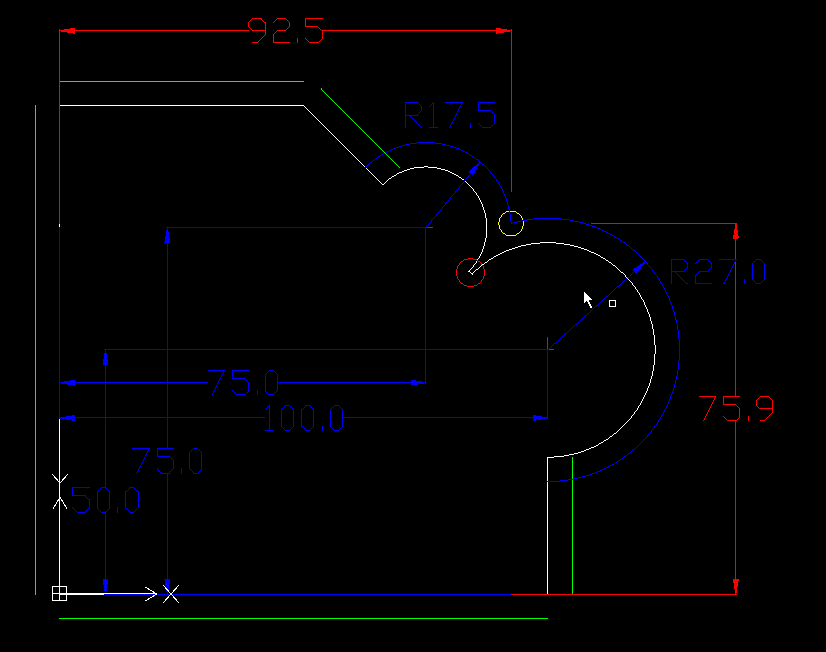
Cad drawing of product with a contour offset 5mm. Find where the 2 circle's collide..
Attached QT C++ project find intersection circle to circle.
console output :
intersection x1 : 74.0697 y1 : 57.5247
intersection x2 : 92.4753 y2 : 75.9303
We have 2 solution's. We calculate wich one we need with a if else statement.
What do we do with the tiny line in within the red circle? Delete it automaticly?
The QT C++ code for intersecting circle to circle :
Okey we have to go on with the next level.
Add contour offset's to the product.....
The swap class needs some improvement's, but i will try add some contour offsets first.
We have classes for line-line, line-circle and arc-arc interceptions. Without that we where lost.
But now we have more power to make offsets.
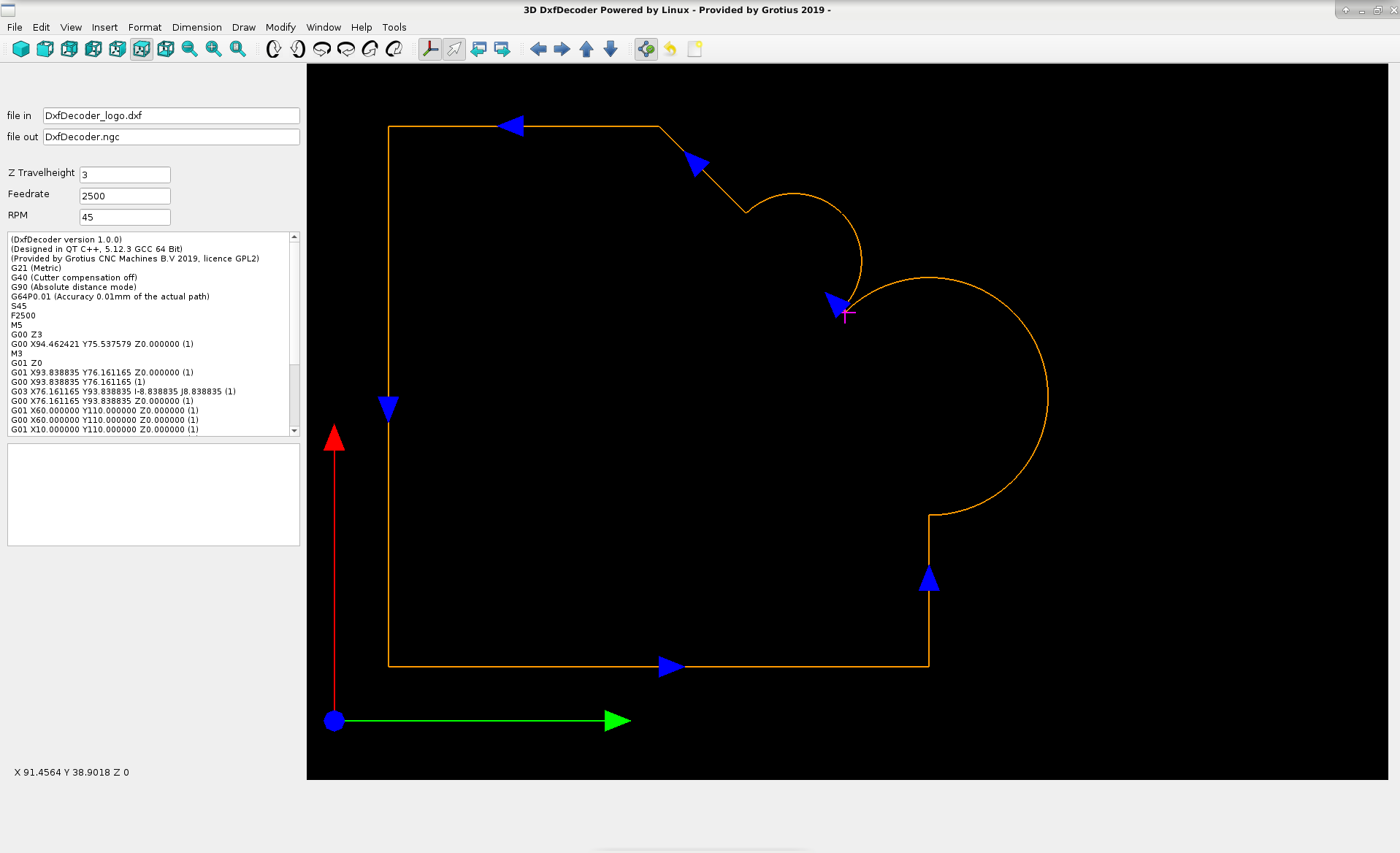
Glad to be back to the relaxed DxfDecoder screen.
The last item to investegate was find the intersecting point of a circle with a circle.
Cad drawing of product with a contour offset 5mm. Find where the 2 circle's collide..
Attached QT C++ project find intersection circle to circle.
console output :
intersection x1 : 74.0697 y1 : 57.5247
intersection x2 : 92.4753 y2 : 75.9303
We have 2 solution's. We calculate wich one we need with a if else statement.
What do we do with the tiny line in within the red circle? Delete it automaticly?
The QT C++ code for intersecting circle to circle :
Warning: Spoiler!
double cx0 = 75;
double cy0 = 75;
double radius0 = 17.5;
double cx1 = 100;
double cy1 = 50;
double radius1 = 27;
// Find the distance between the centers.
double dx = cx0 - cx1;
double dy = cy0 - cy1;
double dist = sqrt(dx * dx + dy * dy);
// See how many solutions there are.
if (dist > radius0 + radius1)
{
qDebug() << "No solution";
}
else if (dist < abs(radius0 - radius1))
{
qDebug() << "No solutions, one circle contains the other";
}
else if ((dist == 0) && (radius0 == radius1))
{
qDebug() << "No solutions, the circles coincide";
}
else
{
// Find a and h.
double a = (radius0 * radius0 -
radius1 * radius1 + dist * dist) / (2 * dist);
double h = sqrt(radius0 * radius0 - a * a);
// Find P2.
double cx2 = cx0 + a * (cx1 - cx0) / dist;
double cy2 = cy0 + a * (cy1 - cy0) / dist;
// Get the points P3.
double intersection_x1((cx2 + h * (cy1 - cy0) / dist));
double intersection_y1((cy2 - h * (cx1 - cx0) / dist));
double intersection_x2 = (cx2 - h * (cy1 - cy0) / dist);
double intersection_y2 = ((cy2 + h * (cx1 - cx0) / dist));
qDebug() << "intersection x1 : " << intersection_x1 << " y1 : " << intersection_y1;
qDebug() << "intersection x2 : " << intersection_x2 << " y2 : " << intersection_y2;
}
double cy0 = 75;
double radius0 = 17.5;
double cx1 = 100;
double cy1 = 50;
double radius1 = 27;
// Find the distance between the centers.
double dx = cx0 - cx1;
double dy = cy0 - cy1;
double dist = sqrt(dx * dx + dy * dy);
// See how many solutions there are.
if (dist > radius0 + radius1)
{
qDebug() << "No solution";
}
else if (dist < abs(radius0 - radius1))
{
qDebug() << "No solutions, one circle contains the other";
}
else if ((dist == 0) && (radius0 == radius1))
{
qDebug() << "No solutions, the circles coincide";
}
else
{
// Find a and h.
double a = (radius0 * radius0 -
radius1 * radius1 + dist * dist) / (2 * dist);
double h = sqrt(radius0 * radius0 - a * a);
// Find P2.
double cx2 = cx0 + a * (cx1 - cx0) / dist;
double cy2 = cy0 + a * (cy1 - cy0) / dist;
// Get the points P3.
double intersection_x1((cx2 + h * (cy1 - cy0) / dist));
double intersection_y1((cy2 - h * (cx1 - cx0) / dist));
double intersection_x2 = (cx2 - h * (cy1 - cy0) / dist);
double intersection_y2 = ((cy2 + h * (cx1 - cx0) / dist));
qDebug() << "intersection x1 : " << intersection_x1 << " y1 : " << intersection_y1;
qDebug() << "intersection x2 : " << intersection_x2 << " y2 : " << intersection_y2;
}
Okey we have to go on with the next level.
Add contour offset's to the product.....
The swap class needs some improvement's, but i will try add some contour offsets first.
We have classes for line-line, line-circle and arc-arc interceptions. Without that we where lost.
But now we have more power to make offsets.
Glad to be back to the relaxed DxfDecoder screen.
Last edit: 7 years 3 months ago by Grotius.
The following user(s) said Thank You: tommylight, emilvv
Please Log in or Create an account to join the conversation.
- Grotius
- Offline
- Platinum Member
-
Less
More
- Posts: 2419
- Thank you received: 2349
7 years 3 months ago - 7 years 2 months ago #141110
by Grotius
Replied by Grotius on topic QT C++ code samples
Hi,
Today i have a C++ example for finding a new xy offset point of a certain line. In this example the offset is 10mm.
We have the x0,y0 (0,0) and x1,y1 (200,100) points. This are the points that form the blue product line C.
We have to calculate the offset point of the blue line, see yellow circle.
Visualisation of the calculation..
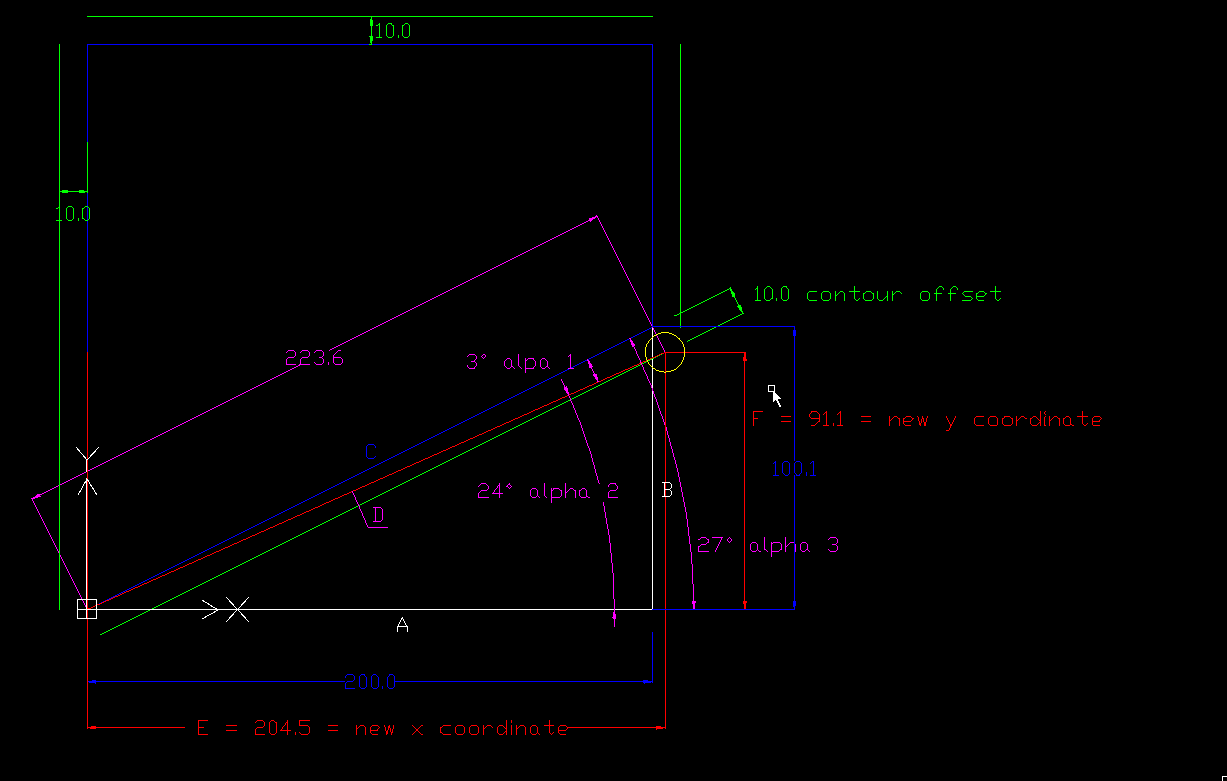
Attached the QT project for this example, the zip includes the cad drawing.
The C++ code spoiler down here has some updated code... Don't forget this...
Console output :
this calculation is between 0 and 180 degrees, the new x is : 204.472 new y is : 91.0557 (alpha 3)
The output in DxfDecoder. Tested in all quadrants. The calculated point is the endpoint of the short blue line wich has
the offset lenght of 10mm in this case. The blue line is perpendicular to the base line. The yellow lines are opposites of the blue line.
The yellow line was founded by only a + and - calculation related to the blue line.
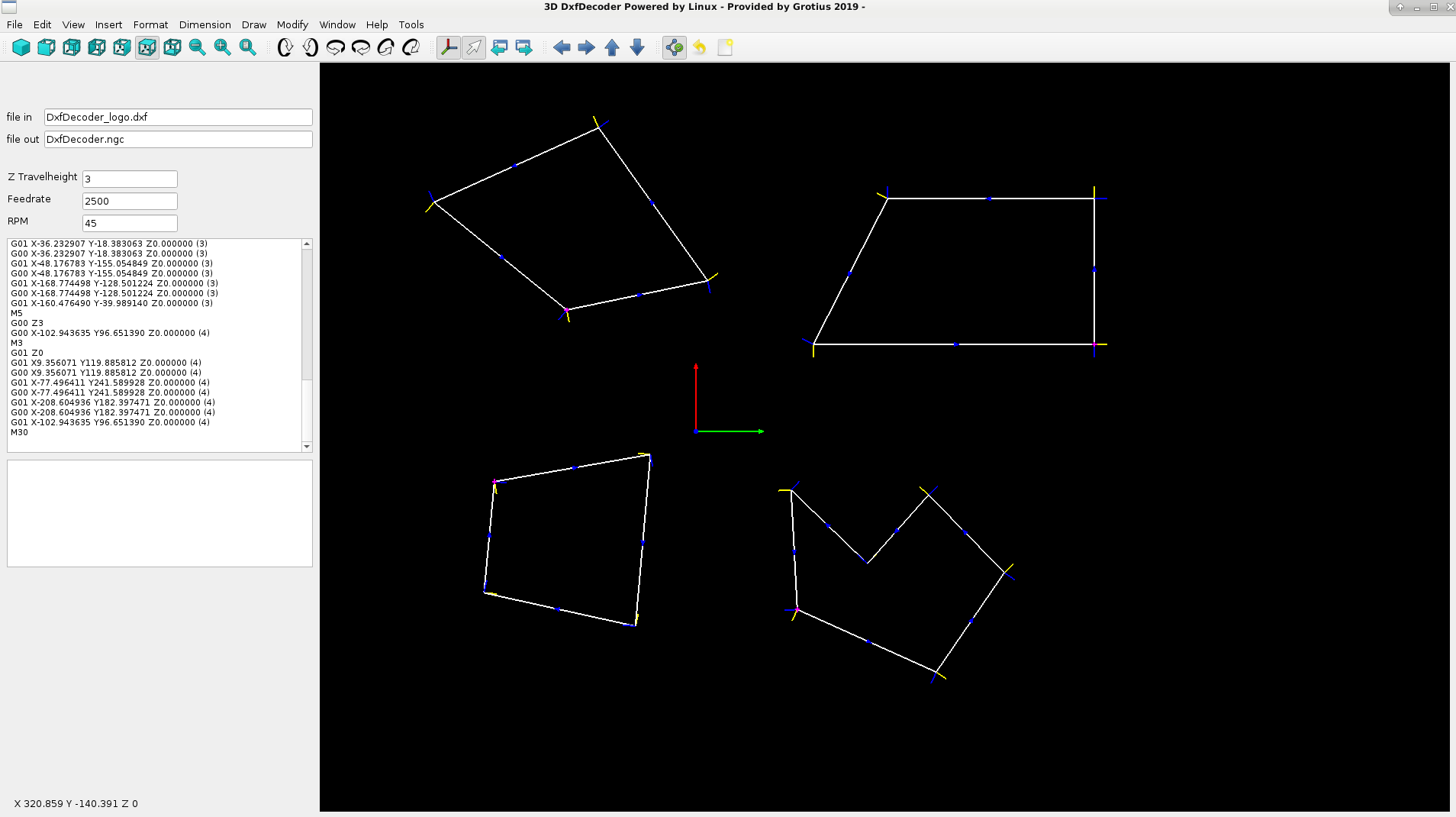
This is nice !!
We can now draw a offset line with opengl.
After that, we can do the intersection calculation for line-line to close the contour... Yes yes..
These separate software step's (tutorials) combined (in total) will result in the base code for a complex contour offset algoritme.
Don't forget the power of Linux !! It's all in the game...
C++ code: (angle1 = alpha1 and so on)
For a quick test we add the offset lines to the opengl class :
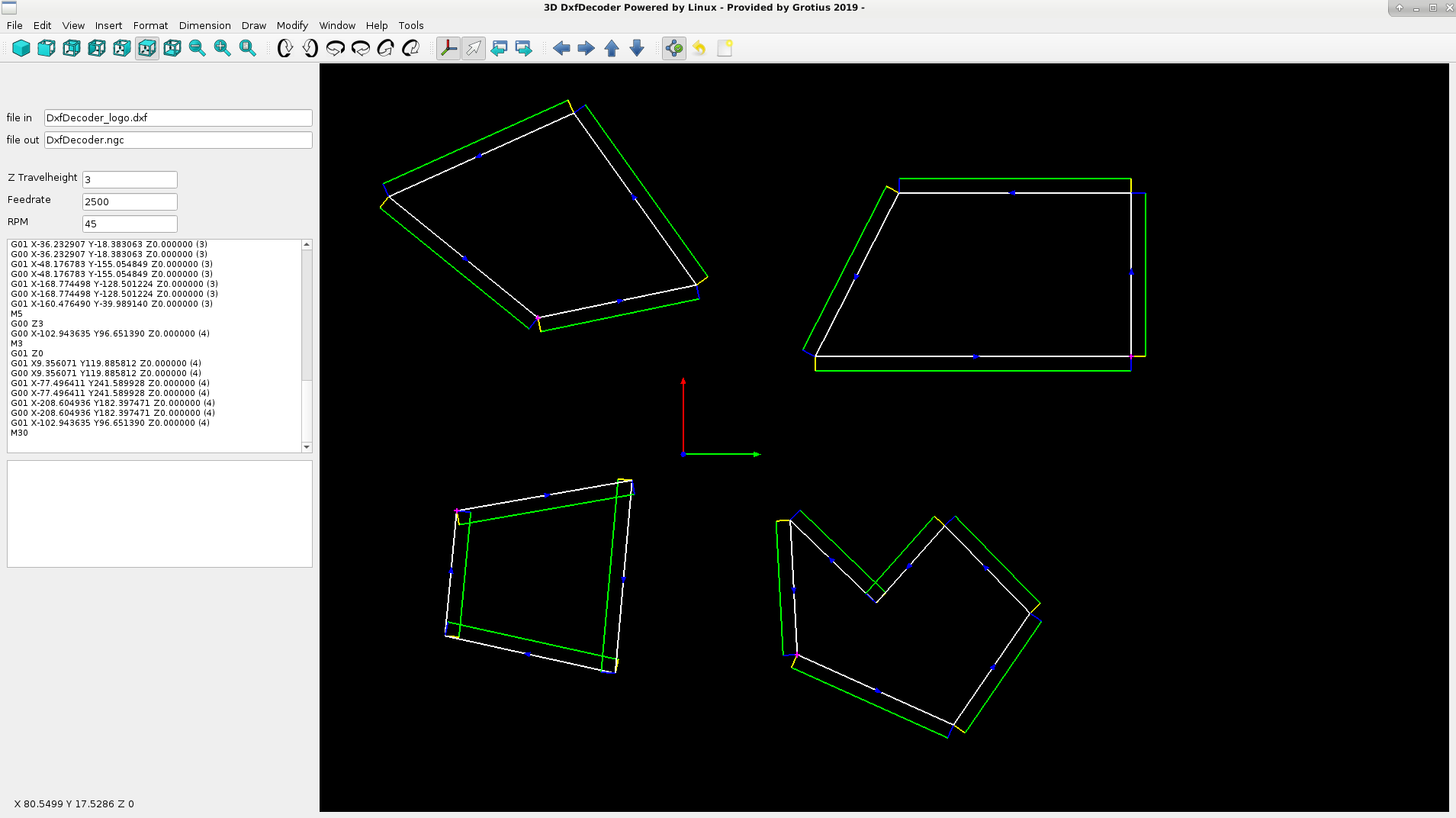
Later on we will copy this test to a new class and keep the opengl as clean as possible.
Next item is to execute the intersection line-line class forum.linuxcnc.org/41-guis/36768-qt-c-co...ples?start=60#140950 to find all the intersection point's... This we will do tomorrow !
If i look at the current output, we can use this for generating press brake products..
Today i have a C++ example for finding a new xy offset point of a certain line. In this example the offset is 10mm.
We have the x0,y0 (0,0) and x1,y1 (200,100) points. This are the points that form the blue product line C.
We have to calculate the offset point of the blue line, see yellow circle.
Visualisation of the calculation..
Attached the QT project for this example, the zip includes the cad drawing.
The C++ code spoiler down here has some updated code... Don't forget this...
Console output :
this calculation is between 0 and 180 degrees, the new x is : 204.472 new y is : 91.0557 (alpha 3)
The output in DxfDecoder. Tested in all quadrants. The calculated point is the endpoint of the short blue line wich has
the offset lenght of 10mm in this case. The blue line is perpendicular to the base line. The yellow lines are opposites of the blue line.
The yellow line was founded by only a + and - calculation related to the blue line.
This is nice !!
We can now draw a offset line with opengl.
After that, we can do the intersection calculation for line-line to close the contour... Yes yes..
These separate software step's (tutorials) combined (in total) will result in the base code for a complex contour offset algoritme.
Don't forget the power of Linux !!
It's all in the game...C++ code: (angle1 = alpha1 and so on)
Warning: Spoiler!
//test product offset at endpoint
if(int_sort_array[0][0] == 1){
double startpoint_x = double_sort_array[0][0];
double startpoint_y = double_sort_array[0][1];
double startpoint_z = double_sort_array[0][2];
double endpoint_x = double_sort_array[0][3];
double endpoint_y = double_sort_array[0][4];
double endpoint_z = double_sort_array[0][5];
double A = endpoint_x-startpoint_x; //triangle horizontal base
double B = endpoint_y-startpoint_y; //triangle vertical
double C = sqrt( pow(A,2) + pow(B,2) ); //orginal cad line, triangle slope side
double angle = acos(A/C) * 180.0 / M_PI; //0 to 180 degrees
if(angle==0){
double offset = 10;
double D = sqrt( pow(C,2) + pow(offset,2) );
double angle1 = acos(C/D) * 180.0 / M_PI; //0 to 180 degrees
double angle2 = angle - angle1;
double E = cos(angle2*(M_PI/180)) * D ; //x value p3
double F = sqrt( pow(D,2) - pow(E,2) ); //y value p3
glColor3f(0.0f, 0.0f, 1.0f); //blue
glBegin(GL_LINES);
glVertex3d(endpoint_x, endpoint_y , endpoint_z);
glVertex3d(startpoint_x + E, startpoint_y + F*-1 , endpoint_z);
glEnd();
//add startpoint :
double p4_x = startpoint_x + ( E - endpoint_x );
double p4_y = startpoint_y - ( endpoint_y - F );
glColor4f(1.0f, 1.0f, 0.0f, 0.0f); //yellow
glBegin(GL_LINES);
glVertex3d(startpoint_x, startpoint_y , startpoint_z);
glVertex3d(startpoint_x + p4_x, startpoint_y + p4_y*-1 , endpoint_z);
glEnd();
}
if(angle==180){
double offset = 10;
double D = sqrt( pow(C,2) + pow(offset,2) );
double angle1 = acos(C/D) * 180.0 / M_PI; //0 to 180 degrees
double angle2 = angle - angle1;
double E = cos(angle2*(M_PI/180)) * D ; //x value p3
double F = sqrt( pow(D,2) - pow(E,2) ); //y value p3
glColor3f(0.0f, 0.0f, 1.0f); //blue
glBegin(GL_LINES);
glVertex3d(endpoint_x, endpoint_y , endpoint_z);
glVertex3d(startpoint_x + E, startpoint_y + F , endpoint_z);
glEnd();
//add startpoint :
double p4_x = startpoint_x + ( E - endpoint_x );
double p4_y = startpoint_y - ( endpoint_y - F );
glColor4f(1.0f, 1.0f, 0.0f, 0.0f); //yellow
glBegin(GL_LINES);
glVertex3d(startpoint_x, startpoint_y , startpoint_z);
glVertex3d(startpoint_x + p4_x, startpoint_y + p4_y , endpoint_z);
glEnd();
}
if(B>0){
double offset = 10;
double D = sqrt( pow(C,2) + pow(offset,2) );
double angle1 = acos(C/D) * 180.0 / M_PI; //0 to 180 degrees
double angle2 = angle - angle1;
double E = cos(angle2*(M_PI/180)) * D ; //x value p3
double F = sqrt( pow(D,2) - pow(E,2) ); //y value p3
glColor3f(0.0f, 0.0f, 1.0f); //blue
glBegin(GL_LINES);
glVertex3d(endpoint_x, endpoint_y , endpoint_z);
glVertex3d(startpoint_x + E, startpoint_y + F , endpoint_z);
glEnd();
//add startpoint :
double p4_x = startpoint_x + ( E - endpoint_x );
double p4_y = startpoint_y - ( endpoint_y - F );
glColor4f(1.0f, 1.0f, 0.0f, 0.0f); //yellow
glBegin(GL_LINES);
glVertex3d(startpoint_x, startpoint_y , startpoint_z);
glVertex3d(startpoint_x + p4_x, startpoint_y + p4_y , endpoint_z);
glEnd();
}
if(B<0){
angle = (angle -180) *-1; //180 to 360 degrees
double offset = 10;
double D = sqrt( pow(C,2) + pow(offset,2) );
double angle1 = acos(C/D) * 180.0 / M_PI; //0 to 180 degrees
double angle2 = angle - angle1;
double E = cos(angle2*(M_PI/180)) * D ; //x value p3
double F = sqrt( pow(D,2) - pow(E,2) ); //y value p3
glColor3f(0.0f, 0.0f, 1.0f); //blue
glBegin(GL_LINES);
glVertex3d(endpoint_x, endpoint_y , endpoint_z);
glVertex3d(startpoint_x + E*-1, startpoint_y + F*-1 , endpoint_z);
glEnd();
//add startpoint :
double p4_x_dist = (A - E*-1)*-1 ;
double p4_y_dist = (B - F*-1)*-1 ;
qDebug() << "startpoint p4_x_dist = " << p4_x_dist;
qDebug() << "startpoint p4_y_dist = " << p4_y_dist;
glColor4f(1.0f, 1.0f, 0.0f, 0.0f); //yellow
glBegin(GL_LINES);
glVertex3d(startpoint_x, startpoint_y , startpoint_z);
glVertex3d(startpoint_x + p4_x_dist, startpoint_y + p4_y_dist , endpoint_z);
glEnd();
}
if(int_sort_array[0][0] == 1){
double startpoint_x = double_sort_array[0][0];
double startpoint_y = double_sort_array[0][1];
double startpoint_z = double_sort_array[0][2];
double endpoint_x = double_sort_array[0][3];
double endpoint_y = double_sort_array[0][4];
double endpoint_z = double_sort_array[0][5];
double A = endpoint_x-startpoint_x; //triangle horizontal base
double B = endpoint_y-startpoint_y; //triangle vertical
double C = sqrt( pow(A,2) + pow(B,2) ); //orginal cad line, triangle slope side
double angle = acos(A/C) * 180.0 / M_PI; //0 to 180 degrees
if(angle==0){
double offset = 10;
double D = sqrt( pow(C,2) + pow(offset,2) );
double angle1 = acos(C/D) * 180.0 / M_PI; //0 to 180 degrees
double angle2 = angle - angle1;
double E = cos(angle2*(M_PI/180)) * D ; //x value p3
double F = sqrt( pow(D,2) - pow(E,2) ); //y value p3
glColor3f(0.0f, 0.0f, 1.0f); //blue
glBegin(GL_LINES);
glVertex3d(endpoint_x, endpoint_y , endpoint_z);
glVertex3d(startpoint_x + E, startpoint_y + F*-1 , endpoint_z);
glEnd();
//add startpoint :
double p4_x = startpoint_x + ( E - endpoint_x );
double p4_y = startpoint_y - ( endpoint_y - F );
glColor4f(1.0f, 1.0f, 0.0f, 0.0f); //yellow
glBegin(GL_LINES);
glVertex3d(startpoint_x, startpoint_y , startpoint_z);
glVertex3d(startpoint_x + p4_x, startpoint_y + p4_y*-1 , endpoint_z);
glEnd();
}
if(angle==180){
double offset = 10;
double D = sqrt( pow(C,2) + pow(offset,2) );
double angle1 = acos(C/D) * 180.0 / M_PI; //0 to 180 degrees
double angle2 = angle - angle1;
double E = cos(angle2*(M_PI/180)) * D ; //x value p3
double F = sqrt( pow(D,2) - pow(E,2) ); //y value p3
glColor3f(0.0f, 0.0f, 1.0f); //blue
glBegin(GL_LINES);
glVertex3d(endpoint_x, endpoint_y , endpoint_z);
glVertex3d(startpoint_x + E, startpoint_y + F , endpoint_z);
glEnd();
//add startpoint :
double p4_x = startpoint_x + ( E - endpoint_x );
double p4_y = startpoint_y - ( endpoint_y - F );
glColor4f(1.0f, 1.0f, 0.0f, 0.0f); //yellow
glBegin(GL_LINES);
glVertex3d(startpoint_x, startpoint_y , startpoint_z);
glVertex3d(startpoint_x + p4_x, startpoint_y + p4_y , endpoint_z);
glEnd();
}
if(B>0){
double offset = 10;
double D = sqrt( pow(C,2) + pow(offset,2) );
double angle1 = acos(C/D) * 180.0 / M_PI; //0 to 180 degrees
double angle2 = angle - angle1;
double E = cos(angle2*(M_PI/180)) * D ; //x value p3
double F = sqrt( pow(D,2) - pow(E,2) ); //y value p3
glColor3f(0.0f, 0.0f, 1.0f); //blue
glBegin(GL_LINES);
glVertex3d(endpoint_x, endpoint_y , endpoint_z);
glVertex3d(startpoint_x + E, startpoint_y + F , endpoint_z);
glEnd();
//add startpoint :
double p4_x = startpoint_x + ( E - endpoint_x );
double p4_y = startpoint_y - ( endpoint_y - F );
glColor4f(1.0f, 1.0f, 0.0f, 0.0f); //yellow
glBegin(GL_LINES);
glVertex3d(startpoint_x, startpoint_y , startpoint_z);
glVertex3d(startpoint_x + p4_x, startpoint_y + p4_y , endpoint_z);
glEnd();
}
if(B<0){
angle = (angle -180) *-1; //180 to 360 degrees
double offset = 10;
double D = sqrt( pow(C,2) + pow(offset,2) );
double angle1 = acos(C/D) * 180.0 / M_PI; //0 to 180 degrees
double angle2 = angle - angle1;
double E = cos(angle2*(M_PI/180)) * D ; //x value p3
double F = sqrt( pow(D,2) - pow(E,2) ); //y value p3
glColor3f(0.0f, 0.0f, 1.0f); //blue
glBegin(GL_LINES);
glVertex3d(endpoint_x, endpoint_y , endpoint_z);
glVertex3d(startpoint_x + E*-1, startpoint_y + F*-1 , endpoint_z);
glEnd();
//add startpoint :
double p4_x_dist = (A - E*-1)*-1 ;
double p4_y_dist = (B - F*-1)*-1 ;
qDebug() << "startpoint p4_x_dist = " << p4_x_dist;
qDebug() << "startpoint p4_y_dist = " << p4_y_dist;
glColor4f(1.0f, 1.0f, 0.0f, 0.0f); //yellow
glBegin(GL_LINES);
glVertex3d(startpoint_x, startpoint_y , startpoint_z);
glVertex3d(startpoint_x + p4_x_dist, startpoint_y + p4_y_dist , endpoint_z);
glEnd();
}
For a quick test we add the offset lines to the opengl class :
Later on we will copy this test to a new class and keep the opengl as clean as possible.
Next item is to execute the intersection line-line class forum.linuxcnc.org/41-guis/36768-qt-c-co...ples?start=60#140950 to find all the intersection point's... This we will do tomorrow !
If i look at the current output, we can use this for generating press brake products..
Last edit: 7 years 2 months ago by Grotius.
The following user(s) said Thank You: phillc54, tommylight
Please Log in or Create an account to join the conversation.
- Grotius
- Offline
- Platinum Member
-
Less
More
- Posts: 2419
- Thank you received: 2349
7 years 2 months ago #141188
by Grotius
Replied by Grotius on topic QT C++ code samples
Hi,
We got the contour offset algoritme working now for a line-line contour offset of only one product at the moment.
It works nice !!
Coming time we can expand this algoritme with the already tested line-arc and arc-arc intersection classes. (see previous posts).
We got the contour offset algoritme working now for a line-line contour offset of only one product at the moment.
It works nice !!
Coming time we can expand this algoritme with the already tested line-arc and arc-arc intersection classes. (see previous posts).
The following user(s) said Thank You: tommylight
Please Log in or Create an account to join the conversation.
- Grotius
- Offline
- Platinum Member
-
Less
More
- Posts: 2419
- Thank you received: 2349
7 years 2 months ago - 7 years 2 months ago #141207
by Grotius
Replied by Grotius on topic QT C++ code samples
Thank you Phill and Tommy,
I hope soon we make progress. It's a long way to the top for sure...
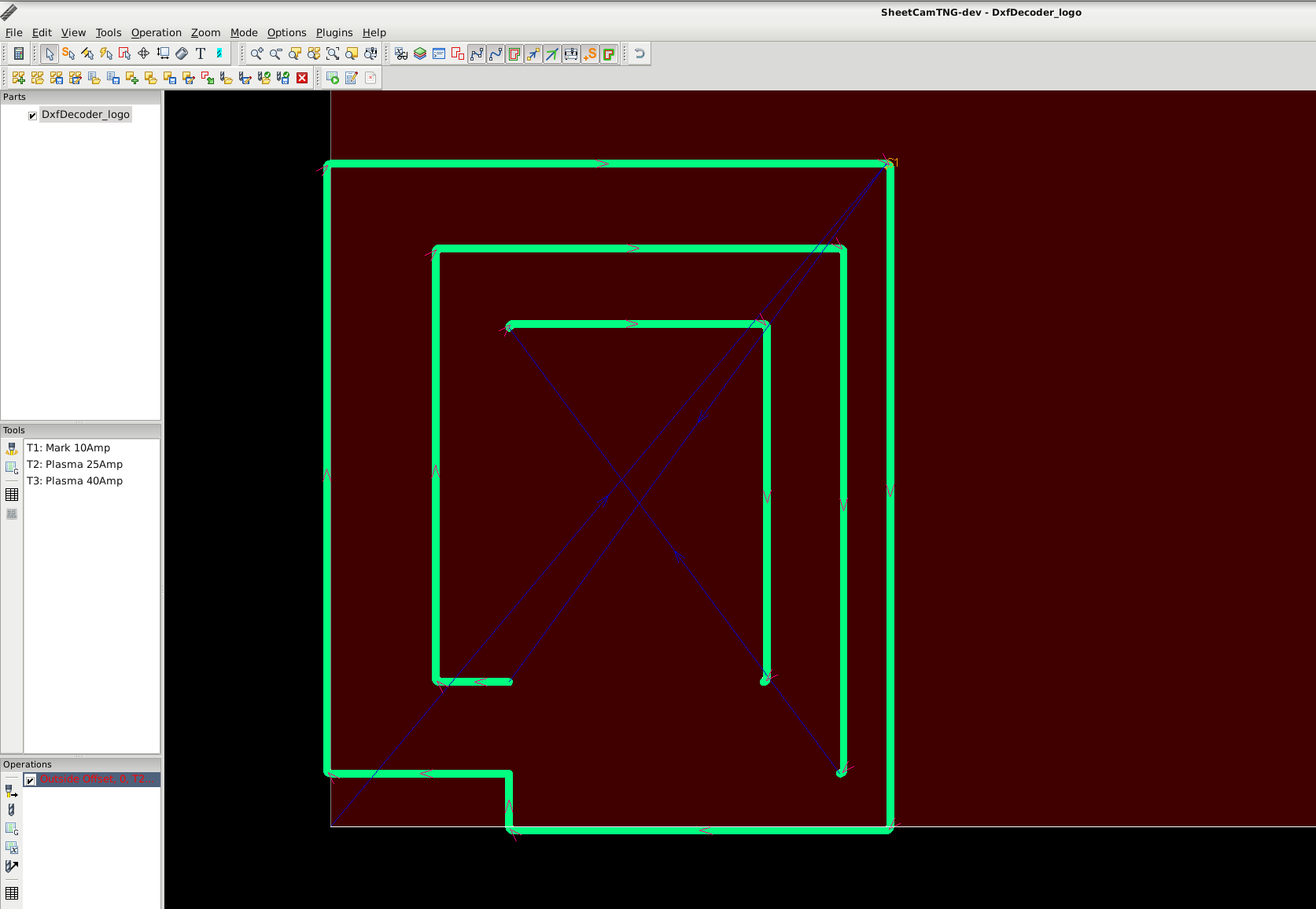
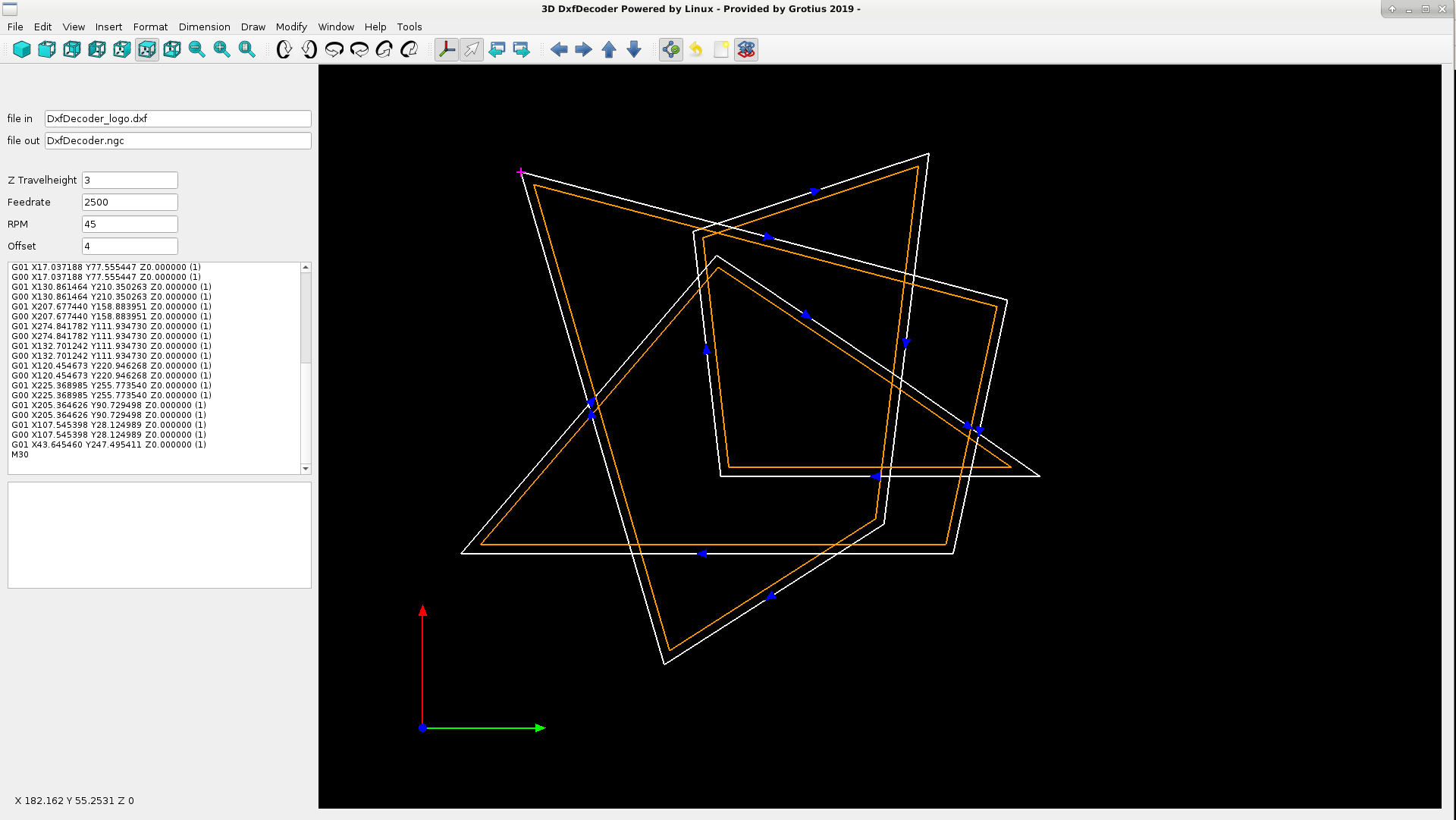
We have a closed contour, and i was curious about other cam program's so i tested this example in sheetcam.
Sheetcam output :
Dxfdecoder output :
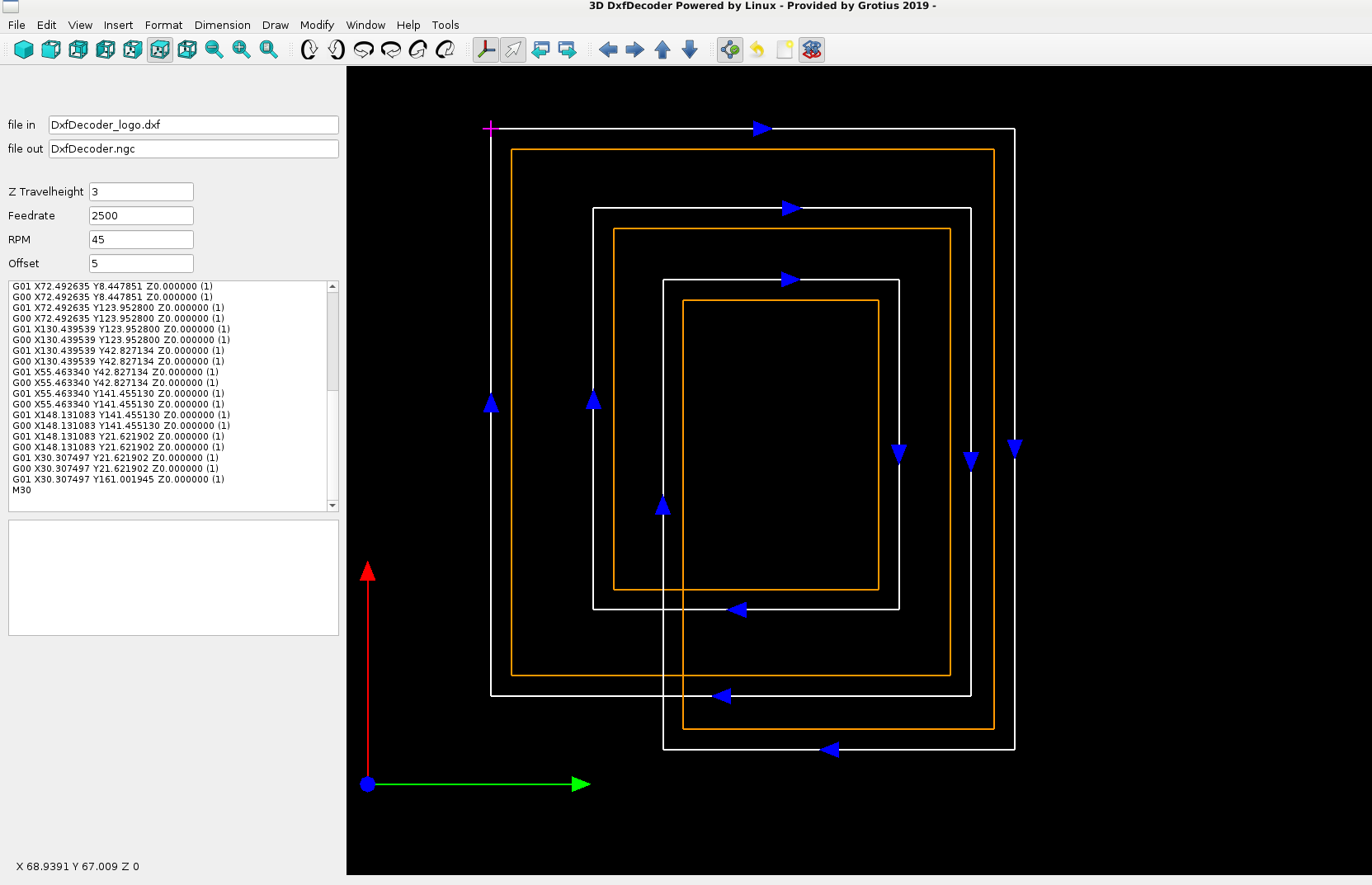
Why has sheetcam no full output for this example?
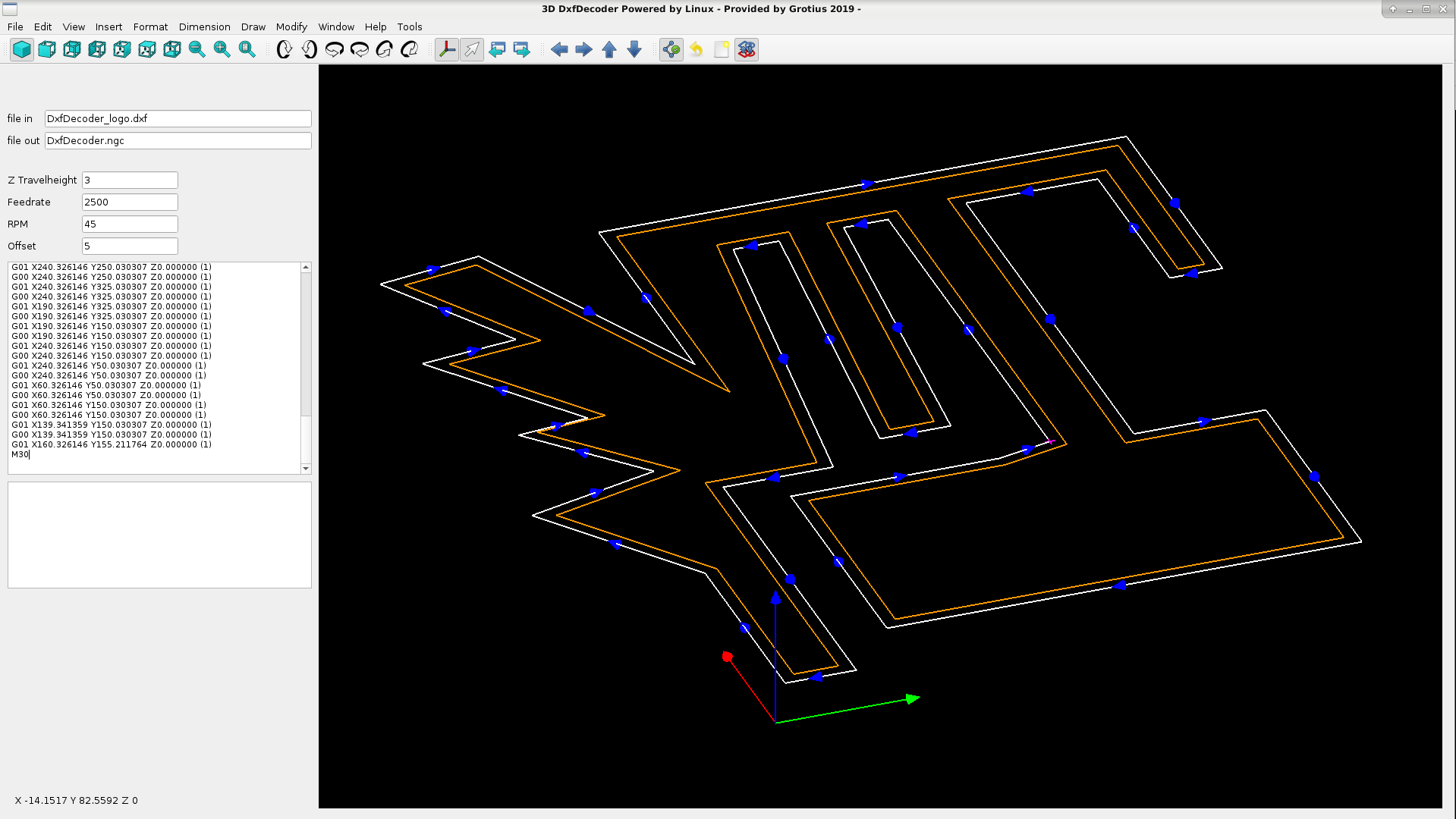
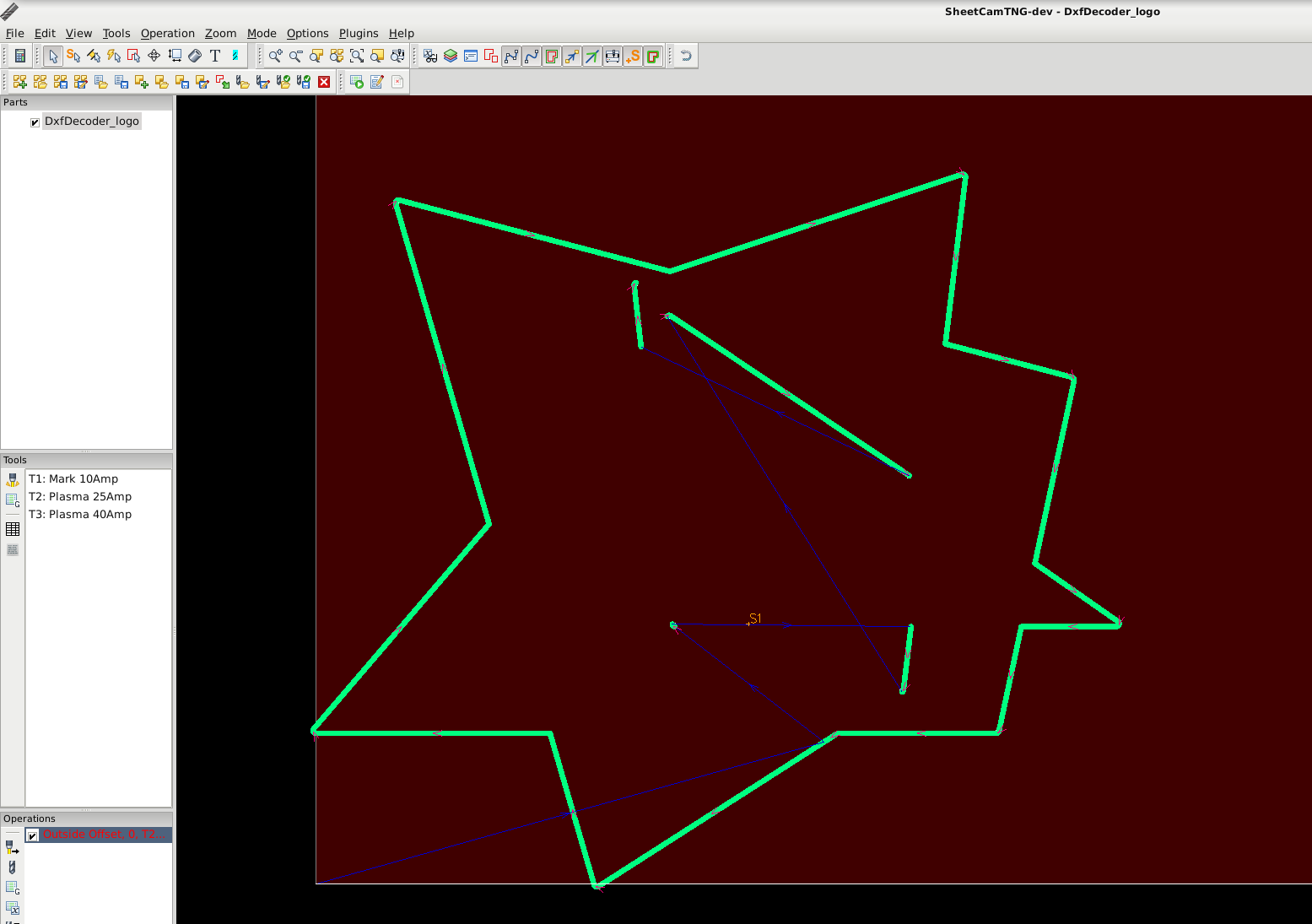
Another example of a more complex shape :
Sheetcam output :
DxfDecoder output :
Okey a while ago i learned from Rodw how to use Switch state's in C, used for custom linux plasma component's that time.
I integrated the switch statement as C code into the C++ dxfdecoder project to startup a structure that deals with multiple contour offset's and mutiple intersection types, like line-line, line-arc, arc-arc and visa versa.
The finishing touch of a nice program that can do contour offset's needs this structure now...
WIth the knowlegde we now have, we could make a open source autocad program, with more function's for sure !!
We only have to add some student's for help coding the program.
Or a program like facebook or watsapp. Or a improvement of youtube called mytube...
Or something else. Can be almost everything.. A global window's 7 update destroyer looks funny to make, but it's not legal to write program's with this purpose this day's. It's only legal if you carry the name America and write some Stuxnet code that involves innocent pc's worldwide. Then it's legal...
In the store i can only buy a new pc with a American Window's Licence. It's to crazy to be true.
This must change soon. It's not a fair trade...
The last time we did a software stress test. Now this one. What is left?
I hope soon we make progress. It's a long way to the top for sure...
We have a closed contour, and i was curious about other cam program's so i tested this example in sheetcam.
Sheetcam output :
Dxfdecoder output :
Why has sheetcam no full output for this example?
Another example of a more complex shape :
Sheetcam output :
DxfDecoder output :
Okey a while ago i learned from Rodw how to use Switch state's in C, used for custom linux plasma component's that time.
I integrated the switch statement as C code into the C++ dxfdecoder project to startup a structure that deals with multiple contour offset's and mutiple intersection types, like line-line, line-arc, arc-arc and visa versa.
The finishing touch of a nice program that can do contour offset's needs this structure now...
WIth the knowlegde we now have, we could make a open source autocad program, with more function's for sure !!
We only have to add some student's for help coding the program.
Or a program like facebook or watsapp. Or a improvement of youtube called mytube...
Or something else. Can be almost everything.. A global window's 7 update destroyer looks funny to make, but it's not legal to write program's with this purpose this day's. It's only legal if you carry the name America and write some Stuxnet code that involves innocent pc's worldwide. Then it's legal...
In the store i can only buy a new pc with a American Window's Licence. It's to crazy to be true.
This must change soon. It's not a fair trade...
The last time we did a software stress test. Now this one. What is left?
Last edit: 7 years 2 months ago by Grotius.
The following user(s) said Thank You: phillc54, tommylight, bkt, rodw
Please Log in or Create an account to join the conversation.
Time to create page: 1.779 seconds