
- Posts: 2419
- Thank you received: 2349
QT C++ code samples
- Grotius
- Offline
- Platinum Member
-

Less
More
7 years 2 months ago - 7 years 2 months ago #141282
by Grotius
Replied by Grotius on topic QT C++ code samples
Hi,
We got the contour offset algoritme working now for multiple product's at the moment. Still only line-line intersection.
We got a inside and a outside offset. The logic about this i have to integrate coming time. The only logic about this at the moment is that it depends on the contour direction.
The next step is to add a line-arc intersection offset to the closed contour.
Today was quite a difficult piece of code to understand. Next time i will make a code template with only a debug output first.
This will display's the correct output first in text form.
After the correct text output flow is approved, we can implement the function's to it. This will make the coding much easyer.
Sometimes you get blind with so many trees in the forest.
DxfDecoder output :

Most of the code that i did today is attached as a picture. In Qt it looks nicer !
Mention that display a text output or a value to a terminal (console) in C++ is much easyer then in C.
This saves you so much time.. C++ is much more automated then C.
We got the contour offset algoritme working now for multiple product's at the moment. Still only line-line intersection.
We got a inside and a outside offset. The logic about this i have to integrate coming time. The only logic about this at the moment is that it depends on the contour direction.
The next step is to add a line-arc intersection offset to the closed contour.
Today was quite a difficult piece of code to understand. Next time i will make a code template with only a debug output first.
This will display's the correct output first in text form.
After the correct text output flow is approved, we can implement the function's to it. This will make the coding much easyer.
Sometimes you get blind with so many trees in the forest.
DxfDecoder output :
Most of the code that i did today is attached as a picture. In Qt it looks nicer !
Mention that display a text output or a value to a terminal (console) in C++ is much easyer then in C.
This saves you so much time.. C++ is much more automated then C.
Last edit: 7 years 2 months ago by Grotius.
The following user(s) said Thank You: sivaraj, phillc54, tommylight
Please Log in or Create an account to join the conversation.
- Grotius
- Offline
- Platinum Member
-
Less
More
- Posts: 2419
- Thank you received: 2349
7 years 2 months ago #141427
by Grotius
Replied by Grotius on topic QT C++ code samples
Hi,
Today we added more offset intersections.
Now we have :
-line to line intersection
-arc to line intersection
-line to arc intersection
-arc to arc intersection
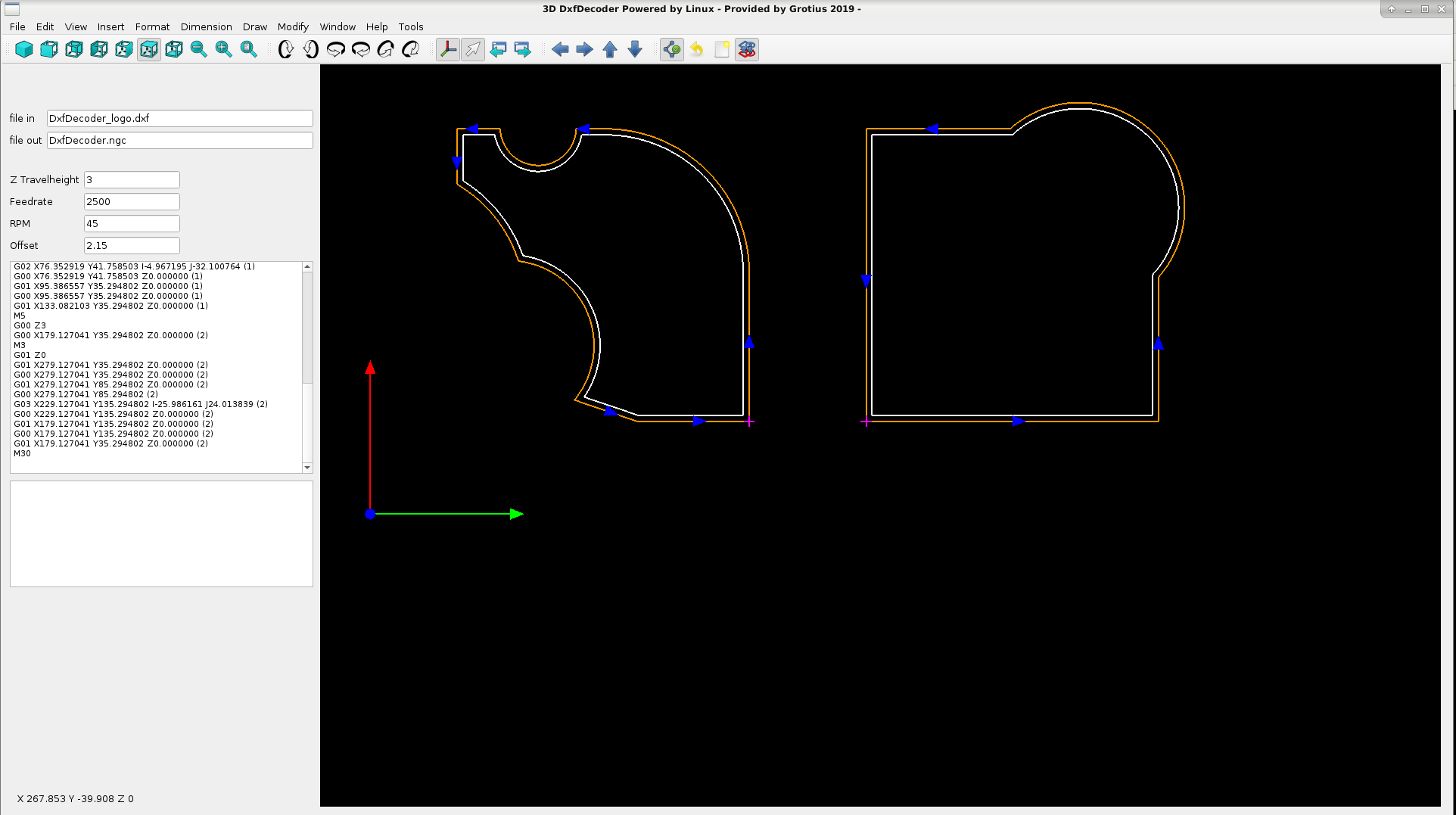
Okey this is nice !!
It's almost time to upgrade the swapping class for swap contours from cw to ccw and visa versa.
Today we added more offset intersections.
Now we have :
-line to line intersection
-arc to line intersection
-line to arc intersection
-arc to arc intersection
Okey this is nice !!
It's almost time to upgrade the swapping class for swap contours from cw to ccw and visa versa.
The following user(s) said Thank You: tommylight
Please Log in or Create an account to join the conversation.
- Grotius
- Offline
- Platinum Member
-
Less
More
- Posts: 2419
- Thank you received: 2349
7 years 2 months ago - 7 years 2 months ago #141550
by Grotius
Replied by Grotius on topic QT C++ code samples
Hi,
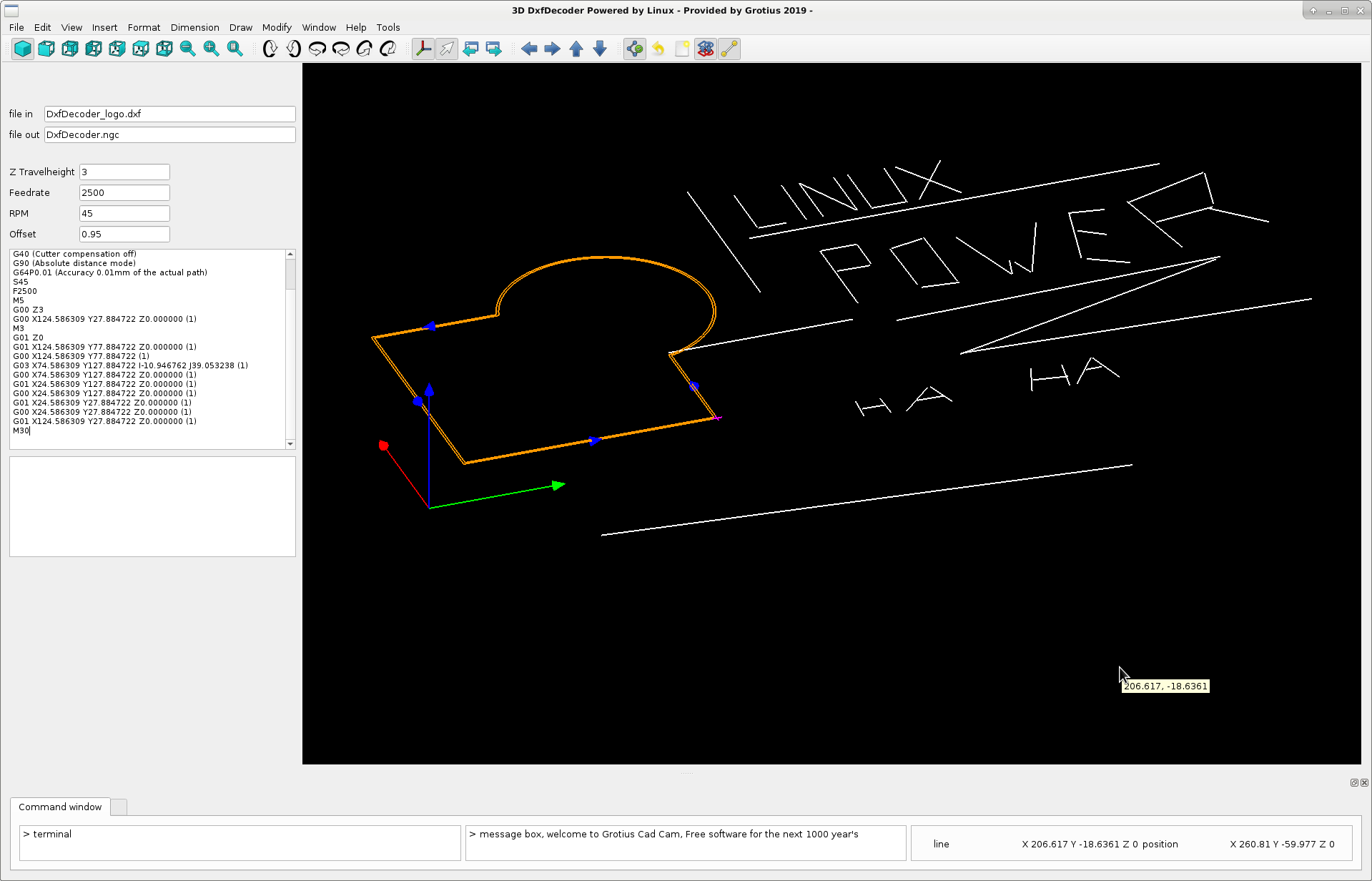
We have a little update.
The idea is to adapt standard cad function's, like drawing a line, circle, etc to the program.
So we added the draw line function today.
- It has an F8 keyboard button for "ortho on" and "ortho off" toggle, to draw a vertical or horizontal line without gambling.
- The line follow's you mouse while drawing the second point.... Wow...
- At the mouse pointer you see how long the line is. In the below screen you see the global mouse position, this is nice !!
- We did not a draftsight decompile... Haha... We did not steal the source code... Haha. It was much easyer. We write the source code our own. We write code with much more power. Linux Power !!
Added a terminal command window below to enter your line lenght or wathever the message box is asking you...
We must get rid of empty window space, just like draftsight. The command line in draftsight fill's the entire screen from left to right.
Hopefully we will make a difference in all kind of detail's and add magic function's.
Why do i do this?
Drafsight has another update to migrate from 2018 to 2019. For window's the program is not free anymore.
How about next year, will draftsight be free for linux? We will not wait untill it's unplugged by Autodesk.
Just provide a open source cad program. It's not so hard to write some text in C++.
See the list of cad program's
partsolutions.com/60-years-of-cad-infogr...y-of-cad-since-1957/
My goal is : the next one on the list will last for 1000 years and is free for everyone. Okey we have freecad etc. Maybe that software will be on the list..
Let's compile for linux, window's, mac and for everyone that want a free cad program without staying with a update licence
a 200 dollars a year.
The name PRONTO CAD 2019 is a good name.... Or maybe OGCC, "Open Grotius Cad Cam" ....
Drafsight is written in QT C++. .. Haha we write with the same development package, we as inventor's, professor's, linux guru's
we have much more practical experience in writing function's up to complex algoritme's.
The idea of CAD has grown from simple 2D designs into complex, multi-layered 3D structures with kinematic-movement and detailed meta-data
Ai ai... Kinematic movement's, we can try to add tomorrow... Meta data is crap.
We have a little update.
The idea is to adapt standard cad function's, like drawing a line, circle, etc to the program.
So we added the draw line function today.
- It has an F8 keyboard button for "ortho on" and "ortho off" toggle, to draw a vertical or horizontal line without gambling.
- The line follow's you mouse while drawing the second point.... Wow...
- At the mouse pointer you see how long the line is. In the below screen you see the global mouse position, this is nice !!
- We did not a draftsight decompile... Haha... We did not steal the source code... Haha. It was much easyer. We write the source code our own. We write code with much more power. Linux Power !!
Added a terminal command window below to enter your line lenght or wathever the message box is asking you...
We must get rid of empty window space, just like draftsight. The command line in draftsight fill's the entire screen from left to right.
Hopefully we will make a difference in all kind of detail's and add magic function's.
Why do i do this?
Drafsight has another update to migrate from 2018 to 2019. For window's the program is not free anymore.
How about next year, will draftsight be free for linux? We will not wait untill it's unplugged by Autodesk.
Just provide a open source cad program. It's not so hard to write some text in C++.
See the list of cad program's
partsolutions.com/60-years-of-cad-infogr...y-of-cad-since-1957/
My goal is : the next one on the list will last for 1000 years and is free for everyone. Okey we have freecad etc. Maybe that software will be on the list..
Let's compile for linux, window's, mac and for everyone that want a free cad program without staying with a update licence
a 200 dollars a year.
The name PRONTO CAD 2019 is a good name.... Or maybe OGCC, "Open Grotius Cad Cam" ....
Drafsight is written in QT C++. .. Haha we write with the same development package, we as inventor's, professor's, linux guru's
we have much more practical experience in writing function's up to complex algoritme's.
The idea of CAD has grown from simple 2D designs into complex, multi-layered 3D structures with kinematic-movement and detailed meta-data
Ai ai... Kinematic movement's, we can try to add tomorrow... Meta data is crap.
Last edit: 7 years 2 months ago by Grotius.
The following user(s) said Thank You: phillc54, tommylight, Clive S
Please Log in or Create an account to join the conversation.
- Grotius
- Offline
- Platinum Member
-
Less
More
- Posts: 2419
- Thank you received: 2349
7 years 2 months ago #141631
by Grotius
Replied by Grotius on topic QT C++ code samples
Thank you phillc54, tommylight, Clive s,
Today we added the function draw a 2 point and a 3 point circle. While drawing, update the circle off course.
I mentioned freecad has no 3p circle. In draftsight you have to enter it in the command line wile drawing a 2p circle.
The C++ code for calculating a 3p circle is attached. Maybe freecad can use this code also.
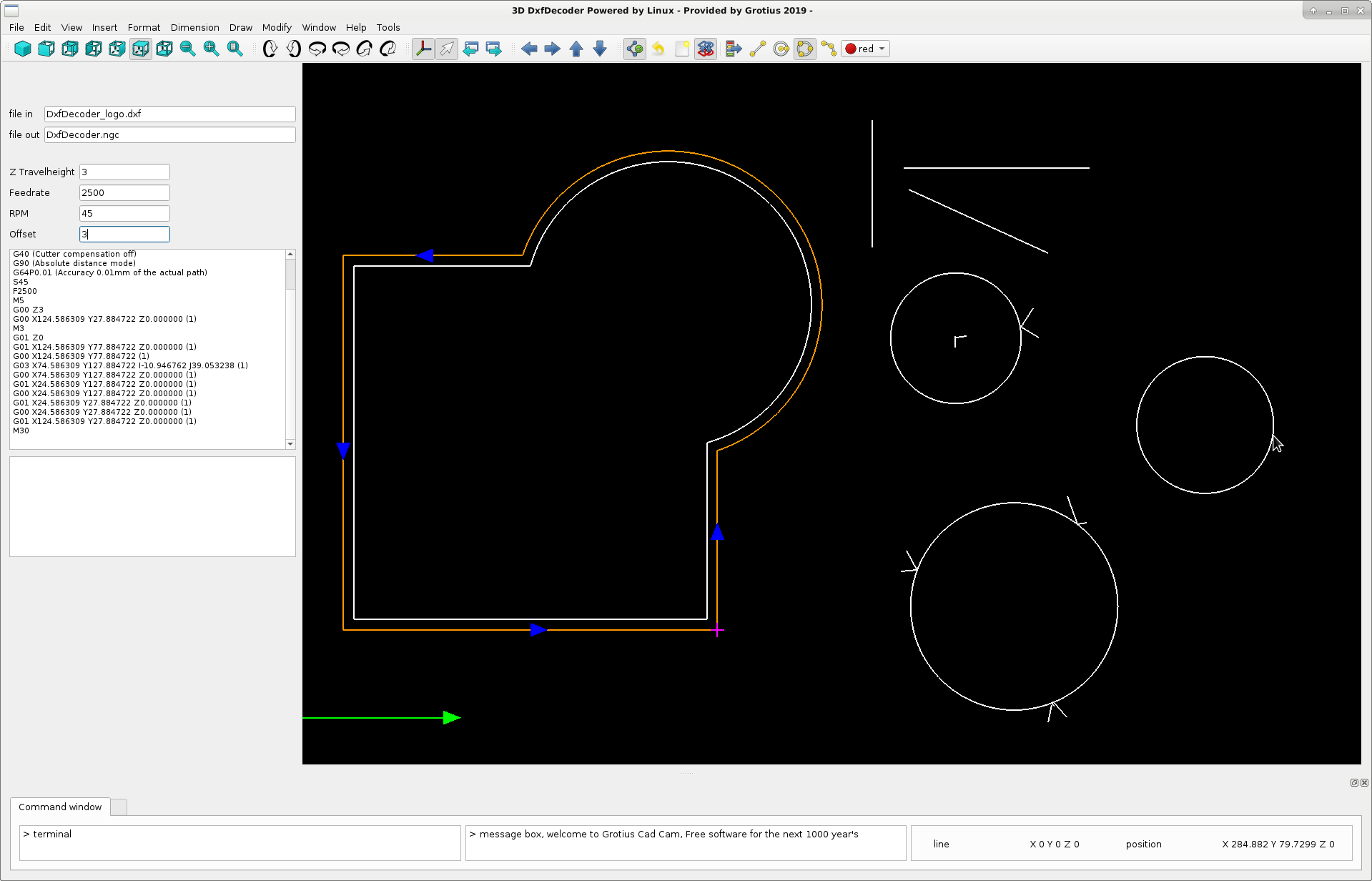
Okey this works nice. Next item to draw is a 3 point arc... This is in fact a 3p circle, but with start_angle and end_angle, combined
with xy_start and xy_end coordinates to make it a succesful story. Keep up the good work !
Today we added the function draw a 2 point and a 3 point circle. While drawing, update the circle off course.
I mentioned freecad has no 3p circle. In draftsight you have to enter it in the command line wile drawing a 2p circle.
The C++ code for calculating a 3p circle is attached. Maybe freecad can use this code also.
Warning: Spoiler!
if(draw3pcircle_mode == 1){
if(click == 2){ // after second click, show the thirth circle point as the actual mouse position
X3 = gl_mousepos_x;
Y3 = gl_mousepos_y;
//calculate 3 point circle... calculate xy center and radius..
// Get the perpendicular bisector of (x1, y1) and (x2, y2).
double x1 = (X2 + X1) / 2;
double y1 = (Y2 + Y1) / 2;
double dy1 = X2 - X1;
double dx1 = -(Y2 - Y1);
// Get the perpendicular bisector of (x2, y2) and (x3, y3).
double x2 = (X3 + X2) / 2;
double y2 = (Y3 + Y2) / 2;
double dy2 = X3 - X2;
double dx2 = -(Y3 - Y2);
double endpoint_x0 = x1 + dx1;
double endpoint_y0 = y1 + dy1;
double endpoint_x1 = x2 + dx2;
double endpoint_y1 = y2 + dy2;
//line 1
double delta_y0 = endpoint_y0 - y1;
double delta_x0 = x1 - endpoint_x0;
double c0 = delta_y0 * x1 + delta_x0 * y1;
//line 2
double delta_y1 = endpoint_y1 - y2;
double delta_x1 = x2 - endpoint_x1;
double c1 = delta_y1 * x2 + delta_x1 * y2;
double determinant = delta_y0*delta_x1 - delta_y1*delta_x0;
//qDebug() << "determinant is : " << determinant;
if (determinant == 0) // The lines are parallel.
{
//qDebug() << "the lines are parallel";
}
else {
double x_center = (delta_x1*c0 - delta_x0*c1)/determinant;
double y_center = (delta_y0*c1 - delta_y1*c0)/determinant;
double dx = x_center - X1;
double dy = y_center - Y1;
double radius = sqrt(dx * dx + dy * dy);
qDebug() << " intersection point is x : " << x_center << " y : " << y_center << " radius : " << radius;
double_cad_array[cad_counter][0][6] = x_center;
double_cad_array[cad_counter][0][7] = y_center;
double_cad_array[cad_counter][0][9] = radius;
}
}
}
if(click == 2){ // after second click, show the thirth circle point as the actual mouse position
X3 = gl_mousepos_x;
Y3 = gl_mousepos_y;
//calculate 3 point circle... calculate xy center and radius..
// Get the perpendicular bisector of (x1, y1) and (x2, y2).
double x1 = (X2 + X1) / 2;
double y1 = (Y2 + Y1) / 2;
double dy1 = X2 - X1;
double dx1 = -(Y2 - Y1);
// Get the perpendicular bisector of (x2, y2) and (x3, y3).
double x2 = (X3 + X2) / 2;
double y2 = (Y3 + Y2) / 2;
double dy2 = X3 - X2;
double dx2 = -(Y3 - Y2);
double endpoint_x0 = x1 + dx1;
double endpoint_y0 = y1 + dy1;
double endpoint_x1 = x2 + dx2;
double endpoint_y1 = y2 + dy2;
//line 1
double delta_y0 = endpoint_y0 - y1;
double delta_x0 = x1 - endpoint_x0;
double c0 = delta_y0 * x1 + delta_x0 * y1;
//line 2
double delta_y1 = endpoint_y1 - y2;
double delta_x1 = x2 - endpoint_x1;
double c1 = delta_y1 * x2 + delta_x1 * y2;
double determinant = delta_y0*delta_x1 - delta_y1*delta_x0;
//qDebug() << "determinant is : " << determinant;
if (determinant == 0) // The lines are parallel.
{
//qDebug() << "the lines are parallel";
}
else {
double x_center = (delta_x1*c0 - delta_x0*c1)/determinant;
double y_center = (delta_y0*c1 - delta_y1*c0)/determinant;
double dx = x_center - X1;
double dy = y_center - Y1;
double radius = sqrt(dx * dx + dy * dy);
qDebug() << " intersection point is x : " << x_center << " y : " << y_center << " radius : " << radius;
double_cad_array[cad_counter][0][6] = x_center;
double_cad_array[cad_counter][0][7] = y_center;
double_cad_array[cad_counter][0][9] = radius;
}
}
}
Okey this works nice. Next item to draw is a 3 point arc... This is in fact a 3p circle, but with start_angle and end_angle, combined
with xy_start and xy_end coordinates to make it a succesful story. Keep up the good work !
The following user(s) said Thank You: tommylight
Please Log in or Create an account to join the conversation.
- tommylight
- Offline
- Moderator
-

Less
More
- Posts: 22011
- Thank you received: 7491
7 years 2 months ago #141633
by tommylight
Replied by tommylight on topic QT C++ code samples
You have become a "one man software development team " !
Respect, you have earned it.
Respect, you have earned it.
The following user(s) said Thank You: Grotius
Please Log in or Create an account to join the conversation.
- Clive S
- Offline
- Platinum Member
-
Less
More
- Posts: 2204
- Thank you received: 486
7 years 2 months ago #141636
by Clive S
Replied by Clive S on topic QT C++ code samples
Yes Grotius. I don't understand that much are what you are doing but I do understand the amount of work that is going into this project and the effort you have put in. I follow along the best I can.
I follow along the best I can.
The following user(s) said Thank You: Grotius
Please Log in or Create an account to join the conversation.
Time to create page: 4.639 seconds