
- Posts: 30
- Thank you received: 4
QT C++ code samples
- ftkalcevic
- Offline
- Junior Member
-

Less
More
7 years 2 months ago #142462
by ftkalcevic
Another nice thing about QT C++ is you can run it without the overhead of X11 running (mostly). This saves memory and CPU load, and annoying pop ups. X11 can always be launched from the command line if you need it.
Running from the text based console you can get QT to use the video card frame buffer directly by just placing some command line arguments...
There are limitations - most annoyingly, no opengl, which also means no qtquick (the last time I looked). This means no path preview.
I'm trying to fire up qtvcp to see it QtPy can support the framebuffer mode.
Replied by ftkalcevic on topic QT C++ code samples
Grotius wrote: Why post something about QT C++?
Another nice thing about QT C++ is you can run it without the overhead of X11 running (mostly). This saves memory and CPU load, and annoying pop ups. X11 can always be launched from the command line if you need it.
Running from the text based console you can get QT to use the video card frame buffer directly by just placing some command line arguments...
Code:
my_qt_app -platform linuxfb:fb="/dev/fb0"
There are limitations - most annoyingly, no opengl, which also means no qtquick (the last time I looked). This means no path preview.
I'm trying to fire up qtvcp to see it QtPy can support the framebuffer mode.
The following user(s) said Thank You: Grotius
Please Log in or Create an account to join the conversation.
- Grotius
- Offline
- Platinum Member
-

Less
More
- Posts: 2419
- Thank you received: 2349
7 years 2 months ago #142744
by Grotius
Replied by Grotius on topic QT C++ code samples
Hi,
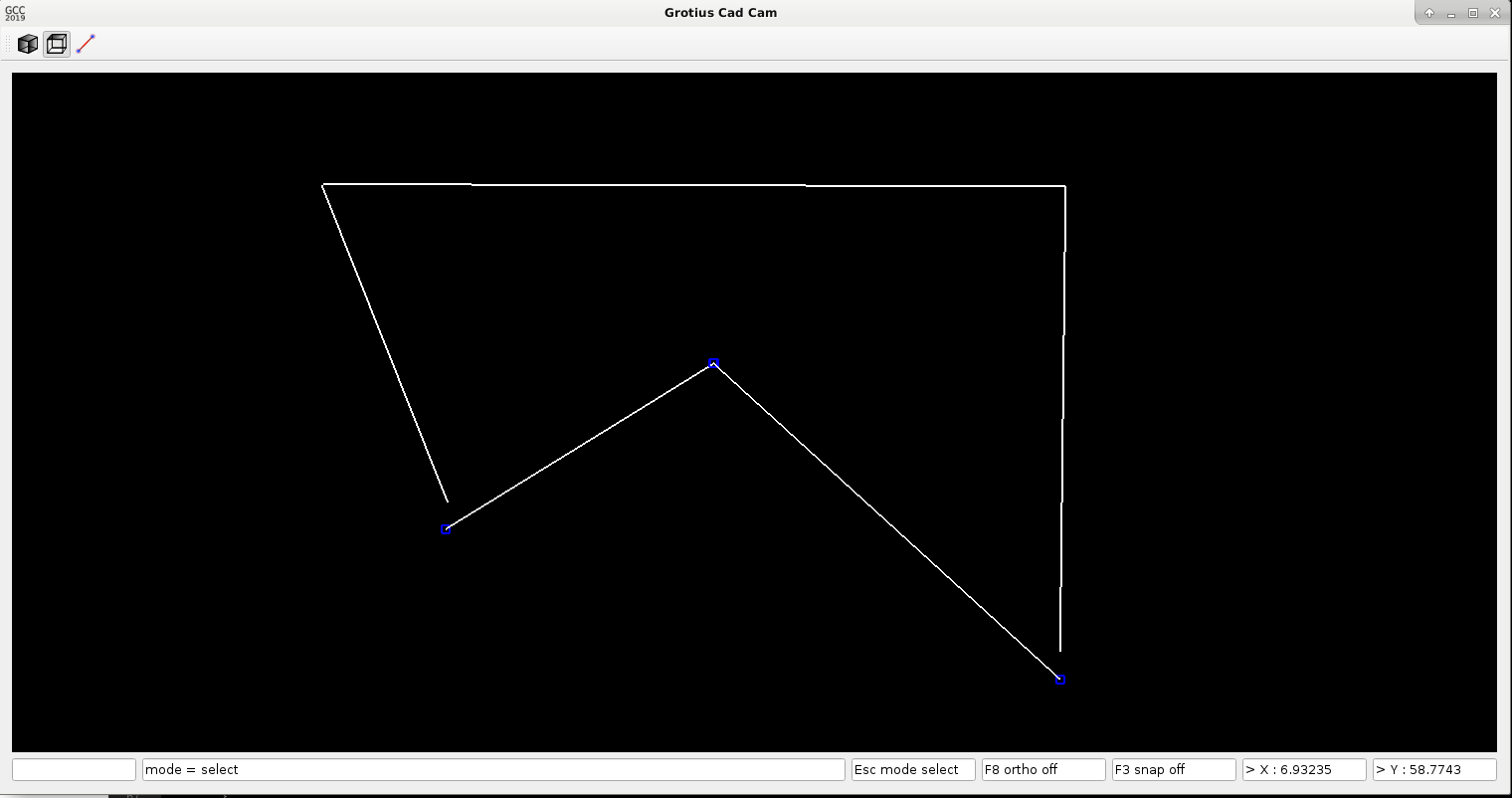
A little project update.
Added a move function, did some object snap practice, and did improvements in program structure. If we do things wrong we
will end up with a slow cad cam program. But it's super fast until now. So that's a good sign for now. I am more and more confident we will make a very nice program... When the cad cam is ready, it can become a Draftsight replacer. How long will draftsight be free for linux?
I mentioned when drawing a line in drafsight, you can use the line icon, but you can use keyboard command's like : L + return for drawing a line.
In my cad version pressing the keyboard L button is enough to draw a line. The return has not to be used. This saves a keypress every time. User can switch between L ( line ) or M ( move ) without pressing the return or enter button.
Another item i mentioned is the move function in Draftsight. When using a move function with previous selection for example.
To move in Draftsight with keyboard buttons : M (move) + return -- then -- P (previous) + return. In my cad version you press M.
Then you can move the selected objects with mouse, when move is active user can add or remove selected objects to the move function.
At the moment i am tuning and coding how to get a near perfect user interface... I have already done some snap functions. There is a lot to do.
A little project update.
Added a move function, did some object snap practice, and did improvements in program structure. If we do things wrong we
will end up with a slow cad cam program. But it's super fast until now. So that's a good sign for now. I am more and more confident we will make a very nice program... When the cad cam is ready, it can become a Draftsight replacer. How long will draftsight be free for linux?
I mentioned when drawing a line in drafsight, you can use the line icon, but you can use keyboard command's like : L + return for drawing a line.
In my cad version pressing the keyboard L button is enough to draw a line. The return has not to be used. This saves a keypress every time. User can switch between L ( line ) or M ( move ) without pressing the return or enter button.
Another item i mentioned is the move function in Draftsight. When using a move function with previous selection for example.
To move in Draftsight with keyboard buttons : M (move) + return -- then -- P (previous) + return. In my cad version you press M.
Then you can move the selected objects with mouse, when move is active user can add or remove selected objects to the move function.
At the moment i am tuning and coding how to get a near perfect user interface... I have already done some snap functions. There is a lot to do.
The following user(s) said Thank You: tommylight, Clive S
Please Log in or Create an account to join the conversation.
- Grotius
- Offline
- Platinum Member
-
Less
More
- Posts: 2419
- Thank you received: 2349
7 years 2 months ago - 7 years 2 months ago #143017
by Grotius
Replied by Grotius on topic QT C++ code samples
Hi,
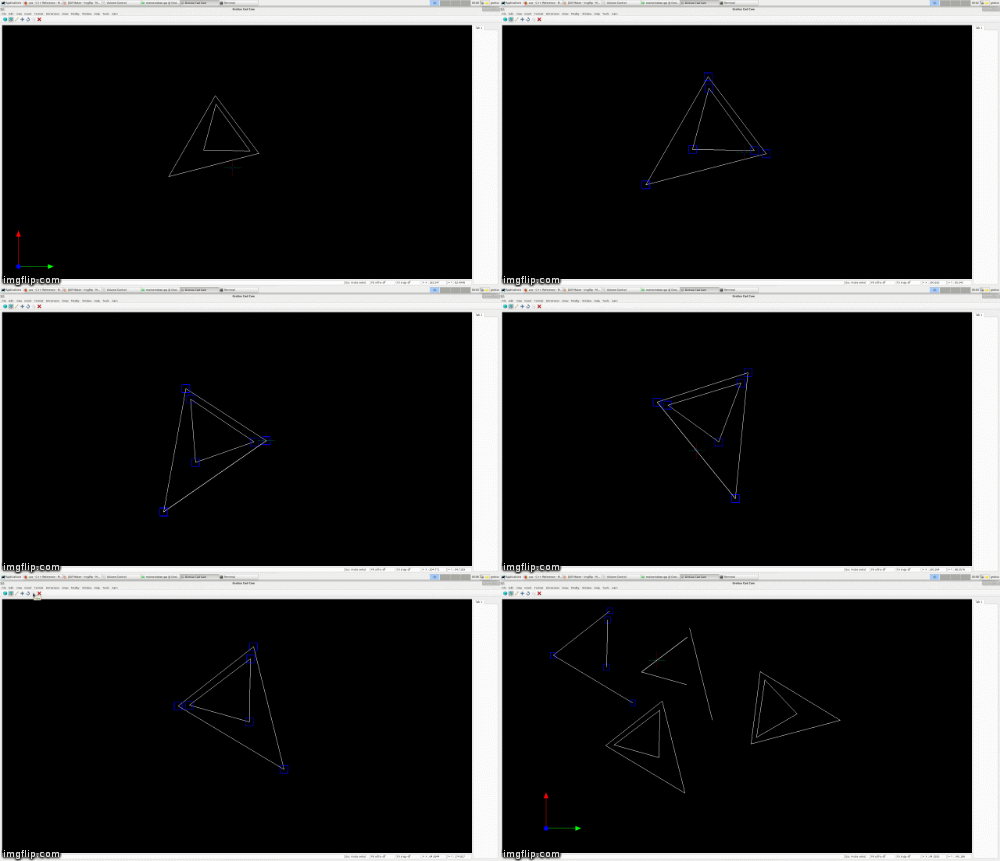
It's going nice. We added a copy and rotate function to the cad interface. Now we have to integrate the mirror function.
The rotate function is done with the help of a matrix.
stackoverflow.com/questions/23856034/coo...r-rotation-in-opengl
| cos(25°) -sin(25°) 0 0 |
| sin(25°) cos(25°) 0 0 |
| 0 0 1 0 |
| 0 0 0 1 |
wich result in a c formula x' = cos(25°)*x -sin(25°)*y y' = sin(25°)*x +cos(25°)*y.
In the C++ program it's integrated like this :
x0 = cos(rotate_degrees * M_PI / 180.0 )* dist_x_startpoint - sin(rotate_degrees * M_PI / 180.0 ) * dist_y_startpoint;
y0 = sin(rotate_degrees * M_PI / 180.0 )* dist_x_startpoint + cos(rotate_degrees * M_PI / 180.0 ) * dist_y_startpoint;
x1 = cos(rotate_degrees * M_PI / 180.0 )* dist_x_endpoint - sin(rotate_degrees * M_PI / 180.0 ) * dist_y_endpoint;
y1 = sin(rotate_degrees * M_PI / 180.0 )* dist_x_endpoint + cos(rotate_degrees * M_PI / 180.0 ) * dist_y_endpoint;
A gif example how the program work's with object select, rotate, move and copy function's.
It's going nice. We added a copy and rotate function to the cad interface. Now we have to integrate the mirror function.
The rotate function is done with the help of a matrix.
stackoverflow.com/questions/23856034/coo...r-rotation-in-opengl
| cos(25°) -sin(25°) 0 0 |
| sin(25°) cos(25°) 0 0 |
| 0 0 1 0 |
| 0 0 0 1 |
wich result in a c formula x' = cos(25°)*x -sin(25°)*y y' = sin(25°)*x +cos(25°)*y.
In the C++ program it's integrated like this :
x0 = cos(rotate_degrees * M_PI / 180.0 )* dist_x_startpoint - sin(rotate_degrees * M_PI / 180.0 ) * dist_y_startpoint;
y0 = sin(rotate_degrees * M_PI / 180.0 )* dist_x_startpoint + cos(rotate_degrees * M_PI / 180.0 ) * dist_y_startpoint;
x1 = cos(rotate_degrees * M_PI / 180.0 )* dist_x_endpoint - sin(rotate_degrees * M_PI / 180.0 ) * dist_y_endpoint;
y1 = sin(rotate_degrees * M_PI / 180.0 )* dist_x_endpoint + cos(rotate_degrees * M_PI / 180.0 ) * dist_y_endpoint;
A gif example how the program work's with object select, rotate, move and copy function's.
Last edit: 7 years 2 months ago by Grotius.
The following user(s) said Thank You: phillc54, tommylight, Clive S
Please Log in or Create an account to join the conversation.
- Grotius
- Offline
- Platinum Member
-
Less
More
- Posts: 2419
- Thank you received: 2349
7 years 2 months ago #143113
by Grotius
Replied by Grotius on topic QT C++ code samples
Thank you Tom, Clive and Phill !
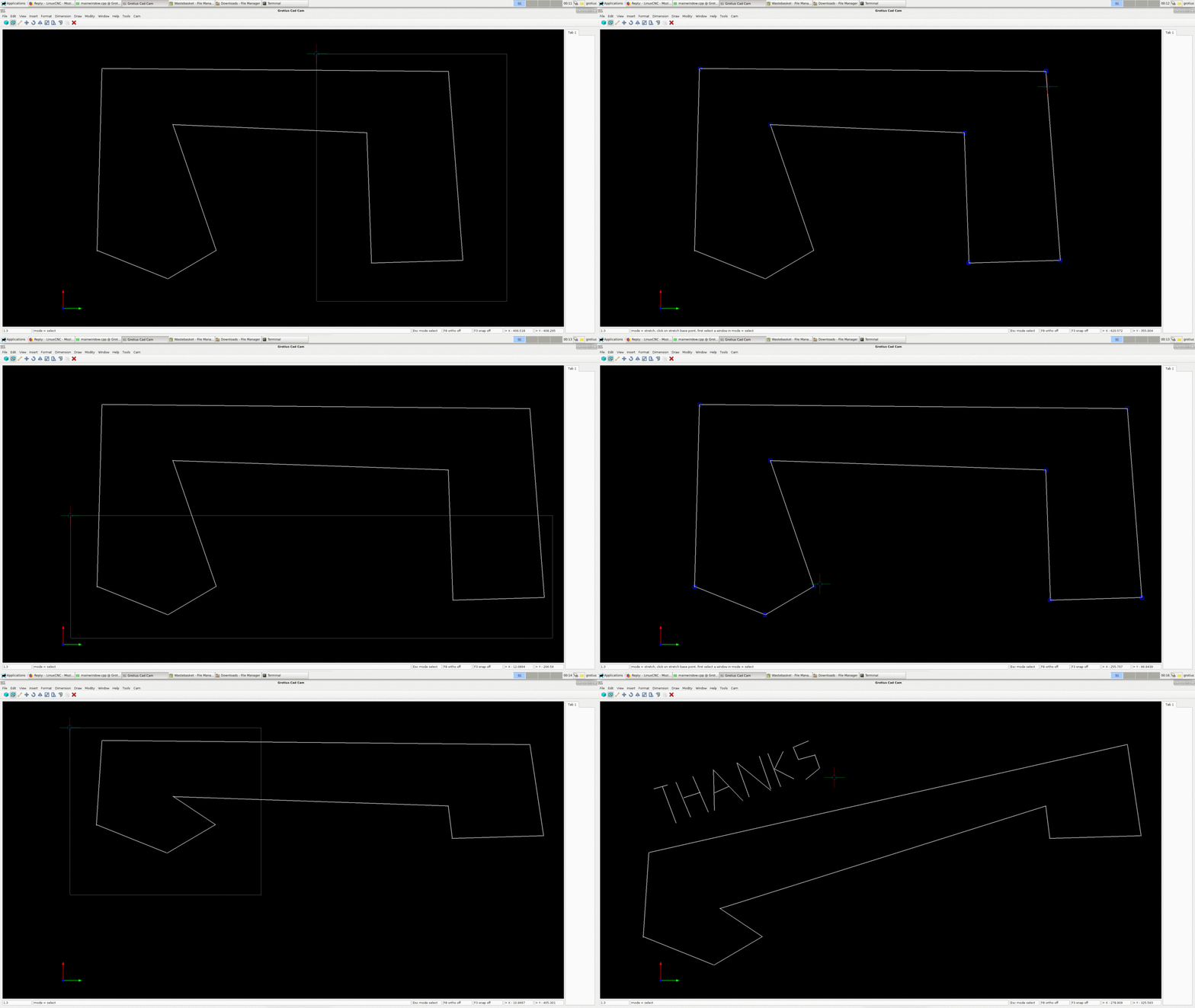
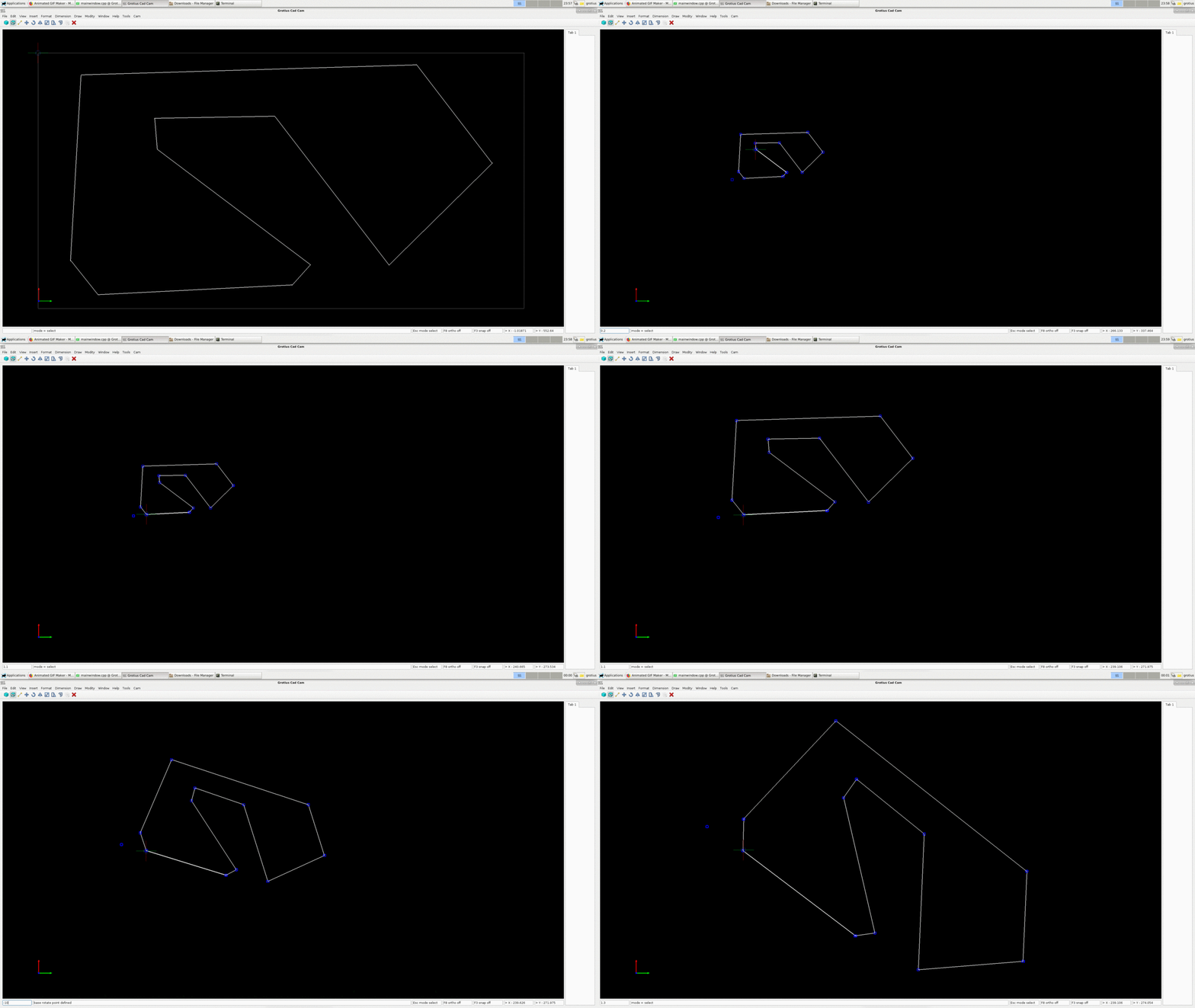
Today added the stretch function and the scale function.
For the stretch function we had to make a window select option. This select window selects the point's in the window.
After that, a list is made for selected point's. After that there is a kind of move function to stretch the selected item's.
It's not hard to make a stretch function.
Next thing to do is fill the side screen tab page with parametric model function's.
I have to do research about writing text for dimension's in opengl. I would like a text wich is also suitable for cam.
stretch example :
scale example:
Today added the stretch function and the scale function.
For the stretch function we had to make a window select option. This select window selects the point's in the window.
After that, a list is made for selected point's. After that there is a kind of move function to stretch the selected item's.
It's not hard to make a stretch function.
Next thing to do is fill the side screen tab page with parametric model function's.
I have to do research about writing text for dimension's in opengl. I would like a text wich is also suitable for cam.
stretch example :
scale example:
The following user(s) said Thank You: phillc54, tommylight
Please Log in or Create an account to join the conversation.
- Grotius
- Offline
- Platinum Member
-
Less
More
- Posts: 2419
- Thank you received: 2349
7 years 2 months ago - 7 years 2 months ago #143197
by Grotius
Replied by Grotius on topic QT C++ code samples
Hi,
A little project update.
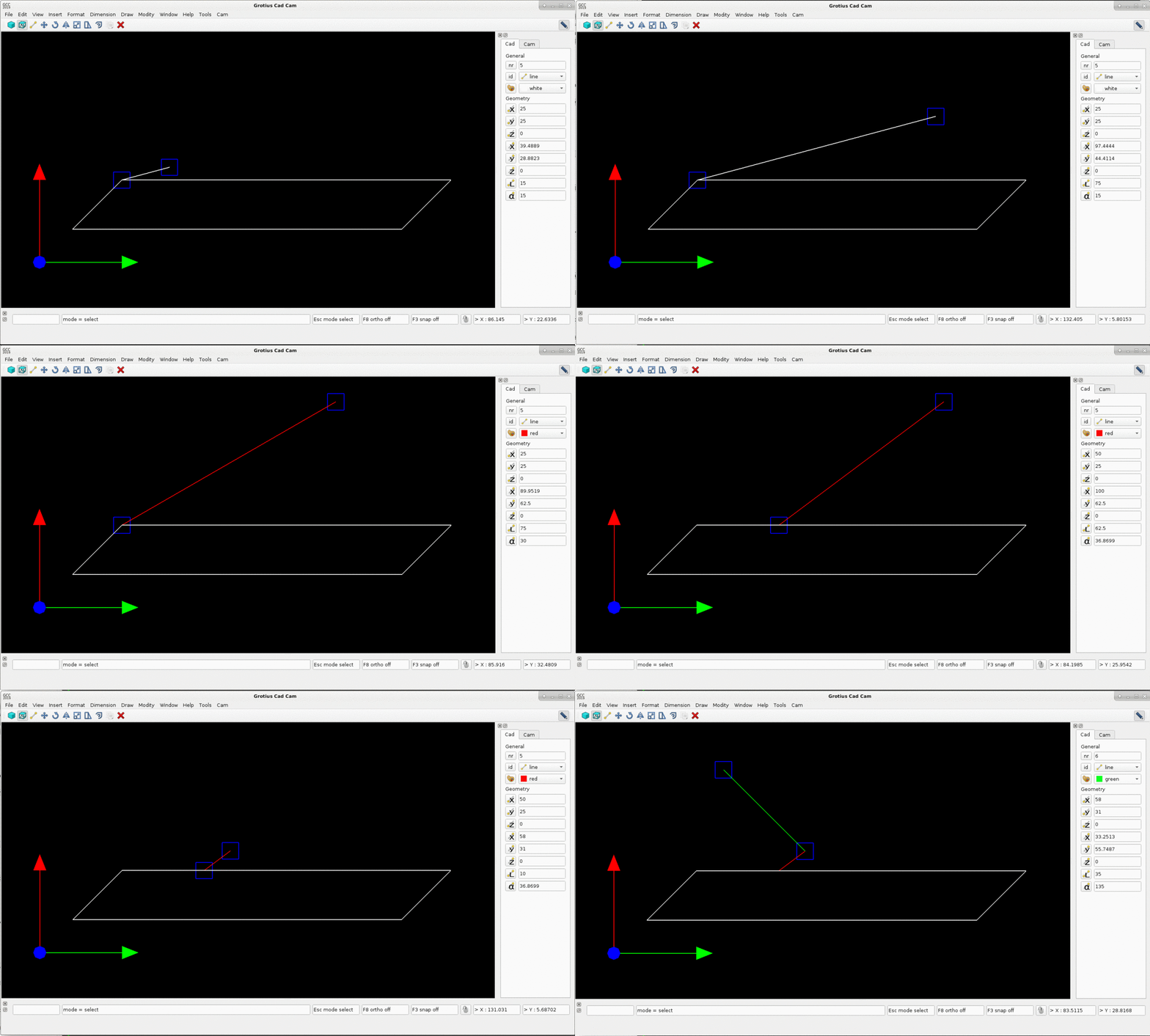
When a object is selected, we can edit the start and end points.
A nice feature is that we can edit the line lenght and edit the angle. This 2 function's are not editable in Draftsight.
The xy start, xy end coordinates are automaticly updated to line lenght and the line angle and visa versa.
A negative line lenght is also possible. Negative angle's are also possible.
Next thing to do is add a "new object" button to the parametric side menu. Then a drawing can made without using the mouse at all.
I will leave the @ command's for drawing a line. I think it's a bit outdated and also complex for new cad users.
A little project update.
When a object is selected, we can edit the start and end points.
A nice feature is that we can edit the line lenght and edit the angle. This 2 function's are not editable in Draftsight.
The xy start, xy end coordinates are automaticly updated to line lenght and the line angle and visa versa.
A negative line lenght is also possible. Negative angle's are also possible.
Next thing to do is add a "new object" button to the parametric side menu. Then a drawing can made without using the mouse at all.
I will leave the @ command's for drawing a line. I think it's a bit outdated and also complex for new cad users.
Last edit: 7 years 2 months ago by Grotius.
The following user(s) said Thank You: tommylight, Clive S
Please Log in or Create an account to join the conversation.
- Grotius
- Offline
- Platinum Member
-
Less
More
- Posts: 2419
- Thank you received: 2349
7 years 4 weeks ago - 7 years 4 weeks ago #146889
by Grotius
Replied by Grotius on topic QT C++ code samples
Hi,
Today i present a project update..
In the past weeks i had to solve a few problems related to the Cad side of the C++ program. There where big problem's
related to the visualisation of the screen and the select procedure.
- Problem 1 : Screen resize problem's. Some people name it aspect or ratio. I spotted problem's with zoom function's. For example a circle was viewed almost as a ellipse when certain zoom's where done. So i did a code rewrite for this item from scratch several time's in several way's. The final zoom code is working as should be.
- Problem 2 : Object select methode by mouse pointer. When the user has made a drawing, the user can select line's when user click's on the line. For cad it's usual that a line, circle or arc light's up when mouse pointer is within a close area.
OpenGL has different implementation's for this object select methode. I tried them all. The conclusion is, non of them works fast
when a drawing has 20.000 lines, circles, arc's or more. So that is not good !
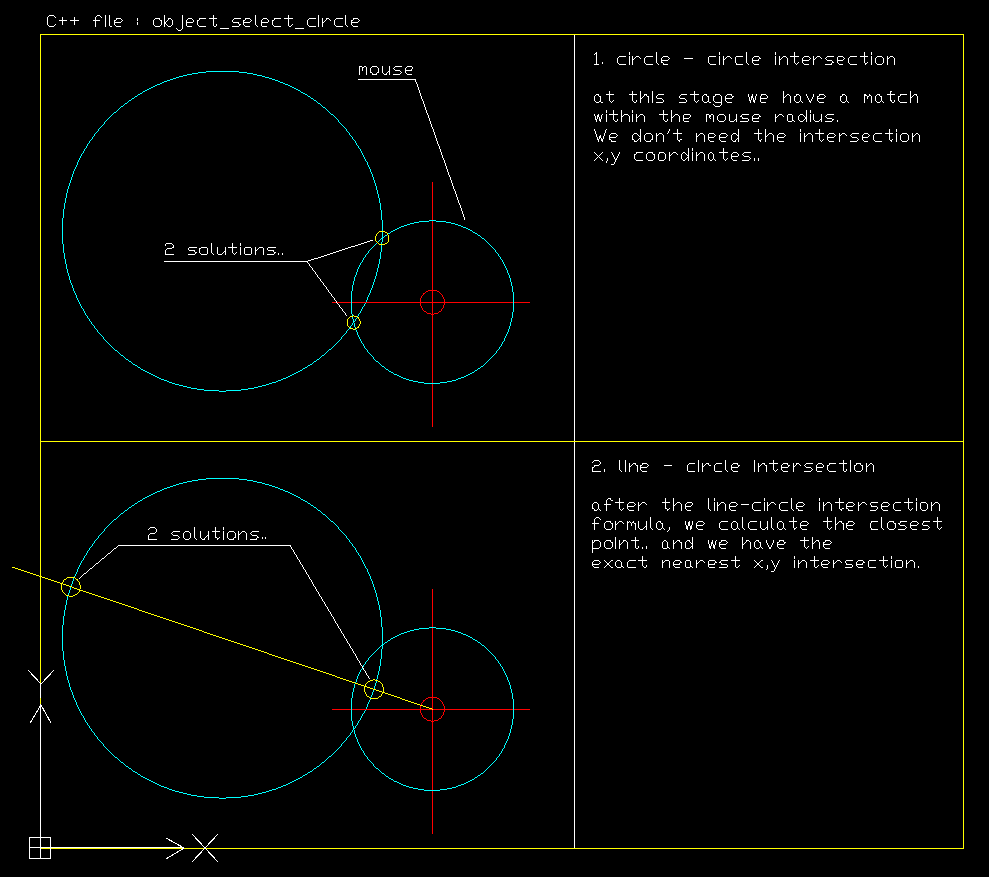
The solution was to write C++ code from scratch to do a object select for a line, circle and arc. A visualisation of the select methode (find intersection) is attached. I found out this is a very accurate methode to find intersections, nearest's etc.
The example show's how to find a circle intersection point by mouse pointer.
For line and arc intersections, the C++ code is almost the same.
First we look at 1. find a circle that is close to the mouse pointer, for example a mouse pointer with 1mm radius.
After that we do 2. We calculate the line-circle intersection and find the closest of 2 output's, and done !
Finally the Cad program is zooming very nice. A circle is a circle in all circumstances.
Also the mouse select methode is very fast for big drawings (20.000 item's plus).
The planning is to integrate all existing functions that where made and tested in the past.
Functions to integrate now are for example : draw line, arc, circle, polygon etc. move, mirror. copy etc.
At the moment the Goal is that this program can be competitive to autocad some day.
This program has a integrated Cam module what is resulting in less programming step's for the end user. Developing
auto nesting after the first CAD-CAM version is released, is on my bucket list.
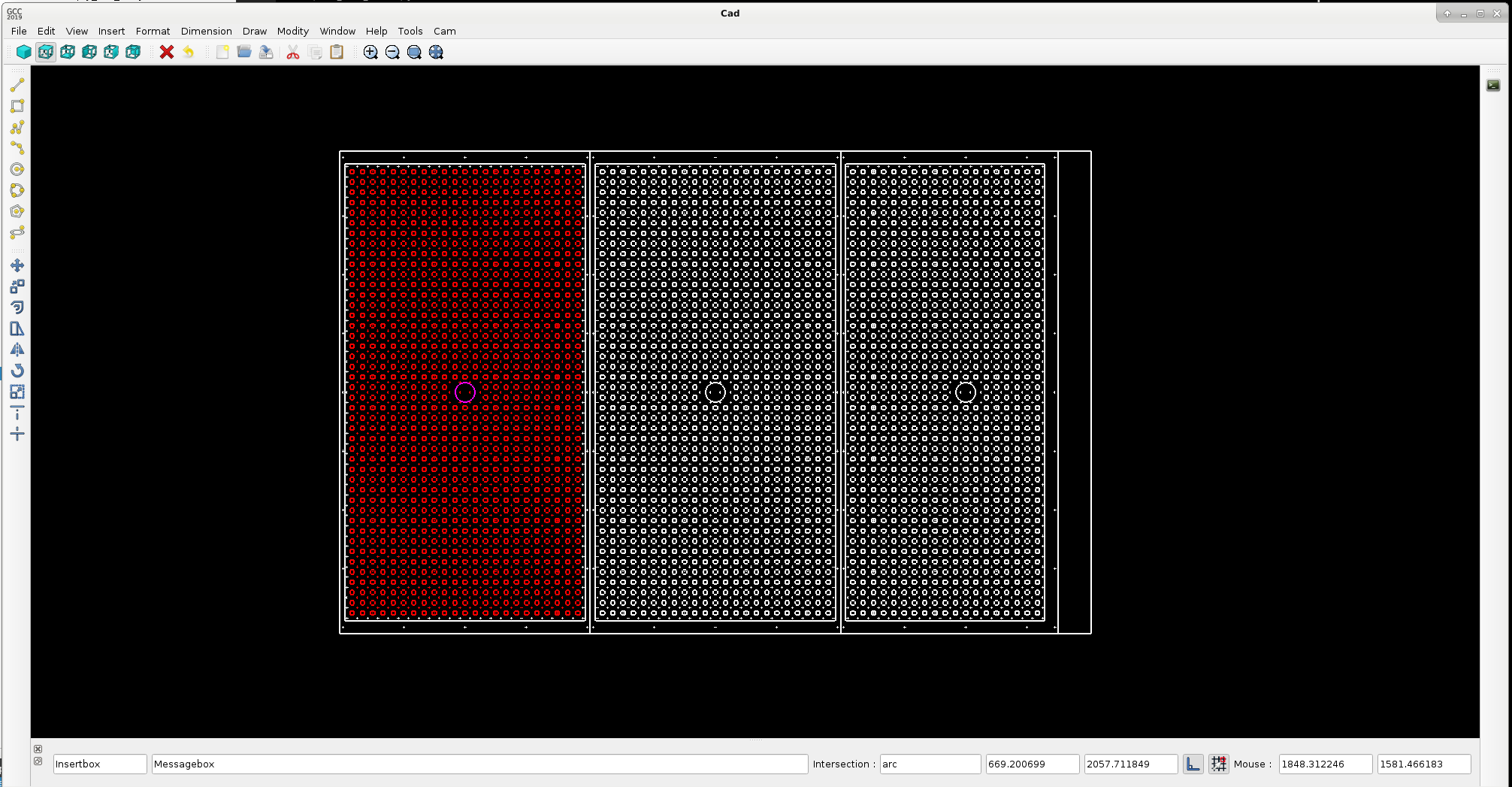
Dxf example to test the program for dxf read in, speed, zoom function's, object select function's etc.
Today i present a project update..
In the past weeks i had to solve a few problems related to the Cad side of the C++ program. There where big problem's
related to the visualisation of the screen and the select procedure.
- Problem 1 : Screen resize problem's. Some people name it aspect or ratio. I spotted problem's with zoom function's. For example a circle was viewed almost as a ellipse when certain zoom's where done. So i did a code rewrite for this item from scratch several time's in several way's. The final zoom code is working as should be.
- Problem 2 : Object select methode by mouse pointer. When the user has made a drawing, the user can select line's when user click's on the line. For cad it's usual that a line, circle or arc light's up when mouse pointer is within a close area.
OpenGL has different implementation's for this object select methode. I tried them all. The conclusion is, non of them works fast
when a drawing has 20.000 lines, circles, arc's or more. So that is not good !
The solution was to write C++ code from scratch to do a object select for a line, circle and arc. A visualisation of the select methode (find intersection) is attached. I found out this is a very accurate methode to find intersections, nearest's etc.
The example show's how to find a circle intersection point by mouse pointer.
For line and arc intersections, the C++ code is almost the same.
First we look at 1. find a circle that is close to the mouse pointer, for example a mouse pointer with 1mm radius.
After that we do 2. We calculate the line-circle intersection and find the closest of 2 output's, and done !
Finally the Cad program is zooming very nice. A circle is a circle in all circumstances.
Also the mouse select methode is very fast for big drawings (20.000 item's plus).
The planning is to integrate all existing functions that where made and tested in the past.
Functions to integrate now are for example : draw line, arc, circle, polygon etc. move, mirror. copy etc.
At the moment the Goal is that this program can be competitive to autocad some day.
This program has a integrated Cam module what is resulting in less programming step's for the end user. Developing
auto nesting after the first CAD-CAM version is released, is on my bucket list.
Dxf example to test the program for dxf read in, speed, zoom function's, object select function's etc.
Last edit: 7 years 4 weeks ago by Grotius.
The following user(s) said Thank You: phillc54, chimeno, tommylight, Clive S
Please Log in or Create an account to join the conversation.
Time to create page: 2.163 seconds